Online billers - ongoing issues
Quicken Windows Classic R64.30, Windows 11 Version 10.0.22631 Build 22631
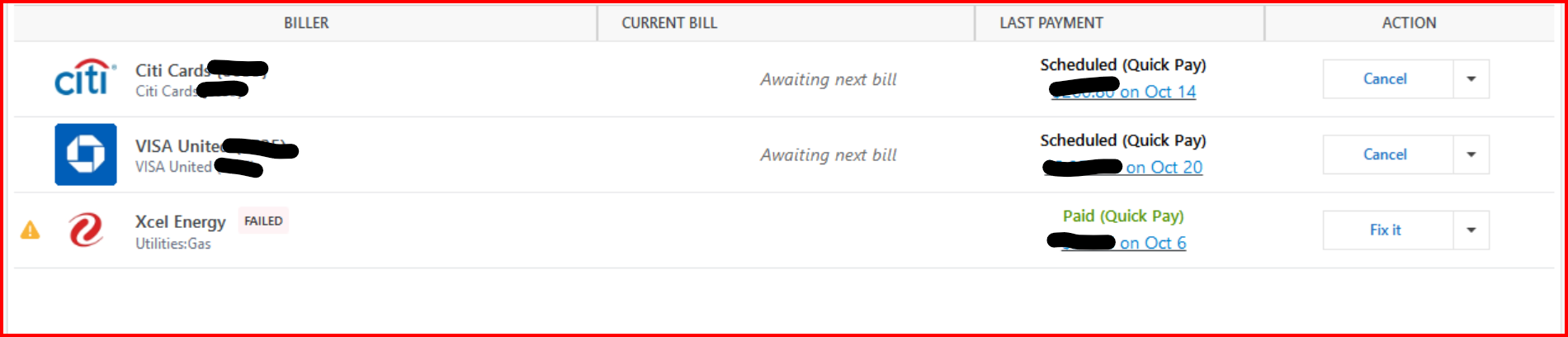
Seven weeks and several Quicken updates later and my online billers continue to fail. National and multi-state billers (Verizon Wireless and Dominion Energy) have continued to fail. Bills which have connected (Chase and Discover), fail to report the monthly statement balance by stating "Awaiting next bill" continually.
Review and Repair stated it functions with online bills. Since I have had to convert all bills to manual bills, I did not attempt to repair.
I performed Validation and Super Validation. I talked to Customer Support.
Many customers are dis-heartened by the recent lack of connection to billers, especially those billers listed.
We all pay for your service. We are not currently getting value for that service.
What is the status of connecting to bills? I think the paying customers deserve an update on the status of the lack of connectivity to online billers.
Steve
Quicken user since DOS 3 (1989).
Steve
Quicken user since 1988
Comments
-
Hello @Steve Horrocks,
Thank you for reaching out, though I'm sorry to hear you're having so many issues with online billers failing. I can see that when you contacted Support, they marked the issue as a known issue associated with this alert:
Does the issue described in that alert match what you are seeing in your Quicken? If not, please provide more information exactly what you are seeing. If possible, please also include screenshots of the specific errors you receive when the connection fails. If needed, please refer to this Community FAQ for instructions on how to attach a screenshot. Alternatively, you can also drag and drop screenshots to your response if you are not given the option to add attachments.
I look forward to your response!
Quicken Kristina
Make sure to sign up for the email digest to see a round up of your top posts.
0 -
I have the exact issues that Steve explained and have been doing report a problem. I have lost track on how long this has been happening. I am able to make a payment, and the statement and next payment is not showing up. Am able to pay Xcel Energy even when it says Fix It. Do have to enter the payment amounts and send date manually. Chase payments have been on and off over the last year. Citi Cards has even been less reliable. This have been a long journey from the beginning of Bill Manager.
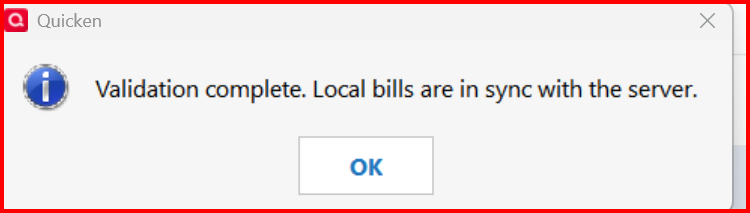
Message from the server shows bills are in sync.
0 -
Hello @fw6322+,
Thank you for letting us know you're also seeing issues with online billers. That is unusual behavior. It sounds like the bills are in sync with the server, but your Quicken file is not updating. To check for a file issue that may be causing this, I suggest that you try validating your data file. Please save a backup file prior to performing these steps.
Validate:
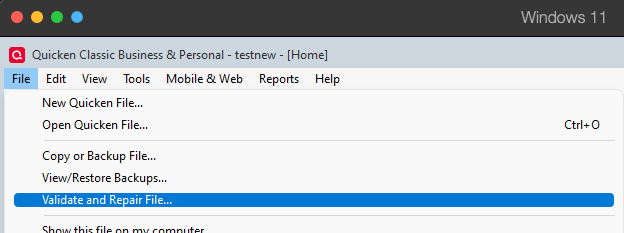
- File
- Validate and Repair File...
- Validate File
- Click OK
- Close the Data Log
- Close Quicken (leave it closed for at least 5 secs)
- Reopen Quicken and see if the issue persists.
Let me know how it goes!
Quicken Kristina
Make sure to sign up for the email digest to see a round up of your top posts.
0 -
I did a Validate and then a Super Validate:
QDF:
Damaged data record.
Validating your data.QEL:
No read errors.QEL:
All internal consistency checks passed.
Reset migration status for online bill.
Maximum security reference: 258, number of securities: 258.
Analyzing securities.
All security references are within the normal range.Super validation has completed.
0 -
Thank you for your reply,
Is the issue persisting? I notice the results you posted indicate that it did find some damage. If the issue is still persisting, you may want to try restoring a backup from before the issue started.
Thank you!
Quicken Kristina
Make sure to sign up for the email digest to see a round up of your top posts.
0 -
Unfortunately, the behavior of Billers not updating is NOT unusual now. The entire Billers tab still has many issues.
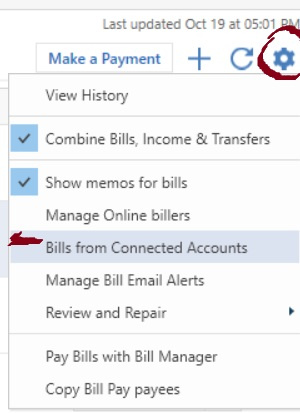
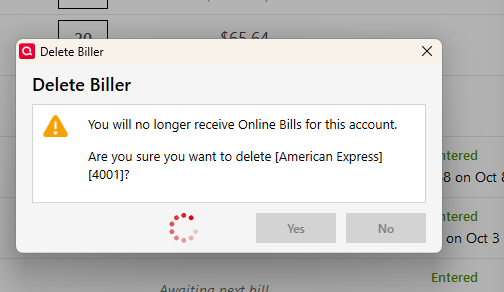
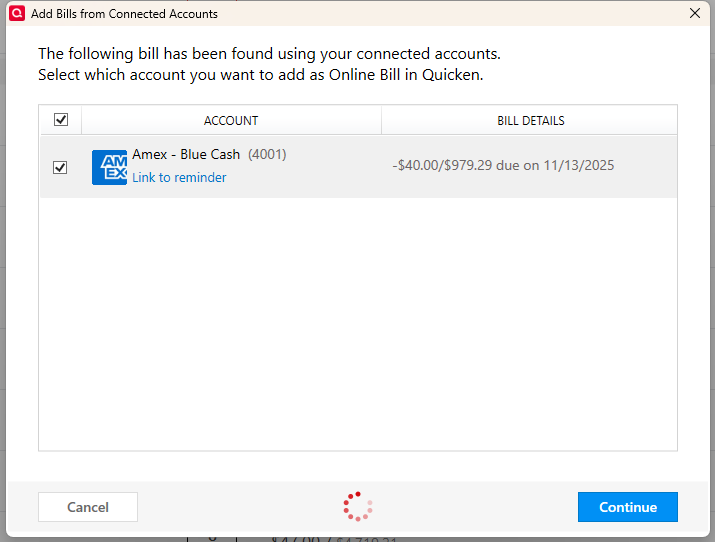
For Connected Account Billers (credit cards from accounts enabled for downloads), the easiest way I have found to force an update is to simply DELETE the Biller via the menu to the right. Then easily add it back quickly by clicking the Gear Icon near top right on Billers Tab and select "Bills from Connected Accounts". When it gets added back this way it seems to always pickup the current Bill.
PS: I am using NON-Linked manual reminders to monitor when Bills are due so I don't miss one that didn't update.
1 -
Posting in several places for visibility and to see if anyone else is getting their Fidelity Rewards Visa bill.
@Quicken Kristina I'm starting to get concerned with Fidelity Visa Rewards Card. Statement closed Oct 17. Biller notified me Oct 18th. Nothing in either Qmac or Qwin. I believe both are getting charges in the Fidelity Registers. I shall know more about that tonight as 5 charges cleared the app yesterday. But the bill is not coming in and now due in 22 days. The last time Fidelity came in on time and accurately was MARCH!!
0 -
Confirmed: i still get charges to this card timely, but no online bill.
This has been 8 months now!! Seems the new, more reliable online bill provider is no more reliable than previous. Again BOTH Qwin and Qmac.
I will say IF it comes in by midnight tonight I shall recount and consider it timely. But if not, its broken.
Only one more this month to come on 10/24. Will see what happens. For now, Chase Amazon Prime and Fidelity Rewards Visa are broken.
1 -
I have also posted in multiple threads. I have validated, super validated files, it doesn't do anything in the end to fix the issues on the bills and income tab. Only thing that works is to delete a biller and re-add it via the gear icon to get it to show up again. Its really frustrating, this bills tab is now at the worst point it has ever been, and the functionality has gone nothing but downhill since this feature was introduced many, many years ago. i have just today reported the error after going through the process of deleting and then re adding from connected accounts my Discover bill just to get it to show up so I could enter it.
1 -
Thank you for your replies,
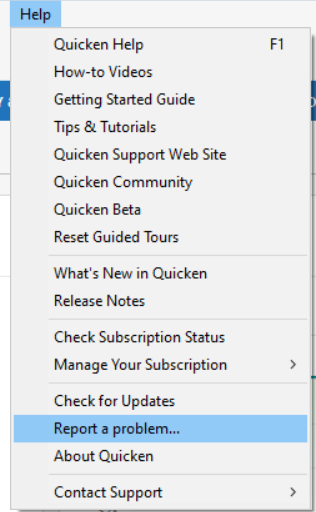
We have forwarded this issue to the proper channels to have this further investigated. In the meantime, we request that you please navigate to Help > Report a problem and submit a problem report with log files attached and (if you are willing) a sanitized copy of your data file in order to contribute to the investigation.
While you will not receive a response through this submission, these reports will help our teams in further investigating the issue. The more problem reports we receive, the better.
We apologize for any inconvenience!
Thank you.
(CBT-881)
Quicken Kristina
Make sure to sign up for the email digest to see a round up of your top posts.
0 -
I can send in a sanitized copy of my file, but I already submitted the ticket. If I separately submit the file now is the reported ticket able to be queried by reporting user so that my data file can be matched to the 10 -15 tickets I have submitted in the past two weeks?
0 -
The "New and Improved Bill Pay" is horrible. It picks up only about 20% of the billers the last version did. It is only grabbing some financial institutions and some cell phone companies (none which I use), no utilities companies, ADT, the list goes on and on. A very peculiar one is Xfinity for internet and then Xfinity for mobile. If I search for Xfinity, nothing comes up. When I searach for Comcast, low and behold it's there. I put in my xfinity internet account number and it works. I try the same for Xfinity Mobile (using Comcast again) and it pulls up Xfinity Mobile, but always fails. Xfinity MObile uses a 10 digit account number, not a 14 or 16 number. Putting in 0000 either before or after fails to, saying "invalid account number". This new biller is very frustrating and was told a month ago when I 1st called into Customer support, they are working on addint new billers, but I haven't seen any. This started happening as soon as the new update came in. I am using R64.30, build 27.1.64.30. Has anyone had any luck with a problem similiar to this and somehow fixed it?
0 -
Thank you for your reply @TopShelf Investing,
You can send the sanitized file if you'd like, but our teams haven't specifically asked for sanitized files yet, so it is currently optional. If you do opt to send one, please reference CBT-881, so that our teams will know it's for that ticket.
To better answer your question about matching your file to the 10-15 tickets you have submitted, please clarify. What method did you use to submit these tickets? Did you contact our Support via phone or chat? Do you have ticket numbers? Are you referring to problem reports you have sent in September and this month?
Thank you!
Quicken Kristina
Make sure to sign up for the email digest to see a round up of your top posts.
0 -
I guess the question is that I have submitted multiple problems through the "report a problem" process in the past two weeks. I have not provided my data file, but I would do that. So the question is if any of those issues are looked at can my data file I submit through a new "report a problem" be cross referenced to it. IE. when I submit anything through report a problem is it tagged at the database level with a reporting user ID unique to me, so a technician could actually reference every issue I've never submitted.
I have doubts I could actually submit my file through this process though, its 305MB
in size.0 -
Thank you for your reply,
When you report issues using the Report a Problem function in Quicken, they are associated with your Quicken ID, which can be used to view all the problem reports you have submitted. That said, unless the problem report is directly solicited via Support or the Community, they are compiled into daily reports that let our teams see what is being reported and look for trends, but typically are not investigated further unless they see multiple reports from different customers about the same issue.
Since the maximum file size for sanitized data files that Report a Problem is able to send is 200MB, you would not be able to send it via Report a Problem. If our teams specifically request a sanitized data file from you, I'd be able to send a secure link that you would be able to use to send the file to us.
I hope this helps!
Quicken Kristina
Make sure to sign up for the email digest to see a round up of your top posts.
0 -
New Biller is incredibly disappointing on so many levels. And it does not feel like it is getting the attention it deserves to fix that which is broken, add significant numbers of new billers to regain access to expected billers or communicate what if anything is being done to either.
Fidelity is as if it does not exist in Qwin or Qmac Online Bills still tonight. Needed to express some frustration.
0 -
Same issue. I have done every potential fix mentioned. This has been going on for several weeks. The only way to get bills to show is to remove them and readd them. Then when the next statement drops you have to do the same thing. Fortunately, since there's been issues over the years, I always have all my online bills set up as unlinked manual reminders as well. Complete garbage we are paying for.
0 -
I commented on deleting and re-adding connected billers. For me the turn around on doing that for a single biller is something like 10 minutes within the program. Are you experiencing similar extreme slowness with the billers tab, or am I just especially lucky?
I do have a 25+ year file of substantial size so I do routinely experience quite a bit of lag to complete any task, but the bills and income tab has become especially painful.
0 -
While deleting and readding DID work for many billers, it definitely does not for my current issue with Fidelity Visa. Something new with this one. In BOTH Qwin and Qmac.
I started a thread for this specific biller.
In Qwin, deleting and readding works more often than not Chase being a prime example (no pun intended).
0 -
For me it is a few seconds only to delete and re-add it back in. Billers tab should not be that slow.
0 -
@miklk thanks for your response.
Yes I suspect I have something more at issue with my particular file I am going to need to sus out. Just to give an example I am deleting and re-adding my amex bill right now, stopwatch running to see how long it takes.
7min 40 sec for this popup to go away after hitting "Yes"
9 min 55sec for this popup to go away after hitting "continue" to add the bill once again.
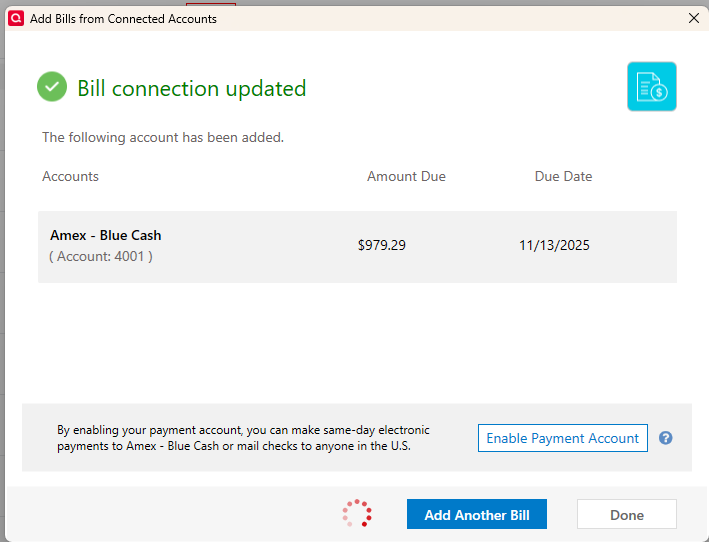
7min 30sec for this box to disappear and ability to navigate again in the bills/income register after hitting "done"
So in total an astounding 25 minutes to delete and re-add this bill. That's especially long from my experience, but I routinely see 15minutes. Perhaps some function of the other things running on my computer, but I had task manager up the whole time and my CPU and memory usage for all operating process never crossed 50% in total..
I'd be interested to hear if anyone out there reading this thread is experiencing latency like I do. Please @ me in any reply affirming this issue. I have my file local to my PC, no one drive cloud syncing, no mobile/web updates.
0 -
Thank you for your replies @TopShelf Investing,
I haven't been able to replicate the slowness when deleting and re-adding billers. Is the slowness happening exclusively when deleting/adding billers, or are you seeing it in other Quicken functions also? When did you first notice this behavior?
Thank you!
Quicken Kristina
Make sure to sign up for the email digest to see a round up of your top posts.
0 -
@Quicken Kristina
I'm not sure exactly when it started happening. I stopped routinely counting on the bills and income tab a while ago because it basically only worked 50% of the time. When I got the update, what a month ago now, that suggested bill improvements were coming I was hopeful.So after I updated, I started looking at it more closely again, and tried to make sure all my billers were setup in the new system. As the threads attest it has been a total disaster.
So, I noticed the slowness then, but I can't say definitively when it started. I experience slowness all across the product. Entering items into a given account register can take 10 -20 seconds sometimes. Switching accounts the same, etc…. but only when in my file which is very large (306MB). I keep a separate file for my parents and it works briskly. Its only two year old made up of investment accounts, 6 of them. I have easily a 100 accounts over my history, many closed and now hidden. I have at least 20 bank accounts, 20 credit accounts and 25 different investment accounts, some accounts for more than 20 years, but getting back to the billers, the editing function especially is slow.
I tried to simply look at the main menu, my preferences and the program locked up for 5-10 minutes before I killed it. If I run validation on the file I get trivial errors that don't account for what's happening, I do not have web/mobile sync on and my file is on solid state flash on my computer in a directory that is not backed up to one drive.
[Edited - Readability]
0 -
Thank you for your reply,
Since this is happening exclusively with your main file, and not with the file that you maintain for your parents, it sounds like what is happening is specific to your main file. You mentioned that the slowness is impacting more than just bills/reminders. To clarify, did all of the slowness, across the entire product, start sometime after the update to support the new bill service provider?
If you haven't already done so, please try restoring a backup from before your Quicken updated to R64 (some time around early August, since R64.19 was officially released on 14 August), and test to see if the slowness is happening in that newly restored backup. If the issue is resolved in that restored file, you may want to consider using it as your new main file. If the issue persists, then return to your main file (for instructions on switching between Quicken files, click here).
I hope this helps!
Quicken Kristina
Make sure to sign up for the email digest to see a round up of your top posts.
0 -
The slowness in my general account ledgers predates the updates in August. It is not any worse than it was previous to the August update. The bills/income area though, exponentially worse since that update, and with each new update is not getting better. I'd say its actually getting worse. I mean even to scroll the list of upcoming transactions will freeze that screen. I get a intermittent spinning blue circle for a cursor. Restoring to an August file is not a realistic option, it would involve me having to enter or download more than a 1000 transactions from a myriad of banking, credit and investment accounts.
0 -
Thank you for your reply,
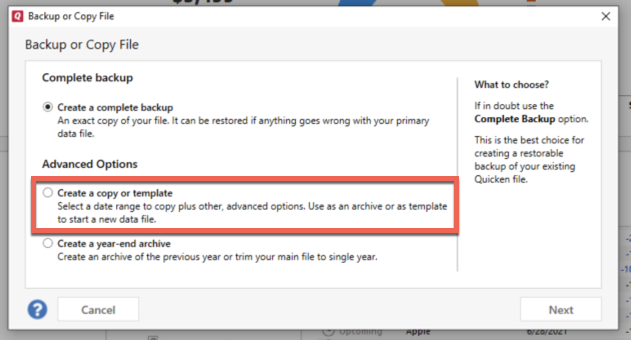
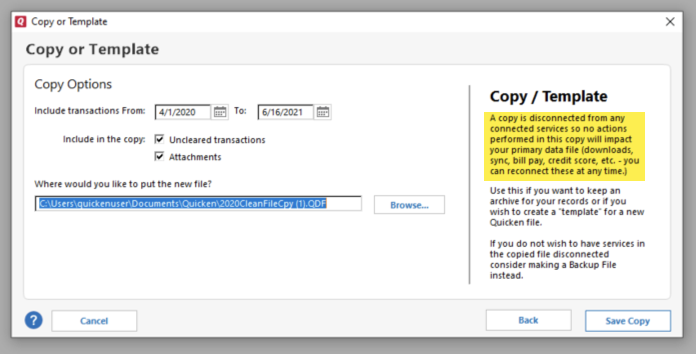
Since restoring a backup isn't a viable option, I suggest that you try creating a copy of your data file, which will rebuild all of the internal lists and database tables. If successful, you would then move forward with the copied file. To create a copy, please navigate to File > Copy or Backup File... > Create a copy or template (see examples below) which will also allow you to select a date range to move forward with.
If you wish to move forward with your entire data file, please check the full date range of your entire data file before copying so you can enter the correct date range if you do not wish to "shrink" your file by eliminating certain dates. Note - The only reason to "shrink" your data file is if you believe older data is causing the issue.
It's important to know that all online services will be disconnected in the copied file, and you will need to sign back in with your Quicken ID and reconnect all of your online accounts, online billers, Quicken Bill Manager services, etc if you plan to use that copied file going forward. The reason for this is that the new copy also creates a new and separate dataset ID.
Please initially reconnect only what is necessary to test the issue. If the issue is resolved in the copied file, then I recommend reconnecting everything and using the copied file as your main file going forward.
If the issue is not resolved in the copied file either, then feel free to switch back to your original file. For instructions on switching between Quicken files, please click here.
Thank you!
Quicken Kristina
Make sure to sign up for the email digest to see a round up of your top posts.
0 -
I too am experiencing the same issues as everyone above. Judging from the posts in the Community, this issue is widespread and affects more than just a handful of Quicken users. My Online Billers (AMEX, USAA Visa, Cox) are initially successfully added as Online Billers and the current bill is downloaded. However, future bills are NOT downloaded and always show "Awaiting Next Bill", even weeks after the bill is available online at the Biller's website. I discovered that removing the Online Biller and re-adding the same Online biller will bring up the current bill, but future bills are NEVER updated. Running Validate shows no issues. I did submit a "Report A Problem…" report about this. Simply put, the new Online Biller feature is completely useless and, IMHO, should be scrapped entirely until a trouble-free and reliable alternative can be enlisted by Quicken.
1 -
Exactly @carlj07 Except, for me, the deleting and readding the biller in QWIN which used to work no longer does at all. And has never worked for me in QMAC.
Less online billers, no updates on when and if will be added or who might have been recently added, and those there do not work as well as they once did.0
Categories
- All Categories
- 56 Product Ideas
- 36 Announcements
- 223 Alerts, Online Banking & Known Product Issues
- 22 Product Alerts
- 701 Welcome to the Community!
- 671 Before you Buy
- 1.2K Product Ideas
- 53.7K Quicken Classic for Windows
- 16.3K Quicken Classic for Mac
- 1K Quicken Mobile
- 813 Quicken on the Web
- 111 Quicken LifeHub