Reminders automatically appearing in register without category

Greg Brown
Greg Brown Quicken Windows Subscription Member ✭✭✭✭

Not sure when this started, but probably within the last 30 days or so. I have been plagued with reminders I have setup, automatically appearing in the register without the category or tags. I check the reminder in "Manage manual bills and income" and the reminders look fine, they have the category and tags present, but the date has changed to the following month. I have the registers set to NOT display reminders in register. Not sure what's going on. Anybody else having similar issue(s)?


Quicken Classic - R65.17, Windows 11 PRO current on updates

My data file is NOT being synced nor backed up.

«1

Comments

  • Quicken Kristina
    Quicken Kristina Quicken Windows Subscription Moderator mod

    Hello @Greg Brown,

    Thank you for reaching out! I haven't seen that happening in my Quicken. Are your reminders set to automatically enter into your register, or are they set to manual? When you see these reminders in your register, do they have the clock icon next to them?

    clock icon.png

    Do they have a red pencil icon (indicating a manual or automatic entry that is uncleared) or a blue pencil icon by them (indicating a manual or automatic entry that matched to a downloaded transaction)?

    pencil icon uncleared.png

    If you're not seeing a clock or a pencil icon, please provide more information exactly what you are seeing.

    I look forward to your response!

    Quicken Kristina

    Make sure to sign up for the email digest to see a round up of your top posts.

  • Greg Brown
    Greg Brown Quicken Windows Subscription Member ✭✭✭✭

    All of my reminders are set to manual. As far as the icon, I'll have to let you know when I see another instance, I have resolved them already.

    Quicken Classic - R65.17, Windows 11 PRO current on updates

    My data file is NOT being synced nor backed up.

  • Greg Brown
    Greg Brown Quicken Windows Subscription Member ✭✭✭✭

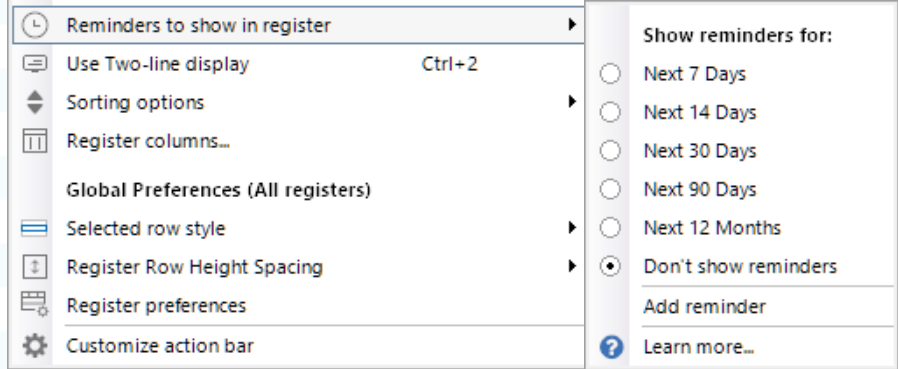
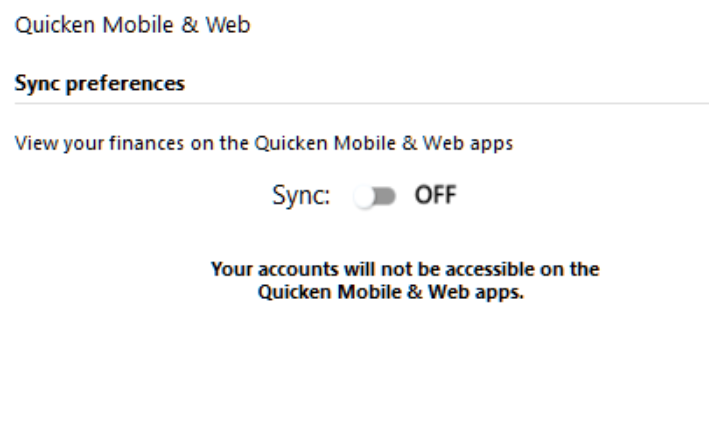
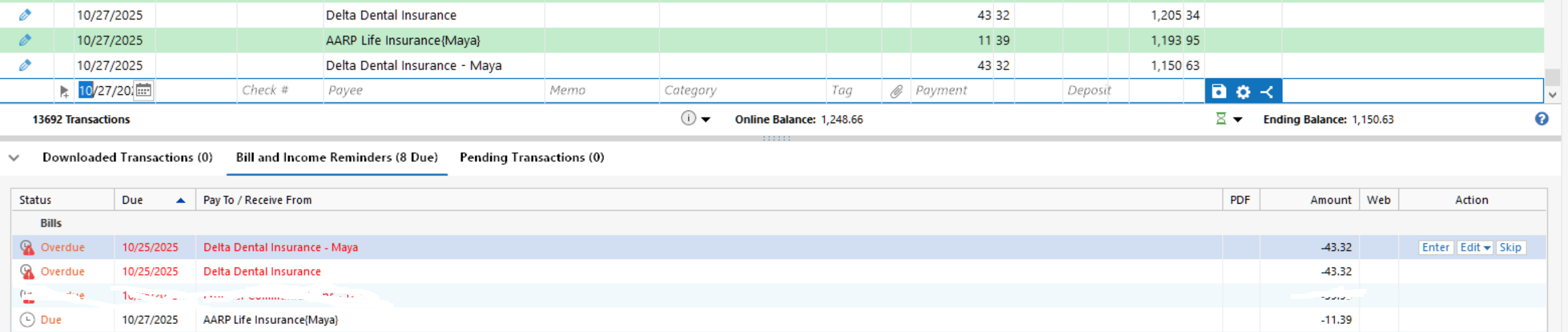
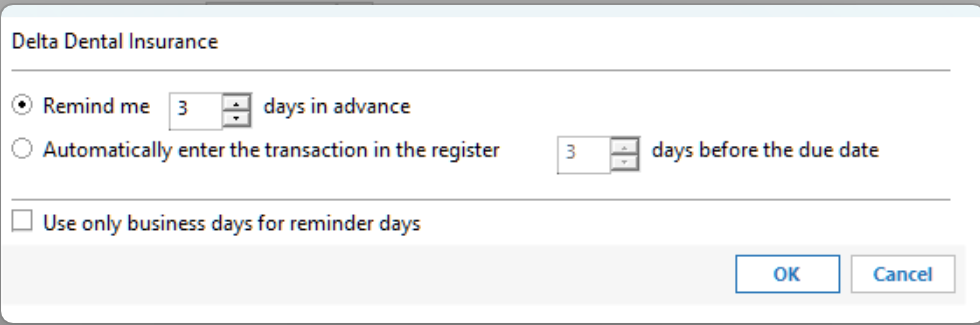
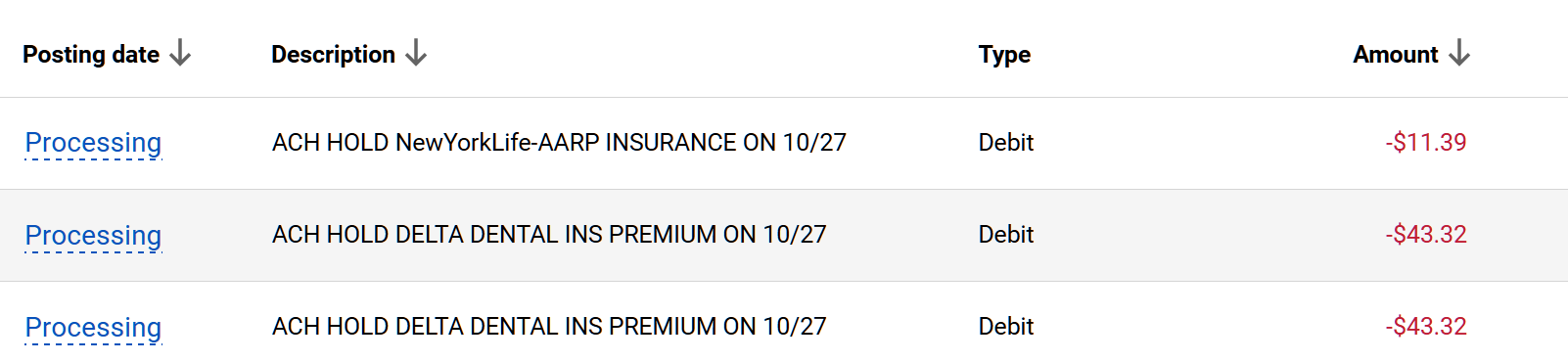
    OK, just had another one show up. It has a blue icon see photo. Notice no category or tags filled in. Also there is a picture of the scheduled transaction still in Bills and Income, not entered yet. Also in the "Manage Manual bills and income" section. Any idea why these keep showing up without intervention? And to reiterate here is the setting for Reminders showing in register; Don't show in register.

    image.png image.png image.png image.png

    Thanks,

    Greg

    Quicken Classic - R65.17, Windows 11 PRO current on updates

    My data file is NOT being synced nor backed up.

  • Bob@45
    Bob@45 Member ✭✭✭✭

    That looks like what I see in the Bills & Income tab display.

    What does your actual account register look like when you click on the account name in your accounts list? It should not include any not-"entered" manual reminders until the "Remind me NN days in advance" threshold is reached.

  • Quicken Kristina
    Quicken Kristina Quicken Windows Subscription Moderator mod

    Thank you for your reply @Greg Brown,

    That blue pencil icon means that Quicken is matching to a downloaded transaction. If you click on the blue pencil, you should be able to tell it to unmatch, which will let you see what it is matching to.

    Thank you!

    Quicken Kristina

    Make sure to sign up for the email digest to see a round up of your top posts.

  • Chris_QPW
    Chris_QPW Quicken Windows Subscription Member ✭✭✭✭

    If you expand the Status/Blue dot column besides the blue icon pencil it will give the text New Match.

    Signature:
    This is my website (ImportQIF is free to use):

    http://www.quicknperlwiz.com/

  • Greg Brown
    Greg Brown Quicken Windows Subscription Member ✭✭✭✭

    When I hover over the blue icon it says "Entered Manually on 10/19/2025" which did not happen. It says "New Match" "Matched to a downloaded transaction in the last update on 10/20/2025". There were NO downloaded transactions on 10/20/2025 for this account. And you can see the pending reminder in the image.

    image.png

    Quicken Classic - R65.17, Windows 11 PRO current on updates

    My data file is NOT being synced nor backed up.

  • Greg Brown
    Greg Brown Quicken Windows Subscription Member ✭✭✭✭

    Here's another one different account. This is happening accross the board.

    image.png

    Quicken Classic - R65.17, Windows 11 PRO current on updates

    My data file is NOT being synced nor backed up.

  • Greg Brown
    Greg Brown Quicken Windows Subscription Member ✭✭✭✭

    I just deleted the last one and added the pendning reminder. This is how it looks, notice category and tags are filled in…

    image.png

    Quicken Classic - R65.17, Windows 11 PRO current on updates

    My data file is NOT being synced nor backed up.

  • Chris_QPW
    Chris_QPW Quicken Windows Subscription Member ✭✭✭✭

    Are you using Sync to Mobile/Web?

    Signature:
    This is my website (ImportQIF is free to use):

    http://www.quicknperlwiz.com/

  • Bob@45
    Bob@45 Member ✭✭✭✭

    @Quicken Kristina this also happened to me today. Problem reported through Help function as described below.

    Through this morning, I remained on a previous version of Quicken because of the problems reported with the update and with Fidelity. This morning after doing my normal OSU and reconciliation, I did a full backup of both of my Quicken files, loaded my primary file, and did the Quicken update. I did an OSU (without Fidelity reauth), and everything seemed to be OK. I loaded my secondary file (my son's family's finances), and did an OSU. The first account in the register (lowest alphabetical checking account name) had three bad reminders generated for that account, with Payees, but no memo or category (and I always put memos and categories into my reminders).

    • Mattress Firm CC is an active payee, which has been paid from several accounts. Current payments are $173. The last $38 payment was years ago. It has never been paid from this account.
    • Camber Care Credit CC is an active payee, and sometimes there are $zero reminders for it, but again, it has never been paid from this account and has never had a reminder in this account. My reminders for it always have a memo of "Care Credit CC payment" and the category is always "[Care Credit MC]"
    • QVC as a payee has been inactive for about a decade.

    I have reported this through the Help > Report a Problem function, Topic = Bank download / Transaction errors, subject “Bad due transactions added to register”. Text: “Just updated to R64.30. Did OSU following update. Three new entries appeared in the first checking account register (lowest alphabetical), all due today, all with payees used in the past, one of which should have NO reminders anywhere since it is years obsolete, no memo or category (and I always put memos and categories into my reminders), two of them for zero amount. These should not have been created.” Since I can ignore these and remove them later, I’m taking no action immediately in case someone wants to ask me for detail within them.

    image.png

    I had planned to move forward and attempt the Fidelity reauth, but I don't want to confuse matters in my file by having multiple different issues from different sources going at the same time, so I will not reauth with Fidelity until this issue is resolved.

    Notes:

    • NOT using Sync to Mobile/Web; never have, never will.
    • Register preferences on: Show date before check number, show memo before category, row height compact, grey reconciled transactions. All other options on that page are off.
    • Data entry and QuickFill: All options on except "use enter key to move between fields" and "add address book quickfill items to memorized payee list". Memorized payees are flagged to be removed if not used in the last 14 months, and QVC has not been used in YEARS.
    • Downloaded Transactions preferences on: automatically categorize transactions, automatically apply quicken's sugtgested name to payee, capitalize first letter only, use my existing renaming rules, automaticaly create rules when I rename payees, let me review/confirm the automatically created rules.

    Bob

  • Bob@45
    Bob@45 Member ✭✭✭✭

    @Quicken Kristina Given that my "problem" is three bad/wrong reminders in a single account, is this something I should call the support phone line about? From my past experience, all they'll suggest is validate / super validate / create a new file (and reconnect dozens of FI's).

    The easy thing to do is delete the three bad reminders.

    But if the tech team working on the problem has suggestions to help track down the issue and get it fixed, I'm willing to help out. That's part of the reason why I've not yet deleted those three reminders.

    Bob

  • Greg Brown
    Greg Brown Quicken Windows Subscription Member ✭✭✭✭

    Quicken Classic - R65.17, Windows 11 PRO current on updates

    My data file is NOT being synced nor backed up.

  • Bob@45
    Bob@45 Member ✭✭✭✭
    edited October 23

    @Quicken Kristina The account which received those three invalid reminders, "due" 10/21, is set to display future transactions 30 days out. Those same three reminders now have "Upcoming" reminders due 11/21. They are set for Monthly billing. Interestingly, when I go to the Bills & Income tab, Bills display, these three have an action button at the far right which reads "Reconnect" while all my valid reminders have an action button which reads "Enter". Note that I have never used online billing for the accounts these actually would have applied to, and interestingly they all deal with Synchrony Bank credit cards.

    New twist: reviewing the Bills & Income list, I see a BofA credit card payment "Overdue, 9/23" with a "Quick Pay" action button. I do have / have had a monthly reminder for that payment, and that payment did process normally, and is posted in the credit card register as having been paid 9/24. I normally don't use the Bills & Income tab, preferring to use the Tool > Bill & Income Reminders window. This overdue bill does NOT show on the Bills & Income Reminders > All Bills & Deposits list. I'm just now submitting this as a report through the Help > Report a Problem interface.

    That one BofA bill is the only entry in the Bills & Income list with "Quick Pay". There are no other past due entries in the list except for the three invalid reminders reported earlier. The BofA bill does not show as pending or past due in any register I've looked at.

  • Quicken Kristina
    Quicken Kristina Quicken Windows Subscription Moderator mod

    Thank you for your replies @Bob@45,

    There are some known issues with online billers/bill reminders, but the issue you describe doesn't quite match up with the known issues.

    Was the account that these reminders appeared in recently connected/reconnected? You mentioned that these appeared after a One Step Update (OSU). Was it a one-time occurrence, or have you had other reminders appear during subsequent OSUs?

    I look forward to your response!

    Quicken Kristina

    Make sure to sign up for the email digest to see a round up of your top posts.

  • Bob@45
    Bob@45 Member ✭✭✭✭

    No, the account these reminders appeared in is a Chase First (youth) account, which originally was connected to Chase, but a month or two ago they stopped sending downloads for that type of account. I discussed with their phone rep, and that was apparently an intentional decision that since these Chase First accounts are not full checking accounts, they weren't going to support full service such as downloading transactions. After learning that, I deactivated the two accounts. The bad reminders appeared only in the first one. Looking at the Account Details, the Online Services tab shows "Set Up Now" and Online Bill Payment shows "No" and "Set up Bill Manager" (I don't use Bill Manager on any account). On the General tab this account still has "Chase" as the Financial Institution. That field is blanked out in the other.

    This appears to have been a one-time occurrence. The reminders are monthly, overdue with 10/21 due date, and the next cycle shows to be due 11/21. No new reminders have appeared since then, and I haven't seen this problem in any other account.

    Since it has not recurred, I'm suspecting that they were left over from some (very) old reminders that had been deleted years ago (probably months apart), but some piece of those three reminders got left behind in my Quicken file. When I updated to R64.30 (Quicken Classic Premier Windows), that included the "fix" from R64.25 which "Fixed: An issue where a user could incorrectly see many overdue bill reminders" and that update "found" these artifacts and made reminders out of them.

    I suspect if I simply delete the reminders they'll go away and not come back, but I didn't want to do that yet in case someone from Quicken support wanted to look at the data. My Sanitized data file is 389 Meg in size, so I cannot travel along with the original problem report.

  • Quicken Kristina
    Quicken Kristina Quicken Windows Subscription Moderator mod

    Thank you for your reply,

    If this issue was a one-off, where invalid bills appeared after the update, then it could be a file-specific issue, or it is possible that it's the known issue with duplicate & overdue reminders appearing after an update (CTP-14392).

    I'd recommend deleting those bad reminders and testing to see if the issue is resolved or if the bad reminders reappear.

    Thank you!

    Quicken Kristina

    Make sure to sign up for the email digest to see a round up of your top posts.

  • Bob@45
    Bob@45 Member ✭✭✭✭

    I'd recommend deleting those bad reminders and testing to see if the issue is resolved or if the bad reminders reappear.

    Deleted the reminders. I'll try to remember to post whether they reappear.

  • Greg Brown
    Greg Brown Quicken Windows Subscription Member ✭✭✭✭
    edited October 27

    What's the status of this issue. I have to believe it was caused by one of the recent releases. I also included the bill reminder setting showing it is NOT set to automatically enter in the register…

    Also the blue icon indicates

    "Entered Manually on 10/25/2025" which did not happen. It says "New Match" "Matched to a downloaded transaction in the last update on 10/27/2025". But as you can see, the transactions are still "pending" in my BofA account. The third reminder down in the screenshot below, the one I erased was set to "autopay". Not sure if that has anything to do with it. It is automatically charged to my account by Frontier Communications on the due date. The reminder does not get entered automatically, I enter it manually, as I do with the other reminders.

    image.png image.png image.png

    Quicken Classic - R65.17, Windows 11 PRO current on updates

    My data file is NOT being synced nor backed up.

  • Greg Brown
    Greg Brown Quicken Windows Subscription Member ✭✭✭✭

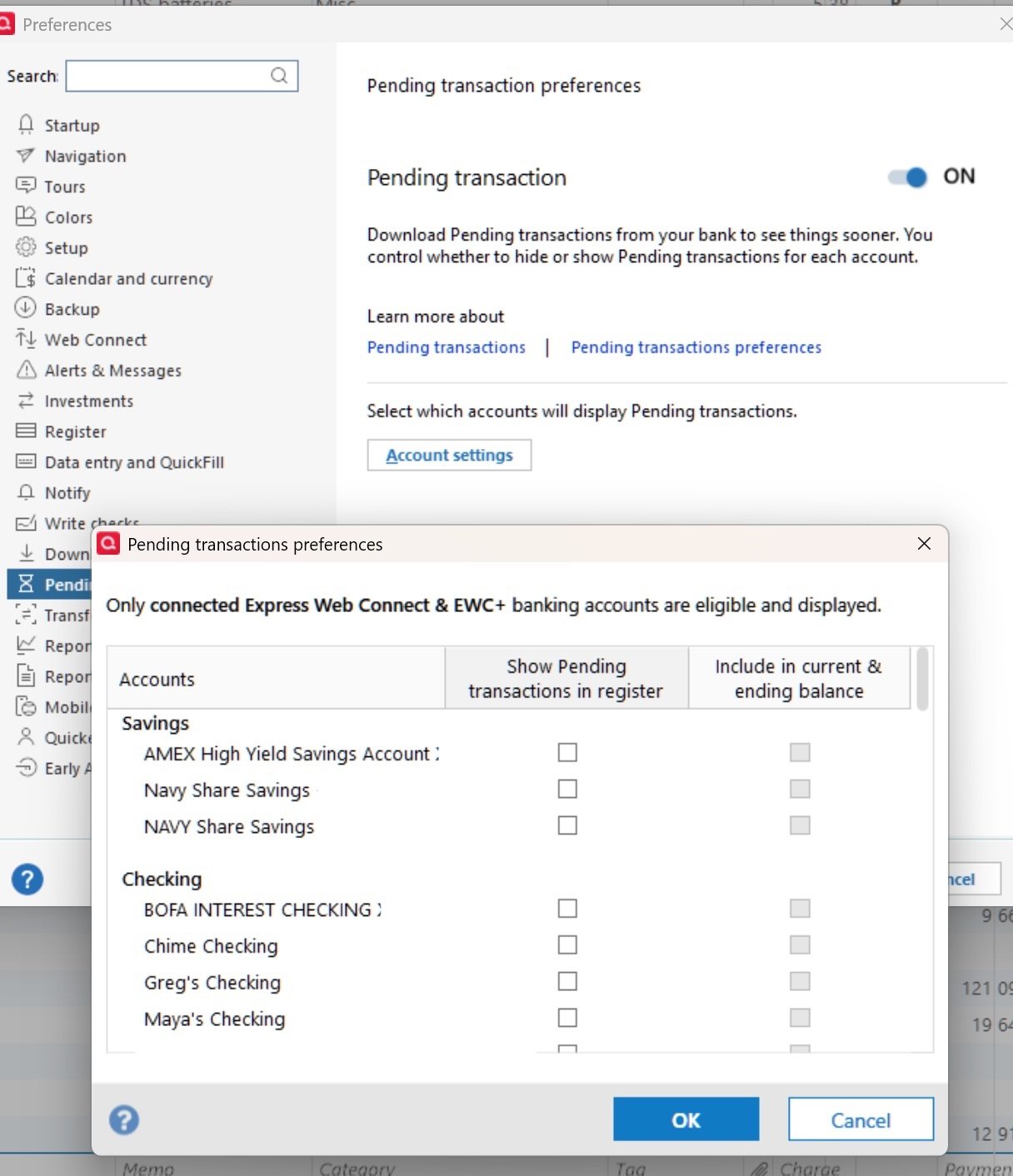
    OK, I think I know what's going on. I have pending transactions set to "Show pending transactions in register". They used to appear in the "Pending transactions" tab after OSU. I'm thinking something changed to NOW show them in the register. I guess I'll turn them off for awhile, but would like clarification on how pending transactions are supposed to work. If I turn off "Show pending transactions in register" will they still appear in the Pending transactions tab?

    Quicken Classic - R65.17, Windows 11 PRO current on updates

    My data file is NOT being synced nor backed up.

  • Bob@45
    Bob@45 Member ✭✭✭✭

    @Quicken Kristina Just a quick note that my bogus reminders have not reappeared after being deleted Friday, through multiple OSU runs.

  • Quicken Kristina
    Quicken Kristina Quicken Windows Subscription Moderator mod

    Thank you for the follow-up @Bob@45,

    I'm glad to hear that so far, those reminders have not returned.

    Thank you for your reply @Greg Brown,

    Are your other transactions also going into your account register automatically, or are they populating in the Downloaded Transactions section below the register?

    Thank you!

    Quicken Kristina

    Make sure to sign up for the email digest to see a round up of your top posts.

  • Greg Brown
    Greg Brown Quicken Windows Subscription Member ✭✭✭✭

    No the problem is with reminders/pending transactions. Downloaded transactions are fine. My question is how are pending transactions supposed to work? Do they continue to show up in the pending transactions tab if I turn off showing them in register. Keep in mind they have never shown up in the register before,

    Quicken Classic - R65.17, Windows 11 PRO current on updates

    My data file is NOT being synced nor backed up.

  • Greg Brown
    Greg Brown Quicken Windows Subscription Member ✭✭✭✭

    So this just gets worse every day… Today after running OSU, the 3 transactions that were automatically entered into my register yesterday the blue icon ones that I deleted yesterday, did NOT download today and appear as processed on my BofA online account and they are included in the online balance but are not downloading. I really need to understand what's going on and need some help.

    Quicken Classic - R65.17, Windows 11 PRO current on updates

    My data file is NOT being synced nor backed up.

  • Greg Brown
    Greg Brown Quicken Windows Subscription Member ✭✭✭✭
    edited October 31

    OK, so here's what happens. When I leave the Pending transaction setting to "On" and the individual accounts set to NOT show transactions in register, I get NO pending transaction tab for any accounts. Not sure what changed recently and I am not getting any answers to my issue. How can I have the pending transactions show up in the pending transaction tab but NOT in the account register. And once again I'm not sure if this resolves the phantom reminders showing up in my account registers.

    Please help.

    image copy.jpg

    [Edited - Removed partial account numbers]

    Quicken Classic - R65.17, Windows 11 PRO current on updates

    My data file is NOT being synced nor backed up.

  • Quicken Kristina
    Quicken Kristina Quicken Windows Subscription Moderator mod

    Thank you for your reply,

    Based on our help article on pending transactions, turning pending transactions off for an account turns them off completely. I also get the impression from the article that when you have automatic entry turned off for an account, the pending transactions should not be in your register, just in the pending transactions tab of the compare to register section. Are the pending transactions appearing with an hourglass icon, like the sample image below?

    image.png

    Thank you!

    Quicken Kristina

    Make sure to sign up for the email digest to see a round up of your top posts.

  • Greg Brown
    Greg Brown Quicken Windows Subscription Member ✭✭✭✭

    no they’re the ones that are appearing with the blue pencil icon

    Quicken Classic - R65.17, Windows 11 PRO current on updates

    My data file is NOT being synced nor backed up.

  • Greg Brown
    Greg Brown Quicken Windows Subscription Member ✭✭✭✭

    This is my issue. Per your research it appears that the pending transactions were NOT supposed to appear in the register but they did, with the blue pencil icon. This is what I talked to tech support about two days ago, and they were supposed to call me back yesterday morning at 8:00 AM. They did NOT call so I'm kind of stuck. It would be nice if you could ask them to call me. I don't want to talk to the first line support people, they were not helpful, I want the folks they were communicating with to call…

    I also get the impression from the article that when you have automatic entry turned off for an account, the pending transactions should not be in your register, just in the pending transactions tab of the compare to register section. Are the pending transactions appearing with an hourglass icon, like the sample image below?

    Quicken Classic - R65.17, Windows 11 PRO current on updates

    My data file is NOT being synced nor backed up.

  • Quicken Kristina
    Quicken Kristina Quicken Windows Subscription Moderator mod

    Thank you for your reply,

    If you're seeing a blue pencil icon, that sounds like the pending transactions may be inappropriately matching to reminders. Is that what is happening? If it is, are they matching to paycheck reminders specifically?

    I'm sorry to hear that you didn't receive the promised callback. I sent you a Direct Message. Please click the envelope icon near the upper right to view it.

    Inbox.png

    Thank you!

    Quicken Kristina

    Make sure to sign up for the email digest to see a round up of your top posts.

  • Greg Brown
    Greg Brown Quicken Windows Subscription Member ✭✭✭✭

    actually I don’t have any paycheck reminders, they are matching to manual bill pay reminders

    Quicken Classic - R65.17, Windows 11 PRO current on updates

    My data file is NOT being synced nor backed up.