Accept payments created outside of Quicken into register - not correct
I have used Quicken for Windows for decades, and started seeing this problem around 6 months ago.
I initiate various online payments (Credit Card, Utility, etc.) within Quicken: I have Online Payees configured with my bank (Fifth Third), use the "Send" option within Quicken, these transactions are sent to the bank, and at the appropriate date, the payments are sent.
When I do an Online Update, the transactions which have been paid then (most of the time) appear in the 'Downloaded Transactions' listing that appears at the bottom of the register, I click on each one, they automatically match with the original transaction, and everything is good.
The problem is that after doing an Online Update, in the Downloaded Transactions section at the bottom of the register, I now sometimes see some of these transactions in a section labeled
"Accept payments created outside of Quicken into register"
I then have to click on each one, and manually match it to the register transaction, since it doesn't happen automatically. Despite the fact that the original transactions is already in the register - exact same Payee, Date, Amount, etc. - it doesn't recognize it or automatically match it, and tries to enter a duplicate. I have to avoid that by manually matching it to the correct transaction.
After matching these, it then shows "Continue" at the bottom right, which then brings me to the usual list of Downloaded Transactions, where I can click and match as usual.
So these transactions it is seeing as having been "created outside of Quicken" were in fact absolutely created within Quicken, as I have done it for decades. It creates additional and needless work to get these properly matched.
I have tried:
Validate
Super-Validate
Did a File Backup, and then restored from that Backup
No matter what I do, it continues to show some of these online payment transactions (not all) as not having been created within Quicken, when in fact they were.
I have done a phone call with support, and was told they would escalate this to Tier 2, but I haven't head anything back. Very frustrating.
Am I the only one seeing this?
Tagging @Quicken Anja as you have been helpful with a couple of other questions and problems I've run into.
Comments
-
Hello @DLCPhoto,
Thank you for the detailed explanation—that’s very helpful!
To better assist, could you please confirm when you contacted Support about this specific issue? Was that a recent interaction?
Also, if possible, please provide screenshots showing what you’re seeing—specifically the section labeled “Accept payments created outside of Quicken into register” and how those transactions appear before and after you manually match them.
If needed, please review this Community FAQ for instructions on how to attach a screenshot. Alternatively, you can also drag and drop screenshots to your response if you are not given the option to add attachments.
This will help us review the behavior more closely and determine next steps.
Thank you!
-Quicken Anja
Make sure to sign up for the email digest to see a round up of your top posts.0 -
Thanks for the response. The chat was on Sept. 24th, and I worked with Fin at first, and then Maverick. We covered the HELOC issue we discussed before, but once that was resolved, I moved on to this problem.
I'm attaching a screenshot that demonstrates the problem, showing 2 specific payments that were initiated within Quicken (you can see the "Sent" designation), but which somehow aren't being automatically matched to the downloaded transaction.
Prior to this starting, I had never seen the "Accept payments created outside of Quicken into register" that now shows up.
0 -
@Quicken Anja - any follow up on this? I've provided a screenshot demonstrating the problem.
Thanks.
0 -
Also, @Quicken Anja - if it's helpful, this is the file name for the support chat I had when I exported the transcript:
quicken_classic_2025_09_24_215470981930394.txt
Hopefully that will let you review that discussion.
0 -
Hello @DLCPhoto,
Thank you for following up and for providing those additional details (and the screenshot)—that’s very helpful, and I apologize for the delay.
I reviewed your previous interactions with Support, and it appears the issue was escalated at that time with a recommendation to reach out to your financial institution. Before moving forward, could you please confirm whether you’ve already contacted Fifth Third Bank regarding this issue?
If you have and they’ve confirmed there are no known issues on their end—or if they directed you back to Quicken—please let me know so we can determine the next best step.
Thank you for your patience while we continue to look into this!
-Quicken Anja
Make sure to sign up for the email digest to see a round up of your top posts.0 -
I have not reached out to them previously, as this is such an obscure issue that the odds of finding anyone there who is even close to having a clue about this problem is essentially zero. I have contacted them in the past when there was an issue with basic connectivity, and they had little to offer even there.
Nevertheless, I left a voicemail with the person I worked with before, and will update this if I hear anything different. But I have zero problems in terms of basic connectivity and downloading transactions, which is all that my bank would be responsible for.
The problem certainly seems to be within Quicken, since it is not recognizing these transactions as having been created within Quicken. When I log into my bank's online account, those scheduled transactions appear there the same way they always have.
I really hope this doesn't come down to Quicken saying the problem is with my bank, and my bank saying the problem is with Quicken, and I'm left in the crossfire.
Thank you.
0 -
@DLCPhoto Thank you for the update and for taking the time to reach out to your contact at Fifth Third. I completely understand your concern about getting caught in the middle when it’s not clear which side the issue falls on.
Let’s hold off on any troubleshooting for now until you hear back from the bank. Once you do, please update me here directly with what they say. If they confirm it’s not an issue on their end or point you back to Quicken, I’ll personally make sure this gets addressed appropriately on our side.
-Quicken Anja
Make sure to sign up for the email digest to see a round up of your top posts.1 -
I have been in touch with 5/3 Bank, and there are no known issues or problems that they're having with Quicken. I described the problem I'm having, in detail, and they were unaware of anything on their end that could cause something like this.
@Quicken Anja - how do we now proceed?
Thanks.
0 -
@DLCPhoto Thank you again for following up. Given everything you’ve tried, there is one more thing we can attempt before moving forward with an escalation.
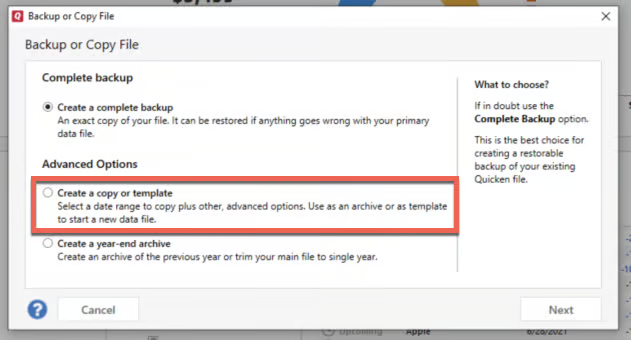
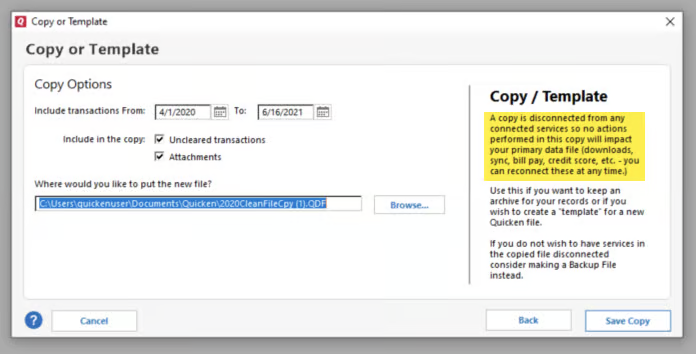
I suggest creating a copy of your Quicken data file, which will rebuild all of the internal lists and database tables. If successful, you would then move forward with the copied file. To create a copy, navigate to:
File > Copy or Backup File… > Create a copy or template
This also allows you to select a date range if you don’t want to include the entire history. If you wish to keep your entire data file, please check the full date range before copying to ensure nothing is accidentally excluded.
Important: Doing this will disconnect all online services in the copied file. You will need to sign back in with your Quicken ID and reconnect all online accounts, billers, and Quicken Bill Manager services if you plan to use the copied file going forward. The reason is that the new copy creates a separate dataset ID.
If the problem persists in the copied file, you can switch back to your original file using the instructions in this support article (scroll down to the section titled How to alternate between multiple files), and we will then proceed with escalating this internally for further investigation.
Thank you for your patience while we work through this!
-Quicken Anja
Make sure to sign up for the email digest to see a round up of your top posts.0 -
I've already created a Backup, and restored from that file. No change in the problem.
Doing the copy process seems to be a lot more work, regardless of the outcome. I have quite a few online accounts, and would prefer to avoid this. In addition, it could take a week or so for the problem to occur, since I only need to do an update twice/week, and it doesn't happen every time.
Don't take this wrong, but so far it seems like I'm doing all the work - can't we just proceed assuming that the outcome will be the same as it has been before, and let Quicken take it from there?
0 -
@DLCPhoto Yes—if you prefer not to create a copied file at this time, we can certainly move forward with escalating this issue. Please note that escalations do not result in an immediate resolution and may take some time before a fix becomes available. Additionally, our escalation team does not provide an ETA for when a resolution might be released.
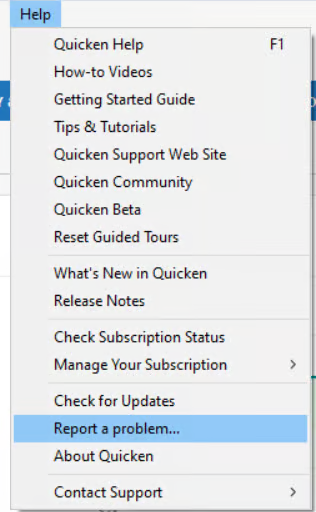
I will go ahead and forward this issue to the proper channels to have it further investigated. However, we kindly request that you navigate to Help > Report a problem within your Quicken program and submit a problem report with log files and screenshots attached to contribute to the investigation.
It would also greatly aid the investigation to include a sanitized file when submitting the problem report. A sanitized file removes any personally identifiable information, so you can safely share it with the Quicken team.
Please note that you will not receive a direct response from this submission, but these reports are reviewed internally and help our teams better identify and resolve the issue. The more files we receive, the more data we have to work from.
Thank you!
(CTP-15052)-Quicken Anja
Make sure to sign up for the email digest to see a round up of your top posts.0 -
Thank you, and Done. I reported the problem through Quicken, describing the problem, sending a sanitized file, along with the screenshot that I used in this thread to illustrate the problem. It said the files were successfully submitted.
I realize there won't be instant action, but when might I expect to hear something back about this? And how will they contact me?
I appreciate your help, as always.
0 -
@DLCPhoto Thank you for submitting your files—they have been successfully attached to the escalation ticket.
Please note that the escalation team typically does not contact users directly (it’s rare, though not impossible), since escalations submitted from the Community go straight to our development team. Any updates or communication from them are usually added internally to the ticket. However, you are more than welcome to check in with me or any of the other moderators about your ticket at any time. We’re happy to look into it and provide any information that is available to share at that moment.
When checking in, please reference your ticket number: CBT-888. (Note that this ticket number may later change to a CTP ticket number, which I’m happy to provide once that change occurs.)
Please don't hesitate to reach back out if you have any further questions regarding this.
-Quicken Anja
Make sure to sign up for the email digest to see a round up of your top posts.1
Categories
- All Categories
- 137 Product Ideas
- 35 Announcements
- 215 Alerts, Online Banking & Known Product Issues
- 21 Product Alerts
- 691 Welcome to the Community!
- 663 Before you Buy
- 1.2K Product Ideas
- 53.2K Quicken Classic for Windows
- 16.2K Quicken Classic for Mac
- 1K Quicken Mobile
- 808 Quicken on the Web
- 109 Quicken LifeHub