Profit and Loss with "Cost of Goods Sold" Section
My business provides personal services so no inventory. I have some contractors so would like to put their labor as a "Cost of Goods Sold" section to create a "Net Revenue" line.
Using category with Tax identifier as Schedule C and "Labor, COGS" doesn't create the COGS section on the Profit and Loss Statement.
Is there any way to create the "net revenue line"?
Answers
-
Hello @bwdon,
Thank you for reaching out! There isn't really a way to force a COGS section to appear. Quicken doesn't automatically calculate COGS. See this article for more information:
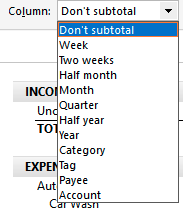
When you run the Profit and Loss Statement report, it does total up income and expenses for you. You can use the column dropdown to determine what columns appear.
That can be helpful if you're needing to see income/expenses over a given timeframe, break it down by account, category, etc.
I hope this helps!
Quicken Kristina
Make sure to sign up for the email digest to see a round up of your top posts.
0 -
Extending @Quicken Kristina's excellent reply.
Q doesn't know/manage inventory. So, it has no way to tracking what you paid (or added to) an item before you sold it. But you seem to already know that.
SO, I don't quite understand about those contractors and their relations to your Q data file. What are you trying to do here? Why isn't there labor simply a cost to you (something you paid) and part of your P/L. Why is it the contractor's concern?
Q user since February, 1990. DOS Version 4
Now running Quicken Windows Subscription, Business & Personal
Retired "Certified Information Systems Auditor" & Bank Audit VP0
Categories
- All Categories
- 56 Product Ideas
- 36 Announcements
- 225 Alerts, Online Banking & Known Product Issues
- 22 Product Alerts
- 703 Welcome to the Community!
- 671 Before you Buy
- 1.2K Product Ideas
- 53.7K Quicken Classic for Windows
- 16.3K Quicken Classic for Mac
- 1K Quicken Mobile
- 812 Quicken on the Web
- 111 Quicken LifeHub