Investing Tab Portfolio View Not Displaying Dividends For Mutual Funds
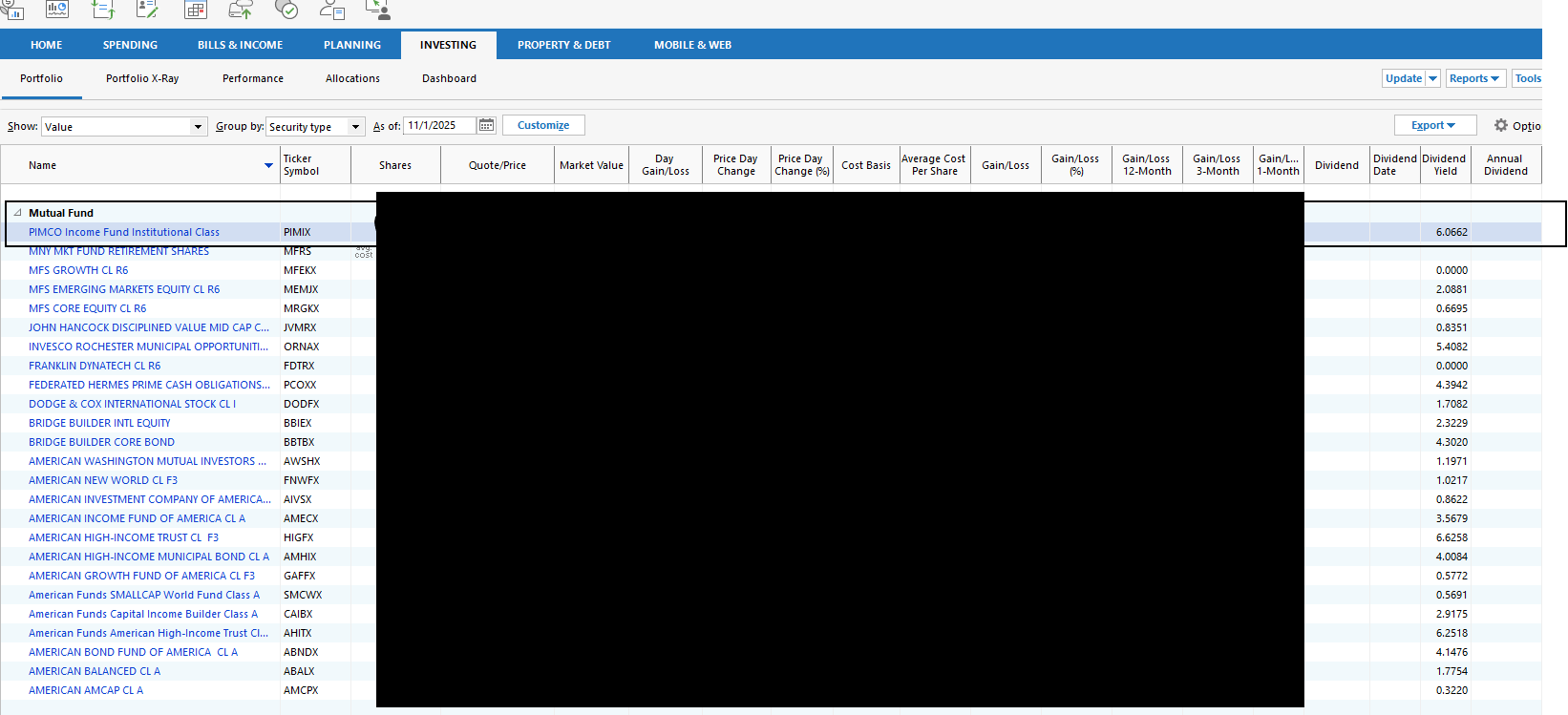
I recently acquired income funds that receive dividends that are reinvested. My individual stocks display dividends, annual yields, etc. Not a single mutual fund is showing dividends received or calculating anything (but apparently downloading a yield from somewhere). Is there a trick I don't know? The dividends on the first example, PIMIX, were reinvested monthly for the last several months. Is this the way mutual funds are treated in Quicken by design?
Comments
-
The Dividend column in the Portfolio views shows Dividend/Share data downloaded from Quicken's quote provider, not based on your holdings. For some reason the data is only provided for stocks and ETFs, not mutual funds.
This is not the only data that is missing from the quote feed. For example, in the Return (%) columns, the data is provided for mutual funds and stocks, but not ETFs.
Personally, I find the Estimated Income column more useful.
QWin Premier subscription1 -
If I have all this right:
Dividend Yield - Downloaded. Annual Value. % of 'recent' market value. Also shows in the "Quote" data of the Security Detail View (Div Yield) but may show there as N/A for MFs and ETFs.
Dividend - Downloaded but not for MF. Most recent value (may be in the future). A per-share value. Does not show in the "Quote" data.
Dividend Date - Downloaded but not for MF. Ex-date, when it was (or will be) accredited to shareholders of record, not when they receive it. Also shows in the "Quote" data of the Security Detail View (Ex-Div Date).
Annual Dividend - Downloaded but not for MF. A per-share value. Also shows in the "Quote" data of the Security Detail View (Ann Div/Sh)
My comments:
- I am not sure Yield is recalculated with each days closing, thus my 'recent' qualifier.
- I believe Annual Dividend is prior 12 months, not forward looking.
- Estimated Income is based on current shares and a user entry under Security Details 'Other Info'. But there is also a Portfolio View Options Preference setting that will use the security's (Annual) dividend rate for the Estimated Income column.
1 -
My objective is to get an estimate of annual income so I can stay on top of it. Concluding I need to download into Excel to do the math. Seems like something Quicken should do, but it's not something I need to update every day, maybe something I would do a few times a year.
0 -
My objective is to get an estimate of annual income so I can stay on top of it.
That the the purpose of the Estimated Income column in the Portfolio views. This is the annual dividend per share X the number of shares you hold.
For stocks and ETFs, the Annual Dividend is downloaded and you can use the setting in the Portfolio views at Options > Portfolio Preferences to have Quicken compute it for you.
For mutual funds and other securities, you can click on the security name to open the Security Detail view. Then click on Edit details and Other Info. Next to Est. Income, enter the annual dividend per share.
It is unfortunate that Quicken can compute the Estimated Income but does not download the Annual Dividend for mutual funds, which would make it much easier for us to get an estimated annual Income. I consider it a bug, but there have been many complaints about it over the years and it has never been fixed. See this discussion for more info
QWin Premier subscription0 -
The Annual Dividend for mutual funds can vary WIDELY, depending upon what the fund holds.
The Annual Dividend for a stock, however, is fairly predicable, based upon what the companies Board declares.
You really can't predict the Annual Dividend for a fund, you can only guess based upon prior years … and that IS A Guess, at best.
Q user since February, 1990. DOS Version 4
Now running Quicken Windows Subscription, Business & Personal
Retired "Certified Information Systems Auditor" & Bank Audit VP0 -
The Annual Dividend for mutual funds can vary WIDELY, depending upon what the fund holds.
True, especially for actively managed funds, but of course companies can and often do change their dividends in mid-year too. That's why they call it the estimated annual income. And it also doesn't explain why they provide the annual dividend data for ETFs but not mutual funds.
Also I think the downloaded Annual Dividend number is just the total dividends per share paid in the past year. As far as I know it does not make any forward-looking adjustment if a company has increased or decreased its dividend.
QWin Premier subscription0 -
There is also a question as to whether “Annual Dividend” from a mutual fund would or should include LT and ST capital gain distributions. For some looking for an income estimate, they should. For someone looking for tax reasons, likely they should not. The other concern with those CG distributions is that they can be a consequence of others trading actions and can be much more varied year over year.
0
Categories
- All Categories
- 56 Product Ideas
- 36 Announcements
- 223 Alerts, Online Banking & Known Product Issues
- 22 Product Alerts
- 701 Welcome to the Community!
- 671 Before you Buy
- 1.2K Product Ideas
- 53.7K Quicken Classic for Windows
- 16.3K Quicken Classic for Mac
- 1K Quicken Mobile
- 813 Quicken on the Web
- 111 Quicken LifeHub


