CSV import: AKA, a Fidelity workaround for now

John QW
John QW Quicken Windows Subscription Member ✭✭

So as we all go thru the Fidelity EWC+ Conversion™️… and I've been waiting for HSA account function to return… I saw this blip in the "Quicken news Fall 2025 Update" email blog, under the article titled "Five Precision Updates In Quicken Classic For Windows."

CSV import: Bring in data from anywhere

Sometimes your financial data lives outside the standard download channels. The new CSV import enhancements ensure you can consolidate everything in Quicken, regardless of the source.

Universal compatibility

Upload banking and investment transactions directly from CSV files. Whether it’s an account that doesn’t support direct download, historical data from another system, or transactions from international banks, CSV import fills the gaps in your financial picture.

The import process intelligently maps columns, remembers your preferences, and handles everything from checking transactions to investment activity. Your data arrives clean and ready to go.

The Bold emphasis is mine. Since I've not played with CSV import recently (And the Fidelity site does provide an Export to CSV option for transactions…) I decided to give this a shot.

As for the Intelligently maps columns… well, you get rather (un) helpful notices like this:

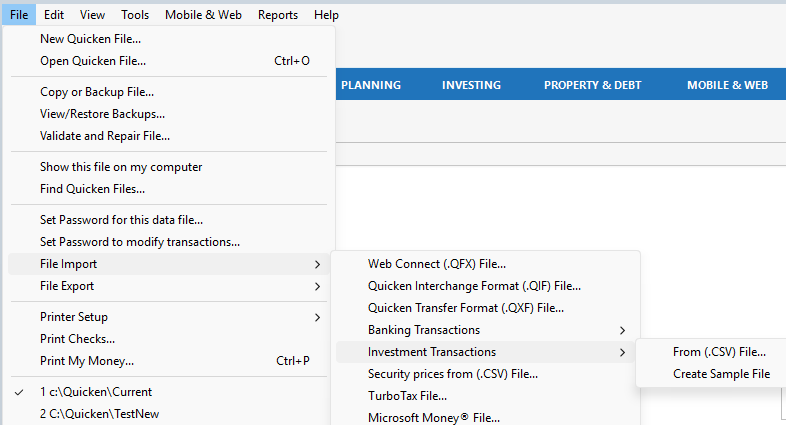
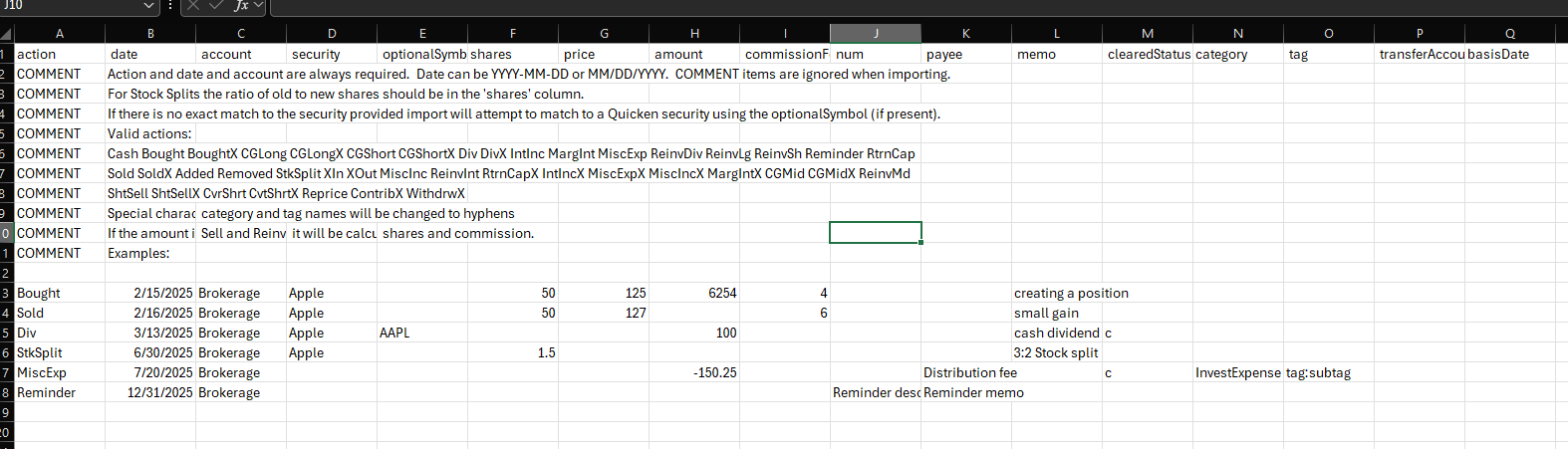
Then I noticed in the File-import→investment transactions→csv→example file. Selecting that downloads the quicken reference template.

After lots of trial an error with, yes, quicken will import your transactions.. as long as the CSV looks EXACTLY like the template. I got a series of "one transaction has blah err" (but doesn't highlight which one.. etc) as I realized how strict the import is and modified the file to match.

So with a lot of manual manipulation, you can get the Fidelity csv data in. Now, I'll be able to write a script to pre-process the csv so that it will import; but thats not going to be a viable option for everyone.


Comments

  • Quicken Kristina
    Quicken Kristina Quicken Windows Subscription Moderator mod

    Thank you for sharing your experience @John QW,

    Hopefully this can help others looking for a work around for Fidelity HSA accounts being unable to download transactions.

    If you haven't already done so, I recommend bookmarking this announcement to track the status of the issue and know when it's resolved:

    Thank you!

    Quicken Kristina

    Make sure to sign up for the email digest to see a round up of your top posts.

  • Chris_QPW
    Chris_QPW Quicken Windows Subscription Member ✭✭✭✭

    That's interesting, I wonder when they added the importing of investment transactions from CSV files.

    It seems to be quite a naive approach at it. They certainly haven't looked at a lot of CSV files that financial institutions put out, let alone "regardless of the source".

    For instance, there isn't any standard on the terms used for the security actions. In fact, I have seen financial institution CSV files that don't even have an action column. Bought and Sold are in the example and work but Buy and Sell don't. The financial institution has to magically use the same terms that Quicken uses.

    And yeah, the columns are fixed, your account name better be in the right column (your exported CSV of course has it, right??)

    Given that these CSV import functions were mostly a byproduct of trying to grab the Mint users that got shutdown and that Mint didn't support "complete mode investment transactions" it would be interesting where the template model and such came from for this idea.

    I'm biased, but I think my more generic approach to this problem is both more complex (the user has to understand what they are mapping for both the columns and the security action) and more generic.

    Signature:
    This is my website (ImportQIF is free to use):

    http://www.quicknperlwiz.com/

  • John QW
    John QW Quicken Windows Subscription Member ✭✭

    Yes, naive is a good word. And good parsing is hard (as I know you aware since you built and maintain a tool for it) . But then, don't lead in with a blog entry that says "intelligently maps".. because a perfectly good column( but out of order) gets rejected.

    Still, I applaud csv import as at least there is a way in when all other roads fails. Fidelity site still shows "QIF download" as an option on the website dropdown, but when you select that, after a long spinning balls expires.. "this is not supported".

  • Chris_QPW
    Chris_QPW Quicken Windows Subscription Member ✭✭✭✭

    I ran theirs and I can see where they are talking about "intelligently maps", but that doesn't include moving columns around or allowing for missing ones and such. It does "intelligently map" Securities from what I saw though.

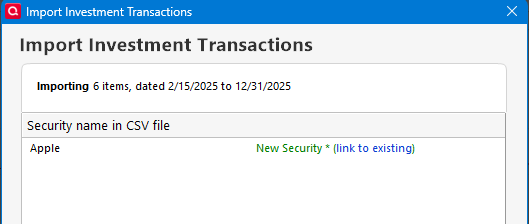
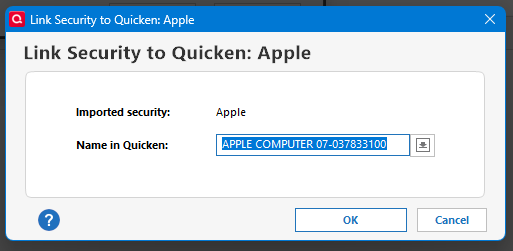
    When importing using QIF Quicken imports by matching the security name. When importing by QFX Quicken matches using the CUSPID. In the case of the CSV it is matching by security name. But being Quicken instead of an external program it knew what to do with "Apple" as the security (from their example). It didn't create a new security it matched that I already had in my data file by allowing me to pick it using the (link to existing) below:

    image.png image.png

    If I hadn't linked it to the existing one would have just used Apple as the security and created a new one. So, it is at least storing a mapping between Apple and APPLE COMPUTER 07-037833100.

    Signature:
    This is my website (ImportQIF is free to use):

    http://www.quicknperlwiz.com/

  • John QW
    John QW Quicken Windows Subscription Member ✭✭

    Good tidbit on the qxf matching versus qif.. I seem some strange cases where quicken gets lost there. (What does EWC+ match securites by, I wonder..)

    But Actually, In the CSV file , I left the security name fields blank (assuming that was ripe for mismatch) and populated the optionalSymbol field … and quicken matched those correctly.

  • Chris_QPW
    Chris_QPW Quicken Windows Subscription Member ✭✭✭✭
    edited November 5

    Yes, the CSV import seems to look at both the security description and the symbol. If you do the reverse and take out all the symbols it will prompt you (provided there isn't a match with one you have in your data file).

    As for Express Web Connect + I'm pretty sure it would do the same as Direct Connect and use the CUSIP ID.

    Signature:
    This is my website (ImportQIF is free to use):

    http://www.quicknperlwiz.com/

  • John QW
    John QW Quicken Windows Subscription Member ✭✭

    Well, I asked about EWC+ because after the conversion from DC to EWC+ on Fidelity a CUSIP ID got duplicated..and/or one security's cusip was rewritten with an incorrect one ( a dupe of another holding in the account). I'd have to go back and confirm that by looking at my pre-conversion backup..but that dupe definitely messed up the share balance reconciling after the conversion completed (and they shares were correctly balanced before the conversion). Took me a while to figure it out because the share imbalance was ironically not on the security with the mismatched cuspid. but as they are supposed to be unique, I think that probably flummoxed whatever matching algo or quicken code was running.

  • MACMONEY
    MACMONEY Quicken Mac Subscription Member ✭✭

    Where is this template. I was able to pull csv out of fidelity but not sure how to format it to upload to quicken. And also is same feature on quicken Mac ??

  • Chris_QPW
    Chris_QPW Quicken Windows Subscription Member ✭✭✭✭

    @MACMONEY I don't know about Quicken Mac, but Quicken Windows has an option to create a sample file:

    image.png

    Which looks like this:

    image.png

    Signature:
    This is my website (ImportQIF is free to use):

    http://www.quicknperlwiz.com/