Quicken windows classic and Fidelity checking

DSPatrick
DSPatrick Quicken Windows Subscription Member

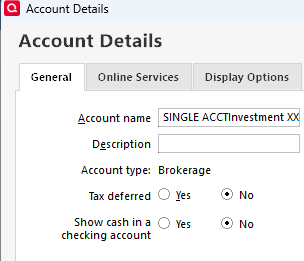
Quicken classic on windows user R64.35 build 27.164.35. So when I setup my Fidelity checking account in 2023 it was treated as a brokerage so the work-around was to let quicken setup the pseudo account by selecting the radio button for "Show cash in a checking account".

Then, in the last couple of months, the connection changed from direct to web express, and now for some reason, the monthly interest transaction comes into the "brokerage" checking and I have to remember to accept it before I can reconcile the pseudo account. I just now found the page explaining the recent change
, but not sure what's exactly going to happen?

  1. Will it make the "brokerage" checking look and work like a checking account?
  2. Will it move from the Investing section to the Banking?
  3. Will the existing nearly 3 years of records in the pseudo account be lost?
  4. Should I leave it be and learn to live with it?

[Edited - Readability]

Answers

  • Quicken Kristina
    Quicken Kristina Quicken Windows Subscription Moderator mod

    Hello @DSPatrick,

    Thank you for reaching out! To answer your questions:

    1. As long as the fund used in your Fidelity account is seen as a core fund, it should still reflect as cash in the account. You would still need to use the linked cash account (pseudo account) to have it look and act more like a checking account in Quicken. linked cash account off.png
    2. No. It will still see the account as an investment account. You should be able to use the linked cash account (pseudo account) to have it act more like a checking account.
    3. No, those records should not be lost.
    4. Is the "it" you're referring to the issue you mentioned with interest payments downloading into the brokerage account portion and needing to be accepted before you can reconcile the linked cash account?

    I hope this helps!

    Quicken Kristina

    Make sure to sign up for the email digest to see a round up of your top posts.

  • DSPatrick
    DSPatrick Quicken Windows Subscription Member
    edited November 14

    4. yes, the issue is the interest downloading to the brokerage and needs to be accepted in brokerage before it is seen in the suedo account. This extra step is something new since August of this year.

  • Quicken Kristina
    Quicken Kristina Quicken Windows Subscription Moderator mod

    Thank you for your reply,

    How are the interest payments downloading into your Quicken? Are they showing associated with a security, or as purely cash transactions?

    Thank you!

    Quicken Kristina

    Make sure to sign up for the email digest to see a round up of your top posts.

  • DSPatrick
    DSPatrick Quicken Windows Subscription Member
    edited November 17

    Ok, so prior to august this year they came in as

    INTEREST EARNED

    Now they come in as

    FDIC INSURED DEPOSIT AT CITIBANK NOT COVERED BY SIPC

    the pseudo account has a columns labeled Payee and Category, whereas the brokerage has a columns labeled Security and Action.

    The bottom block in the screens shots is the brokerage checking, the top and middle blocks are the pseudo checking both before and after 8/2025.

    [Edited - Readability]

  • Quicken Kristina
    Quicken Kristina Quicken Windows Subscription Moderator mod

    Thank you for your reply,

    Is that screenshot from before or after you manually corrected the transactions? I notice the Action on the transactions that downloaded into the investment part of the account show as IntIncX. Does it show what account the transfer is to/from?

    Thank you!

    Quicken Kristina

    Make sure to sign up for the email digest to see a round up of your top posts.

  • DSPatrick
    DSPatrick Quicken Windows Subscription Member
    edited November 17

    I didn't manually create transactions. I just needed to Accept them in the brokerage. I'm not sure how they presented before Accepting but the IntIncX may be because after accepting it shows as xfered to the pseudo checking?

    [Edited - Readability]

  • DSPatrick
    DSPatrick Quicken Windows Subscription Member

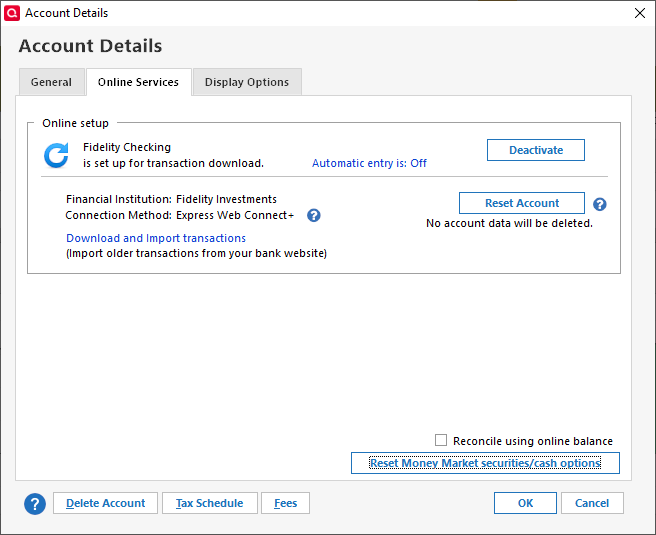
    So I might have ended up fixing this but won't know until end of the month. On Online Services I did the Reset Money Market securities/cash option,

    image.png

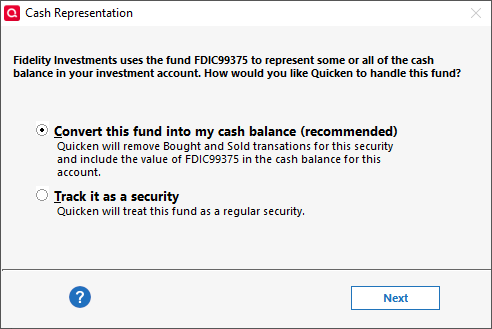
    then after next Update (download) I got,

    image.png

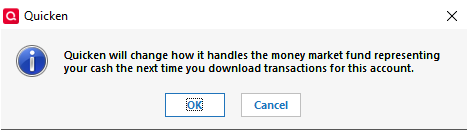
    and then

    image.png
  • Quicken Kristina
    Quicken Kristina Quicken Windows Subscription Moderator mod

    Thank you for your replies,

    I'm glad to see you found something that may have corrected the issue. Please let me know if the transactions go straight to the linked cash account without needing to be accepted on the brokerage side first next time they download!

    Quicken Kristina

    Make sure to sign up for the email digest to see a round up of your top posts.

  • DSPatrick
    DSPatrick Quicken Windows Subscription Member

    It did not fix the problem.

  • NotACPA
    NotACPA Quicken Windows Subscription SuperUser ✭✭✭✭✭

    @DSPatrick Fidelity Investments is a brokerage, not a bank. Thus, legally, they CAN'T offer a true checking account … but only a MMF (investment) that ACTS as if it were a checking account.

    Fortunately, the differences, while real, won't ever be encountered by the vast majority of customers … but Q is correct is showing the Linked Checking account as an Investment account, not a banking account.

    Q user since February, 1990. DOS Version 4
    Now running Quicken Windows Subscription, Business & Personal
    Retired "Certified Information Systems Auditor" & Bank Audit VP

  • DSPatrick
    DSPatrick Quicken Windows Subscription Member
    edited 1:54PM

    @notacpa

    a worthless brain-dead reply