Migrated Fidelity to new connection and now have duplicate accounts [Edited]

Franklin S.
Franklin S. Quicken Windows Subscription Member ✭✭

Quicken started a new method for connecting to Fidelity Investments after which I have had the following problems. I now have duplicate accounts for each of my Fidelity accounts in Quicken. One has the full account number and the new one starts with "XX" followed by the last four digits of the account number. The original account shows data up to 10/10/25 and data in the new one starting with "XX" as the account number starts on 08/27/25 and ends with the current date. Initially, I could not download any data, but with the help of a Quicken representative, I deactivated and reactivated all the accounts. However, when I do the One Step Update, Quicken has divided my accounts into two groupings. One is the original group and the second is called zzz-Fidelity Investments -DC. The latter does not work. Fidelity Investments has no idea what the zzz-Fidelity Investments-DC is.

My questions are 1) how do I combine the two accounts in Quicken without having duplicate entries, and 2) how do I resolve the zzz dilemma?


Answers

  • chazc797
    chazc797 Quicken Windows Subscription Member

    I have similar problem ….I have several Fidelity accounts and was told to reauthorize in October. I reauthorized all accounts through Fidelity. However, one of the accounts continually asked for reauthorization and will not update - the last activity is October 8th. Prior to October, this account always updated in a separate grouping from my other Fidelity accounts; it worked fine up to the date of the reauthorization. Since October, the Quicken program has continually asked me to reauthorize the problem account through Fidelity…. upon reauthorization, a box appears that says "do not add to Quicken" with no other choice available. I deactivated the account and now when I try to set up download I get routed back to Fidelity, reauthorize and program still comes back "do not add to Quicken." This now defunct account has the same coding as mentioned above "zzz - Fidelity Investments - DC." This account originated as a 401K (roll-over) and I believe this may have something to do with the reason that it was segregated from the other accounts.

  • Jem
    Jem Member ✭✭✭

    Try deactivation the account, go to preferences =, Quicken id and disconnect, log out, then log in again and try to reauthorize. This has worked for me in the past.

  • SanjayT
    SanjayT Quicken Windows Subscription Member

    I am having the same issue. After downloading from fidelity, it changed my register to different format where I cannot update the transactions. It automatically updates the account every time when I download but I do not have an option to see in the form of register where I can enter any trading transaction or reinvestment transaction. Any help from Quicken or the community will be appreciated. Quicken should update the software to allow to go back to original format of a register.

  • Quicken Kristina
    Quicken Kristina Quicken Windows Subscription Moderator mod

    Hello @Franklin S.,

    Thank you for letting us know you're encountering this issue. Based on your description, it sounds like when you reauthorized your accounts to connect using the new connection type, the accounts got added as new instead of linked to your existing accounts.

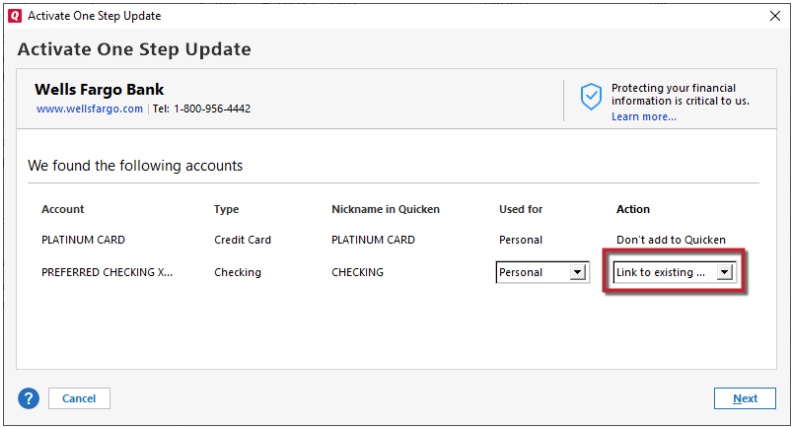
    To resolve this issue, backup your Quicken file and delete those new, duplicate accounts. Once the duplicate accounts are deleted, deactivate the original accounts. Then, reconnect the original accounts by navigating to Tools>Add Account and following the prompts. Once you get to the Add/Link screen in Quicken, make sure to carefully link the accounts to the correct nickname in Quicken.

    Link to Existing.png

    Hello @chazc797,

    Thank you for reaching out! As @Jem said, you should be able to correct this by deactivating and then reconnecting the account. To do this, first, backup your Quicken file. Then, deactivate the problem account, and reconnect it by navigating to Tools>Add Account. Follow the prompts. Once you get to the Add/Link screen in Quicken, make sure to carefully link the account to the correct nickname in Quicken.

    Link to Existing.png

    Hello @SanjayT,

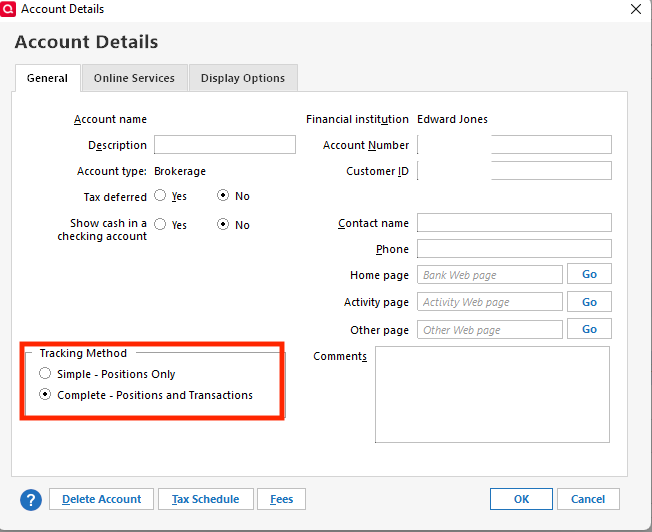
    Thank you for letting us know you're seeing this issue. To clarify, are your accounts connected, but giving you no way to view your transactions? If that is the case, then it sounds like they may be set to Simple Investment Tracking instead of Complete. To correct this, backup your Quicken file, then navigate to Tools>Account List and click the Edit button next to the problem account. On the General tab, in the investment tracking method section, select Complete - Positions and Transactions.

    tracking method QWin.png

    I hope this helps!

    Quicken Kristina

    Make sure to sign up for the email digest to see a round up of your top posts.

  • chazc797
    chazc797 Quicken Windows Subscription Member

    HI Kristina,

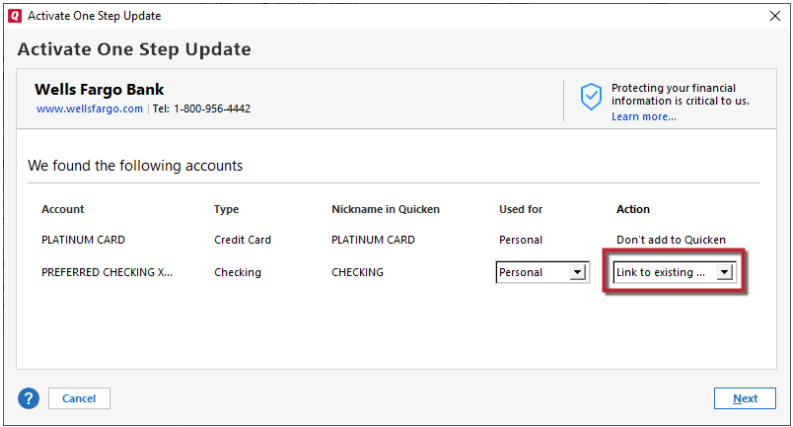
    Thanks for responding. I had previously deactivated the problem account. When I try to add the account, I get to the Activate One Step Update Screen and there is no option to link the account. Instead under Action column, it says "Don't add to Quicken". There is no dropdown box.

    image.png

    Thanks again.

  • Boatnmaniac
    Boatnmaniac Quicken Windows Subscription SuperUser, Windows Beta ✭✭✭✭✭

    When you get a Don't add to Quicken message like that typically means that Quicken thinks the account the download should be linked to already has a download connection set up.

    Do you have only 1 account that are just showing up differently here? Or do you have 2 accounts…a rollover IRA and a rollover 401K?

    If these are actually one and not two accounts:

    1. Go to the Online Services tab of Account Details for the IRA account. Does the top button say Set Up Now or does is say Deactivate?
    2. If is says Deactivate, click on that.
    3. Then try doing Add Account, again. (DO NOT try using Set Up Now on the Online Services tab. Make sure use Add Account.)
    4. When prompted be sure to Link the download to your IRA account already in Quicken.

    If it still does not let you Link the download to the correct account in Quicken:

    1. Go to the General tab of Account Details for the IRA account.
    2. Remove all the Financial Information from the upper right corner of that tab (i.e, everything in the fields above the Contact Name field).
    3. Then try doing Add Account, again.
    4. When prompted be sure to Link the download to your IRA account already in Quicken.

    Did either either of these resolve the issue for you?

    Quicken Classic Premier (US) Subscription: R65.15 on Windows 11 Home

  • chazc797
    chazc797 Quicken Windows Subscription Member

    I have several accounts…. they all show up as "do not add." all but one are downloading properly.

    For the account that is not working, on the Online Services Tab, there is no button to deactivate (I believe I already did that a few days ago).

    On the general tab, the only information above the Contact Name is Financial Institution: "zzz- - Fidelity Investments - DC." It is a non-editable field. Only buttons at bottom of this box are : Delete Account; Tax Schedule and Fees. There is no Add button. Thanks.

  • Quicken Kristina
    Quicken Kristina Quicken Windows Subscription Moderator mod

    Thank you for your reply,

    Which account are you trying to deactivate: Rollover IRAXXXX or Fidelity 401K Rollover?

    Based on the screenshot you provided earlier, Quicken is seeing the account you're trying to link is connected to Fidelity 401K Rollover.

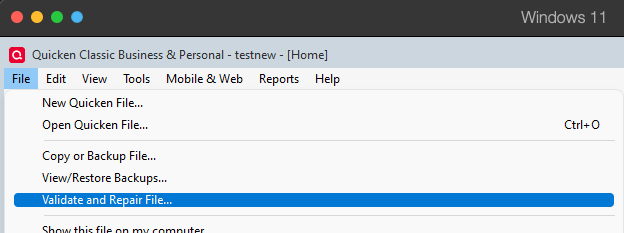
    If that is the account you're trying to deactivate, and it's not giving you the option to do so, then that would indicate a file issue. To troubleshoot that, I suggest that you try validating your data file.  Please save a backup file prior to performing these steps. 

    Validate: 

    1. File
    2. Validate and Repair File... Validate and repair.png
    3. Validate File
    4. Click OK
    5. Close the Data Log
    6. Close Quicken (leave it closed for at least 5 secs)
    7. Reopen Quicken and see if the issue persists.

    Thank you!

    Quicken Kristina

    Make sure to sign up for the email digest to see a round up of your top posts.

  • Franklin S.
    Franklin S. Quicken Windows Subscription Member ✭✭

    I followed the advice from multiple responses. Thank you! As you recommended, I deleted the duplicated accounts, then deactivated and subsequently added the accounts that were not updating. It provided me with partial success I have with Fidelity Investments. I still Have 3 accounts that are not updating; one is not updating past 11/12/24 (even though it was up to date before this dilemma), and the other two have not updated since 10/31/25. Lastly, I have one account that is linked to the wrong Fidelity account. How do I unlink it and then connect it to the correct account?

  • Franklin S.
    Franklin S. Quicken Windows Subscription Member ✭✭

    Let me add that I also see the listing "zzz- - Fidelity Investments - DC" when I attempt to update my accounts with Fidelity. Fidelity says they have no idea what that is and suggested that Quicken has created that category. I believe some of my accounts are listed under this category while others are just under the "Fidelity Investments" category.

  • chazc797
    chazc797 Quicken Windows Subscription Member

    Hi Kristina,

    I tried validating and repairing file as you suggested. This did not resolve the issue.

    Everything else seems normal.

    Please note that I had previously deactivated the account in question, Also, Rollover IRA XXXX is the account name and Fidelity 401K Rollover is the "Nickname in Quicken." Thank you.

  • Quicken Kristina
    Quicken Kristina Quicken Windows Subscription Moderator mod

    Thank you for your replies,

    @Franklin S.

    Are the accounts that still aren't updating connected to Fidelity Investments, or are they showing connected to zzz - Fidelity Investments - DC? If you're not certain which one they're connected to, navigate to Tools>Account List, click the Edit button next to the account, and on the Online Services tab, it should show you.

    Online Services FI and Connection Method.png

    For the account that got linked incorrectly, there are a couple options.

    1. If the erroneous connection made a big mess, then the simplest fix would be to restore a backup from before the issue happened, then go through the connection process again.
    2. If it's fairly easy to clean up the transactions that downloaded into the wrong account, then you can get the account reconnected to the correct account by making a backup of your file, deactivating the problem account, then navigating to Tools>Add Account and following the prompts. When you get to the Add/Link screen in Quicken, make sure to carefully link the account to the correct Nickname in Quicken. Link to Existing.png

    The zzz - Fidelity Investments - DC that you're seeing is the old, no longer supported connection option. Any account that's still connected to that option would not be able to update since the connection option is no longer active.

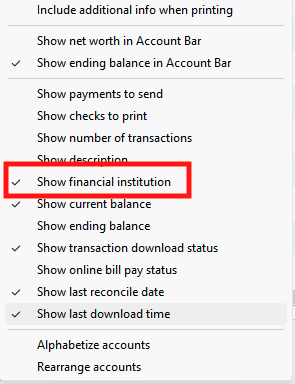
    You should be able to correct the issue by making a backup of your Quicken file, then navigating to Tools>Account List, and deactivating any account showing connected to that zzz option. Note - If you don't have the Financial Institution column visible in your Account List, you can make it visible by clicking the Options dropdown and selecting it.

    Screenshot 2025-11-17 at 3.46.24 PM.png Screenshot 2025-11-17 at 3.46.37 PM.png

    Once any accounts connected via the zzz option are deactivated, you can reconnect them by navigating to Tools>Add Account and following the prompts. Once you get to the Add/Link screen in Quicken, it's important to make sure that they are linking to the correct Nicknames in Quicken. If they show "Add to Quicken", instead of linking the existing accounts, it'll add new, duplicate accounts.

    Link to Existing.png

    Thank you for your reply @chazc797,

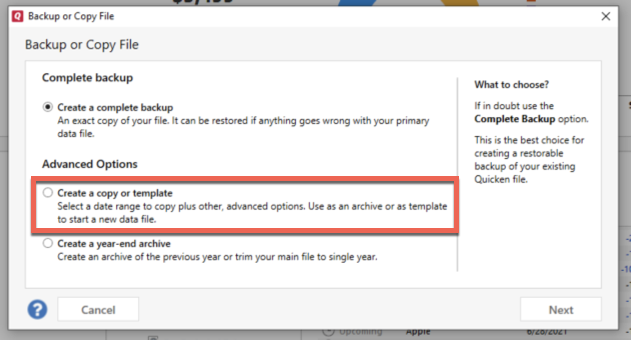
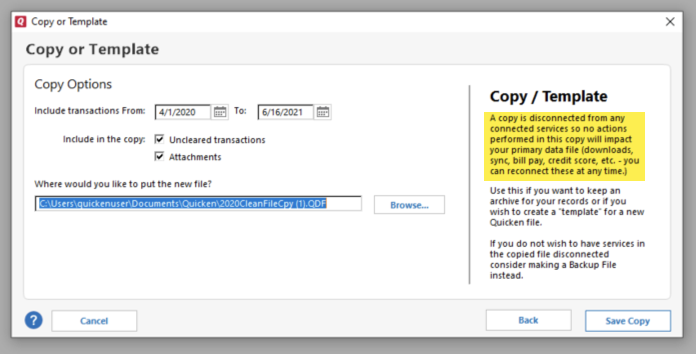
    Since the validate and repair didn't correct the issue, I recommend making a copy of the file, since that process will cause all online accounts and services to be disconnected, and in the process, will force that account to disconnect. To create a copy, please navigate to File > Copy or Backup File... > Create a copy or template (see examples below) which will also allow you to select a date range to move forward with.

    If you wish to move forward with your entire data file, please check the full date range of your entire data file before copying so you can enter the correct date range if you do not wish to "shrink" your file by eliminating certain dates. Note - The only reason to "shrink" your file is if you believe older data in the file is causing the problem.

    image.png image.png

    Once it finishes making the copy of the file, opt to open the copy. Reconnect only what is necessary to test if the issue is resolved. If the issue is resolved, then reconnect the rest of your accounts/online services and use the copied file as your new main file.

    If the issue is not resolved, then go back to your main file. For instructions on switching between Quicken files, please click here.

    I hope this helps!

    Quicken Kristina

    Make sure to sign up for the email digest to see a round up of your top posts.

  • chazc797
    chazc797 Quicken Windows Subscription Member

    Hi Kristina,

    I made the copy and tried reconnecting the problem account. I was allowed to re-map the account. However, when I ran an update, the missing transactions (since October 8th) did not download. More troubling, when I tried to run an update a second time to see if the transactions would populate (through settings dropdown in upper right of screen), only option is to "set-up download". I clicked on this, reauthorized in Fidelity and when back in Quicken, there is no dropdown box and it says "don't add to Quicken". So I appear to be back in the same place as before. Thx.

    Chazc797

  • Franklin S.
    Franklin S. Quicken Windows Subscription Member ✭✭

    I've run into the same situation that Kristina has described.

  • Franklin S.
    Franklin S. Quicken Windows Subscription Member ✭✭

    Sorry, I meant Chazc797 described.

  • Quicken Kristina
    Quicken Kristina Quicken Windows Subscription Moderator mod

    Thank you for your replies,

    Since the issue isn't fixed in the copied files either, I recommend reaching out to Quicken Support directly for further assistance, as they have access to tools we can't access on the Community and they're able to escalate the issue as needed. The Quicken Support phone number can be found through this link here. Phone support is available from 5:00 am PT to 5:00 pm PT, Monday through Friday.

    I apologize that I could not be of more assistance! 

    Quicken Kristina

    Make sure to sign up for the email digest to see a round up of your top posts.

  • Franklin S.
    Franklin S. Quicken Windows Subscription Member ✭✭

    I tried your recommendation three times prior to contacting the Community. The first two times I was connected to people in an Asian country (India or Bangladesh?). The first one wanted me to turn over control of my computer with Quicken open. When I didn’t agree to that, she guided me through all the steps to deactivating and reconnecting one of my accounts to Fidelity Investments. I then followed the same procedure for the remaining accounts on my own. When that didn’t work, I called back and the new person had such a heavy accent that I couldn’t understand him. I decided to try during USA working hours in the hope of connecting with someone domestically. This time I got someone from Guatemala who also insisted on taking control of my computer.

    That’s when I resorted to working with the Community. Your help has been most appreciated! Your instructions have been very clear and easy to follow. Unfortunately, we haven’t been successful. Would it be possible to save the Quicken account as it is and start a new one? I could then start from scratch as if I were a new user of Quicken. If so, would it load all available data in my Fidelity accounts and others or just back to a specific date? What problems could I run into by doing this?

    I have been with Quicken since 2011 and have never, NEVER experienced such a mess in activating an update. This is a fiasco! I’m sure there are many of us experiencing the same problems. The best solution would be for Quicken to reinstall the system before this update and work on a better update that can be installed quickly and seamlessly!

    If I can’t fix this soon, I will be looking for an alternative software product.

    Again, I most appreciate your help!

  • Quicken Kristina
    Quicken Kristina Quicken Windows Subscription Moderator mod

    Thank you for your reply @Franklin S.,

    I sent you a Direct Message. You can view it by clicking the envelope icon near the upper right.

    Inbox.png

    Thank you!

    Quicken Kristina

    Make sure to sign up for the email digest to see a round up of your top posts.