Incoming eBills not updating actual amount
eBills coming in from most sources (like Bank of America, Citi, etc) are not updating the amount in the payment schedule. I have the estimated amounts set at zero. My understanding as stated on the screen is "enter an estimated, the actual amount will be updated when the eBill arrives."
Comments
-
This has been happening to me with credit card statement balances for about 2 months now. Amounts unrelated to the statement-due amount are being entered into my registers and then the surprisingly different actual amount is downloaded when the payment is made. I haven't figured out how to fix it.
Quicken user since 1990, MacBook Pro M2 Max on Tahoe 26.1 (and Win 11 under Parallels Desktop)
0 -
Hello All,
Thank you for taking the time to report this issue!First, could you please provide a screenshot of what you are seeing? If needed, please refer to this Community FAQ for instructions on how to attach a screenshot. Alternatively, you can also drag and drop screenshots to your response if you are not given the option to add attachments.
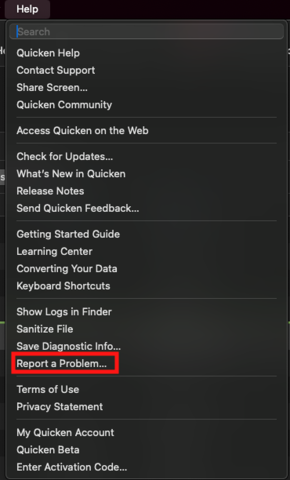
We have forwarded this issue to the proper channels to have this further investigated. However, we request that you please navigate to Help > Report a problem within your Quicken program and submit a problem report with log files and screenshots attached in order to contribute to the investigation.It would also aid the investigation to include a sanitized file when submitting the problem report. A sanitized file is a data file that removes personally identifiable information so you can comfortably share this file with the Quicken team.
While you will not receive a response through this submission, these reports will help our teams in further investigating the issue. The more problem reports we receive, the better.
We apologize for any inconvenience in the meantime! Thank you.
(CBT-934)-Quicken Anja
Make sure to sign up for the email digest to see a round up of your top posts.1 -
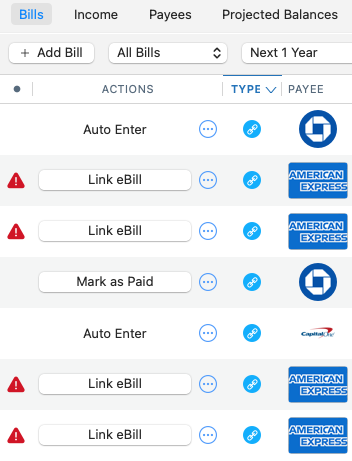
@Quicken Anja —- Well I see now why my Amex payment entries aren't matching my statement balances…. Somehow those accounts got un-linked… even though transactions continue to download daily. My Chase and Capital One accounts are still linked. No idea what happened to Amex but will try to relink now…
Quicken user since 1990, MacBook Pro M2 Max on Tahoe 26.1 (and Win 11 under Parallels Desktop)
0 -
@MontanaKarl Thanks for the update! Please let us know how the relinking goes.
Appreciate you checking into it!
-Quicken Anja
Make sure to sign up for the email digest to see a round up of your top posts.1 -
The relinking was incredibly awkward. The "Link eBill" button led me to a list of all of my (three) Amex cards… but had radio buttons (round - only select a single card) - yet let me rename all cards. When I clicked next, the one selected card went through the wizard…but had account names for a different card so lots of editing…
After finishing that first card - with no offer to relink the other two, and clicking the Link eBill button again… I had checkboxes, which I had expected the first time, and could check both of the remaining accounts and the wizard led me through each of them. (But each had data for a different account and had to be edited.). Did the same scenario for my wife's two accounts… could only change one, then had to go back and change the other … radio buttons vs checkboxes.
Good news, is that after doing an update, all accounts show the correct balance due again :-)
If I hadn't gone to the Bills & Income tab, who knows when I would have seen this. I realize this was a biller process update… but that update should have caused a serious/meaningful warning to pop up after installation I think? Have to wonder how many customers are in the same boat of having previously linked credit cards that are not unlinked and they don't realize it…
Thanks for your help and inspiring me to see what was going on :-) Happy Thanksgiving!Quicken user since 1990, MacBook Pro M2 Max on Tahoe 26.1 (and Win 11 under Parallels Desktop)
1 -
Thanks so much for the detailed follow-up—that’s incredibly helpful.
I’m glad to hear everything is showing the correct balances again, though I agree the relinking flow you described sounds confusing and definitely not ideal. I’ll include your feedback in the ticket so the team can review both the UI behavior (radio buttons vs. checkboxes) and the lack of a clearer warning when billers become unlinked.
However, we are still in need of log files for this ticket, so if you wouldn’t mind, please submit those via Help > Report a problem.
Really appreciate you taking the time to walk through all of that, and wishing you a wonderful Thanksgiving as well!
-Quicken Anja
Make sure to sign up for the email digest to see a round up of your top posts.0 -
Done. Thanks.
Quicken user since 1990, MacBook Pro M2 Max on Tahoe 26.1 (and Win 11 under Parallels Desktop)
0 -
Perfect, thank you!
-Quicken Anja
Make sure to sign up for the email digest to see a round up of your top posts.0
Categories
- All Categories
- 56 Product Ideas
- 36 Announcements
- 223 Alerts, Online Banking & Known Product Issues
- 22 Product Alerts
- 701 Welcome to the Community!
- 671 Before you Buy
- 1.2K Product Ideas
- 53.7K Quicken Classic for Windows
- 16.3K Quicken Classic for Mac
- 1K Quicken Mobile
- 813 Quicken on the Web
- 111 Quicken LifeHub