One of my Vanguard investment accounts isn't listed when I try to set it up for Direct Connect.

About two months ago, one of my investment accounts at Vanguard quit downloading transactions using Quicken's Direct Connect feature. For several years transactions downloaded to this account using Direct Connect successfully. I have disable the account and then tried to set it up again repeatedly, but it never shows up as a choice when Quicken connects to the Vanguard site. All my other accounts show up. I download transactions for this account using the workaround of downloading manually from the Vanguard website with no problem but it is a lot more time consuming than using Direct Connect. Vanguard advises that it is a problem with Quicken. Can anyone give me some help please? Thanks!
Comments
-
Hello @millersp54,
Thank you for letting us know you're encountering this issue. Since Vanguard told you it's a Quicken problem, it sounds like they suspect the problem may be specific to your file. Did they have you do any troubleshooting?
I suggest that you start by validating your data file. Please save a backup file prior to performing these steps.
Validate:
- File
- Validate and Repair File...
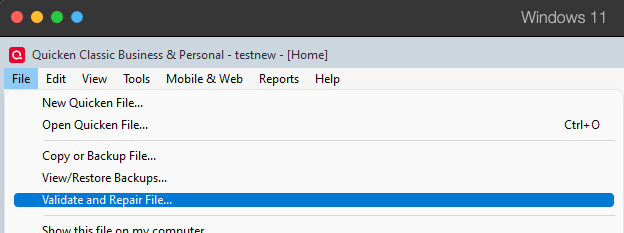
- Validate File
- Click OK
- Close the Data Log
- Close Quicken (leave it closed for at least 5 secs)
- Reopen Quicken and see if the issue persists.
Please let me know how it goes!
Quicken Kristina
Make sure to sign up for the email digest to see a round up of your top posts.
0 -
I have this exact same problem.
0 -
Spoke to tech support. They are aware of the problem but don't have a date yet to have it resolved.
0 -
Thank you for your replies,
I checked your interaction with Support, and the known issue they were referring to is this one:
If that is the issue you're encountering, then please follow the instructions in the alert to resolve the issue. If that is not the issue you're encountering, then please provide more information exactly what is happening and what error message/code you see (if any).
Thank you!
Quicken Kristina
Make sure to sign up for the email digest to see a round up of your top posts.
0 -
That's not my issue. My issue is with direct connect and it even seeing that one of my Vanguard accounts exists. It stopped downloading from that particular account last March but I didn't notice it until recently as it was still downloading from all my other Vanguard accounts. Maybe Quicken support isn't aware of this issue. I am able to import QFX file for that account, but I'd rather use direct connect as I had been and still do with all my other Vanguard accounts. The person up above described the issue perfectly.
1 -
Thank you for your reply,
What kind of account is it (brokerage, 401k, IRA, etc.)? Has there been recent activity in the account? Are you the primary account holder? Is the problem account accessed using the same login credentials as the other accounts? When you try to add/connect the account in your Quicken, on the Add/Link screen, does the account show up, but with no option to link it, or is it completely absent?
Thank you!
Quicken Kristina
Make sure to sign up for the email digest to see a round up of your top posts.
0 -
It's an IRA. There's been a lot of activity. Since it stopped downloading automatically, I've been updating it manually. Like the person above when I try to relink this account it is no longer listed as existing. All my other accounts are listed.
0 -
Thank you for your reply,
IRAs should be supported. Are you the primary account holder? If it's a shared account, are you making sure to connect using the primary account holder's credentials? Does it have the same account number as any of your other accounts with the financial institution?
Thank you!
Quicken Kristina
Make sure to sign up for the email digest to see a round up of your top posts.
0 -
If the problem account is one that you have been accessing in Quicken for many years, Vanguard may be expecting to see the old Pershing account number, from before they converted to the Vanguard Brokerage Services platform in 2009, as discussed in Step 4 below.
Here is a summary of the steps needed to reconnect your Vanguard accounts. Some of these steps may not be necessary in every case, but I want to cover as many bases as possible.
- Back up your data file in case something goes wrong.
- Go to Edit > Preferences > Investments and make sure the "Default to Simple investing for new accounts" box is not checked.
- Go to Edit > Preferences > Downloaded transactions and un-check the "Automatically add to investment transaction lists" box if it is not already un-checked. This will give you a chance to review any new transactions to make sure there are no duplicates and the transactions are going to the correct accounts.
- Go to each problem account, click on the gear at the top right and select Edit account details. Make a note of the account name and the Vanguard account number.
For accounts that have been connected since before 2009, when Vanguard converted to their current brokerage platform, you may see old “Pershing” account numbers, which begin with 2 digits and a V rather than the current 8 digit numbers. If you downloaded transactions using Web Connect (QFX) during the outage, your account numbers may have been changed to the new numbers. You will need to use the old numbers when re-linking the accounts. If in doubt, open a backup from before the outage, record the correct account numbers, and then return to your working file. You are only using the backup to see what account numbers Quicken was using for Direct Connect before the outage. - Now for each problem account, click on the gear at the top right, select Edit account details, and then the Online Services tab. If it says the account is set up for transaction download, click on Deactivate. Do not click on “Set up now” after deactivating, you must go through the following steps.
- Go to the General tab and now you should be able to select Complete mode. Select that.
- Go to Tools > Add Account. This should open the Add account window. Don't worry, you will not be adding any accounts, you will be linking your current Vanguard accounts in Quicken to the corresponding online accounts.
- Enter Vanguard and you should see the Vanguard logo on the right.
- Below the logo, click on Advanced options. Read the permission screen about Quicken and Intuit and click on Continue.
- Under How should Quicken connect, select Direct Connect. Click on Next.
- Provide your Vanguard username and password, and check the Save to Password Vault if that is how you normally operate. Click on Next.
- You will see a list of all your Vanguard accounts. Any accounts that are already connected will be marked Don't add to Quicken. Accounts that you can connect will have entry boxes. For your existing problem accounts DO NOT SELECT THE DEFAULT OF ADD TO QUICKEN. Instead, select Link to existing account and select the Quicken account to use. Do not guess here. If you don't know which account to select or there are Vanguard accounts that you don't want to track, select Don't add to Quicken and only do the accounts you are sure of. You can pick up at step 7 later and reconnect any other accounts later if necessary.
- Click on Cancel if you are confused at this point and your accounts will not be re-linked. If you are satisfied, click on Done and your accounts should be set.
- Check to make sure any downloaded transactions are going to the correct accounts.
If you have attempted to update while the accounts were in Simple mode, you may see Added or Removed transactions during that time. You will need to delete these. If there are problems, restore the backup file you saved and you will be back to where you started.
QWin Premier subscription0 -
Thank you. I didn't have "Default to Simple investing for new accounts" checked. When I tried to add the account, the missing one still didn't show up.
0 -
When I tried to add the account, the missing one still didn't show up.
And this is a relatively new Vanguard account, not one that was first connected to Quicken before 2009?
QWin Premier subscription0 -
I've had it since 2007. Downloads worked till last March.
0 -
Did you follow ALL of the steps above, including the note on Step 4 about long term accounts and the need to use old Pershing account numbers? If that did not work, you should also delete the name and the new account number that may be listed on the Account Details page, so that Quicken will not try to use that information to reconnect.
Please let us know if that procedure fixes the problem for you.
QWin Premier subscription0 -
I have encountered the same issue: in January 2026, the connections for four Vanguard accounts disappeared and relinking did not work. Only one IRA shows up for ALL the accounts. Neither did adding new accounts. After a very long and tedious chat with Quicken support, I was told to connect using Quicken Connect which, I found out, does not download transactions. The whole purpose of a brokerage account it to track transactions and I do not have the time or desire to do it manually. Two of the accounts are older ones; none were Pershing. There is simply a flaw in the Direct Connect connection that will not display all your Vanguard accounts. Very frustrating. And I've done it all and double checked—it isn't user error. It is either Quicken or Vanguard or some unfortunate combination. Repeat: very frustrating.
1


Categories
- All Categories
- 18 Product Ideas
- 34 Announcements
- 246 Alerts, Online Banking & Known Product Issues
- 19 Product Alerts
- 517 Welcome to the Community!
- 682 Before you Buy
- 1.5K Product Ideas
- 55.7K Quicken Classic for Windows
- 16.8K Quicken Classic for Mac
- 1K Quicken Mobile
- 834 Quicken on the Web
- 127 Quicken LifeHub