Automatic Transfer

Windows - ver R65.17

I have a regular weekly transfer setup between two checking accounts at different banks.

I recorded a memorized transaction in Quicken marked to be automatically added to my registers.I do not have any downloaded transactions marked for automatic addition.

The transaction is removed from Account 1 a couple of days before it appears in Account 2 (the accounts are at different financial institutions). However, the transfer is recorded on the same date in both accounts in Quicken.

The transaction is marked as cleared in account 1. All good so far.

A couple of days later, in Account 2 (BOA), a new transaction is added, and the accompanying transfer is added to Account 1. Now, there are two transfers in each register. The transaction is marked in blue as "New Match." Although I have the option to unmatch the transaction, the choice does not change make any changes.

In the past, I have chosen to delete the first transfer, but then the next week, it will try to match the prior week's transfer. It is a mess.

John

Answers

  • Jim_Harman
    Jim_Harman Quicken Windows Subscription SuperUser ✭✭✭✭✭
    edited December 11

    When you say you have set up a memorized transaction to be automatically added, I assume you have set up a single manual Reminder for this. You can make this either a transfer Reminder specifying the two accounts or a deposit in the receiving account with the Category set to the other account in [square brackets]

    You should set the Reminder to record the transfer a few days before either of the transactions is downloaded. Then when the transactions download, they should match to entries that are already in your registers.

    If for some reason this still causes problems, you can go to Edit > Preferences > Transfer detection and un-check "Scan downloaded transactions for possible transfers." If you still want Quicken to look for possible transfers, you can leave it checked and select "Confirm possible transfers before entering in register."

    QWin Premier subscription
  • splasher
    splasher Quicken Windows Subscription SuperUser ✭✭✭✭✭

    I agree with @Jim_Harman,

    You want one scheduled transaction that creates the pair of transfer transactions in the two accounts.

    The downloaded transactions should ALWAYS be matched to their respective preexisting transactions, that way the posting date (generally not shown unless you have added it to the register) will be added to the preexisting transaction and marked as Cleared.

    -splasher using Q continuously since 1996
    - Subscription Quicken - Win11 and QW2013 - Win11
    -Questions? Check out the Quicken Windows FAQ list

  • nooncaster
    nooncaster Member ✭✭✭

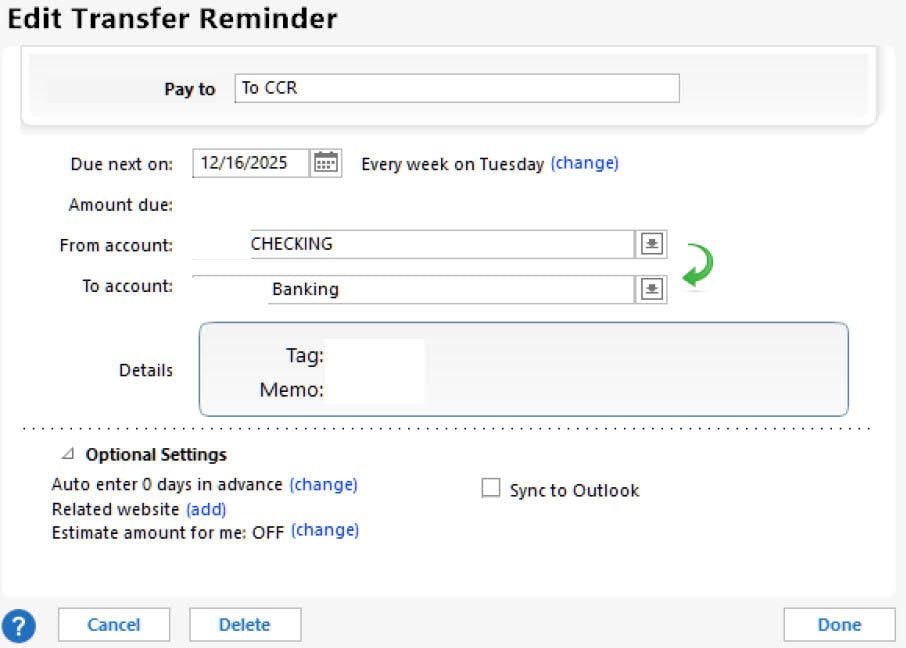
    I set up a single memorized transaction to record the transfer with both accounts,

    Screenshot 2025-12-11 143549_1.jpg

    With auto enter turned on.

  • nooncaster
    nooncaster Member ✭✭✭

    Quicken, in an attempt to match downloaded transactions, adds the transfer even though I do not have that option selected for downloaded transactions.

    John

  • Jim_Harman
    Jim_Harman Quicken Windows Subscription SuperUser ✭✭✭✭✭

    If the transfer Reminder is recorded in your registers with a date a few days earlier than the date of the downloaded transactions and before they are downloaded, you should not see the problem you describe. I don't.

    QWin Premier subscription
  • nooncaster
    nooncaster Member ✭✭✭

    Hence, that is why I'm asking the question, because Quicken will automatically add a new transfer when the money hits the download on the second account. I can not unmatch the duplicate transaction.

    John

  • Jim_Harman
    Jim_Harman Quicken Windows Subscription SuperUser ✭✭✭✭✭

    So the Reminder will hit your Register on Tuesdays.

    Do you leave Quicken running overnight, or do you exit and restart every day? I am not sure what triggers the automatic entry, it may require a restart.

    Watch next week and see what dates the downloaded transactions arrive and what the "cleared" dates are. Make sure the transfer is in the register before the first side of the transfer is downloaded.

    QWin Premier subscription
  • NotACPA
    NotACPA Quicken Windows Subscription SuperUser ✭✭✭✭✭

    If the discrepancy is posting dates between the 2 banks is concerning you, you could always use a Intermediate account, which is banking is frequently called "Cash Items in Transit", and make the transfer from account 1 to the intermediate and then another transaction from the intermediate to account 2.

    But, how long is the period between the 2 posting dates? Because if you've recorded the transfer in account 1 on the day the money was taken (and shown that in Q as a transfer to account 2), an offsetting credit should have been created in account 2 with the same date … and that credit should have matched when downloaded from bank 2 … even if the download from bank 2 was a few days after the debit from bank 1.

    Just as your checks written on bank 2 match in Q when downloaded even though they were written many days before actually getting back to bank 2.

    Q user since February, 1990. DOS Version 4
    Now running Quicken Windows Subscription, Business & Personal
    Retired "Certified Information Systems Auditor" & Bank Audit VP

  • nooncaster
    nooncaster Member ✭✭✭

    "But, how long is the period between the 2 posting dates? Because if you've recorded the transfer in account 1 on the day the money was taken (and shown that in Q as a transfer to account 2), an offsetting credit should have been created in account 2 with the same date … and that credit should have matched when downloaded from bank 2 … even if the download from bank 2 was a few days after the debit from bank 1."

    That is what I would expect too, but instead, Quicken doesn't recognize the transfer from a couple of days and instead automatically adds a new transaction and calls it a new match, which can be unlinked

    John

  • splasher
    splasher Quicken Windows Subscription SuperUser ✭✭✭✭✭

    I'm not sure exactly what you are doing different from what I do, but I create a transfer transaction in my checking account when I schedule my credit card payment in my credit union based bill pay system and Q creates the matching transaction in the credit card account. This is done weeks in advance of the actual pay date.

    The CU reports and downloads the payment in a download and it matches to the pre-entered transaction. A day or two later, the credit card download matches to its pre-entered transaction.

    No duplicates are ever created.

    -splasher using Q continuously since 1996
    - Subscription Quicken - Win11 and QW2013 - Win11
    -Questions? Check out the Quicken Windows FAQ list

  • nooncaster
    nooncaster Member ✭✭✭

    I think the difference might be that my transfer is automatically entered into the register?

    John

  • splasher
    splasher Quicken Windows Subscription SuperUser ✭✭✭✭✭

    It works for me whether I manually initiate the transfer transaction or have Quicken enter it from an auto entered reminder. They are just entered prior to anything that is downloaded.

    I also do not do "Accept All" or have Quicken enter downloaded transactions automatically when downloaded. Every downloaded transaction is manually accepted individually.

    -splasher using Q continuously since 1996
    - Subscription Quicken - Win11 and QW2013 - Win11
    -Questions? Check out the Quicken Windows FAQ list