I have been waiting YEARS for this! So many hours wasted transforming data then converting using ImportQIF and crossing fingers. Please don't disappoint me and tell me it doesn't work.
This is HUGE if it works well !
I have November statement to reconcile, so will post here when I get through the process. 🤞
I think you will be very disappointed.
First off this isn't "One Step", this is selecting:
File → File Import → Banking Transactions → From (.CSV) File…
OR
File → File Import → Investment Transactions → From (.CSV) File…
And there is a reason Quicken Inc never supported this. I think the only reason they started down this path was to capture the Mint customers when Intuit got rid of Mint. That was their first importing of a CSV file, it had to be in Mint format.
The new CSV import has to be in the exact format that they give. The chances that are going to be exactly the same as what your financial institution puts out is very unlikely. So, unless you just love reformatting CSV files (which ImportQIF will do for you) then you are not going to like this.
Here is the banking format (they let you create an example to see what it should look like):
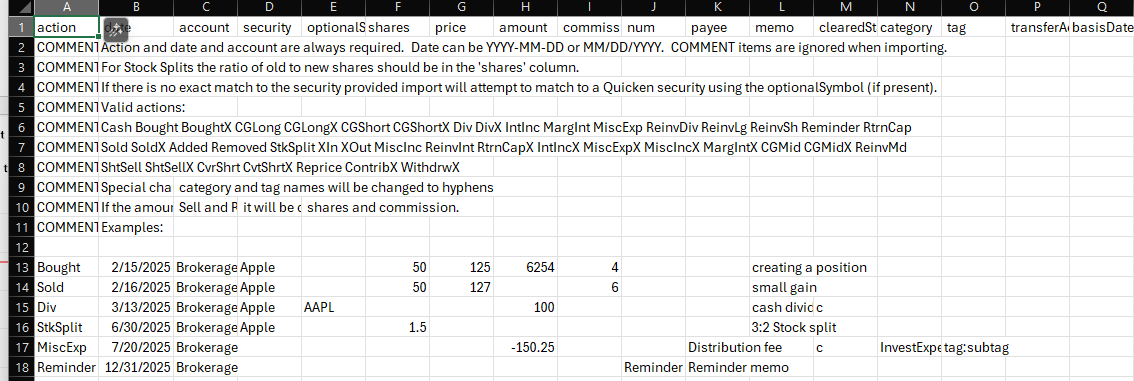
Here is the investment format:
And there are already threads on this where it is truncating values instead of rounding.
7.049999999999999999 becomes 7.04. And why would anyone have 7.04999999999999999, because there are some numbers that don't exactly convert from decimal to binary, and you get numbers like this. First year programmers should know to round floating point numbers.
In the investment side it is far from clear what action terms will work. One guess would be what is used in a QIF file (but that hasn't been proven) and they have never stated all possible terms, but even if they do, you will have to figure out how to translate the terms used by the financial institution to the ones this import needs. Not to mention there are lots of financial institutions that don't even have a column for "action".
If one is looking for "One Step Update of CSV" that handles all of this automatically, that already exists and fails miserably for multiple reasons.
History lesson.
QIF never really intended for this, was created as a support/debugging tool.
So, Intuit, Check Free, and "financial institutions" got together and created the OFX standard.
Direct Connect is Intuit's implementation of that. It has a "request" from a OFX server and a "response".
Web Connect/QFX file is just the response in a file format.
Unfortunately, not all the financial institutions adopted this standard.
Express Web Connect; the initial idea is in its name. Get a Web Connect/QFX file by logging into the financial institution's website as the user and download and import that QFX file.
But wait what if the financial institution doesn't create a QFX file?
Well, then Intuit works with them to download the transactions in a format they do produce. Want to guess what format most of them would pick? My guess would be CSV. So, it is Intuit that has had the burden getting those different CSV formatted files and translate them into a format that Quicken understands, which back in the day was the QFX format.
Of course, for this magic to happen, Intuit has to work with each financial institution to get an agreement on how to do all of this. Not to mention logging into a secure website as the user, getting around the fact that they are doing it from a server/program, just like a hacker might be trying to do.
You guys aren't going to get it, but Express Web Connect +'s main security feature is that Intuit doesn't use the username and password to access the financial institution's website. It uses a rotating OAuth2 security token. And the other part of it is that it has another standard format for the data being transferred.
This is all nice except just like the OFX standard not all of the financial institutions will adopt it. What's more there has been "growing pains" when switching over. Not to mention going from Direct Connect which was between Quicken the program and the financial institution's OFX server to. Quicken (the program) → Quicken servers → Intuit servers → financial institution server.
I just imported 85 transactions for November and I don't see any rounding/truncating issues on my data. Only issue I see (so far) is I think they are looking at the header row when assessing the import and incorrectly flagging the "action" header as an invalid action. At least that is what it looks like. I had 85 transactions to import and it kept saying I had one invalid action that would be skipped. I imported anyway and it imported all 85. Also - it would be awesome if you could import an exchange rate at the same time, rather than having to confirm for each transaction.
I am not completely finished reconciling yet, but it looks like (at first glance) it managed to keep the share quantities correct anyway, which is my primary concern.
EDIT: Nope - looks like there are some weird issues with the import. A bunch of the sales and purchases had to be opened and posted (no changes made) to work properly? And I see some issues with reinvested dividends. Looks like there are bugs to work out yet. 😕 But it's a start.
My imports will NEVER be one step in the sense that (in my case) I will always have to play with the financial institution's CSV export before I can import it (or use ImportQIF), but if this works, I don't have to do the ImportQIF step before I import into Quicken, so it reduces the steps I need to take. So instead of 3 steps it is two - but for me that is a win, again if it works. I misspoke in my excitement when I said 1 step, and don't think I can edit the title 🙄 And to your point, I gave up on the One Step transaction download in Quicken many years ago, so I never even thought of that when I used the term. Also, I bought ImportQIF in 2020 and it has saved me a ton of time, so thanks!
OK, I agree with @Chris_QPW in that it is not yet ready for primetime.
It seems like it might be close, but there are weird glitches in the import. They don't appear to be rounding or truncation, but something is going on. It is changing numbers - I look at the import data for a simple miscellaneous expense, and it it changed it by a penny in quite a few instances. Not like it changed 1.046 to 1.05 or 1.04 or 1.00, but it changed a 2 decimal number by a penny 🤔 85.05 became 85.04 where zero calculations should have been involved.
Edit: just saw the discussions Chris was referring to, and the thought is it may be a floating point truncation error. Still not sure on that, as it seems to be happening where no calculations should need to be happening.
It doesn't say that you have to have prices if you have a total amount, but I am guessing you need to. The data I get, especially for reinvested income, does not include a unit price, just the total. I assumed there might be error checking if that was not acceptable, but it appears not. I may try it again next month, but not until I check back here again.
Sometimes it would do sell or reinvestment transactions correctly, another time the data would be there, but you would have to open the transaction in Quicken and save it for the investment amount to calculate.
Definitely didn't save any time this go-around. 😂 I am surprised this stuff didn't get caught in beta?
For an explanation of this issue, see this discussion and the others linked from that one
No calculation is needed to show the problem.
The key is to understand that for any given number it may or may not translate to an exact floating point binary number. Your CSV file can have 85.05 in it, but internally that number is converted into floating point binary and that number might be 85.04999999901 when converted back to decimal. This is just fine if the programmer had rounded to the number of digits required. For cash that would be to two digits, for other numbers like the number of shares it would be either 6 or 8 digits depending on what the user has selected in the preferences. But instead the number is getting truncated to two decimal points. And you end up with 85.04.
Maybe a good analogy is 1/3 is exact as a fraction, but as a decimal number all you can do is .33333333~ and then round to the number of digits you need for that precision. The same thing is going on with the conversion of the character string of "85.05" to the internal binary format.
Actually the safest method would probably to be to round to something like 9 digits. And that would probably work for all the numbers they encounter.
Did they not have a beta with this feature? How did this not get caught? 🙄
As others have mentioned, this import process is not quite ready for prime time. While I was able to import transactions without too many glitches (as long as I followed their strict format), when buys and sells were imported, the share quantity and investment value were correct but Quicken listed the cash amount as $0. consequently the balances were wrong. However, when I edited the transaction, all of the fields were correct and upon simply clicking on enter/done, it populated the transaction correctly. Something else is wrong with the mapping. Not intending to do this sequence for 50 transactions so I will continue to use my QIF translator. Perhaps someday Quicken will get this process right.