CSV Investment Import Error Off by One Cent
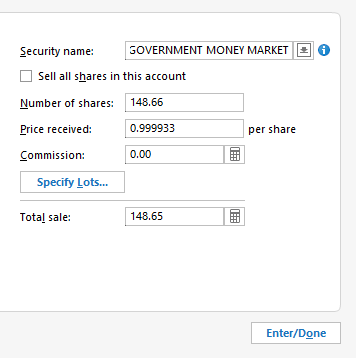
When I import a *.CSV into an investment account, it creates a $0.01 difference between the Investment Amount and the Cash Amt. It is not a rounding error. It occurs in Bought, BoughtX, Sold and SoldX actions. If you open the edit dialog box, all of the information is correct. When you close the dialog box, the error is fixed. I have had this error 5 or 6 times in 4 different investment accounts so not a one off. Here are some screen shots and notes.
Quicken R65.17 Build 27.1.65.17 OS Windows 11 Home
Comments
-
Hello @Jeeter,
Thank you for letting us know about this issue. I was able to replicate the problem in my Quicken as well, and have forwarded it to the proper channels for further investigation and resolution. If you haven't already done so, we request that you please navigate to Help > Report a problem and submit a problem report with log files attached in order to contribute to the investigation.
While you will not receive a response through this submission, these reports will help our teams in further investigating the issue. The more problem reports we receive, the better.
We apologize for any inconvenience!
Thank you.
(CTP-15583)
Quicken Kristina
Make sure to sign up for the email digest to see a round up of your top posts.
1 -
@Quicken Kristina Please note that this issue has also been reported here
and here
I think yours is the first response from a Moderator. Thanks for confirming and creating the CBT report! I think there may be other Report a Problem submissions already.
From the other discussions, you can see that other users have confirmed that this is caused by a double precision floating number that is being truncated rather than rounded in the import routine.
You may want to combine these discussions and add them to the CBT report.
QWin Premier subscription2 -
Hello @Jim_Harman,
Thank you for letting me know about these other discussions!
I added them to the ticket.
Quicken Kristina
Make sure to sign up for the email digest to see a round up of your top posts.
0 -
Thanks for the response.
FYI, doesn't seem like an import truncation issue. If you look at the import file data I included in *.pdf, everything is trailing 0's. Also note that share value is $1/share, so even if it is trying to do math, it should get that right.
I can submit a native *.csv samples to report a problem if you like that generated the same issue today. Note it is the same deal, nothing to truncate and 1 for the price.
action, date, account, security, optionalSymbol,shares, price, amount, commissionFee, num, payee, memo, clearedStatus,category, tag, transferAccount,basisDate
SoldX,12/8/2025,Account,No Description,SPAXX,148.66,1,148.66,0,,,AMEX EPAYMENT ACH PMT (Cash),,,,XAccount,0 -
In your original example, you sold 65.85 shares and received $65.85. I used this converter
to convert $65.85 to a double precision floating point value and the result is the binary equivalent of
65.849999999999994315658113919198513031005859375
Likewise, $148.66 converts to
148.659999999999996589394868351519107818603515625
I still think it is a truncation issue, but that is for the developers to debug.
QWin Premier subscription1 -
Agreed re: floating point truncation. I thought the data was importing correctly because both the "Number of shares" and the "Price received" is correct in the register. Both of these values will take/display beyond 2 decimals so they aren't storing a errant floating point conversion. "Total sale" is also correct, although is only displays 2 decimals, but it doesn't show the off by one cent value. As I stated earlier, it you just edit the transaction and retype in the any of these 3 values as displayed, it fixes the error.
Anyway, I ran a test where I changed the value of the "amount" in the *.csv, and it does change the results. (If you make it $65.80 you get a corresponding different error amount, but the "Number of shares", "Price" and "Total Sale" all stay correct). So the import function is taking the "amount" value and using it for the account "Cash Balance", and as you indicated that appear to be where the truncation error gets introduced. Same deal, if you just edit the transaction keeping the value, everything gets fixed.
I guess I assumed the database was calculating "Cash", but it makes more sense that it stores it as a record by transaction to reduce the calculation volume.
0 -
Quicken's default, and usually the best practice when entering transactions manually, is to enter the number of shares and the total amount and accept Quicken's calculated price per share.
If you leave the price per share blank in the CSV file, does it still store the wrong amount for the Total Sale?
QWin Premier subscription1 -
Ran some more tests and short answer - no matter what you put in for the amount, it generates a truncation error.
Details:
If you input a positive number for amount, it uses that number and can create a truncation error. (148 and 0.05, no error. 0.06 truncation error)
If the amount is a blank or a 0, it appears to calculate the amount from the shares and price, but it is subject to the truncation error - but all of the information is still correct in the transaction edit dialog box.
Editing the transaction with no change in imported values always fixes it.
As you said, it is for the developers to sort, but it appears that it will use the amount if nonzero or nonnull, or calculate an amount for 0 and null amounts, but always handles that amount incorrectly.
*.cvs info:
If I change the "amount" to $148, the cash balance reflect the $148 (off by $0.66) - no trunc error
action, date, account, security, optionalSymbol,shares, price, amount, commissionFee, num, payee, memo, clearedStatus,category, tag, transferAccount,basisDate
SoldX,12/9/2025,Account,No Description,SPAXX,148.66,1,148,0,,,AMEX EPAYMENT ACH PMT (Cash),,,,XAccount,A blank value for "amount" is off by one cent, $148.65 - trunc error
action, date, account, security, optionalSymbol,shares, price, amount, commissionFee, num, payee, memo, clearedStatus,category, tag, transferAccount,basisDate
SoldX,12/9/2025,Account,No Description,SPAXX,148.66,1,,0,,,AMEX EPAYMENT ACH PMT (Cash),,,,XAccount,A 0 amount is off by one cent, $148.65 - trunc error
action, date, account, security, optionalSymbol,shares, price, amount, commissionFee, num, payee, memo, clearedStatus,category, tag, transferAccount,basisDate
SoldX,12/9/2025,Account,No Description,SPAXX,148.66,1,0,0,,,AMEX EPAYMENT ACH PMT (Cash),,,,XAccount,and a 0.05 amount is off $148.61 - no trunc error
action, date, account, security, optionalSymbol,shares, price, amount, commissionFee, num, payee, memo, clearedStatus,category, tag, transferAccount,basisDate
SoldX,12/9/2025,Account,No Description,SPAXX,148.66,1,0.05,0,,,AMEX EPAYMENT ACH PMT (Cash),,,,XAccount,Finally 0.06 amount is off $148.01 - trunc error
action, date, account, security, optionalSymbol,shares, price, amount, commissionFee, num, payee, memo, clearedStatus,category, tag, transferAccount,basisDate
SoldX,12/9/2025,Account,No Description,SPAXX,148.66,1,0.06,0,,,AMEX EPAYMENT ACH PMT (Cash),,,,XAccount,0 -
Did you try the combination I recommended, which would be
SoldX,12/9/2025,Account,No Description,SPAXX,148.66,0,148.66,0,,,AMEX EPAYMENT ACH PMT (Cash),,,,XAccount,
?
i.e. 148.66 shares, share price = 0, total amount = $148.66 hoping that in that case it will use the total amount to calculate the share price and use the total amount you entered.
QWin Premier subscription0 -
Different version of the same basic problem. This time the transaction data is wrong. Off by one error show up in the Total sale resulting in a bad share price.
0 -
Thanks for those experiments. Another workaround, as described in the discussion I linked above, is to add .00499999 to the total amount, so that the truncation will bring the amount down to the correct value.
QWin Premier subscription0 -
For me I think the best work around until they fix it is to let it go in and make sure the cash portion gets right. You start adding stuff to the total, you're going to create other errors if actual fractions numbers come in. (Prefer the devil I sort of know to the one I don't) Hopefully they'll clear it out in the next update or so.
0
Categories
- All Categories
- 64 Product Ideas
- 36 Announcements
- 222 Alerts, Online Banking & Known Product Issues
- 21 Product Alerts
- 704 Welcome to the Community!
- 673 Before you Buy
- 1.2K Product Ideas
- 54K Quicken Classic for Windows
- 16.4K Quicken Classic for Mac
- 1K Quicken Mobile
- 812 Quicken on the Web
- 115 Quicken LifeHub