Is there an ETA on when the Amazon Prime Store Card integration with Synchrony Bank will be updated?

bhcaff
bhcaff Quicken Windows Subscription Member ✭✭

I reported this a couple weeks ago. Would love to have a way to track progress. Seems the integration is totally broken now. Synchrony changed their login system and now the Quicken download integration is totally broken. Can someone please confirm? How do we know when it will be fixed?? It's the worst time of year to lose download transaction capabilities for Amazon purchases. PLEASE ESCALATE!

Previous related post earlier this year:

Answers

  • Quicken Kristina
    Quicken Kristina Quicken Windows Subscription Moderator mod

    Hello @bhcaff,

    Thank you for reaching out. To help troubleshoot, please provide more information. When I checked our internal tools, I'm not seeing any recent attempts to connect to Amazon.com Store Card - Synchrony. What exactly is happening when you try to add the account? Are you seeing any error messages/codes?

    I look forward to your response!

    Quicken Kristina

    Make sure to sign up for the email digest to see a round up of your top posts.

  • bhcaff
    bhcaff Quicken Windows Subscription Member ✭✭

    The financial institution description for "Amazon.com Store Card - Synchrony" shows www.syncbank.com but they have migrated their logic URL to www.synchrony.com. I believe the integration needs to be updated. What is the ETA on that? The rep I spoke with said it has to be done by Intuit??

    Hmmm…. but it appears maybe my old credentials are still working with the Quicken integration. I will monitor to see if it is still working as before, but is there a plan to change to their new login method and credentials?

  • bhcaff
    bhcaff Quicken Windows Subscription Member ✭✭

    Now I'm getting CC-800 errors for Synchrony when I'm trying to sync other accounts…??

  • Quicken Kristina
    Quicken Kristina Quicken Windows Subscription Moderator mod

    Thank you for your replies,

    Our teams are aware of the issue. What Support told you is correct. When there are changes to the URL (web address) used to login, the financial institution needs to send the updated information to the aggregation partner (Intuit). Unfortunately, they do not provide ETAs.

    To troubleshoot the CC-800 error, backup your Quicken file, then follow these steps from our article on CC-800 errors:

    First, you'll need to deactivate the affected accounts:

    1. Select Tools Account List
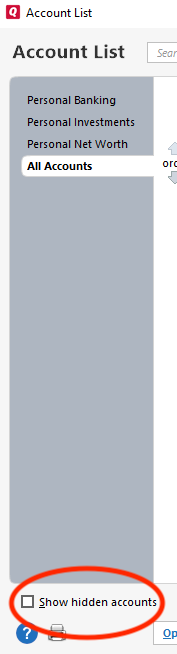
    2. If present, select the Show Hidden Accounts checkbox at the bottom of the Account List show hidden accounts win.png
    3. Select Edit on each account with this error and Deactivate them on the Online Services tab
    4. When finished, close the Account List.

    Second, reactivate the accounts:

    1. Select Tools Add Account
    2. Complete the flow of re-adding the deactivated accounts to Quicken, using your bank login credentials and answering any security questions.
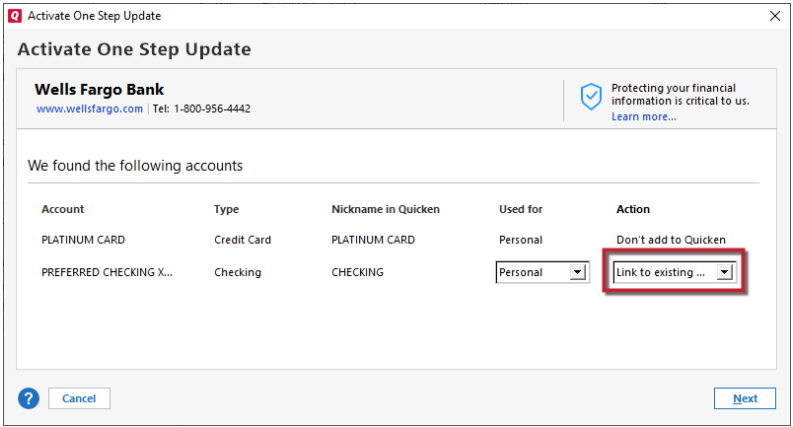
    3. When you reach the screen listing the accounts discovered at the financial institution, use the Action drop-downs to re-link your accounts:
      • For accounts you want to re-link, select Link to existing account and choose the corresponding account to re-link with.
      • Select Add to Quicken for new accounts you didn't previously track in Quicken.
      • For accounts you don't want to link or add, select Don't add to Quicken. Link to Existing.png

    I hope this helps!

    Quicken Kristina

    Make sure to sign up for the email digest to see a round up of your top posts.