Fidelity download and auto category
With one of the recent updates…. Quicken Mac now incorrectly setting category for my investment account. For example transaction download for Sony will show as "electronic & Software". A download transaction for Honda shows as "auto payment" … There are many other examples.
Why did this start happening? This is so messed up.
[Edited - Readability]
Comments
-
Hello @ericrose12,
Thank you for letting us know you're seeing this issue. To help troubleshoot, please provide more information. When did you first notice this issue? Is this happening in just one account, or multiple?
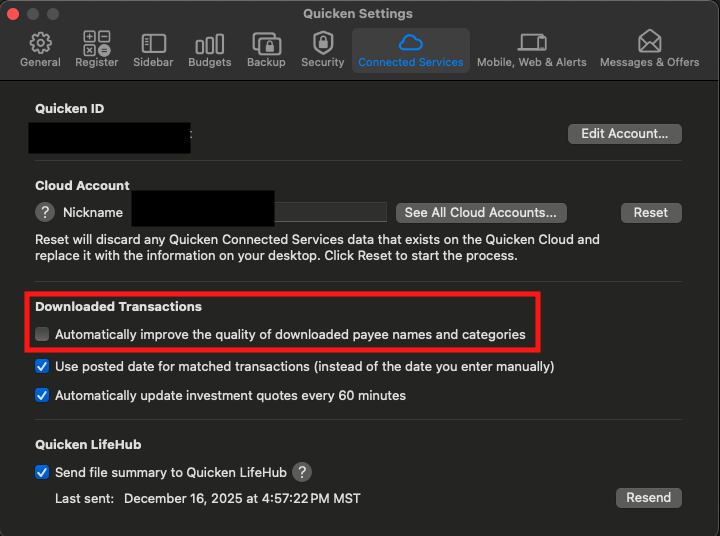
If you haven't already done so, please navigate to Quicken>Settings>Connected Services and check to see if "Automatically improve the quality of downloaded payee names and categories" is selected. If it is, please unselect it and test to see if that resolves the issue.
I look forward to your reply!
Quicken Kristina
Make sure to sign up for the email digest to see a round up of your top posts.
0 -
@Quicken Kristina
looks like it started around 11/13…I will try to disable that feature but it may take some days to know if it helps. Need to wait for more transactions .
0 -
Thank you for your reply,
Please let me know what happens!
Quicken Kristina
Make sure to sign up for the email digest to see a round up of your top posts.
0 -
I am seeing the exact same behavior and I disabled the feature to "Automatically Improve the quality of downloaded payee names and categories." I've been seeing the issue since the change to the method of download for Fidelity transactions. I had previously categorized many of the transactions but Quicken does not use the category I had assigned.
I did contact Quicken support about issues with the Fidelity download but they were unhelpful and provided only canned responses based on information that is already available online.
0 -
@Quicken Kristina disabled the feature to "Automatically Improve the quality of downloaded payee names and categories." solved the issue.
What changed to make this feature break like this?
0 -
Thank you for your reply,
The feature uses Quicken's database to automatically clean up downloaded information. It can be a convenience, as long as the information it's filling in works. I'm glad to hear that turning it off corrected the issue!
Hello @EK118,
Did turning the feature off help, or are you still encountering issues?
Thank you!
Quicken Kristina
Make sure to sign up for the email digest to see a round up of your top posts.
0 -
Turning the feature off has not helped in my case. There are two related new behaviors since the Fidelity connection changeover related to categorization for any type of Payment/Deposit transaction.
I downloaded from Fidelity an entry called "FEE CHARGED MITSUBISHI HEAVY INDUSTRIES UNSPON A... (MHVIY) (Cash)"
Fidelity auto-categorized it to Auto & Transport, and not Fees & Charges as it should.
It also entered it into my Payees & Rules list, and when I updated the category created a rule. Prior to the changeover, these fees did not show up in the Payees & Rules list. It is causing the payee list to become unmanageable.
Prior to turning off the "Automatically Improve the Quality…" feature, those fees were sometimes renamed, occasionally bizarrely. For the entry I listed above, it would change it to something like "Mitsubishi Motors." In all of my other accounts, the Improve Quality feature worked well and I would much prefer to be able to turn it back on.
I did try talking to support about the Fidelity connection. The person I talked to blamed Fidelity and provided only a canned troubleshooting method based on the idea that I made a mistake setting up the connection. The fee is not categorized as an automobile expense on the Fidelity end.
0 -
Here's another example, just downloaded:
0 -
@EK118 I'm not clear on what you did with creating rules, but Renaming rules and QuickFill rules are designed to help these situations. I'm not sure how you would want them displayed in your register. Do you have these types of fees for many securities, or just one or two? Do you want to see the individual payees for each such transaction — Subaru Foreign Tax, Subaru Fee — or would you prefer to have them under a single Payee? Should these be using two separate categories or lumped into one? Renaming Rules could standardize certain types of downloaded Payees, and then QuickFill Rules could assign the desired category. I can list specific steps if you need help with that once you provide detail about your desired outcome.
Quicken Mac Subscription • Quicken user since 19930 -
@jacobs I actually did nothing. Quicken started creating all of the payees unexpected with categories after Fidelity changed from direct connect to quicken connect. Nearly all foreign securities have fees and taxes so I get a large number of them. There's something going on in how Quicken is categorizing the fees and taxes that creates multiple problems.
0 -
Fidelity apparently changed how they label and report these types of transactions. (I'm not a Fidelity customer, so I can't compare what they used to download versus what they download currently.)
Quicken's auto-categorization is a server-based attempt to determine who the Payee is and what the typical category for that Payee is. It makes those rules, which are really "educated guesses", based on compiling many thousands of (anonymized) user transactions. Because this approach is hit-or-miss, Quicken allows users to create their own rules for renaming Payees and for assigning categories to a Payee; these local rules take precedence over the server based rules.
As I wrote above, you will likely want to create some rules so these transactions appear and are categorized the way you want them. It may take a little time initially to set them up correctly, but then you'll be back to running on auto-pilot.
The question I asked — do you want to see the individual payees for each such transaction or would you prefer to have them under a single Payee? — will guide what rules you create. If you want to leave the transaction Payees exactly as they show up now, then you don't need any renaming rules, and you just have to create QuickFill rules for each such foreign stock transaction to categorize it correctly. Alternatively, you might prefer to create Renaming Rules for transactions with a Payee name that includes "Foreign Tax Paid" or "Fee Charged", to change the Payee name to a generic one you create, such as "Foreign Security Taxes/Fees"; then you could have a single QuickFill Rule for that catch-all Payee to assign the desired category to it.
Quicken Mac Subscription • Quicken user since 19930
Categories
- All Categories
- 42 Product Ideas
- 36 Announcements
- 225 Alerts, Online Banking & Known Product Issues
- 21 Product Alerts
- 497 Welcome to the Community!
- 676 Before you Buy
- 1.3K Product Ideas
- 54.4K Quicken Classic for Windows
- 16.5K Quicken Classic for Mac
- 1K Quicken Mobile
- 814 Quicken on the Web
- 115 Quicken LifeHub