Category entry no longer working for downloaded transactions
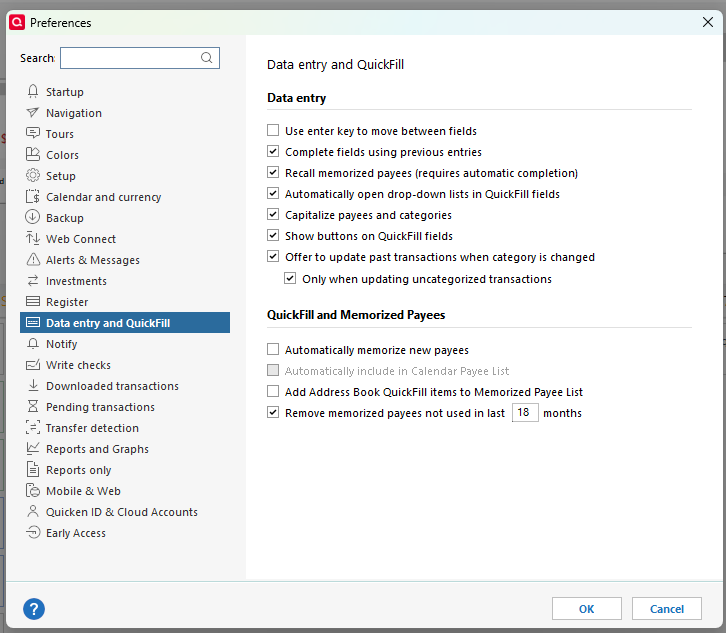
R65.17 Build 27.1.65.17 Previously on downloaded transactions I could click on the category and as I would type I would be able to select from the category list. Now it only shows a box to check for saving to the memorized list. And anything I type in, if not a correct category, is showing as a new category.
Answers
-
Hello @galebinder,
Thanks for reporting this! To help us better understand what’s happening, could you please provide a few screenshots showing what you see when trying to enter a category on downloaded transactions?
If needed, please refer to this Community FAQ for instructions on how to attach a screenshot. Alternatively, you can also drag and drop screenshots to your response if you are not given the option to add attachments.
Additionally, could you answer a few questions for us:
- Where is your Quicken data file stored? Is it on your local hard drive (C: Drive) or a cloud-based/external drive (e.g., OneDrive, Dropbox, USB, etc.)?
- Have you attempted any troubleshooting steps so far? If so, what were they?
- When did this issue first start occurring?
- Were there any significant changes to your system or software before the issue began (updates, new installations, etc.)?
This information will help us narrow down the cause and suggest next steps.
Thank you!
-Quicken Anja
Make sure to sign up for the email digest to see a round up of your top posts.0
Categories
- All Categories
- 60 Product Ideas
- 35 Announcements
- 223 Alerts, Online Banking & Known Product Issues
- 21 Product Alerts
- 704 Welcome to the Community!
- 672 Before you Buy
- 1.2K Product Ideas
- 53.9K Quicken Classic for Windows
- 16.4K Quicken Classic for Mac
- 1K Quicken Mobile
- 812 Quicken on the Web
- 115 Quicken LifeHub