This discussion was created from comments split from:
No downloads in a week...
.
The Quicken team does need to work with Fidelity to accurately reflect correct transactions from an IRA (Tax deferred account), as I have a double withdrawal. One for the total amount and two more for the cash transfer to checking and the other for withheld fed taxes. Who at Quicken is looking into these errors and correct them?
Hello @dkrawchu,
Thank you for letting us know you're seeing this issue. To help troubleshoot, please provide more information. Is this a frequent occurrence, or has it happened only once? I notice that the two labeled Withdrawal are marked as cleared, while the XOut transaction is not. Was it a manual transaction or a reminder that didn't match when the withdrawals downloaded?
I look forward to your response!
@dkrawchu Do you enter a split deposit in the receiving account to handle the transfer from the IRA and the withholding? This might be entered manually or via a Reminder. That is what you need to do for the tax implications of IRA distributions to be recorded correctly in Quicken.
That should enter a WithdrawX in the IRA for the gross amount, and you should delete the two downloaded transactions.
@dkrawchu - Quicken has never had a good built-in process for correctly managing IRA distribution transactions and correctly capturing the tax implications in the Tax Reports and Tax Planner. The process mentioned by @Jim_Harman is considered to be a best practice workaround to resolve this issue and it does work pretty well at properly reflecting the transactions in both the IRA and the receiving accounts as well as properly capturing the distributions details correctly in the Tax Reports and Tax Planner.
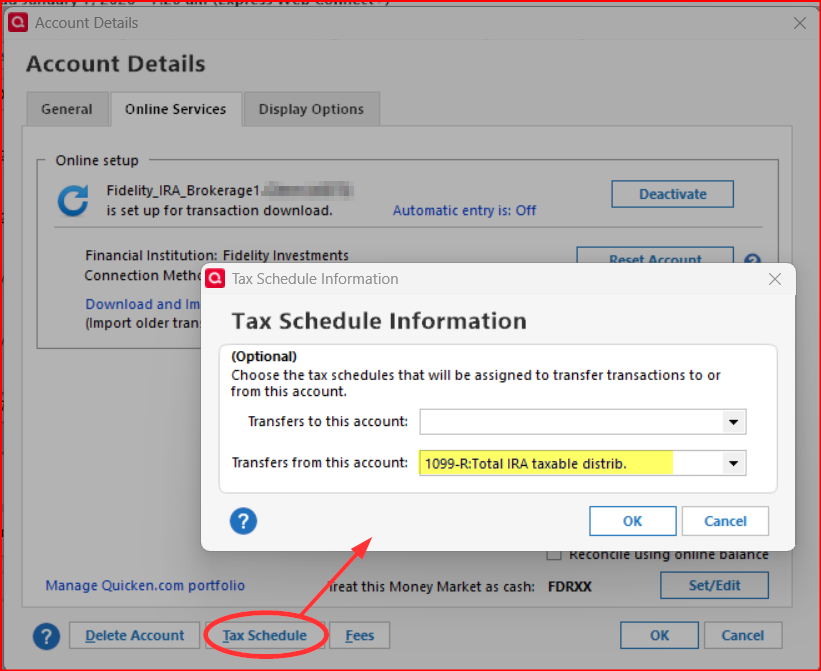
One thing I would add: Go to Account Details for the IRA account and make sure the Tax Schedule for withdrawals is 1099-R:Total IRA taxable distrib.. When setting up IRA accounts it seems the default Tax Schedule for withdrawals tends to be 1099-R:Gross IRA taxable distrib. which will not capture distributions as taxable so you will need to make sure 1099-R:Total IRA taxable distrib. is in that field.
This is planned for improvement for how Quicken handles IRA distributions but we do not yet know when that will be done and you can read the discussion and plan here: Improve handling of IRA distributions, including QCDs and Roth conversions.
@dkrawchu I'm a Fidelity customer also, and they, in their systems, are able to record the tax withholding in the retirement account. Q isn't able to record a tax action in a non-taxable account.
SO, Fido downloads 2 transactions into your IRA account, the transfer of the net amount and the tax w/h.
It sounds like you recorded the transfer for the net amount yourself, and then Fido downloaded something different.
The only thing that you can do is to delete the tax transaction in the IRA account and change the w/d FROM the net amount to the GROSS amount and then edit the transaction in the taxable account to be a split for the net amount as the deposit with split lines reflecting the Gross transfer and the tax line in the split as a negative amount so as to equal the net.
And given that the original post that @Boatnmaniac referenced is from 2019, I wouldn't hold my breath waiting for it to happen.
But the idea was changed to "Planned" in Aug 2023 so about 1-1/2 yrs ago. It is not uncommon for changes that might be more complex to implement to take 1-2 yrs or sometimes even more so I wouldn't rule it out quite yet. And if/when a Planned change is no longer planned the status is usually updated to reflect that but that hasn't happened, yet.
In addition, during a telecon I had with some of the Quicken Dev Team (including 2 managers) about a year ago I was told this improvement is in their roadmap. Of course, they would not tell me what the priority is for this nor a schedule for it. And since there is a workable (albeit somewhat awkward) workaround my guess is this is not one of the top priorities for them but that's just my guess. So, I agree, and am not holding my breath waiting for this to happen.
If they are not going to implement an improved way to handle IRA distributions soon, it would sure be nice if there were a Help or Support page users could refer to rather than SuperUsers having to detail the instructions each time this issue comes up.
Great idea! Maybe @Quicken Kristina would care to comment on this suggestion?
Thank you for your replies,
I sent a request to our content team to get an article created.
Thank you!
Thank you, @Quicken Kristina
For the record, I think the instructions for entering a taxable distribution from an IRA (also known as an RMD) should be:
It can be tricky to record distributions such as RMDs from a tax deferred account to a taxable account in Quicken so that the tax implications are captured correctly.
There are no built-in Categories for IRA tax withholding; you must set them up yourself. I use these:
In the IRA, click on the gear at the top right and select Edit account details. Click on Tax Schedule and set Transfers out to "1099-R:Total IRA taxable distrib." If you don’t see the Tax Schedule button at the bottom of the Account Details dialog, click on View in the top menu and select “Tabs to show”. In the list of tabs, select Planning.
Enter one or more Sold transactions for the securities that were sold. This will put a cash balance in the account equal to the total amount of the distribution, including any taxes that were withheld.
If no taxes are withheld from the distribution, you can simply enter the distribution in the IRA as a transfer to the receiving account.
If taxes are withheld from the distribution, the process is more complicated because you must record the gross distribution as well as the withholding(s) in the receiving account. To do this, go to the receiving account and:
1) Enter a Deposit transaction for the net amount of the RMD as a positive number.
2) Split the Category:
If the deposit is made to a banking account between Jan. 1 and April 15, you will see a dialog titled “Confirm Your Contribution Tax Year”, even though this is a distribution and not a contribution. Select the current year, not the default of the previous year, and click on OK. This seems to be a bug.
If you receive the distributions regularly, you can save repeated manual entry by setting up this transaction as an Income Reminder.
If taxes were withheld, you must delete or not accept any downloaded transactions in the IRA for the net distribution and the withholding.
With this setup, the taxable income and any withholding will be shown in the Tax Planner and the “1099-R Total IRA Taxable distrib.” and any tax withholding in the withholding sections of the Tax Schedule report.
@Jim_Harman - Thanks for capturing this detail so well. It really is a good summary of the discussions in the planned Product Improvement thread:
Hopefully it will not only help the Content Team put together a great Support/Help Article but it will also help the Dev Team better understand what we currently have to do so they can implement a good solution in the application.