Why is Quicken Mobile showing a security that I don't own?

I regularly sync Quicken Mobile and Quicken Classic on my desktop. Quicken Mobile shows 900 shares of a mutual fund in one of my investment accounts that I don't own. Quicken Classic on my desktop is correct. I have reset my Cloud data set and resynced multiple times. I have deleted my old, no-longer-used cloud data files. The problem persists. What do I do?
[Edited-Readability]
Answers
-
Hello @KJS,
Thank you for sharing your experience. Definitely odd to have phantom shares showing in the mobile app.
Based on what you said, it sounds like you have done most of the troubleshooting steps already. Great job!
At this point, I suggest you try manually resetting your cloud data by creating a test file and deleting your cloud account from that test file. After that, you would attempt to resync your main data file, which should then create a new cloud account (this does not affect your data saved within that data file).
First, please proceed to save a backup (just in case). From there, create a new data file (click here to view instructions, and review the section titled: "Creating a new file"). Once the new file opens, follow the steps below to remove your main data file's cloud account.- Go to Edit.
- Select Preferences.
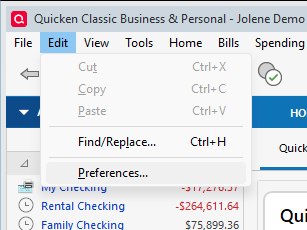
- Click on Quicken ID & Cloud Accounts.
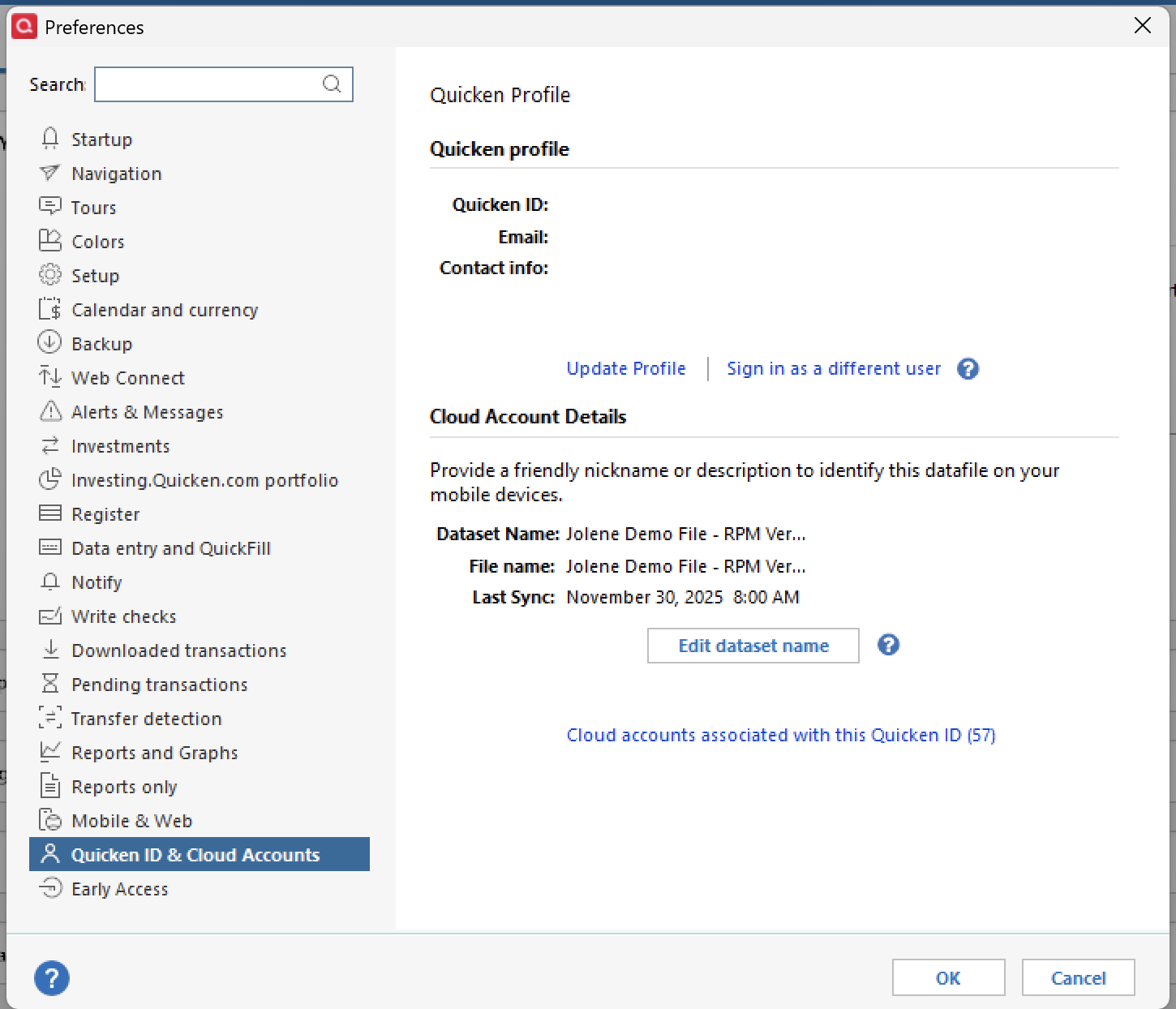
- Click Cloud accounts associated with this Quicken ID (#) (this is not a button; it is written in blue underneath the "Edit dataset name" button).
- Select the Cloud Account Name used for your main data file and click Delete.
- Type Yes and click Delete.
After that, switch back to your main data file (click here to view instructions, scroll down and review the section titled: "How to alternate between multiple files").
Once your main file opens, resync your data by navigating to the Mobile & Web tab and clicking on the blue Get Started button, and then the blue Sync Now button, and see whether or not the errors you were receiving persist. You can then also delete the new file you previously created, as well as its cloud account.I hope this helps!
Quicken Alyssa
Make sure to sign up for the email digest to see a round up of your top posts.
0 -
I followed the steps you advised but the phantom mutual fund shares are still showing up in my Quicken Mobile app.
0 -
@KJS,
Thank you for following up. I apologize for the delayed response.
Are you still seeing these phantom shares? If possible, can you share some screenshots of what you see on the mobile app vs in the desktop software?
If needed, please refer to this Community FAQ for instructions on how to attach a screenshot. Alternatively, you can also drag and drop screenshots to your response if you are not given the option to add attachments.
Thanks again!
Quicken Alyssa
Make sure to sign up for the email digest to see a round up of your top posts.
0 -
@KJS,
Just checking in, we haven't heard back from you in a while.
Do you still need assistance?
Thank you!
Quicken Alyssa
Make sure to sign up for the email digest to see a round up of your top posts.
0 -
Hello again,
Checking in once more before this thread is closed.
Let us know if you still need assistance.
Thank you!
Quicken Alyssa
Make sure to sign up for the email digest to see a round up of your top posts.
0 -
@KJS ,
after all the refreshing you have done between your desktop/laptop and the Quicken server, have you made sure that your mobile app downloaded the latest data file from the server?
Did you log out of your mobile app and log back in? (Or whatever the procedure is to get a fresh download from the server to the mobile app …)0


Categories
- All Categories
- 16 Product Ideas
- 34 Announcements
- 248 Alerts, Online Banking & Known Product Issues
- 20 Product Alerts
- 516 Welcome to the Community!
- 680 Before you Buy
- 1.5K Product Ideas
- 55.6K Quicken Classic for Windows
- 16.8K Quicken Classic for Mac
- 1K Quicken Mobile
- 834 Quicken on the Web
- 126 Quicken LifeHub