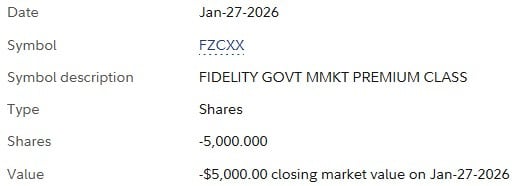
A transfer of shares (not cash) between Fidelity accounts does not get reported correctly in Quicken. Quicken records a Sold transaction in one account and a Bought transaction in the other. As a result, the cash balance is wrong in both accounts.
What types of accounts are these? Taxable, IRA, etc?
What do you see when you look at this activity on the Fidelity website? Sell - transfer cash - Buy or shares transferred?
Transfers in and investment account can never be recorded correctly automatically.
Quicken isn't provided (in the downloaded transaction information) with the security action of "transfer" with the "other account" in the downloaded information. On the other hand, Fidelity should have sent a Withdraw and a Deposit transaction, and it sounds like those are missing (It is up to the user to change the Withdraw/Deposit to a transfer).
This transfer is between two taxable accounts, one of them is a CMA. Fidelity website posts the transaction as follows:
TRANSFERRED TO VS Z25-123456-1 FIDELITY GOVT MMKT PREMIUM CLASS (FZCXX) (Cash)
Oh, a pure transfer of securities. That is definitely something that never gets the right "security action" when downloading.
To enter that transaction correctly, you would click on Enter Transactions in the source account and select Shares transferred between accounts. This will preserve the original tax lots and cost basis.
If this is actually a money market fund transferred from one account to another, there is no capital gain or loss to track, so you could enter one Removed transaction in the source account and and Added transaction receiving account.
Thanks. I was thinking Quicken should be able to recognize such a transfer. Perhaps my expectations are too high. I'm not worried about tax lots in this case, but I still would prefer my Quicken accounts more accurately reflect reality, and that it would happen without manual intervention. Meanwhile, for this case, I've changed the downloaded "Sold" transaction to "SoldX" with cash proceeds directed to the receiving account (which downloaded a "Buy" transaction). This preserves correct cash balances. I see that I also could have done Remove/Add to approximate the transfer, and then deleted the downloaded transactions.
Most of us DON'T WANT Q speculating about what was intended when the FI downloads misleading info … because the odds are better than 50-50 that Q's speculation would be wrong.
I don't want Quicken speculating either. But they chose to mark this as a sale, which is not correct. The Fidelity website shows this correctly as a transfer. Is there a way that I can see how Fidelity presents this to Quicken?
Quicken didn't choose to mark it as a sell, Fidelity did. And it is important to note that you will NEVER get a "transfer of securities" action. "Transfers". Just look at how Quicken's "wizards" handle this. If you use "Shares Transferred Between Accounts", that isn't a "single action", it's a "wizard" that translates it into different actual security actions/transactions. What it does is a remove shares in the first account and an add shares in the other account. There isn't an option for an actual transfer. I don't think I have ever seen a financial institution send an "remove shares" or "add shares" they always use sell and buy. And even if we were talking about a cash transfer, your financial institution doesn't know the names you use for accounts in Quicken. So even it that flagged as a transfer Quicken would have to guess the Withdraw in one account and the Deposit another is a transfer even when this might be between different financial institutions being recorded on different dates. That is what the "Transfer detection" option in Quicken is doing, guessing. I'm not sure if this "guess" applies to cash transfers when an investment account is involved. But for sure it doesn't apply to security transfers.
You might be able to see what Fidelity coded in the Cloud Sync log (I'm not sure about that), Help → Contact Support → Log Files → Cloud Sync Log.
But note this isn't a direct log of what Fidelity sent. Fidelity talks to the Intuit server (Quicken Inc pays for Intuit to provide the connection services/aggregation) and then Intuit sends that information to Quicken servers which in turn "sync" that data to your Desktop data file through Quicken (the program). We as users have no way of knowing how much "translations" are being done in between. Maybe very little, maybe not.