Credit card statements contain more than 29 transactions so Quicken can't let me match them manually

Windows
R65.29
I record my credit card charges daily, as I incur them so I always know the actual balance in my checking account. I always pay my credit card bill in full. I noticed some time ago that when the credit card statement has more than 29 transactions on it, I can't manually match the credit card payment to the transactions that I have previously entered in Quicken.
My work around has been that when I have a credit card statement with more than 29 transactions, I list all the transactions on an excel spreadsheet and then have subtotals for batches of 29 transactions. Then I pay the credit card bill in the amounts of the batches which has been as many as 3 different batches so 3 different payments.
Can Quicken expand the number of categories available for a single payment so I don't have this limitation issue? It is mainly a problem when I am traveling and have more charges than usual. Also, some credit cards have better rewards so I may use just one of them exclusively and it is easy to get past the 29 categories limit.
Thanks and fingers crossed I'm not the only one with this issue!
Comments
-
Wait, what are you doing? If you record your credit card charges daily why do you need that many lines for the payment? The process should be as follows:
1 - Record or download the charges to the credit cards daily, categorizing each charge.
2 - Monthly pay the credit card from your checking account the "category" for this payment is the credit card in square brackets like this - [credit card]. This results in a "transfer" from checking to the credit card to pay it.
That is the only line needed on the payment. You do not need to list each charge on the payment. If you are listing each charge you are doing it wrong.
Quicken Windows user since 1993.
0 -
Echoing the advice of @bmciance.
Unless you're doing something that you haven't described, you're not paying each card charge individually … you're making a single payment to the card account.
There's no need (and no benefit that I can discern) of splitting the single payment to the card account for however much you're paying.
Q user since February, 1990. DOS Version 4
Now running Quicken Windows Subscription, Business & Personal
Retired "Certified Information Systems Auditor" & Bank Audit VP0 -
To clarify, the best way to handle this situation is to create an account in Quicken for the credit card. Then you can list each charge with an appropriate Category in that account. When you make the payment, it is a transfer from your checking account to the credit card account.
Even better, with most credit cards you can download the transactions to the credit card account so you don't have to enter them manually.
QWin Premier subscription1 -
If you are working with the Split Transaction dialog, you can have up to a max of 250 split lines.
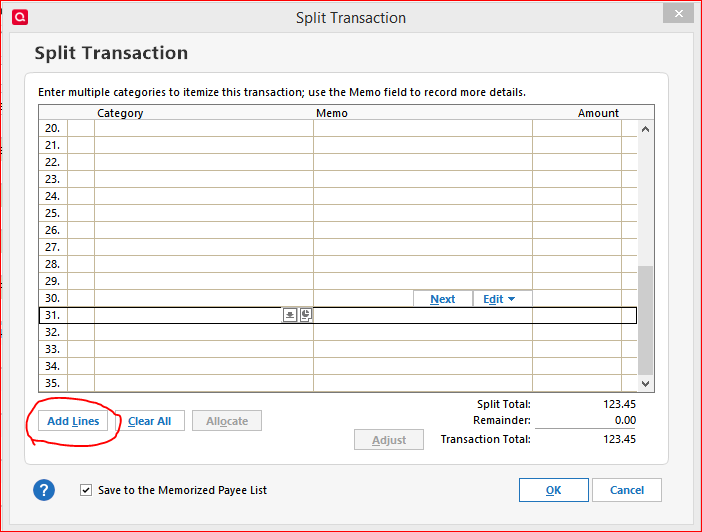
If you need more than the original allotment of 30 lines, simply click the Add Lines button and additional lines will be added to the dialog, in increments of five.
1 -
I like to know what my actual checking account balance is at all times. That is why I have recorded my credit card receipts in my checking account on a daily basis.
If I adopt the method suggested above, my checking account balance will be what I see in the checking register plus the addition of the negative balances shown on all credit card registers.
Is that correct?
Thanks!
0 -
@RoZann you could look at it that way but here is what I do. I have a reminder for the credit card payments which you can show in the checking register on the dates they are to be paid. By doing this I can see my projected checking account balance out 30 days (you can show more days but I prefer 30). To show reminders you click the gear at the upper right of the register and pick "Reminders to show in register" and then pick the number of days to show.
Reply back if you need help setting up the reminder for the credit card payment. The beauty of that is that it always automatically shows the current credit card balance. Then once the credit card statement cuts off I post the reminder in the register on the due date. This then "freezes" that payment and the next month's reminder starts accumulating any new charges.
Quicken Windows user since 1993.
2 -
You can set up and use Quicken any way that works for you, but usually it is best if your accounts in Quicken match your real life accounts.
If you have a debit card, the money is taken out of your checking account within a day or two after you use the card and the card transactions appear on your checking account statement. In that case it makes sense to have one account in Quicken and record the card transactions there, as you describe above.
If you have a credit card, there is a separate real life account for the card and the money to cover the charges does not leave your checking account until you pay the credit card bill. In that case it is best to have two accounts in Quicken. You enter and categorize the charges in the credit card account and record the payment as a transfer from the checking to the credit card account.
When reconciling, if there are too many uncleared transactions to fit in the Reconcile window, there should be a scroll bar that will let you see them all.
QWin Premier subscription0 -
Adding to what @bmciance said regarding the Reminder: When setting it up, there are several different methods that can be selected from for the dollar amount to show in the Reminder. The one I think you would want to select is Current credit card balance.
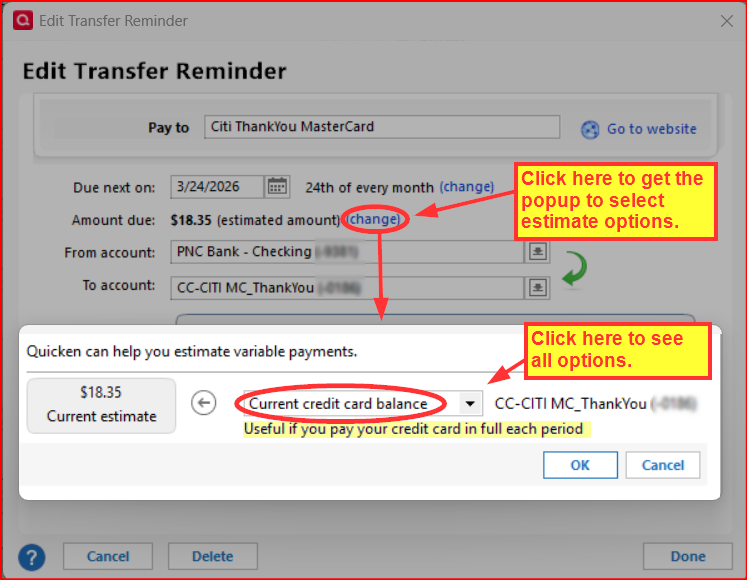
What this will do is cause Quicken to estimate the amount due for the next Reminder to be equal to the current balance of the CC account less any payments that have already been scheduled. So, if you do as @bmciance suggested and select this estimate method for the recurring Reminder you will always see the next planned CC payment in your checking account that will equal the current balance of the CC account which, as I understand it, is what you want to see in your checking account.
Quicken Classic Premier (US) Subscription: R66.23 on Windows 11 Home
3 -
@RoZann I can’t follow what you are doing. If you are entering the credit card charges directly into your checking account then what is the other side or Category? Then what entry do you make when you actually pay the credit card bill? You shouldn’t need to be splitting anything.
The proper way is to set up a credit card ACCOUNT and enter the charges into it when the purchase is made and assigning it to a category. The transactions need to be entered with the date you charged it, not the date you pay the credit card bill.
Then when you pay the bill you TRANSFER the payment from your checking account to the credit card account. Then when you download the payment from the bank you match it to the one you already entered. Then your credit card account should match what you actually owe at any time.
When you enter the payment in your checking account you put the credit card account name in for the category using square brackets around the name to indicate it is a transfer...like this… [credit card] or newer versions have a Transfer column.
I used to do it the wrong way for years! Then I wised up and now enter them properly. I would split my credit card payment into all the categories on one transaction in my checking account. And since I always pay more than the bill I would need to figure the difference and put it to another category. But then I needed to have them entered on the date the charges actually happened. So I finally set up a credit card account. It makes it much easier to enter and balance!
Here's a list of some reasons why you should do it this way…..
You don't have to wait to make the payment and split it out
You won't run out of split lines (I used to use Q2004 and there was only 30)
You can use both the payee and memo fields for more description
You don't have to figure out the difference if you pay a different amount
Then your Credit Card Account will exactly match your statement
Charges get entered with the right date (better at year end for taxes)
You can enter all charges to date, not just what's on the bill - then you can see what you still owe
You won't forget what a charge was for if you enter it right away from the receipt
And if there are multiple categories purchased on a single credit card charge, you can split that one credit card charge to detail the items purchased each with their own category and memo/note.
I'm staying on Quicken 2013 Premier for Windows.
2




