Quicken bills & income not showing bills for today or in past that haven't been recorded yet

This has been happening off and on for a few months now. I go to record a scheduled bill and it could be due today or before today and they no longer show up in the list. I can see the next bill but no way to enter the current bill. If I edit the bill reminder it only shows the future date. Also my income reminders show a total of 0.00 so when I look at projected balances there's no income. I pay way too much for this program to have it do this. I'm on the latest version R65.29, Windows 11 25H2. I've backed up and tried restoring previous backups, same issue. Please someone help.
Answers
-
Are these bill reminders set to Auto enter [xx] days before due date?
If so, they'll be in the account register as "real register transactions" already.BTW, what is the setting of "[xx] days before due date" for these reminders? 0 days? Some other number?
0 -
No I don't use auto enter and I've double checked that they weren't changed. I've had these bills set up for years. They are all set to remind 3 days in advance.
0 -
@Chris Peterson there have been quite a few posts on this issue. The cause seems to be corrupted reminders from the Quicken cloud getting synced to your data file, which corrupts the reminders in your file. The current best known solution is to reset your Quicken cloud account. If that doesn’t fix the issue, there are other steps to try.
Here is a post about the issue from one of the super users who has done extensive troubleshooting on this issue. It is posted under a Quicken on the web category, but covers the Quicken desktop issue as well.Quicken user since Q1999. Currently using QW2017.
Questions? Check out the Quicken Windows FAQ list0 -
Thanks for this I'll check it out. I don't use Quicken for cloud though.
0 -
I have sync off for mobile and web. And after reading that thread yes it does appear to be transactions with splits that are having this issue. Some others that I had for the 20th were still present when I looked today and was able to record them.
0 -
Any other ideas on this? I pre-entered my paycheck information today and accepted the transaction today, but now it shows TWO future entries for March 1 that haven't been entered by me or accepted. Also the description is not something I'd ever enter.
 0
0 -
Hello @Chris Peterson,
Another customer saw that issue with duplicate paycheck entries and shared what seems to have corrected it for them:
I hope this helps!
Quicken Kristina
Make sure to sign up for the email digest to see a round up of your top posts.
0 -
No, enabling and disabling sync didn't help. In fact, I closed and reopened the file, and now it's completely trashed. My balances are all wrong somehow. I'm furious and ready to dump Quicken. [Edit - Readability/Removed - Rant]
0 -
Thank you for your reply,
Data changing the way you describe is usually caused by file-specific issues. I recommend restoring a backup from before the problem started, if possible. Verify if the issues are resolved in the newly restored file.
Please let me know how it goes!
Quicken Kristina
Make sure to sign up for the email digest to see a round up of your top posts.
0 -
I did already restore the data. I backed up before turning on sync. Didn't fix the issues though.
0 -
Thank you for your reply,
To clarify, did you restore the backup from before you turned on sync, or one from before all of the issues started? Were any of the issues corrected in the newly restored backup?
If you haven't already done so, I suggest that you try validating your data file. Please save a backup file prior to performing these steps.
Validate:
- File
- Validate and Repair File...
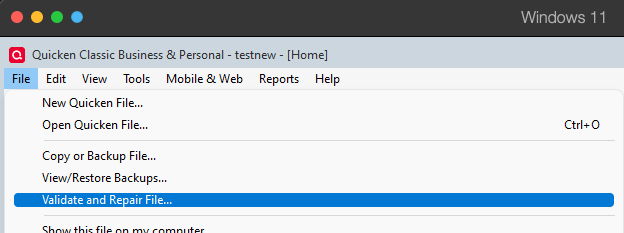
- Validate File
- Click OK
- Close the Data Log
- Close Quicken (leave it closed for at least 5 secs)
- Reopen Quicken and see if the issue persists.
I hope this helps!
Quicken Kristina
Make sure to sign up for the email digest to see a round up of your top posts.
0 -
It's been going on for a couple of months. I don't have a backup from then and wouldn't want to have to manually recover all those entries either. I restored from before I turned on sync and no, the issue is not resolved that I can see. I have validated the file prior to this a few different times.
0 -
Thank you for your reply,
Did the backup you restored at least restore your balances to the correct values (as of the backup date), or is the balance information still incorrect as well?
Since restoring from an earlier backup isn't a viable option, next, I suggest that you try creating a copy of your data file, which will rebuild all internal lists and database tables. If successful, you would then move forward with the copied file. To create a copy, please navigate to File > Copy or Backup File... > Create a copy or template (see examples below), which will also allow you to select a date range to move forward with.
If you wish to move forward with your entire data file, please check the full date range of your entire data file before copying, so you can enter the correct date range if you do not wish to "shrink" your file by eliminating certain dates. Note: Unless you believe that older data is causing the issue, there is no reason to "shrink" your file.
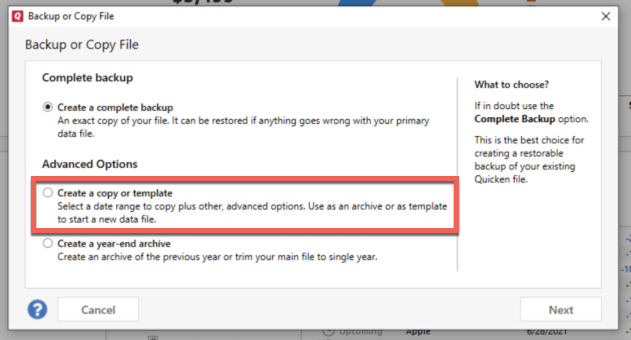
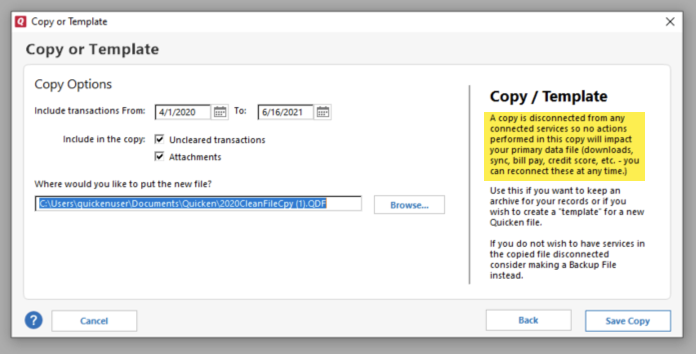
It's important to know that all online services will be disconnected in the copied file, and you will need to sign back in with your Quicken ID and reconnect all of your online accounts, online billers, Quicken Bill Manager services, etc if you plan to use that copied file going forward. The reason is that the new copy also creates a new, separate dataset ID.
Please reconnect only what is necessary to test if the issue is resolved. If it is resolved, then reconnect everything and use the copy as your main file going forward.
If the issue is not resolved in the copied file either, then feel free to switch back to your original file. For instructions on switching between Quicken files, click here.
Thank you!
Quicken Kristina
Make sure to sign up for the email digest to see a round up of your top posts.
0 -
Hello @Chris Peterson,
We haven't heard back from you in a while. Do you still need assistance?
Check back and let us know! Thank you
Quicken Kristina
Make sure to sign up for the email digest to see a round up of your top posts.
0



Categories
- All Categories
- 18 Product Ideas
- 34 Announcements
- 246 Alerts, Online Banking & Known Product Issues
- 19 Product Alerts
- 517 Welcome to the Community!
- 682 Before you Buy
- 1.5K Product Ideas
- 55.7K Quicken Classic for Windows
- 16.8K Quicken Classic for Mac
- 1K Quicken Mobile
- 834 Quicken on the Web
- 127 Quicken LifeHub