Bill & Income Reminders with Splits Do Not Match Desktop Reminders Original Order
Reminders splits in the Web app do not match the order entered for the splits in the desktop. If the split is updated in the web app, it is force sorted by amount from low to high.
This causes discrepancies in the desktop and when syncing, sometimes disconnects the amounts assigned to a category. Tax Planner then provides erroneous data and Reports based on category assignments are also affected.
The order of rows in split reminders should be preserved when synced or the cloud data is reset.

Comments
-
I see the same behavior and have sent a problem report. This appears to be the same issue that was reported in Moy 2025 and tracked as CBT-746.
QWin Premier subscription0 -
Hello @markus1957 & @Jim_Harman,
This issue looks like the issue you brought up earlier in the Tax Planner discussion:
Is this the same issue?
Thank you!
Quicken Kristina
Make sure to sign up for the email digest to see a round up of your top posts.
0 -
Yes this is the same issue as discussed in the Tax Planner discussion.
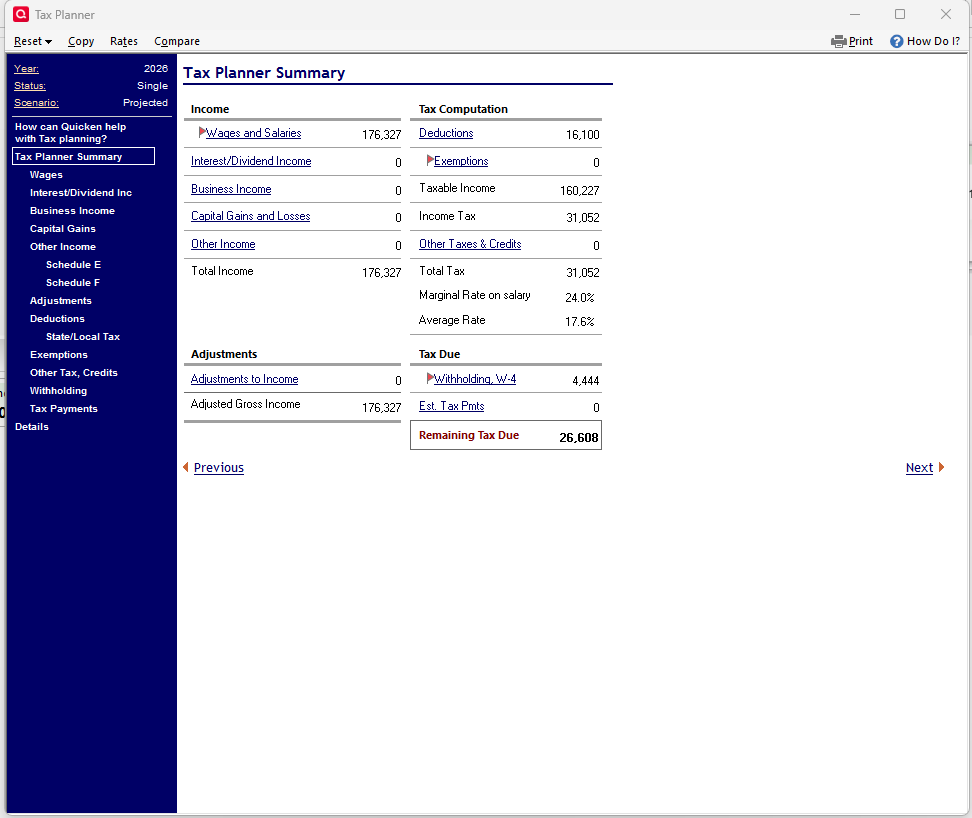
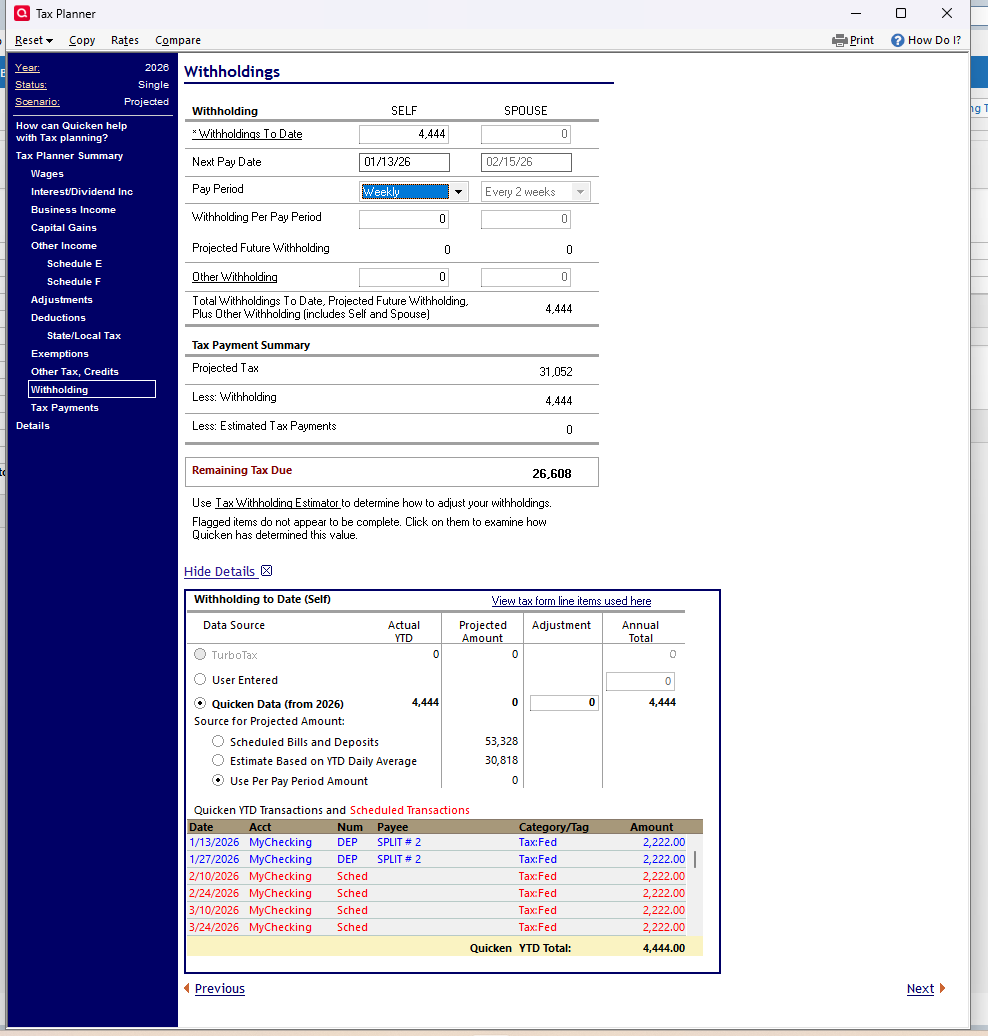
Continuing that discussion, today I opened my test file with syncing and the Tax Planner amount due changed from $6,472 to $26,608. The Withholding amount changed from $57,772 (2,222 x 26) to 4,444. The 4,444 correctly indicates that I have accepted 2 of the reminders but none of the future Reminders is being included.
I have not accepted any software updates since the original issue; I am still running R65.29.
In the Withholding detail, the setting has changed from the correct Scheduled bills and deposits to Use pay period amount, which is zero. The future reminders look correct.
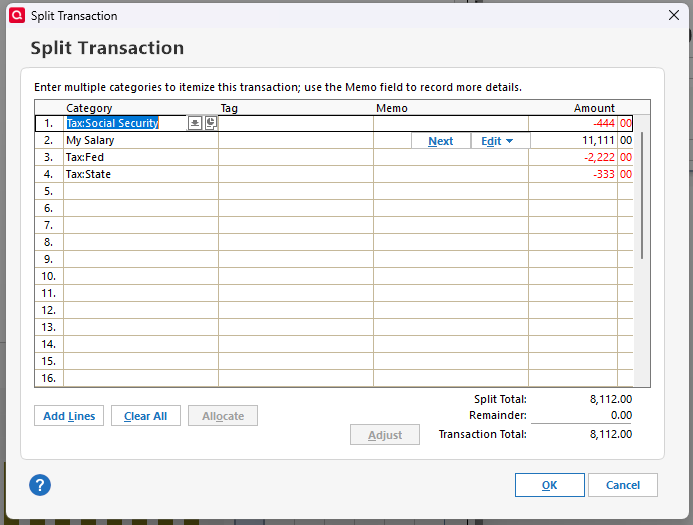
Looking at the split in the Reminder, the order of the split lines has changed again but each Category still has the correct amount.
I changed the Withholding setting back to Scheduled bills and Deposits and now the Planner shows a Refund due of $26,608, which is also wrong.
On the Wages page in the Planner, the Wages and Salaries - Self setting has been changed from Scheduled bills and deposits to Estimate based on YTD average. I corrected that setting but now the Withholding setting changes back to Use the Pay period amount.
I corrected both settings a couple of times and now the Tax due is back to the original $6,472.
But that's not all! If I leave the Tax Planner open and switch to my web browser to update this post or simply close and reopen the Tax Planner, both settings revert to their incorrect selections!
So it appears that the Tax Planner settings I have selected are not being saved.
I sent a Report a Problem report with a sanitized copy of this data file attached.
QWin Premier subscription1 -
It's related. It makes the difference between the desktop and web app more apparent. It also provides a possible explanation for the scrambling of the order. When an edit to a reminder with splits is done in the web app, the split order is resorted by amount from lowest to highest.
There is also an added issue with income reminders for something like social security in the web app. The web app has no ability to schedule a social security payment on say the 3rd Wednesday of the month. So, if you update your social security reminder in the web app it will change the frequency to the 3rd of every month.
I'll also say that I've confirmed that the process I laid out is more complicated than necessary to reproduce the issue.
Any reminder with more than 2 splits is almost certain to get jumbled by cloud sync, but if you create one with 5 splits it's pretty much a lock. The easiest way to reproduce the issue is as follows-
- create a new file with one cash account
- set up an income and a bill reminder, each with 5 splits. Note the order of the splits.
- Mobile Sync should default to On in a new file so deselect the cash account from sync so no accounts sync.
- Then create a backup file using the backup routine. You'll use this to easily restore the reminder splits to their original order.
- Then with sync Off, perform a cloud sync. You will note the reminders do not get jumbled and if you login to the web app, it will say no accounts have been selected.
- Then select the cash account for mobile sync and perform a cloud sync.
- You will notice the split order has been jumbled in both the desktop and the web app.
- You can restore from your backup file and repeat as often as desired.
0
Categories
- All Categories
- 52 Product Ideas
- 35 Announcements
- 239 Alerts, Online Banking & Known Product Issues
- 20 Product Alerts
- 508 Welcome to the Community!
- 677 Before you Buy
- 1.4K Product Ideas
- 55.1K Quicken Classic for Windows
- 16.7K Quicken Classic for Mac
- 1K Quicken Mobile
- 828 Quicken on the Web
- 122 Quicken LifeHub