CC-601 Error - Fidelity Brokerage Accounts not updating.
Comments
-
Thank you for fixing this. No longer seeing CC-601 error. Transactions appear to have downloaded correctly. My system was set to manage MMF as cash. Finally, cash management does appear to work, but very few transaction types are processed. Will keep a close eye for the next few weeks.
Thanks to the support and engineering staff who battled this fire.
If management is listening…sustaining engineering is the engineering team that is keeping your primary source of revenue alive !!! Staff and pay them accordingly. Support people are the ONLY conduit you managers have to the real world. Staff and pay them accordingly. If the company you are responsible for managing has a fire that lingers for over 6 months, like this Fidelity mess, it's clear that you are not staffing and paying your sustaining and support teams properly. Now, management, please go fix that fire!
0 -
Hi everyone,
We really appreciate your feedback, and it’s great to hear that most of you have been able to connect your accounts and download transactions successfully.
If you have any further questions or run into issues, please don’t hesitate to reach out; we’d be happy to help!
Quicken Laura
Make sure to sign up for the email digest to see a round up of your top posts.
0 -
Also wondering about this. I haven't attempted a Fidelity download in weeks.
0 -
I nodded in agreement to post “But there were so many attempts over the last six months in disconnecting and reconnecting to Fidelity, I’m not surprised.” I also wondered if the procedure outlined in OTN’s 3/10/26 msg is required to regain the ability to link accounts and download. So I went ahead and did Step 1 by signing out and back in Quicken. I skipped Step 2 since I’m not using Cloud data. Next, I followed Step 3’s Link Deactivation steps for multiple accounts and then easily revoked Fidelity access for all accts as instructed. So far, so good.
Step 3C of OTN 3/10 post’s instructions started okay and then problems happened. First, reconnect Link worked fine between one Fidelity Brokerage acct and its corresponding, existing one in Quicken. After getting linked, the transactions downloaded fine into Q. But none of the multiple other Fid accounts would or could be linked with Q. They’re all Retirement or Professionally Managed Fid accts. For some reason, Q’s screen for all of these incorrectly defaulted to ‘Add Account.' When I prompted the appropriate ‘Connect to Existing’ drop-down menu failed to show any active Q accounts and instead gave a long, non-scrollable list of hidden or closed accounts. Users are basically prevented from selecting any active account to link.
So the Brokerage acct linked and downloaded but no Fid Retirement or Professionally Managed accts could be linked to Q. No Error Codes appear at any time. I also noticed that retirement accts defaulted to ‘Brokerage’ instead of IRA-401k-Keogh. I’m not sure if this has any bearing on the lack of connection between Fid and Q, or whether IRA-401k or Brokerage are relevant on this screen anymore. Anyway, I tried the link process using Brokerage and retried by selecting IRA. Neither worked to link Fid and Q accts.
Has anyone had recent success connecting Fidelity Retirement or Prof Managed accts to download into Q? I haven’t been able to download those types of Fidelity transactions since 2/20/26 and look forward to a working resolution soon.
[Edited Readability]
0 -
yes I have just yesterday started to get Q working with Fidelity in all my accounts including managed ones. I didn’t follow any of Olaf’s directions just OSU which worked fine…. For now.
2 -
My 7 Fidelity accounts (including professionally managed) seem to be updating properly now. I had gone through the re-link process last week (not Olaf's procedure) and managed to get rid of the CC-601 errors, but no transactions were downloading. They finally started working again on 3/12/26 with just OSU. The totals are off by about $0.20, but that's close enough for me.
1 -
My multiple Fid retirement and managed accts still fail to download transactions this AM. This marks three weeks of no Fidelity-Q connection for these account types. A non-retirement, non-managed Fid Brokerage downloads. After doing Olaf's recommendation yesterday, a new NetBenefits acct connected for first time since it was opened 1/1/26.
0 -
To Quicken Laura: Quicken appeared to have fixed the feed, and the Fidelity data finally flowed again on the 12th. BUT, when One Step updated Fidelity accounts today (Saturday, March 14), multiple Fidelity accounts with March 13 transactions didn't pull down a thing. Premature victory dance perhaps? Will try the steps from Olaf/Gemini from earlier members' post and see if that helps.
P.S. Followed the steps precisely, and No Joy for the accounts with transactions from Friday the 13th. How appropriate![Edited Readability]
1 -
Now that Quicken/Fidelity is "up and running" (mostly) and the Gemini re-link process is known (or whatever re-link process succeeds "more often"), I hope Quicken Development will recognize as a "Priority 1 Bug" that "One Step Update", and similarly the individual account "Update Transactions", does not have functionality to report to the user: (1) a failed Express Web Connect + / OAUTH Token update (any reason), (2) a failed "re-link process" where the Gemini-described re-link steps "did not work/succeed" (any reason). If additional code is needed to detect and report out to the user such failures in either the Intuit Express Web Connect + pipeline/link, and/or the Fidelity token-owner side, then Quicken, please write and test that code. Allowing "One Step Update" and "Update Transactions" to run and "error out" with no error-reporting to the user is unconscionable.
Also re: means of error reporting to the user, if such failure is a "601 Error" then the 601 error should be reported-out to the user, regardless if the 601 error cause is the one that is currently reported out to external/users, or if the error cause is the separate 601 error source (same effect) that is now only reported INTERNALLY and only able to be seen by "Quicken Support Supervisors". The 601 error message should also explain that the link is "broken", requiring a repeat of the Gemini re-link process (or whatever Quicken provides as an "official" re-link process).
0 -
I thought I would be brave and try to reconnect my Fidelity accounts in Quicken. I track several Fidelity brokerage accounts some belong to my wife. Some are Traditional IRAs and some are taxable brokerage accounts. Some are managed and some are self-directed.
Here are the steps I followed and the issues I encountered along the way...
1) I backed up my Quicken data files (*.QDF, *dat, and *.DAT). Call me paranoid but having suffered through the recent issue of how Quicken tracks Fidelity Money Market Accounts and Cash I was very skeptical that CC-601 issue was really fixed. I wanted to be able to go back to a set of files I knew was working. After all, it's only been 2 weeks since my original post.
2) I started with my Wife's accounts. There are fewer accounts and smaller balances. Right off the bat, the system threw an error at the Fidelity sign-in process - i.e., "HTTP Status 400 - Bad Request." I had forgotten that Quicken and Edge don't play nicely together. So, I switched my default browser from Edge to Firefox. For more on this see https://community.quicken.com/discussion/7971481/bank-of-america-reauthorization-error-edited#latest. After switching browsers, I was able to "Link to existing accounts" and download transactions without encountering the "CC-601" error.
3) I closed Quicken and backed up my Quicken data files.
4) I re-opened Quicken and moved to connect my Fidelity accounts - 5 of them. I was able to successfully link 4 of the 5 accounts. That is, the action dropdown to "Link to existing accounts" worked and I was ultimately able download transactions without encountering the "CC-601" error. One of the 5 accounts would NOT link. When I clicked on the action dropdown and selected "Link to existing account" the list was short - only 3 accounts - and it did NOT include any Fidelity accounts. So, for the time being I went with "Don't add to Quicken."
5) I closed Quicken and backed up my Quicken data files.
6) I re-opened Quicken and moved to connect the remaining account - the account that would not link in Step 4. I encounter the same issue: it would not link. When I clicked on the action dropdown and selected "Link to existing account" the list was short and it did NOT include any Fidelity accounts.
7) I closed and re-opened Quicken. I opened the Account Details dialog box and deleted the account number and tried again. It worked. I was able to "Link to existing accounts" and download transactions without encountering the "CC-601" error.
8) I reset default browser back to Edge.
Absolutely unbelievable. I would rate the user experience on this one as "poor." It reminds me of playing an old fantasy game on a small hand-held console involving an ocarina and time. I look forward to the day when there is an alternative to Quicken - one that is supported by a management team that seeks and retains highly qualified developers. One that involves a testing process before patches are pushed to production.
Thanks for reading this far.
0 -
Hi everyone,
Thank you for reporting your experiences with the Fidelity connection in Quicken Classic. I’m sorry to hear that some of you are still encountering issues connecting your accounts or downloading transactions properly.
I’d like to share some troubleshooting steps that may help resolve the reported issues, including transactions not downloading or the CC-601 error (similar to what was suggested, with a few more steps for those unable to link existing accounts).
Steps to Reauthorize Your Accounts
Deactivate account:
- Select "Tools"
- Select "Account list"
- In the Account List, select the account you want to deactivate, and then click Edit.
- In the Account Details window, click the Online Services tab.
- Click Deactivate next to the service you want to disable.
- Click Yes to the message confirming if you want to disable this service.
After deactivating the account, please revoke Quicken’s third-party access from your account on the financial institution’s website.
- Go to Tools > Add Account.
- Search for and select your financial institution.
- If prompted, choose the appropriate connection method.
- Follow the on-screen instructions.
- When the list of found accounts appears, be sure to select the right account type and Link to connect them to your existing accounts (do not add duplicates).
Refresh your login session
- Go to Help > Refresh Sign In.
- Complete the login process.
- Run One Step Update again.
For Users Unable to View Existing Accounts Due to the Inability to Scroll
This issue has been reported, and our team is currently working on a fix. In the meantime, you may try the following workaround:
- Back up your data file.
- Close Quicken.
- Install the Release R65.29.
- Reopen Quicken and follow the steps above to reconnect your accounts.
Finally, submit your logs so we can forward them to the proper team.
- To send your logs:
- Open Quicken
- Click Help
- Select Report a Problem
- Click Send to Quicken
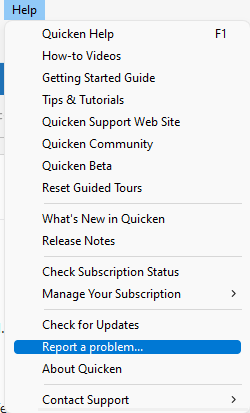
Please let me know how it goes after trying these steps. I’ll be happy to assist further if the issue persists.
Quicken Laura
Make sure to sign up for the email digest to see a round up of your top posts.
0 -
@Quicken Laura Just to be clear, if we have multiple accounts with Fidelity that all use the same log in and password, do we have to do this for each account?
0 -
If you are unable to update your accounts properly, you can deactivate the affected accounts and then reactivate them. Doing so should allow you to reconnect all accounts at the same time, since they are associated with the same user ID and password.
The recommendation to install Release R65.29 only applies to users who are unable to link their existing accounts due to the inability to scroll in the account selection window. If you are not experiencing any issues linking your accounts, you can safely skip that step.
If you are encountering any other issues or need further assistance, please feel free to let me know. I’ll be happy to help!
Quicken Laura
Make sure to sign up for the email digest to see a round up of your top posts.
0 -
As I posted Saturday, after the temporary joy on March 12th with backlog of Fidelity transaction, Friday the 13th Fidelity transactions in multiple Fidelity accounts do not appear after one-step update and no change after going through the deauthorize in quicken and at Fidelity and reauthroize process. Will test again tomorrow St. Patick's Day hoping for just a little luck.
0 -
Hi @Mark D,
Sure, we appreciate your update, so we can continue working on this case. If you’re seeing an error message, it would be very helpful if you could share the exact details with us.
Quicken Laura
Make sure to sign up for the email digest to see a round up of your top posts.
0 -
I followed each step exactly… except I didn't delete the institution name or account number in the 'General' tab… and it worked great for me! All accounts are reconnected and downloaded transactions. Only one account missed downloading one transaction, but that was it.
@OTN Thank you so much for providing this information and for providing a great example of how to use Gemini AI!
0 -
Worked following the above steps. The first time I skipped resetting the cloud because I didn't use sync and sync was off and thus the reset cloud option was grayed out. But it didn't work so the second time I turned sync on and then reset the cloud and it worked.
0 -
Hi all,
We appreciate everyone who has stayed engaged throughout this process and shared steps to help resolve the connection; your input has been very helpful. It’s great to hear that many of you have successfully reconnected your accounts using the provided steps.
If you have any additional questions, please feel free to reach out; we’re happy to help.
Quicken Laura
Make sure to sign up for the email digest to see a round up of your top posts.
0 -
I'm also a Quicken user for several years and am not happy with the issues going on, like this one. I have reached out to customer support via phone twice and they are not too helpful. Hoping they can resolve this soon.
-1 -
Hi @maraniba,
Thank you for joining this thread. I’m sorry to hear about your experience with Support, and I appreciate you sharing that feedback. I’ll make sure it’s passed along to the appropriate teams so improvements can be made.
Regarding this thread, which focuses on the FDP-101 or CC-601 errors, I checked your accounts on our end, and they appear to be connected properly. Are you currently seeing any error messages when updating your accounts, or are you experiencing an issue specifically with the Money Market fund?
I look forward to your response!
Quicken Laura
Make sure to sign up for the email digest to see a round up of your top posts.
0 -
To Quicken Laura, thanks for the response. I may have posted to the wrong thread. My issue is that my Mac Quicken Classic is not "seeing" my FZDXX security shares that I have with Fidelity. I know there's another thread with many users commenting on this with no resolution that I could see. Otherwise, everything else is syncing. The FZDXX was syncing previously; however, after a Quicken Update a few weeks ago, it stopped recognizing it, so now there is a discrepancy in my Quicken balance and Fidelity balance by that amount. The first call I made to Quicken support I was told Quicken was getting many calls about the similar issues but that it likely wasn't going to get fixed anytime soon. The second time I contacted Quicken support via phone, I was told that the first person I spoke to was incorrect and that the issue was with my Quicken setup itself, but I still haven't been able to figure it out. I've tried disconnecting and reconnecting. My register is prompting with a placeholder for it, but I was holding off in case the issue gets fixed. Hoping it gets resolved soon. Thanks
[Edited Readability]
0 -
Hi @maraniba,
Thank you for joining the discussion and sharing your experience.
In Quicken Classic for Mac, there are limited options for controlling how cash is managed within the application. In a previous update, Quicken began treating money market funds as cash, which is likely why you noticed this change after updating.
While the alert is still active, I wouldn’t recommend any troubleshooting steps just yet. Instead, I suggest keeping an eye on the Community Alert, where we’ll post any new updates as they become available.
The alert also mentions contacting Quicken Support. This isn’t for standard troubleshooting, but part of an internal process that may involve escalating specific cases to Tier 2. If you choose to reach out, you can mention that you’re contacting regarding Ticket #12299543 so they can more easily follow the steps associated with this issue.
If you have any additional questions, please feel free to let me know.
Quicken Laura
Make sure to sign up for the email digest to see a round up of your top posts.
0 -
@maraniba I am having the same issue. If FZDXX pre-existed in your QDATA file, Quicken deletes it if you attempt an update/sync. If you start with a new QDATA file and download, it converts FZDXX to cash. Quicken stopped differentiating between core money markets that Fidelity treats as cash and those that are traded as securities. It now attempts to treat all as cash but not always successfully. I have provided Quicken Laura with a lot of information regarding the issue and trust that they are working to resolve this issue…hopefully sooner rather than later. Depending on what functionality you are looking for from Quicken, Fidelity Full View may be helpful while they address the issue.
0 -
I have 7 Fidelity accounts and it looks like I will be manually entering transactions from now on. I haven't done a OSU with those accounts since late 2025. I recently created a test file and updated the Fidelity accounts and while some were accurate, others had incorrect balances. My accounts go back decades and I do not have the time or patience to go through all those transactions to try to determine the cause of these errors. And apparently now I will have to manually enter the transactions from my Marcus accounts as well. I'm curious, do I have to pay the Quicken subscription fee to enter my bank and credit card transactions via file downloads from each bank's web sites?
0


