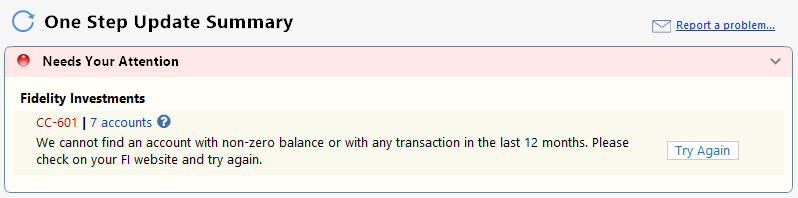
CC-601 Error - Fidelity Brokerage Accounts not updating.
Comments
-
I've finally contacted Quicken Support after experiencing the issue since 3/2. I went in to "report the issue" in the Quicken Windows app. Quicken Support said that they are trying to analyze the logs of affected users to try to determine root cause.
Is there any update? This is getting frustrating.
1 -
Add me to this list! Error Code CC-601. Thank you.
1 -
I have the same problem. [Removed - Rant]
For me, the only way to get attention is to cancel my subscription.
That we are not given a date when they expect to resolve it is unforgivable.
[Edited - Readability]
0 -
Same problem here. I had to create an "adjustment" account to track net worth. Between the BOA problems and Fidelity, it's been a time consuming week.
2 -
Quicken Premiere, Version: R66.23, Build: 27.1.66.23
For the last several days I've been getting the CC-601 Error with Fidelity. I've been trying account RESETs and Super Validations, but nothing helps. I had also restored from a Backup but that was a mistake. I forgot that restoring now causes all banking links to be broken and have to be re-established. Quicken seems to be going downhill. I wish there was a suitable replacement.
----Quicken User since 1998 ----
3 -
I m not getting this error, but my wife (different Quicken file) has been for several days.
 1
1 -
I just now upgraded to Premier, specifically to get a simple asset allocation overview and am getting this error. Sigh.
0 -
I just tried reauthorizing my Fidelity accounts. I am no longer getting any error messages but it is also not downloading any data. Simply turning off the error messages without fixing the problem does not help
1 -
FIX IT!! This should be a priority for Quicken and it doesn't appear to me that it is. No response from Quicken to many of the comments above. FRUSTRATING!!!!!
Having to manually enter my transactions in Fidelity to Quicken for a week now….
2 -
- Quicken is no longer a flagship product for a software company.
- It’s an asset being optimized for revenue, not long‑term engineering quality.
- That’s why things like QIF export/import, connectivity changes, and UI modernization lag behind.
it’s consistent with how private‑equity‑owned software behaves.
----Quicken User since 1998 ----
2 -
Add another frustrated user with a CC601 problem with Fidelity accounts. Have followed all procedures found for correcting, including deactivation, without success.
2 -
Hello everyone,
Thank you for reaching out to us. At this time, we do not have any new updates to share, as our team is still actively working to resolve the issue.
We sincerely apologize for any inconvenience this may be causing and truly appreciate your patience and understanding while we work toward a solution. Although we do not have an estimated time for resolution yet, please be assured that addressing this matter is a top priority for us. We recognize how important this is and are committed to resolving it as quickly as possible.
For the latest information, please refer to the Community Alert below. We'll keep you in the loop as new details come in.
Quicken Laura
Make sure to sign up for the email digest to see a round up of your top posts.
-1 -
@Quicken Laura @Quicken Kristina
I even tried forcefully resetting my connections from the Fidelity website, Profile → Security → External data sharing : Fidelity Access → Remove all Quicken access. The only upside there was finally finding a way to disconnect all of my Fidelity accounts at once (doing it from Quicken is tedious having to pull up Account Details and Deactivate one by one).
This looked initially promising — Fidelity seemed to recognize something special and force a complete reconnect/relink with all Fidelity accounts (including the dialog for picking the cash position of MMFs), which went fine.
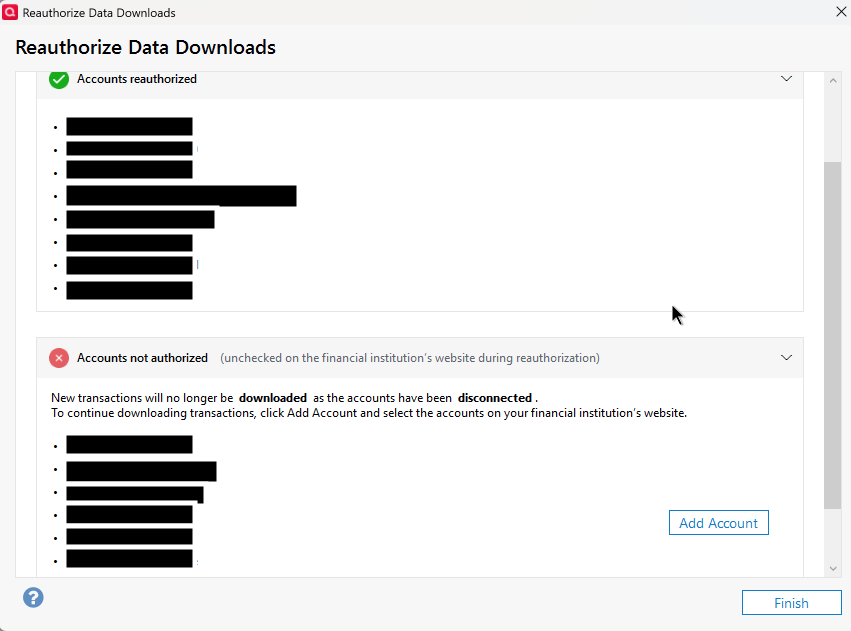
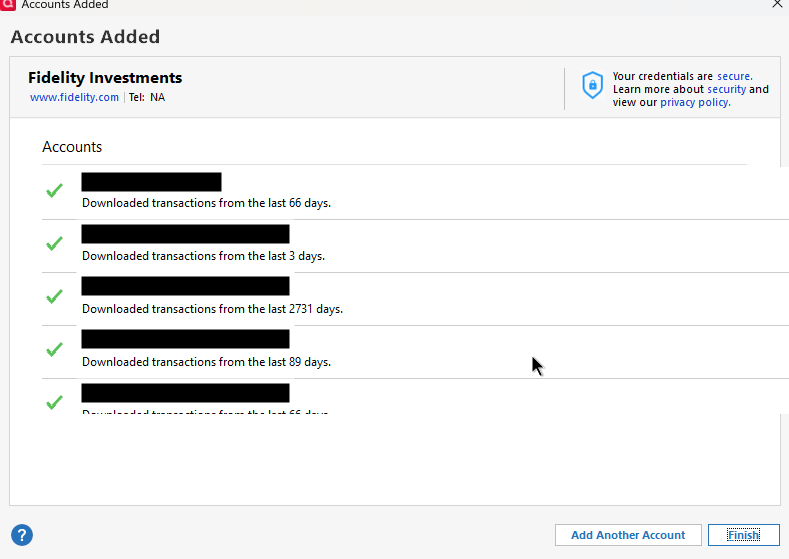
One can see that the account additions thinks there were transactions. But a OSU after got the same CC-601 errors.
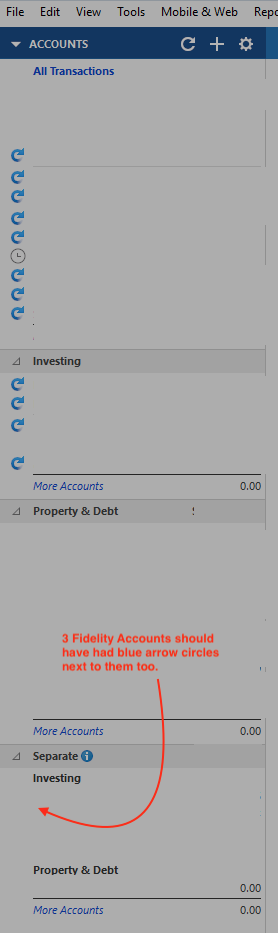
I also noticed a weird bug during the OSU: the little blue circular arrow showing an update in progress for affected accounts in the Accounts panel didn't show up for "Separate" accounts, despite them clearly being included.
I also sent a message to Fidelity Electronic Channel Support (general client service at Fidelity hadn't even heard of Quicken — which is ridiculous in and of itself) since they don't have weekend phone support hours (of course).
Whether it be Fidelity, Intuit, or Quicken causing this never ending EWC+ debacle, please get senior engineers on each team together and get this resolved for good! This is nuts how unstable Quicken has become.
1 -
@Quicken Kristina @Quicken Laura
The only subtle difference I notice between my old file (where the Fidelity OSU still works) and the new copied file with fresh connections (where it gets CC-601 errors) is this:
In the OSU progress dialog for the old file, I see TWO lines for Fidelity Investments, one for my Cash Management Account, and one for all the rest. In the new file, I see ONE line for Fidelity Investments in that progress dialog.
The Online Center only shows one entry for "Fidelity Investments" in both files.
0 -
I am experiencing this issue as well. Is Fidelity and Quicken something that is just not usable anymore? It's been down since around March 2nd.
I have a simple test case of creating a new Quicken file and adding one of my Fidelity brokerage accounts. It sees the correct balance, but does not download any transactions and gives that CC-601 error seen earlier in this support thread.
This is weird that has lasted so long and with no serious update from Intuit. What should we do? Is it time to start considering Quicken alternatives?
Jeff
3 -
I'm using R66.23 Build 27.1.66.23.
As a long time software engineer, I also strongly agree with @jblevy01.
0 -
Totally agree with @jblevy01 - 30 years of Quicken for me and this is a major mess.
The fact is for me Fidelity via Quicken has become unusable and its been MONTHS! Worse yet this change was forced on Fidelity users in September of last year and has NEVER recovered! It became so bad I deactivated Fidelity in One Step Update back during the CvrShrt mess for fear of the hours required to clean up the mess or revive the backup. Now its a new issue! How do we know when it is safe???? Multiple false starts so far.
The value of my subscription to Quicken is unquestionably diminished and has been for almost 6 months. I am wondering how I ask for and receive a credit…can you please provide that info Quicken Support? Who do we connect with to make such a request???
5 -
Quicken needs to step-up it's game or prepare to lose customers. The Fidelity download is a BIG deal and needs immediate attention with daily updates to the user community. If and when they get the Fidelity download repaired, they then need to hire the right developers to fix the software so that users can reliably access qdata files stored in the Cloud. I use OneDrive to store my Quicken data so that it's backed up and accessible from multiple devices. Sadly, Quicken software is not multi-user friendly or cloud friendly.
4 -
Agree with @spence288, @labailey AND @jblevy01.
Interestingly @jblevy01 post seems to have been removed from this thread. Or I am missing it. Why?
@bdantes I think we have all tried those things many times. Quicken <> Fideliy is flat out not working and we are not receiving very good feedback from Intuit as to what their plans are.
I have relied so much on Quicken and have so much data in it, I am not looking forward to changing, but beginning to realize I may not really have much choice.
Can anyone suggest alternatives? Maybe discussing Quicken alternatives in the Quicken support forum will help us get the attention we deserve …
2 -
Yes, if someone knows of a good alternative that supports robust and complete migration / conversion of Quicken data, I'm all ears.
0 -
Your most recent update:
UPDATE 3/9/26"We do not have an ETA at this time for a resolution for this issue, though our teams continue to work towards a solution. We apologize for any inconvenience and thank you for your patience."While I sympathize that you are limited to what engineering tells you, these shell updates are simply inadequate. Your users need more detail than this. Where is the cause? Fidelity? Intuit? Quicken? All of the above? What is specifically being explored? What is it that is preventing an ETA on a fix, especially after this has been going on over a week?
Even when these issues are finally resolved, we see no detailed post-mortem. Given how often this stuff seems to be occurring, even if there's nothing Quicken can do about it, detailed information is always better than statements like above.
Please make your executive product management aware that this stuff (and the way it's communicated) is really alienating your users and making the product look unreliable.
2 -
Doing a little AI searching, [Removed-Third Party Software] might be an acceptable alternative. I say acceptable, because I did not find anything that is as functional as Quicken. Also, even though it says you can import a QIF file (exported from your current Quicken file), I suspect it won't be that seamless for a large and complicated Quicken file like I have, going back 20 years. I would need to try it out and verify that the Fidelity and other connections work as well. I don't want to end up with a similar set of issue with other software … Beginning to think it may be easier to switch away from Fidelity … just kidding, that would be a nightmare and have all sorts of other daunting financial implications … I may just go back to Excel;-( or maybe I will write my own small significantly less functional program myself haha. Pretty bad state of affairs …
1 -
I've been looking at [Removed-Third Party Software]. It will do a QIF import but if your data is like mine, it will be full of discrepancies. You can install the full version and test the UI but limited to 100 manual transactions. Right now, I'm just using it to help clean up the Quicken QIF file. For instance, one issue is making account transactions reference back to the same account. Quicken lets you do this, but it isn't a standard accounting practice, and it causes problems in the export/import. There's much to consider and it wouldn't be an easy switch all things considered that Quicken does, whether well or not.
----Quicken User since 1998 ----
1 -
Fidelity Electronic Channel Support points the finger at Quicken:
“I am sorry that you have been experiencing these issues with your Fidelity Connections in Quicken. Quicken has made us aware that this is a known issue they are investigating internally. They have not given us a time frame for repair but you can can get updates from the Quicken Community Support page on their website.”1 -
@Quicken Kristina has posted that this issue has been resolved. Can anyone confirm this?
-1 -
Nope, not for me. I even disconnected, reauthorized, and remapped all the accounts; Same errors.
I think she was updating a different error, zero balances.0 -
@shtevie where did you see this post by @Quicken Kristina? It's not in the main status page.
Definitely still broken for me.
0 -
You can also add me to the list with same error. It started appearing about 2 weeks ago and continues. It seems we will just have to wait till Quicken support can identify the issue and fix it. I have also done resetting of every Fidelity account and issue still remains.
0 -
RESOLVED 3/9/26 Fidelity Investments-Missing Transactions/Incorrect Balance/Missing Securities/Etc.
RESOLVED 3/9/26
This issue has been marked as resolved. However, this Alert will remain available for those who may still be experiencing it.
If you’re still encountering the issue, we recommend reaching out to Quicken Support for further assistance.
Thank you!https://community.quicken.com/discussion/comment/20542253#Comment_20542253
1 -
@shtevie where did you see this post by @Quicken Kristina?
I have a simple test of creating a new Quicken file and connecting one Fidelity account (I select simple investing). I confirm as of this morning no transactions are downloaded and when I perform an update I get the CC-601 error.
The problem is not fixed yet. I am so depressed I did a [Removed-Third Party Software] ;-)
1




