Bill Reminders Being Automatically Entered and Duplicated AGAIN
Comments
-
I have noticed differences in how certain reminders are treated with this issue.
I primarily use reminders that I manually enter into the register. On those it will create duplicate entries as discussed on all of the prior comments, and it will show in the 'Downloaded Transactions' list to be accepted.
I do, however, have a few reminders that are set to automatically post into the register and those are handled slightly different.
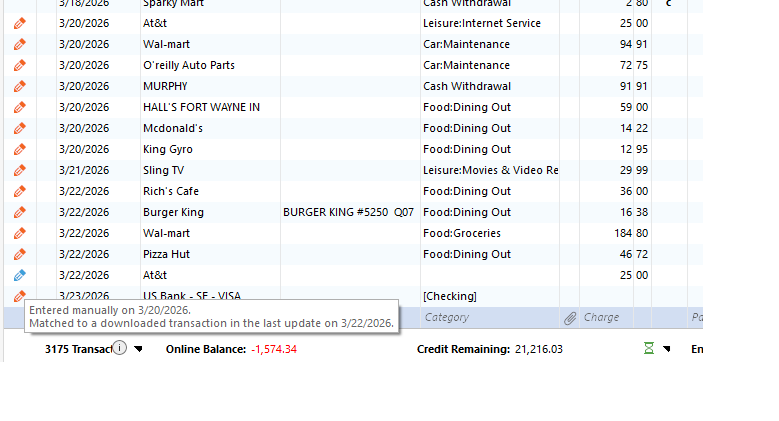
At the top of this list, you can see that AT&T was auto-entered on 3/20 as planned. At the bottom of the list you can see where OSU entered the transaction on 3/22 when it was downloaded. Notice the blue pencil, no category, and it is not marked as clear. This never showed in the 'Downloaded Transactions' list to be matched at all. I hovered over the pencil to show what it showed. I have only seen the blue pencil on the reminders set to auto-post but entered by OSU.
I don't know if any of this helps, but I have found, in my limited programming at work, that sometimes the smallest detail can set off the lightbulb showing where to start looking.
 0
0 -
I just did some further investigating and found the AT&T transaction shown above is still pending at the bank. So it has not been actually downloaded yet. Since last month's AT&T entry was the first time I noticed this issue on my system, I am going to watch this one some more. If I recall, there was another issue then when it actually cleared the bank and was ready for download.
0 -
Hello All,
Thank you for adding to this discussion.
The escalation ticket for this issue is still actively being worked on. If you would like to contribute to this investigation, you can submit your log files. See instructions on how to do that in my previous post:
Thank you!
[CTP-16297]
Quicken Alyssa
Make sure to sign up for the email digest to see a round up of your top posts.
0 -
Do you want log files every time we post here, or every time we have a new incident.
Either way, I just sent log files for an issue where OSU downloaded 5 random transactions on an account that has not been used in a year. They were valid transactions but had already been downloaded, matched, and reconciled back when they were made. One of them was from a year and a half ago.
I tagged the report/log files to check this discussion group for this post explaining it.
I don't know if this is a related issue or not, but since it had to do with OSU, I thought I would start here.
ALSO: I mentioned it in an earlier post and it happened again with this update. I am NOT supposed to be SYNCING or using cloud, but during this same OSU a window popped up stating 'Syncing Quicken with cloud accounts'
0 -
Fwiw, I also just reported this issue through the app. I did not include log files because it seems like this is a logic issue handling transactions after they have been downloaded. It also seems like the issue affects all sorts of reminder-based transactions (from what I am reading here). This fundamental functionality is clearly very, very broken IMO.
1 -
Thank you both for updating this thread.
I added the new logs you sent to the escalation ticket. No, you don't have to send them every time you post. I was mostly stating that anyone who has not done it and wants to can. But having fresh sets of logs after some time has passed is helpful too, so thank you for that.
I reviewed your profile internally, and it shows that you have Cloud Sync disabled, so I can confirm that your data is not being synced to the Quicken Cloud. I have seen instances where a file that has had sync on at one time and then sync was turned off later still flashes the sync progress wheel quickly, and then it disappears. I am guessing that is what you are seeing, just Quicken triggering a sync, registering sync is off, and then continuing without actually performing a sync.
The issue you brought up with the random transactions downloading into an old account. I think that would be considered a completely separate issue.
Thanks again.
Quicken Alyssa
Make sure to sign up for the email digest to see a round up of your top posts.
0 -
May have a temporary workaround. But, more importantly, may have somewhere for the programmers to look!
I use a reminder for payroll with multiple split lines for taxes and a transfer. I also have several reminders that I post weekly to CC payments. For the last few weeks these reminders have fallen victim to the duplication issue. This week I posted the reminders on Sunday as always even though they will actually occur on Tuesday. I then edited the date on all of these items to Monday's date. I did this to make it easier to make sure to match the downloads to the entries that I entered, knowing that any duplicates would have the true date, but the correct entries would be off 1 day.
I did not have to worry about matching the download to the correct entry because it DID NOT DUPLICATE.
It seems when OSU is looking for matching entries it is not seeing the entries are there if they are dated for the true date. But it does see them if they are dated for the day before.
This does not explain the AT&T duplication in my post from March 23rd. But it may still have something to do with the date range it is looking at for matching. Or it could be that since that entry automatically posts to the date set in the reminder, OSU is not recognizing it. Also, that issue was with a pending transaction at the bank.
The way my bank handles the payroll entry, it will never show as a pending transaction.
On my March 12th post, I mentioned OSU duplicating my payroll reminder twice when it saw a second transfer I had entered in addition to the regularly scheduled transfer embedded in the payroll reminder. When I manually entered that transfer, Quicken asked if this entry was the same one in the reminder to which I replied NO. If I am not mistaken, OSU did not look at the reminders when downloading until recently. In the past it would have just shown 'New' in the download list if it saw something it did not recognize. I know it does this if the amounts are off slightly as my wife's payroll can vary slightly due to early or late clock-ins and tax rounding that FICA likes to see. My point is, if OSU is going to try matching to reminders, on the chance that the user did not post the reminder beforehand; it should, at the least, ask if should, not just assume. There is a saying about when you assume….
2 -
Others have noted elsewhere if a transaction is manually entered directly into the register it will match without duplicates. It is only when the transaction is entered using a scheduled reminder that duplicates show up.
I think what you saw when you edited the date is that Quicken changed the transaction from a scheduled reminder entry type entry into a manual register entry. It's still good information but not really new.
2 -
No.
There is a difference between 'manually entered transaction' for filling your gas tank and 'manually posted reminder' for your weekly paycheck.
I've been fighting this problem for about a month now. Find my first post from March 12th, and see that I had an issue with a 'manually entered transaction' for an extra transfer for the same amount as one in my payroll reminder that OSU duplicated twice as my full payroll reminder. Once for the payroll download and again for the extra transfer, both during the same OSU.
1 -
Regarding your March 12th post, the transfer behavior could also be associated with the Transfer Detection preference. You did not mention that preference in your post.
If the preference is set to automatically detect a transfer, that could explain the behavior you saw. If transfer detection is enabled, the Confirm option should also be enabled. Otherwise, the automatic linking of transfers in your March 12th post would be as designed, but maybe not as desired.
0 -
I don't like anything being done without my permission and those settings are set in such a way as to prevent it.
I do need to make a quick off topic comment. I used to have an offsite IT person for work that helped me through many scrapes until he recently retired. His name was Markus and he seemed to like the number 57 a lot. It's not you is it??
1 -
I am experiencing the same thing that @Greg Brown shows above.
0 -
Hello All,
Thank you for contributing your findings to this discussion.
Progress is being made on this escalation, and we appreciate the contributions. We do not have an ETA as to when it will be resolved.
Thanks again!
[CTP-16297]
Quicken Alyssa
Make sure to sign up for the email digest to see a round up of your top posts.
-1 -
Pleased to see that you are working on a resolution to this. I have dozens of vendors/customers/online downloading accounts that are being affected by this and have been pulling out hair over reconcilation issues caused by Q-added data duplicating entries already made. Will the email digest notify me when this is resolved? I have had to manually reconcile to printed statements to weed out some of the duplications that have thrown my balances off…
I agree with comments above noting this seems to have to do with pending and scheduled transactions that a gremlin is reposting. Looking forward to an early resolution! Thank you!0 -
Thank you for adding to this discussion.
If any updates are posted in this thread, and you have it bookmarked, then yes, you should receive an email notification. Unless, of course, you have turned the notifications off.
If I receive any updates on this, I can post them here; however, we do not always get updated on these escalations. You can check in here and ask for updates periodically, or check by testing it in your Quicken software.
Hope this helps!
Quicken Alyssa
Make sure to sign up for the email digest to see a round up of your top posts.
0 -
I am having the same issue where scheduled future paychecks have been auto-entering duplicate transactions with the wrong amounts upon transaction download. I just reported the problem and uploaded the log files via the link within Quicken.
1 -
Thank you for adding to this discussion and sending over your log files.
I have added them to the escalation ticket.
Thanks again!
Quicken Alyssa
Make sure to sign up for the email digest to see a round up of your top posts.
-1 -
A very REAL bug! For the past 2 months I am experiencing this issue on multiple accounts. Seems that duplicates can appear after (during) a transaction download. For me, duplicate entries ONLY appear for a transaction that was automatically entered to the register by virtue of the "Auto Enter" setting in the reminder. Dupe entries have no category assigned, so are easily spotted. Quicken attempts to match to the dupe rather than the properly categorized transaction. You can select "unmatch" or "manually match" on the right click menu in order to correct the matching. I usually just delete the bogus dupe and Quicken then matches to the remaining (proper) transaction. Is there an official Bug Fix posting that I can bookmark to track this problem?
1 -
Thank you for adding to this discussion.
This issue does not have an open alert associated with it at this time, so I don't have a post you can bookmark to follow the progress.
You can, however, check in here periodically for updates if you would like.
Hope this helps!
[CTP-16297]
Quicken Alyssa
Make sure to sign up for the email digest to see a round up of your top posts.
-1 -
So this is a widespread problem that can significantly affect being able to properly balance accounts and match transactions, but here we are 6 weeks later, and there is still no fix. And this is for an issue that has been a problem in certain situations for many months prior, which is now more far-reaching. I personally find this unacceptable. I know you say that it's been escalated, @Quicken Alyssa, but it doesn't seem to be escalated nearly high enough, IMO. If we can't count on Quicken to at least allow us to balance our accounts — the most basic of financial tasks —, we might as well just use plain spreadsheets or even paper and pen!
8 -
Thank you for adding to this discussion with your comments and concerns.
We apologize that you and others have been affected by this issue for an extended period of time. I can assure you the ticket is still active, and progress is being made.
We appreciate your patience as we work through this.
Thanks again!
[CTP-16297]
Quicken Alyssa
Make sure to sign up for the email digest to see a round up of your top posts.
-1 -
I wish it had only been going on for six weeks, it’s been affecting me since November. They’ve made some changes since November, which only made it worse. It used to only affect accounts that had pending transactions turned on now it affects all accounts.
Quicken Classic - R67.7, Windows 11 PRO current on updates
My data file is NOT being synced nor backed up.
3 -
Thanks for chiming in!
We apologize that you, too, have been affected by this issue.
Please bear with us while we work toward a solution.
Thank you.
Quicken Alyssa
Make sure to sign up for the email digest to see a round up of your top posts.
-1 -
I just noticed that when these transactions are put into the registry, and you right-click on the transaction and try to click on "Go to Matching Transaction". The following error is returned. "The transfer transaction is to an account that no longer exists in Quicken". However, the account that is showing does match the exact name of an existing account.
Is there a way to search through all transactions to find any transaction that has this error on it? I am sure that some of these transactions are in my registry due to this error and need to fix these issues so that they do not cause problems with reports, potentially, and other information within Quicken.
[Edited-Readability]
0 -
Thank you for adding to this discussion.
Unfortunately, there is no way to easily search for transfers with this error. You can narrow down your search to all transfers and check them one by one. Another thing you could try is validating your file. The file validation sometimes helps clear up things like this.
To do this:
- Save a backup.
- Go to File.
- Select Validate and Repair file…

- Check the first box for Validate file.
- Click Ok.
Once the validation has completed, it will produce a report of anything it has found/corrected. If you are unhappy with the results for any reason, you can restore the backup you saved before validating.
Hope this helps!
Quicken Alyssa
Make sure to sign up for the email digest to see a round up of your top posts.
-1 -
The error is because the offsetting account is supposed to be the "category" and since this issue is adding the transactions to the register without the category, that's why it happens. If you want to search, search for transactions that are blank in the "category" field.
Quicken Classic - R67.7, Windows 11 PRO current on updates
My data file is NOT being synced nor backed up.
1 -
This issue is only affecting debits not credits. I have deposits as reminders and they are never added without category or duplicated. Not sure if that helps at all with this issue…
Quicken Classic - R67.7, Windows 11 PRO current on updates
My data file is NOT being synced nor backed up.
2 -
Hi Greg
The Category field is not actually Blank. It is showing a category in it that has the exact name of another account it is supposed be assigned to.
 0
0 -
OK, sorry about that. I'm going based on my experience.
Quicken Classic - R67.7, Windows 11 PRO current on updates
My data file is NOT being synced nor backed up.
0 -
I am having the same experience. I have reminders for expenses that are being entered automatically that shouldn't, resulting in duplicate transactions for a month or two now. It has been very annoying to look out for this and delete them, as I have a lot of reminders. I don't see any fixes anywhere.
2