PNC Doesn't download.

I spent almost an hour on the phone with PNC, tried resetting, deactivating, checking for updates, the usual. We then created a Test file and added PNC to it. It worked. They suggested a corrupt file and that I talk to Quicken. The error I get now is OL-332-A: login information is incorrect. I have no problem logging in to PNC directly, and the test file still works. All my other accounts work well. I see other posts re similar issues. How do I fix a corrupt file if there is one?
[Edited - Readability]
Answers
-
Hello @AirForcTwo,
Thank you for letting us know you're seeing this issue. To troubleshoot file issues, I suggest that you start by validating your data file. Please save a backup file prior to performing these steps.
Validate:
- File
- Validate and Repair File...
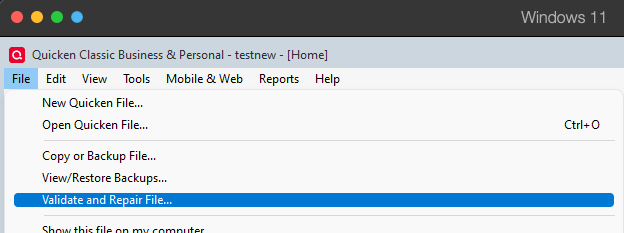
- Validate File
- Click OK
- Close the Data Log
- Close Quicken (leave it closed for at least 5 secs)
- Reopen Quicken and see if the issue persists.
Please let me know how it goes!
Quicken Kristina
Make sure to sign up for the email digest to see a round up of your top posts.
0 -
I tried that at the beginning of this problem, but I just tried the validation again. Same results. What next? Looks like there are lots of people having this problem.
[Edited - Readability]
0 -
Thank you for your reply,
A lot of people are reporting that transactions aren't downloading from PNC when connected using Direct Connect, but they aren't seeing any error messages/codes.
Are you still seeing the OL-332-A error in your main file? If so, the next step is to restore a backup from before the issue started, then verify if the issue is resolved in the newly restored file.
I hope this helps!
Quicken Kristina
Make sure to sign up for the email digest to see a round up of your top posts.
0 -
I had a similar problem 2 months ago. Do all your other accounts work as they should with PNC Direct Connect? In other words, are the other accounts PNC DC connected and do they get DC downloads and can they do BillPay?
Charlie
0 -
Charlie, All my non-PNC accounts work well. The only one effected is my PNC Checking account. It returns no records during an update and none of the payments are uploaded.
0 -
Ok. I would check to see that the correct PNC DC PIN is in the password vault. Do not delete any PINs unless you have the original correspondence and PIN from PNC.
If it is there, then you have a problem similar to what I experienced. PNC reset something on their side and I was able to connect again and download. In my case, when I disconnected from DC, I could not completely reconnect. The process threw an error at about 95% completion. The account looked connected, but Bill Pay didn't work and all I got was the OL-332-A.
0
