PNC Bank - OL-297-A Error - Not Able to Connect or Download - Quicken Direct Connect
Comments
-
I switched over to using ACH to pay my credit cards and Check Pay (Express Web Connect) where ACH could not be done. I am at peace now. From ChatGPT:
Here’s the real, current situation with PNC Bank and Quicken Direct Connect — and it’s a little messy:
👍 Does PNC still work with Quicken Direct Connect?
Yes — but with important limitations.
- PNC still supports Direct Connect for existing users
- It allows:
- Transaction downloads
- Transfers
- Bill pay (this is the big advantage)
👉 If you already have it set up, you can keep using it.
🚫 Big change: PNC is phasing it out (sort of)
- PNC has stopped accepting new enrollments for Direct Connect
- They’re pushing users toward Express Web Connect+ (newer API method)
👉 In plain English:
- Old users = grandfathered in
- New users = can’t easily sign up anymore
🔄 What PNC wants you to use instead
- Express Web Connect+
- Uses a secure login/token through PNC’s website
- No direct OFX connection
- No built-in bill pay from Quicken
Quicken confirms this transition and even warns users not to accidentally switch off Direct Connect if they rely on bill pay
⚠️ Real-world reliability (2025–2026)
There have been recent issues reported:
- Some users saw downloads stop working in early 2026
- Problems were often traced back to PNC’s systems, not Quicken
👉 Translation:
Even if you have Direct Connect, it’s not as stable as it used to be.💡 Bottom line (this is what matters)
- ✔️ You can use Direct Connect with PNC
- ✔️ It’s the best option if you want bill pay inside Quicken
- ❗ You probably can’t newly enroll today
- ❗ Long-term, PNC is moving away from it
👍 My practical advice
- If you already have Direct Connect with PNC → keep it
- If you don’t have it → don’t count on getting it
- Be prepared that:
- You may eventually need to switch to Express Web Connect+
- Or handle bill pay directly on PNC’s website
If you want, I can walk you through:
- How to check if your account is Direct Connect
- Or how to reconnect it (a lot of people accidentally lose it)
Sources how to reconnect it
Here’s a practical, step-by-step way to reconnect Direct Connect with PNC Bank in Quicken—and just as important, how to avoid accidentally losing it.
🔧 Before you start (important)- Back up your Quicken file
- File → Copy or Backup File
- Make sure you already had Direct Connect before
(PNC usually won’t let you newly enroll anymore)
- Open Quicken
- Go to your PNC account
- Click the gear icon ⚙️ → Edit Account Details
- Go to Online Services tab
- Click Deactivate (this won’t delete transactions)
👉 Now reconnect carefully:
- Click Set up Now
- Search for: PNC Bank – Direct Connect
- ⚠️ Do NOT pick:
- “PNC Bank” (this is Express Web Connect+)
- ⚠️ Do NOT pick:
- Enter your PNC user ID & password
- When accounts are found:
- Link to your existing accounts (don’t add new ones)
If you select the wrong option:
- ❌ “PNC Bank” → switches you to Express Web Connect+
- ✔️ “PNC Bank – Direct Connect” → keeps full functionality
👉 This is where most people lose bill pay capability.
🔐 If it fails (common with PNC)Try these fixes:
1. Reset your PNC profile
- Log into PNC website
- Go to:
- Customer Service / Security settings
- Look for:
- “Quicken/QuickBooks access” or “Direct Connect access”
- Re-enable it if needed
2. Confirm Direct Connect is still active
- Some PNC accounts require:
- Enrollment in Direct Connect service
- Sometimes a small monthly fee
3. Wait and retry
- PNC has had intermittent outages
- Try again later the same day
If you successfully reconnect:
👉 Do NOT click “Improve connection” or “Update connection” later
- That often forces migration to Express Web Connect+
That usually means:
- PNC has removed Direct Connect for your profile
At that point your options are:
- Use Express Web Connect+ (downloads only, no bill pay)
- Or manage bill pay directly on PNC’s website
- Always choose: “PNC Bank – Direct Connect”
- Link accounts carefully
- Avoid any prompts to “upgrade” connection
[Edited-Removed Blurry Images]
1 -
Thank you for chiming in.
The change you made makes sense, and I hope it continues to work well for you.
For the OL-297 error, you can bookmark the Open Alert to be notified when this issue is resolved.
Thanks again!
Quicken Alyssa
Make sure to sign up for the email digest to see a round up of your top posts.
0 -
Here’s the
real, current situation with PNC Bank and Quicken Direct Connect—While there is some good information in this ChapGPT text there is also a fair amount of inaccurate information in it. That's one of the issues with AI….it does occasionally provide inaccurate or misleading results.
Of particular note regarding this:
- Contrary to what ChapGPT states, PNC does still allow new DC connections to be made. There have been no restrictions regarding this put into place by PNC. PNC's website still encourages people who use Quicken to sign up for and use DC if they want to exercise DC Bank Bill Pay and/or to transfer funds between PNC accounts.
- There have been no official communications from PNC that it is moving away from DC, that it is restricting DC to only existing accounts nor that it is preventing new DC setups. ChatGPT's statement that PNC is moving away from DC is contrary to what has been directly messaged by PNC to many other Quicken users.
- PNCs support for EWC+ was implemented to replace EWC, not DC. Previous PNC communications posted by Quicken in this Community have stated that PNC will continue to offer DC support.
- DC for Consumer accounts is always free. However, for Business accounts there is a small $2/month fee for DC but it has always been this way and it is not a new change.
It appears to me this ChatGPT message incorporates a bunch of misinformation that has floated around for the last 3 years on the Internet and in this Community beginning when PNC first migrated the EWC connection to the new EWC+ connection. But that EWC+ connection only eliminated EWC support, not DC support.
Your decision to use the EWC+ (not EWC) connection and to use the optional Quicken Bill Manager (QBM) feature for Quick Pay (which you refer to as ACH) and for Check Pay is certainly a good option. I hope it continues to work well for you. But for those who have been able to successfully establish a DC connection with PNC the DC Bank Bill Pay feature provides a superior and more reliable bill payment method that can, depending on the subscription, can be lower cost. Each of us needs to make the decision about which best meets their wants and needs.
Quicken Classic Premier (US) Subscription: R67.7 on Windows 11 Home
0 -
Several people (including myself) have reported in other threads the OL-297-A error code and the missing transactions issues with DC appear to have been resolved beginning last night. If anyone is not getting the same improved results, please post it here along with your observations.
Quicken Classic Premier (US) Subscription: R67.7 on Windows 11 Home
3 -
I do recall receiving an email from PNC Bank several months stating that they were discontinuing DC and encouraging the use of EWC+ instead. So, I don't think DC is on its roadmap. It would be nice to get clarification directly from PNC.
0 -
My OL-297-A issue seems to have been resoved at PNC and I've successfully connected using DC and downloaded transactions for 2 days now. I haven't tried my DC bill pay since though.
0 -
Anyone else have an issue with Online Balance reported as 0.00? This started yesterday for me.
 0
0 -
Hello All,
Thank you for updating the discussion.
I am happy to hear that some of you are finding success. For anyone still experiencing the error, the Alert is still open, and you can bookmark it for updates.
Thanks again!
Quicken Alyssa
Make sure to sign up for the email digest to see a round up of your top posts.
0 -
I have not received any email from PNC stating that they were discontinuing DC. If you can find that email and post a picture of it here that would be most helpful.
But, as mentioned in my earlier post, PNC is still promoting using Quicken to pay bills and to transfer funds between PNC accounts and that is a function that is only available with DC. Do a search for "Quicken" on their website and there will be several articles about DC that pop up.
Also, there is a Quicken Support Article regarding PNC's discontinuation of EWC and replacing it with EWC+ that states pretty clearly that PNC continues to support DC.:
I also have an email from Quicken stating the following:
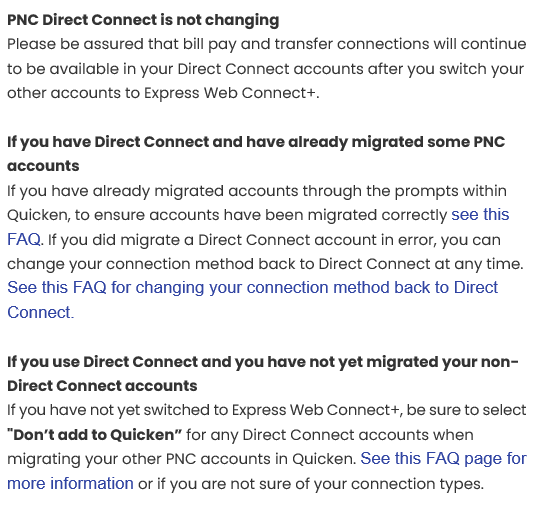
BTW, the reason why the Support Article and the email referenced above came out (a couple of years ago) is because when PNC's cut in of EWC+ first came out there was some communication from Quicken that was not totally clear regarding it that made many people think at that time that PNC was discontinuing DC. So, these were published to clear the air regarding that.
There have been other financial institutions that have discontinued support for DC and replaced it with EWC+ and one of the most recent ones was Fidelity. Maybe that is the email you are thinking of?
I am pretty sure that in every case where a financial institution dropped support for DC and replaced it with EWC+ there was pretty clear prior messaging from both the financial institution and from Quicken about it. IMO, unless such clear messaging regarding the discontinuation of DC is provided by both the financial institution and by Quicken it is pretty safe to assume that DC will continue to be supported.
Quicken Classic Premier (US) Subscription: R67.7 on Windows 11 Home
1 -
After the OSUs for the evening of 3/30 and through 3/31 (the ones where the OL-297-A and missing transactions errors appears to have been resolved) all of my PNC accounts had the correct online balances reflected below the register.
This morning:
- My checking account incorrectly shows an online balance of $0.00. There were no new transactions downloaded but none were expected. No error code/message was presented.
- My 2 savings accounts show the correct online balances. There were new transactions downloaded into both accounts.
This seems eerily similar to the $0 online balance issue PNC had with DC this past Jan/Feb. If it is, I should be getting downloaded transactions into checking by tomorrow and then I'm guessing the online balance will be correctly updated.
Quicken Classic Premier (US) Subscription: R67.7 on Windows 11 Home
1 -
@Boatnmaniac I would have to agree that PNC at this time has no intention of discontinuing Direct Connect. I use PNC Direct Connect with four different user accounts accross 13 PNC accounts and I have never been discouraged from using DC at PNC. In fact, the local PNC folks out here have plenty of web based DC support tools available to help customers get started. I know this only because I sat with the local branch manager a few times this past Fall to discuss the problems with DC. I do remember an email from PNC about discontinuing EWC in favor of EWC+, but that is all.
1 -
Hi everyone,
I appreciate you all continuing to share updates here.
If you’re still encountering the issue, please note that the alert is still active; you may want to save it to easily check for any new developments.
I have linked the alert here:
Thank you!
Quicken Alyssa
Make sure to sign up for the email digest to see a round up of your top posts.
0 -
UPDATE: I just ran OSU this evening. PNC did not download any new transactions (none were expected) but the Online Balance updated to the correct amount. So maybe the $0.00 Online Balance earlier today was just a fluke?
Quicken Classic Premier (US) Subscription: R67.7 on Windows 11 Home
0 -
Ran Update Now and still no update - 0.00. Decided to run OSU and once completed, the Online Balance updated as expected. Why the difference, who knows?
Hopefully PNC DC will go back to being reliable, but this does not give me much confidence. PNC DC once was bulletproof.
1



