Checking account register has a Check# field. I like to put INT, POS, ACH, etc there (Q Mac)
QUICKEN CLASSIC, using QMac since 1992.
In Q2007, I could get/make a drop-down of various entries besides a check number. I currently can type in what I want, but there is no drop-down. In Q2007, I could type the 1st character and tab, and the system would fill it in. It's tedious to type each one.
Does anyone else do this, and what is a quick fix?
Paulette
Answers
-
Hello @polly5931,
Thank you for reaching out with this question. While the Check # column doesn't currently have a dropdown to let you select INT, POS, ACH, etc., there is an Idea post requesting that functionality be added:
I recommend adding your vote and a comment. Ideas that get enough votes may be implemented in the future!
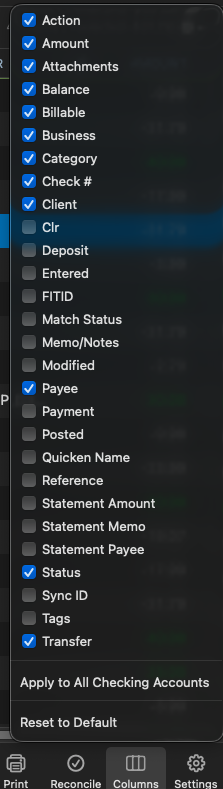
In the meantime, in that idea discussion, @jacobs recommended using the Action column. That column isn't visible in your register by default, but you can turn it on by clicking the columns icon near the lower right and selecting it.
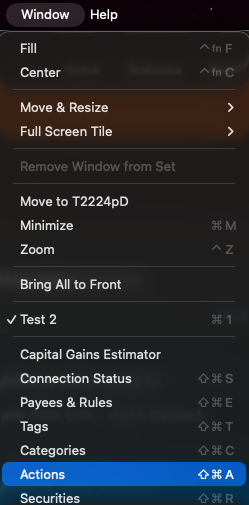
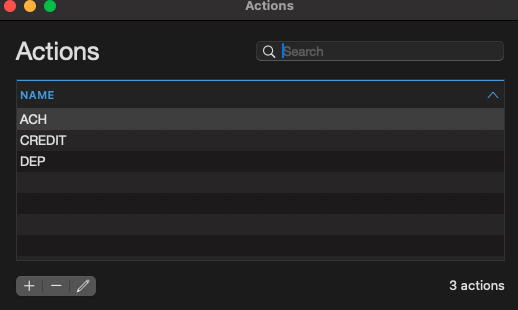
You can customize the Actions you want to use by going to Window>Actions and adding/removing actions as appropriate.
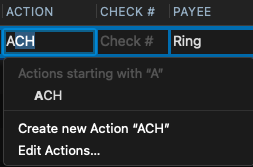
Once you have the column added to your register and the actions you want to use set up, you can type the first letter of the action, and you should see a dropdown of actions you can select that start with that letter.
I hope this helps!
Quicken Kristina
Make sure to sign up for the email digest to see a round up of your top posts.
0