Mondo Patch for R67.7 does not completely install Quicken
The Mondo Patch for R67.7 (as with recent Mondo Patches) continues to not completely/properly install Quicken.
Context: I am running R62.16 with no issues on Windows 10 Pro.
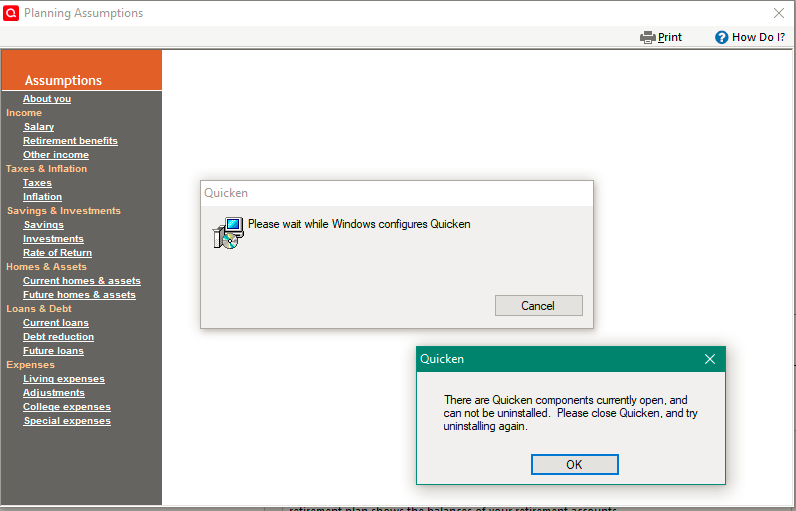
When I launch Quicken after running the R67.7 Mondo Patch, back come prompts such as below if I 1) try to Change Assumptions in the Lifetime Planner or 2) open the Tax Planner:
Due to this issue, back to R62.16 I will go.
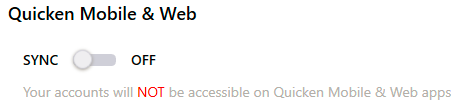
- Deluxe R67.7 on Win 10 Pro 22H2. I don't use Bill Pay, Online Backup, Mobile & Web. Cloud Sync is off.
Comments
-
For the record, this same 'components open' or 'prompt installation' issue also existed with R55.13 (and interestingly, it was at the same time when QXF file imports were also broken).
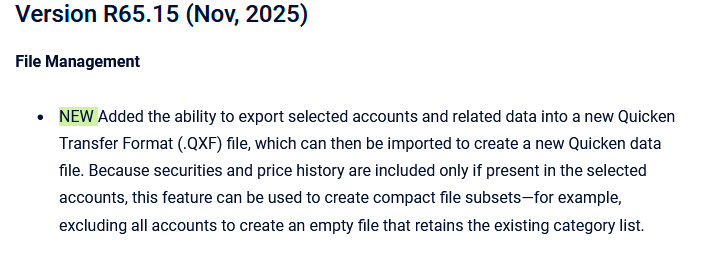
I first saw this current 'components open' or 'prompt installation' issue with the R65.15 Mondo installation in November 2025, again at the same time as the following 'new' QXF feature was introduced:
The issue has persisted in every Mondo installation from R65.15 to R67.7.
- Deluxe R67.7 on Win 10 Pro 22H2. I don't use Bill Pay, Online Backup, Mobile & Web. Cloud Sync is off.
0 -
Hello @TangledWeb,
Thank you for reaching out! I can see that you brought up this issue when R66.18 was released also:
Did you contact Quicken Support, as recommended?
Based on the information you have provided and the fact that I can't replicate the issue, I suspect the problem is being caused by something specific to your device. Is this issue happening on only one device, or on multiple devices? Do you use an antivirus? Is your device a personal device or a work device?
I look forward to your reply!
Quicken Kristina
Make sure to sign up for the email digest to see a round up of your top posts.
0 -
@TangledWeb I find it a bit curious that you've got the Planner open when trying the update.
SO, as an experiment, close all of these "subordinate" windows in Q … leaving open ONLY the HOME dialog.
Then click HELP, Check for updates. What happens when you do that?
Q user since February, 1990. DOS Version 4
Now running Quicken Windows Subscription, Business & Personal
Retired "Certified Information Systems Auditor" & Bank Audit VP0 -
Hello @Quicken Kristina and @NotACPA
Update! I have discovered that my old tried-and-true method of installing Quicken no longer works.
My old method for the past 5-6 years has been to completely uninstall and then reinstall using an original 'Quicken.exe' installation file that I downloaded back in 2019 when the subscription model first came out. Then I would simply update using the Mondo patch to the version I wanted.
Today I tried installing from scratch by using a copy of 'Quicken.exe' downloaded today from my account (this 'Quicken.exe' file installed R66.28). Then I updated to R67.7 using the Mondo patch.
Voila! The above problem with the 'components open' and 'prompt installation' prompts has disappeared.
Thanks for all your help!
(PS - I never had the Planners open during an Update - it was always after completing a full mondo installation that I would try to open Lifetime Planner or Tax Planner).
- Deluxe R67.7 on Win 10 Pro 22H2. I don't use Bill Pay, Online Backup, Mobile & Web. Cloud Sync is off.
2 -
Thank you for the update!
I'm glad to hear the issue is resolved!
Quicken Kristina
Make sure to sign up for the email digest to see a round up of your top posts.
0 -
@TangledWeb Sorry for the misunderstanding. It looked to me like the Planner was open because of the 2 dialogs that are on top of the Planner in your original post.
And, as a total aside, you might want to consider updating you signature line.
Lastly, of course, glad you got it working.
Q user since February, 1990. DOS Version 4
Now running Quicken Windows Subscription, Business & Personal
Retired "Certified Information Systems Auditor" & Bank Audit VP0 -
@NotACPA Thanks…I will update my signature line likely in a few days.
I am about to begin reconnecting my Fidelity accounts which I deliberately disconnected before the EWC update fiasco rollout last year. I have been manually updating (luckily not that many) all my Fidelity transactions since that time.
Assuming I have some success with the Fidelity reconnections, I will update the signature line accordingly 😀
Also, I see that R67.7 has been pulled back from all users, so it is perhaps likely R67.7 will not be the final version of R67…
- Deluxe R67.7 on Win 10 Pro 22H2. I don't use Bill Pay, Online Backup, Mobile & Web. Cloud Sync is off.
0 -
R67.7 was never available to all. It was a limited release to see how, after testing, it performed in the wild.
See this
I'm running it, and haven't had any issues, but haven't had a chance to look for reports from others ,,, so I don't know when/if it will be back, or they'll release something else.
Q user since February, 1990. DOS Version 4
Now running Quicken Windows Subscription, Business & Personal
Retired "Certified Information Systems Auditor" & Bank Audit VP0 -
The Manual Patch Update file is available for downloading at https://www.quicken.com/support/update-and-patch-20182019-release-quicken-windows-subscription-product/ . So, anyone can download and install it now.
I am also getting prompted within Quicken to update to it.
So it does not appear to have been pulled back.
I'm excited to see all of the beneficial upgrades, feature improvements and fixes that are included in it. I usually wait a little while before updating to newly released versions but I'm thinking I might bite the bullet and update to R67.7 tomorrow.
Quicken Classic Premier (US) Subscription: R66.28 on Windows 11 Home
0 -
I was prompted this morning to update to R67.7, but later in the day it was gone and R66.28 was back as the latest update.
Due to the number of improvements I too was very tempted and I took the plunge and upgraded to R67.7. So far so good, and even reconnecting Fidelity went fairly smoothly ( a couple of small cash discrepancies which I can work out later).
I have a complete separate copy of the qdf files as they were before I abandoned R62.16 so that if there is a major issue over the next few days I can always go back to my R62.16 comfort zone 😀
- Deluxe R67.7 on Win 10 Pro 22H2. I don't use Bill Pay, Online Backup, Mobile & Web. Cloud Sync is off.
0 -
I manually installed R67.7 on my test setup and posted one of my observations and a most likely bug here.
- Q Win Deluxe user since 2010, US Subscription
- I don't use Cloud Sync, Mobile & Web, Bill Pay1 -
An observation today from reconnecting the Fidelity accounts with R67.7:
Despite my never having enabled Cloud Sync…
…Quicken decided during the reconnection of my 5 Fidelity accounts to enable them for 'Syncing' to the cloud. I noticed this when I turned on the Sync button and saw that the 5 Fidelity accounts were enabled for 'Syncing'.
I unchecked the 5 accounts, 'Reset' my cloud account, and Signed out and back in again (as the same user).
- Deluxe R67.7 on Win 10 Pro 22H2. I don't use Bill Pay, Online Backup, Mobile & Web. Cloud Sync is off.
0 -
@TangledWeb , This behavior is not new and has been sporadically reported in the past. In my case this release didn't modify my settings. But lesson's learned: After every Quicken update and account deactivation/reconnection, I always immediately check the Sync setting.
- Q Win Deluxe user since 2010, US Subscription
- I don't use Cloud Sync, Mobile & Web, Bill Pay0 -
@TangledWeb @BK NOTE, that the above described Sync does NOT, in any way, impact your ability to download from your bank/card/brokerage/etc. Or to upload if the FI supports Direct Connect.
It only enables/disables the ability to sync to/from Quicken cloud … which is only needed if you use the Mobile (on your phone) of Web (via a browser) add-on products.
Using those product is a mixed bag. For some, they work well. But for others they've been known to cause corruption in the data residing in your desktop Q product.
Q user since February, 1990. DOS Version 4
Now running Quicken Windows Subscription, Business & Personal
Retired "Certified Information Systems Auditor" & Bank Audit VP0