Why was this post closed when it is an acknowledged issue without providing a resolution?
Hi @ddemoney, Thank you for reaching out to the Quicken Community!
If you haven't done this yet, I suggest reviewing our support article about how matching transactions work in Quicken. In that thread, multiple users reported different types of issues involving transaction matching, duplicate transactions, and Reminders.
Our support team has requested additional information to better understand what may be causing the issue. Since the behavior can vary depending on the transaction details and the user's account setup, each scenario needs to be reviewed individually.
To help us better understand what you're experiencing, could you please provide the following information?
This information will help us determine how Quicken is matching the downloaded transaction and whether there is a pattern that may need further investigation.
I look forward to your reply and appreciate your help in providing these details!
The transaction date, the download date, and the posted dates are always within a few days of each other. Sometimes the transaction date is a day or two after, sometimes it is a day or 2 before. The amount and payee match; however, the category in the entry created by Quicken is almost always wrong (typically empty). If I delete the incorrect entry created by Quicken, it will then match to the correct entry which was already in the register. This seems to be tied to specific accounts - in some accounts it happens almost every time for several recurring bill payments & income entries; in other accounts, it never happens.
This problem has been occurring for several months and was first reported in the post I referenced above - which was closed by Quicken without giving any explanation as to why or whether it is being fixed. It seems that when a community post is closed, you owe your users an explanation as to why.
Hi @ddemoney, I understand why the closure of the previous post would be frustrating, especially since you’re still experiencing the issue. I also appreciate the information you’ve provided so far. The post was closed after 30 days without activity. This does not mean that the underlying issue was considered resolved.
Duplicate transactions can occur for different reasons and in different scenarios. While the symptoms may look similar, the underlying cause can be different, which is why our team is requesting screenshots of the duplicate transactions along with the transaction details.
Without that information, it is difficult for our team to determine which scenario is affecting your account and investigate the appropriate cause.
If you’re still experiencing this behavior, please provide the requested screenshots and details in this thread. That information will help our team continue investigating the specific behavior you’re seeing. [CTP-16657]
I am not crazy about putting my personal financial information in a public discussion group. If you can tell me specifically what you would be looking for, I can provide those details.
Also, after the most recent Quicken upgrade (R69.29), the behavior changed slightly - OSU now matches the downloaded entry to the correct entry in the register, but the duplicate entry is still there (this is based on a single case, I will have to wait for more transactions to see if it is persistent).
Hi @ddemoney, I completely understand your hesitation about posting personal financial information in a public discussion. You do not need to post any sensitive information here.
Our escalation team is requesting transaction details and screenshots showing the behavior you’re experiencing, including the transactions on the financial institution's website and the duplicate transaction being created. This will help the team compare what Quicken is receiving with what is already in the register.
Since this information may contain personal financial details, I can send you a Direct Message with a secure file link where you can upload the requested information privately. I’ll then make sure it is transferred to the appropriate team for review. I look forward to your reply!
Here is an entry I can share
Downloaded entry matched to bogus duplicate. After deleting duplicate entry, it matched to correct entry.
Hi @ddemoney, Thanks for your reply. Based on the Screenshot you provided, I can see the two separate register entries for The New York Times.
One is dated 9/21/2026. The other is dated 9/24/2026.
Both appear to have the pencil icon, which indicates the transactions were manually entered rather than downloaded; it could also indicate reminders were set up. To better understand this, could you please check whether you have a reminder set up for the New York Times $6 monthly subscription? If so, could you let us know whether the 09/24/26 and 09/21/26 transactions were automatically entered from that reminder or if you entered it manually?
To check:
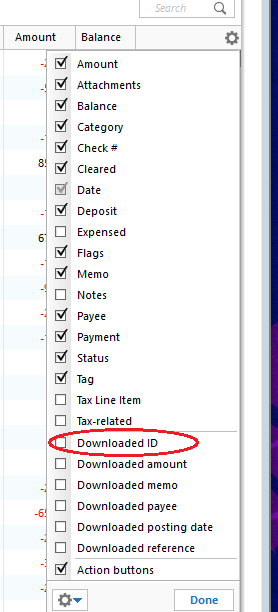
If there are no reminders set up for those transactions, can you confirm if they have a downloaded ID, as it is mentioned in our support article about duplicate transactions:
I look forward to your reply!
Hi @ddemoney,
I just wanted to follow up since I haven’t heard back from you. I’m checking in to see if you still need assistance.
There is a bill reminder for my NY Times subscription, it is auto-entered every 4 weeks 3 days before the due date; and corresponds to the first entry in my screen shot (with the Education category).
I added the downloaded ID column & see that there is a very long encoded value for the entry in the register. At this point, I only have the one entry, since I deleted the duplicate. Do you need this value? Or do you want me to wait for the next time this occurs & show you the value for both entries?
Thank you for following up and for helping us gather more information. Since the behavior appears to happen during the matching process, I suggest waiting until the next time a duplicate transaction occurs.
When this happens, could you please provide the following screenshots?
These details will help our team compare both stages of the process and investigate why the duplicate is being created.
I appreciate your patience and assistance as we work to better understand this behavior.
I have found that the matching process gets "picky" sometimes. Even if the transactions are a few days apart, I found that I need to change the transaction date to match the downloaded transaction exactly in order for the match to occur.
The other thing to note is that the downloaded transaction will never have a category and is always blank. The category that you see in the downloaded transaction is a category that is suggested by Quicken, if you have that set in Preferences under "Downloaded transactions".
The main reason it "gets picky" based on the date is if the pre-entered transaction is in the future. I think that it only allows like a day or two. On the other, in the past it can be a lot more, at least 30 days, maybe more. It used to be "forever in the past" but that was causing problems when unmatched transactions from far in the past were still being matched instead of the recent ones.
But in all cases, if it says "Matched" on the transaction it shouldn't be creating another transaction. The whole point of "Matched" is to merge the pre-entered transaction in the register with the downloaded one. If one is getting a "Matched" and it doesn't do the merging of the two, then there is either a bug or maybe a problem with the data file.
It will be very interesting to see what the next one shows in a screenshot.
The criteria for a match for banking transactions are that the transaction in the register must be between 15 days before and one day after the date in the download and the amounts must be the same. If the date in the register is more than one day after the date in the download, the transactions will not Match.
For investing transactions, the dates must match exactly.
Thanks, I thought it was 30 days, but I generally don't do matching and as such my information on it is a bit out of date it seems.
Couple problems with the "pickiness" theory:
@ddemoney It's almost like the transactions are being both posted directly to the account register and placed in the download window, and thus, matching to each other. Have you tried toggling the option on and then off? I'm not sure it will do anything, but it's worth a try.
Edit→Preferences→Downloaded transactions
@ddemoney Going back to your original comment, which is that you got a match, and then you accepted it and got a new transaction. That is definitely some kind of bug so everything after that with the topic of how Quicken matches has just strayed from the original problem. I have never seen such a problem, but I also do very little matching. I can't really suggest anything about this problem other than reporting it to Quicken Support and using Help → Report a problem.
But I will say this about Quicken's matching 90% of it is the amount. The dates when used are for "excluding" not for matching. If you have two transactions in the same "include period" that have the same amount, it is most likely going to pick the first one not the one that is "the closest date".
Here is a new entry after OSU:
The first entry (with category) was already recorded from Bill & Income reminder. The second entry was created and matched by OSU. As you can see neither entry has a Download ID (even though 2nd entry was created by the download process).
Yes, something is very wrong there. Not only does it not have a downloaded ID, but it also isn't set to "c".
It is like it is creating its own manually entered transactions.
Are you using Sync to Mobile/Web?
If so, this might be some kind of strange sync problem, but even then, there should be a Downloaded ID and the transaction should be set to cleared.
And Notice that no category, but the memo is the same… Very strange.
Well, I now see another thread on this, so it seems that you aren't alone in this happening.
@Quicken Carlos,
Do you still need more info? You said if I sent you a DM you would send me a secure link to send screen shots; unfortunately, I have not figured out how to send a DM. Please provide details & I can send you more examples.
Do you see this icon in the upper right?
That is what you select to send DM. But you have to have enough points on the forum for it to be allowed (I don't know how many points are needed).
Hi @ddemoney, I have sent you a direct message. You can check your messages in the upper-right corner of the Community page, as @Chris_QPW mentioned.