Editing paycheck fields - no longer able to make entries directly into field

steve parker
Member ✭✭✭
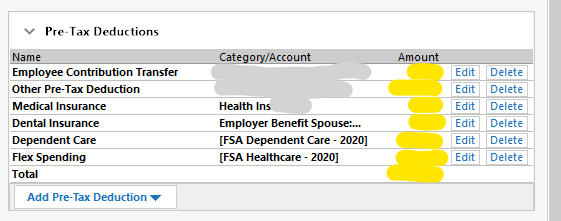
Prior to the most recent update it was possible to edit a paycheck by entering amounts directly into the "Amount" fields (in yellow). Tabbing from field to field would select the amount for quick editing.
The fields are no longer accessible; instead you have to click edit, enter the amount and click 'OK".
I set up a paycheck that has the average amounts in it because my pay and deductions change every pay period. It was easy to just tab through the fields and enter the correct numbers. Now I have 14 fields that require 3 clicks to enter rather than just tabbing through.
Is this supposed to be an improvement? Maybe it's a setting that I messed up?
Quicken Home, Business and Rental Property - Year 2020 - v R2828 - Build 27.1.28.28
The fields are no longer accessible; instead you have to click edit, enter the amount and click 'OK".
I set up a paycheck that has the average amounts in it because my pay and deductions change every pay period. It was easy to just tab through the fields and enter the correct numbers. Now I have 14 fields that require 3 clicks to enter rather than just tabbing through.
Is this supposed to be an improvement? Maybe it's a setting that I messed up?
Quicken Home, Business and Rental Property - Year 2020 - v R2828 - Build 27.1.28.28
0
Comments
-
You should be able to left-click in an Amount field to set the focus and then edit the amount and use the Tab (or Enter) and Shift + Tab to move between the Amount fields. No setting required.0
-
Sherlock said:
@Sherlock Appreciate your reply.You should be able to left-click in an Amount field to set the focus and then edit the amount and use the Tab (or Enter) and Shift + Tab to move between the Amount fields. No setting required.
I'm not sure what you mean by "set the focus." However, as I said the fields were not directly editable after update, 28.28. No way to tab or navigate among them. No point in repeating what I said in the original post, tho'.
I reinstalled 28.24 and the paycheck fields can again be directly edited as always in the past. I'll try reinstalling 28.28 again and see what happens. But that patch has to be the problem.
0 -
I just edited my wife's paycheck, and had no problem directly changing a value (w/o clicking the Edit button first). I tried both Income and Pre-Tax Deduction fieldsThe only field that I couldn't edit directly was "Employer Match" ... but that has always been the case.
And I'm running R28.28 also .... so I suspect that there's something else at play here.Q user since February, 1990. DOS Version 4
Now running Quicken Windows Subscription, Business & Personal
Retired "Certified Information Systems Auditor" & Bank Audit VP0 -
To be able to edit the amount, you need to left-click on the amount. This sets the focus which enables the amount field to become editable. When the focus is appropriately set, an entry box forms around the amount and the calculator icon appears.steve parker said:Sherlock said:
@Sherlock Appreciate your reply.You should be able to left-click in an Amount field to set the focus and then edit the amount and use the Tab (or Enter) and Shift + Tab to move between the Amount fields. No setting required.
I'm not sure what you mean by "set the focus." However, as I said the fields were not directly editable after update, 28.28. No way to tab or navigate among them. No point in repeating what I said in the original post, tho'.
I reinstalled 28.24 and the paycheck fields can again be directly edited as always in the past. I'll try reinstalling 28.28 again and see what happens. But that patch has to be the problem.0 -
Thanks. I'll install 28.28 again and see what happens. Wish me luck. I'd rather be on the current version if possible.NotACPA said:I just edited my wife's paycheck, and had no problem directly changing a value (w/o clicking the Edit button first). I tried both Income and Pre-Tax Deduction fieldsThe only field that I couldn't edit directly was "Employer Match" ... but that has always been the case.
And I'm running R28.28 also .... so I suspect that there's something else at play here.
Yes, Employer Match has always been that way, and that's exactly what happened to the other fields.
Never had this issue before. Been using program for several decades. Admittedly, I don't recall when they started the paycheck form, but never an issue.
0 -
Just re-installed 28.28. It's fixed now. Something weird in the first install. Maybe the wrong incantation before I installed.
Thanks for responses.0 -
Gremlins. That explains everything.
Q user since February, 1990. DOS Version 4
Now running Quicken Windows Subscription, Business & Personal
Retired "Certified Information Systems Auditor" & Bank Audit VP1


This discussion has been closed.
Categories
- All Categories
- 18 Product Ideas
- 34 Announcements
- 246 Alerts, Online Banking & Known Product Issues
- 19 Product Alerts
- 518 Welcome to the Community!
- 682 Before you Buy
- 1.5K Product Ideas
- 55.7K Quicken Classic for Windows
- 16.8K Quicken Classic for Mac
- 1K Quicken Mobile
- 834 Quicken on the Web
- 127 Quicken LifeHub