Anyone else seeing OL-295-A with TD Bank?
Answers
-
I spent another 45 minutes on a Zoom link with Quicken and Intuit and we were able to restore my TD Bank Direct Connect link. We went through a number of different tries along the way before it all got sorted out so what follows is my recollection of the steps which worked. I'm happy to try to clarify, if I can, but we did a bunch of different things…
- Deactivate at TD Bank - in Account Services - Manage Linked Services - Manage Settings delete any Quicken-related linked apps or financial tools.
- Deactivate at Quicken - in your TD Bank account Account Details - Online Services deactivate in online setup
- Add Account at Quicken - in Tools - Add Account (not in the Account Details dialog…) select TD Bank Online Banking and enter the appropriate details. This will fail! Leave the dialog box with the failing message open at Quicken and go back to TD Bank in your browser.
- Activate at TD Bank - in Account Services - Manage Linked Services - Manage Settings - Financial Tool Access allow access for Quicken Windows 2018
- Back in Quicken, select the Next button in the dialog left open in step 3 (above)
This should do the trick. But…it wasn't sufficient in my case. When I got to this place it appeared that I had reestablished my Direct Connect link, but it was still failing silently - no transactions were downloading, no bill pays were uploaded. Bummer.
As a test, we tried activating Direct Connect (as above) in a new (empty) Quicken data file and that worked - transactions downloaded, bill pays uploaded.
So…back on my actual data file, I ended up doing a Super validate file. If you need to do this, you can access Super validate file by holding Ctrl- Shift and selecting Validate and Repair File in the Quicken File menu. The first option in the popup dialog box should be Super validate file. Note that I deactivated online access for my TD Bank accounts before doing the validation. After validation, I went through all 5 of the steps above to reactivate Direct Connect and, so far, everything seems to be working.
I realize this is all a bit convoluted…and maybe there's an easier or clearer way…but this did work for me.
1 -
YES!!!!! I got it working. Needed the super validate. Got a few duplicate transactions in the first successful download from last week, but Bill Pay is working and transactions downloaded. Fingers x'd
1 -
It's interesting — this turns out to be exactly what I did several weeks ago to get ordinary non-Direct Connect to work again.
I actually did the Super Validate as part of troubleshooting at first. Clearly it removes something of the older protocol which prevents operation as long as it's present.
Then the complete removal of TD Banks permission/s, remove Quicken connection, do the Super Validate, reconnect Quicken but fail, now permit anew on the TD Bank site, then reconnect again sounds exactly right.
Glad it worked for both of you, and we can hope others.
This fix shows some layers, it appears, in what is actually wrong, but if persons can do this…great0 -
I just tried these steps but after step #3 is complete TD Bank never shows an entry for Quicken in account services at step #4.
I was able to setup again with Express Web Connect for now and this prompted me to login to TD Bank and add Quicken to Account Services.
0 -
Broken again this morning
0 -
I don't know what to say about this. One thing that seemed to work pretty cleanly for me was to work out of a newly created data file - following the five steps seemed to make that connection successfully. After that I went back to my original data file, did the Super Validate and followed the steps…and that seems to have worked.
One thing I can think of is if you missed the part about using the Tools - Add Account menu item to establish the connection. It doesn't seem to work if you use the Online Services tab in the Account Details dialog for the account.
Hmm…
I just ran several direct connect downloads from my TD Bank account - everything seemed to work as expected and a couple of new transactions came in.
I did not break / reestablish the connection this morning - I just used the connection I established yesterday.
0 -
FYI… I did use "Tools - Add Account" when trying to setup Direct Connect.
0 -
It appears that stability remains elusive!
0 -
it appears (?) that each unique QDF needs to be authorized AND that when you authorize a QDF, it voids the previous authorizations. And you can't just trash a prior or new autho on the TD website, you have to start over with all those steps, which leads to the theory that only a single QDF can be authorized for Direct Connect. theory, not a fact at this point.
0 -
You know, what happens here seems to relate to what happens for Quicken Mobile.
There, once you have a problem, it seems that no combination of clearing and updating the mobile account will recover it to work properly again. There are a lot of dead-ending complaints about this, and it's been my situation for months.
Protocols, and what various Quicken files remember about them, appear to get fatally mismatched, in both problems. And as you are observing on this one, a 'repair' can appear to work, and then fail from the next day.
I really think Quicken needs to gain or assign a person with the depth protocol technical competences and the consulting sense to work both of these problems with Intuit, and where banks get involved, the target banks together.
Line technicians in higher support are I think not able to solve, however we may appreciate them — it takes more….this is simply how things in the real world are.0 -
really weird (and annoying) - had issues again yesterday and thiis morning. and even mini OSU's looked like Quicken wasn't sending anything
================ (27.1.60.20) (20250117/08:03:12) ===================
==== Mini-OSU Start (20250117/08:03:43) ====
==== Mini-OSU End (20250117/08:03:49) ====I was about to go through the painful deactivate/activate process, but I did the Super Validate first (it found NO ERRORS). Then I tried OSU again and it worked as expected.
0 -
@digitalmediaphile , hmm, relative to my comment just above, it seems you might be onto something….
If your Direct Connect/One Step Update (OSU) now _continues_ to operate, without Super Validate every day, you might have found what breaks the cycle…
And if so, just possibly this will work for the similar cycle of errors on Mobile. That is an even more painful situation, because when doing the complete reconnect procedure, you get duplicated entries at least on the mobile app end, which have to be dealt with.
So hope you'll keep us posted over some days of I hope very smooth and recovered operation, seeing that this is solid here…and then I could try it on the Mobile problem….(!)-1 -
to Eric Dunn - Thanks for your Dec post, but Direct Connect with TD Bank is still not fixed. Can you please get this fixed for us?
0 -
had to do a super validate this morning as OSU was not sending anything and Quicken was not communicating with TD Bank. After I did the super validate (no errors found again) OSU immediately worked as it should with TD Bank Direct Connect. I downloaded transactions, Bill Pay worked. I have to think this is something on the Quicken side. The OFXlog's all looked like this again until I performed the super validate
==== Mini-OSU Start (20250121/07:47:28) ====
==== Mini-OSU End (20250121/07:47:32) ====
0 -
It really feels you are on to something, with this magic Super Validate of no visible, but very evident effects.
This is something then that Quicken can locate and fix, on their own turf, without the fraught process they seem to have with regards Intuit and the banks.And, I tried Quicken Mobile on an iPad for the first time in a long time, having done a Super Validate a bit ago. And…it worked. For the first time in about six months. Proper transaction values, and no duplication of accounts.
It will take further experience to see if this holds, of course. And one more point is that the Mobile software erroneously told me I didn't have a Quicken subscription when first tried. Apparently because it was still logged in from last year, and there's been a fresh payment thus license in December. I logged out, back in, and found the working software, this moment anyway.
Quicken clearly has a lot of quality control missing that is very natural to need to do with software. Perhaps their contractors haven't yet understood that…?0 -
It's all very odd. I haven't had a problem since my post of January 13.
But communication between Quicken and TD Bank takes a very long time (relatively…)
I just did an update, TD Bank only. The first send/receive pair seems to be related to bill payment, but did not download any transactions. The second send/receive pair downloaded 3 transactions, all previously downloaded. Both interactions included login info.
10:36:18  Mini-OSU started
10:36:18  Send to TD Bank
10:37:07  Receive from TD Bank (49 seconds)
10:37:07  Send to TD Bank
10:37:12  Receive from TD Bank (5 seconds)
10:37:16  Mini-OSU ended
By contrast, a Direct Connect update from Fidelity only uses one send/receive pair (no bill pay) and completes in a couple of seconds.
0 -
I can tell there is an issue when OSU for TD shows COMPLETE within 1 second. If it takes longer "waiting" I know if it querying the OF server. The CONNlog below clearly shows that the failed OSU's did not send a request to TD's OFX server, only the marketing crap. Connection logs from today. The first two times only marketing. After I did the supervalidate, Quicken sends a request to the OFX server. The OFXlog clearly reflects the same issue.
==== OSU End (20250121/07:46:39) ====
==== Mini-OSU Start (20250121/07:47:28) ====
20250121 07:47:28: Marketing session sending to: http://www.tdbank.com/quicken/marketingQ2009.ini
20250121 07:47:28: QFN: Beginning get from http://www.tdbank.com/quicken/marketingQ2009.ini
20250121 07:47:28: QFN: End get from http://www.tdbank.com/quicken/marketingQ2009.ini, netstatus 0
20250121 07:47:29:==== Mini-OSU End (20250121/07:47:32) ====
==== Mini-OSU Start (20250121/07:51:23) ====
20250121 07:51:24: Marketing session sending to: http://www.tdbank.com/quicken/marketingQ2009.ini
20250121 07:51:24: QFN: Beginning get from http://www.tdbank.com/quicken/marketingQ2009.ini
20250121 07:51:25: QFN: End get from http://www.tdbank.com/quicken/marketingQ2009.ini, netstatus 0
20250121 07:51:26:==== Mini-OSU End (20250121/07:51:30) ====
==== Mini-OSU Start (20250121/09:26:32) ====
20250121 09:26:32: Marketing session sending to: http://www.tdbank.com/quicken/marketingQ2009.ini
20250121 09:26:32: QFN: Beginning get from http://www.tdbank.com/quicken/marketingQ2009.ini
20250121 09:26:32: QFN: End get from http://www.tdbank.com/quicken/marketingQ2009.ini, netstatus 0
20250121 09:26:33:==== Mini-OSU End (20250121/09:26:37) ====
==== Mini-OSU Start (20250121/09:29:06) ====
20250121 09:29:06: QFN: Beginning send to https://ofx.tdbank.com/eftxweb/td.ofx
20250121 09:29:55: QFN: End send to https://ofx.tdbank.com/eftxweb/td.ofx, netstatus 0
20250121 09:29:55: Marketing session sending to: http://www.tdbank.com/quicken/marketingQ2009.ini
20250121 09:29:55: QFN: Beginning get from http://www.tdbank.com/quicken/marketingQ2009.ini
20250121 09:29:55: QFN: End get from http://www.tdbank.com/quicken/marketingQ2009.ini, netstatus 0
20250121 09:29:55: QFN: Beginning send to https://ofx.tdbank.com/eftxweb/td.ofx
20250121 09:29:59: QFN: End send to https://ofx.tdbank.com/eftxweb/td.ofx, netstatus 0
20250121 09:30:00:==== Mini-OSU End (20250121/09:30:05) ====
0 -
nice drawing into focus — I hope someone apt from Quicken may actually be listening, or will be brought in by someone who is…
-1 -
Hello All,
Thank you for continuing to update this thread and provide more information. We truly appreciate your patience!
-Quicken Jasmine
Make sure to sign up for the email digest to see a round-up of your top posts.
0 -
Hello All,
I am sorry to hear this issue is still occurring for so many of you.
Could you please navigate to Help > Report a problem and submit a problem report with log files, a sanitized data file, and screenshots (if possible) attached to contribute to the investigation?
Let us know once you have done so. Thanks!
-Quicken Jasmine
Make sure to sign up for the email digest to see a round-up of your top posts.
0 -
To be honest, Quiken Jasmine, I don't know why you don't put a fully qualified person working seriously on this in direct touch with @digitalmediaphile?
He is showing logs that directly illustrate the problem, the local temporary solution, and is likely able to test Quicken pre-release which intends to solve it.
His work, via the repairing effect of Super Validate, makes it quite clear that the problem is in the Quicken app itself, one would think. Thus the work with a person qualified on the code seems very appropriate, doesn't it?-1 -
I am working with someone from the CEOs office. I am posting here as well to see how has the same issue. The ball is in Quicken’s court.
0 -
Both @digitalmediaphile and I have been working with technical and customer support folks from both Quicken and Intuit. They, in turn, have worked with TD Bank to correct some of the issues which were on that side of the connection. While various issues still need to be resolved I think that most (all?) users have been able to use the work arounds outlined previously to get on with their work. I know that Quicken still working the problem and can use our help in providing log files, etc., when problems do occur.
0 -
for the first time since end November, this morning, while I was watching the OSU window, I saw verbose status messages from TD like "updating FI info" "sending online instructions". that hopefully is a good sign. I did not have to supervalidate this morning. fingers x'd.
0 -
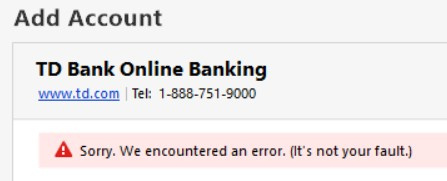
I am still getting an error when trying to disconnect and re-add TD Bank Online Banking.
 0
0 -
Hi John …
While others have had some success reestablishing their TD Bank Direct Connect you've been unable to get through it. As I understand it, you complete steps 1, 2 and 3 - leaving you in Quicken with the error box you just posted. With Quicken still open and the error box still showing, you go back to TD Bank's web site in your browser, and attempt to complete step 4:
Activate at TD Bank - in Account Services - Manage Linked Services - Manage Settings - Financial Tool Access allow access for Quicken Windows 2018
But nothing shows up in the Financial Tool Access section.
I just went through the sequence again and one thing I noticed was that I had to logout of my existing TD Bank browser session and then log back in. When I tried it using my already existing session nothing showed up…after logging out and back in, the request appeared after I clicked the green Financial Tool Access link.
I don't know if that's your issue, but let us know if that fixes it or perhaps provide more detail on each of the steps you taken if it doesn't.
Dave
0 -
Broken again this morning. Same issue, OFXlog does not show a SEND to TD's OFX server, etc. Ran supervalidate. No errors. Then got a normal Direct Connect OSU.
0 -
Dave526 - My mistake from the other day as I was doing the steps from memory and I did not perform the account services stop/start othe TD Bank website. I did that again today and was able to reconnect with Direct Connect. HOWEVER, the update process with Quicken is still almost instentaneous and does now download anything so I will have to revert back to the other connection method so at least I receive downloads from my account.
0 -
did you do a supervalidate? after performing all steps?
0 -
Yes. Sorry I did not mention that before.
0


