Ongoing USAA transaction download problem

Does quicken have an open issue with USAA downloads? I see questions in the community, but links to pages I can't access for more information.
My USAA Problem - My Update has gone fine - No Errors or warning. It appears that the updated sucesfully contacted USAA and got the updated. But no transactions have downloaded. And there are new transactions there.
I have reset all USAA accounts. Deactivated all and reactivated, and did a file validation and repair. Bottom line, everything appears to work from the UI, swirling donut and no errors, but no transactions or current balances are download.
Answers
-
Hello @Randall.G,
I am sorry to hear that you are experiencing this issue with your USAA account(s). I invite you to review the instructions below in an attempt to resolve this issue. Please save a backup before proceeding (just to be safe).
- Deactivate all the accounts associated with USAA.
- Navigate to USAA's website, (www.USAA.com), look for third-party apps, and unlink Quicken.
- After the accounts are unlinked, return to Quicken, and attempt to Add the USAA accounts by using the "+" button.
- Click on "Tools"
- Select "Online Center"
- Make sure that "USAA" is selected in the account dropdown
- Hold CTRL + SHIFT + Click on Contact Info
- Click on "Reset DTStart"
- Perform a One Step Update.
Please let me know how it goes!
-Quicken Jasmine
Make sure to sign up for the email digest to see a round-up of your top posts.
0 -
Hi Jasmine,
This did not work.
I followed your recipee exactly step by step. No USAA Accounts updated. There are new transactions.
0 -
Hello @Randall.G,
I apologize that those troubleshooting steps failed.
Due to the nature of this issue, I suggest reaching out to Quicken Support for further assistance as an escalation may be in order. The Quicken Support phone number can be found through this link here. Phone support is available from 5:00 am PT to 5:00 pm PT, Monday through Friday.
Thanks!
-Quicken Jasmine
Make sure to sign up for the email digest to see a round-up of your top posts.
0 -
Quicken confirmed during my call that the problem is with USAA.
What is the status of this issue? It's been over a month without a working connection to my USAA accounts.
I'm not getting any information from either USAA nor Quicken about the issue.
Is there an update? Is Quicken planning on discontinuing access to USAA?
0 -
Hello @Randall.G,
I certainly understand how frustrating this must be, and we appreciate you following up!
Since you are not receiving any errors, I suggest you try signing out of your data file completely and then signing back in to refresh the registration token for your Online Connected Services. However, I do recommend that you first save a backup file prior to performing these steps.
- Navigate to Edit
- Preferences...
- Quicken ID & Cloud accounts
- Click Sign in as a different user (or it might say Sign in using a different Quicken ID)

- Follow the prompts to Sign Out
- Sign back in using your Quicken ID (email) and password
Once that is done, see if the issue continues to persist.
Let us know how it goes!
-Quicken Anja
Make sure to sign up for the email digest to see a round up of your top posts.0 -
Hello again,
We haven't heard back from you in a while. Do you still need assistance?
Thank you!
-Quicken Anja
Make sure to sign up for the email digest to see a round up of your top posts.0 -
Yes - still having problems.
USAA is still not working.
Now my Citi card isn't updating in the same say. The date being passed to USAA and Citi for an "Update As Of Date" is 11 years in the past.
Quicken phone line help said that it's USAA's fault. Now Citi too?
I'm about to call and escellate the issue.
0 -
Thank you for following up and letting us know the route you have decided you're going to take with contacting support!
If you still need assistance after contacting support, please don't hesitate to reach back out.
-Quicken Anja
Make sure to sign up for the email digest to see a round up of your top posts.0 -
I finally got it working with a Quicken call.
I had to copy my file to a new file. Then resetup all my online downloads with all banks again.
It was kind of a mess to go through the first time. I'm glad it's done now so i can just download my transactions from all my banks and see my current status.
0 -
Thanks for the update and for sharing the solution that worked! Glad to hear you were able to get it working with Quicken Support.
-Quicken Anja
Make sure to sign up for the email digest to see a round up of your top posts.0 -
My downloading of all USAA transaction shows "Inst Xfer *********** Slo Ach Withdrawal 0" . Please explain issue or workaround!!
1 -
Hello @bracey,
Thank you for letting us know you're having this problem. To better assist, could you provide more information? Is the "Inst Xfer *********** Slo Ach Withdrawal 0" showing as the Payee?
If it is changing the Payee for all your transactions to "Inst Xfer *********** Slo Ach Withdrawal 0", then an overly general renaming rule is the most likely culprit. Navigate to Tools>Renaming Rules.
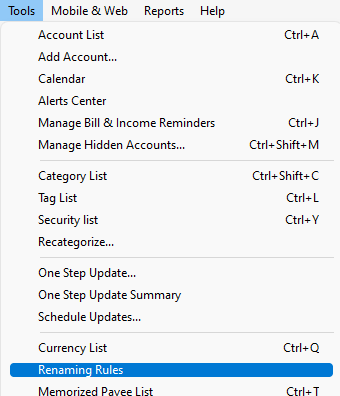
In the window that comes up, check for a renaming rule that would be causing the problem. Once you find it, you can click the pencil icon to edit the rule or you can click the red circle with the minus sign icon to delete it.

I look forward to your response!
Quicken Kristina
Make sure to sign up for the email digest to see a round up of your top posts.
0


