Charles Schwab one step update CC-800 error - Still looking for a fix

This is still an issue. Has anyone been able to get this fixed? Several months ago, Quicken said my software would receive an update to fix this error. My Quicken has received several updates since but issue has not been fixed. I called them again today, whereby a technician did the same troubleshooting which did not help. He then said to call Schwab. I did, and they could not help. The same thing is documented here -
Any help is appreciated.Comments
-
Hello @sdzeller,
Thank you for bringing this issue to our attention.
I have sent you a direct message, please navigate to the inbox in the top right-hand corner of the Community page and check your inbox.

I look forward to hearing from you so we can get this issue resolved!
-Quicken Jasmine
Make sure to sign up for the email digest to see a round-up of your top posts.
0 -
I have the same issue. I also went through the deactivate/activate process both on my own and with support. Nothing has changed. I still get the CC-800 error message.
0 -
Hello @tecramer@,
Thanks for joining this thread!
I have sent you a direct message. Please navigate to the inbox in the top right-hand corner of the Community page and check your inbox.
Thanks!
-Quicken Jasmine
Make sure to sign up for the email digest to see a round-up of your top posts.
0 -
Greetings,
I'm having the same issue and would appreciate any assistance you can provide- thanks.
0 -
Hello @otchis,
Thanks for joining this thread!
I took the time to review the internal errors you are receiving with your Charles Schwab accounts, and there are none; the status shows as okay. Are you receiving a CC-800? What exactly is occurring?Also, I was unable to locate any support tickets using the information tied to your Quicken subscription. Have you contacted Support?
Let me know!-Quicken Jasmine
Make sure to sign up for the email digest to see a round-up of your top posts.
0 -
I'm having the same issue
0 -
Hello @Chinga,
Thank you for letting us know you're also encountering this issue. To help troubleshoot this issue, please provide more information. Is this happening only with your Schwab account(s), or are you seeing this with other financial institutions also? When did the issue start?
If you haven't already done so, please backup your Quicken file, then follow these steps from our article on CC-800 errors:
First, you'll need to deactivate the affected accounts:
- Select Tools > Account List
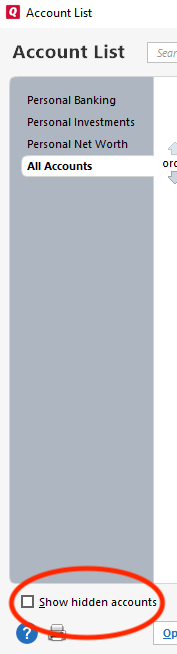
- If present, select the Show Hidden Accounts checkbox at the bottom of the Account List
- Select Edit on each account with this error and Deactivate them on the Online Services tab
- When finished, close the Account List.
Second, reactivate the accounts:
- Select Tools > Add Account
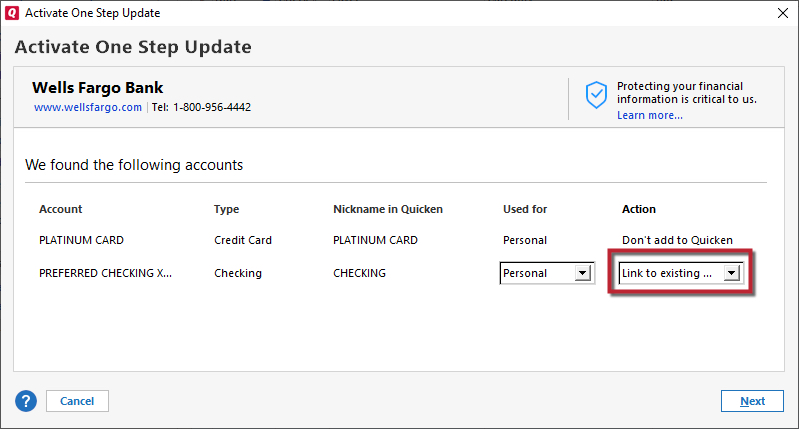
- Go through the flow of re-adding the deactivated accounts to Quicken, use your login credentials and answer any security questions, until you reach the screen where Quicken displays the Accounts Discovered at the financial institution
- Select to LINK each of the found accounts to the accounts you already have set up in Quicken. For accounts you don't want to link, select Don't add to Quicken.
I look forward to your response!
Quicken Kristina
Make sure to sign up for the email digest to see a round up of your top posts.
0 -
I tried the steps above and still have the problem. I've been getting the "Needs Your Attention" message with the CC-800 code for probably 6 months or more. I reported it through the "Report a Problem" link in the one step update summary when it first happened and again yesterday. My Schwab account updates, but I always get the message.
0 -
Thank you for your reply,
When I review the logs, it shows that Quicken sees 2 accounts with Schwab. One account has no problems, but the other shows the account not found error. How many Schwab accounts do you have connected in your Quicken? Is it possible that you have any closed or duplicate Schwab account that is still trying to connect?
Please go to Tools>Account List, make sure the option to view hidden accounts is selected, and check for any closed or duplicate accounts that are still trying to connect in Quicken.
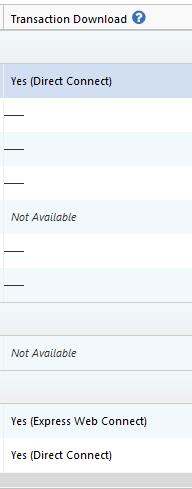
You can tell if an account is still trying to connect by looking in the Transaction Download column. If it shows "yes" and a connection method, that means it's trying to connect.
I hope this helps!
Quicken Kristina
Make sure to sign up for the email digest to see a round up of your top posts.
0 -
What you posted above makes sense, but even after making sure that I am viewing all hidden accounts, I do not see another Schwab account. The only accounts that I see trying to connect are the ones that I want.
0 -
Thank you for your response,
I have forwarded this issue to the proper channels for further investigation and resolution. To contribute to the investigation, please navigate to Help>Report a Problem and send a new problem report with log files attached.
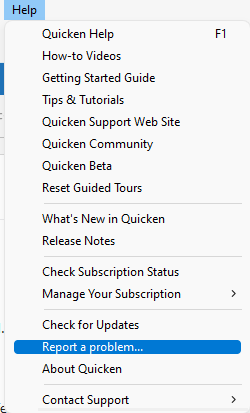
While you will not receive a response through this submission, these reports will help our teams in further investigating the issue. The more problem reports we receive, the better.
We apologize for any inconvenience!
Thank you.
(CPT-12582)
Quicken Kristina
Make sure to sign up for the email digest to see a round up of your top posts.
0

