CC-501 Errors and Freezing/Hanging during One Step Update
Comments
-
Are updates now being handled properly with OSU?
0 -
After hanging this morning, OSU just worked for me.
0 -
I just ran OSU, again, in one of my data files. Observations:
- OSU completed in a normal amount of time.
- 3 of the 5 financial institutions with EWC and EWC+ connections updated without error.
- 1 of the 3 "successful" download financial institutions is set up with WC, not EWC nor EWC+. It should not have been included in the OSU Summary because it is WC and it is not included in OSU Settings. But it shows in the OSU Summary as having been successfully updated with 1 new transaction downloaded. The account register shows that it was updated today but Account List shows it was not. And there was no new transaction downloaded. Weird, to say the least.
- The other 2 financial institutions with EWC+ returned the CC-501 error code and no new transactions were downloaded (some were expected). However, both the Account Register and Account List show they did last update with this last OSU.
So, the story simply gets more "interesting".
Quicken Classic Premier (US) Subscription: R66.23 on Windows 11 Home
0 -
I am not having any difficulty with a mixture of DC, EWC, and EWC+ account connections. No lock-ups or frozen sessions. OSU connections to 20+ FI's finish in less than 2 or 3 minutes.
0 -
Thank you for your reply @Toasties,
To help troubleshoot the CC-501 error, please navigate to Help>Report a Problem and send a problem report with log files attached.
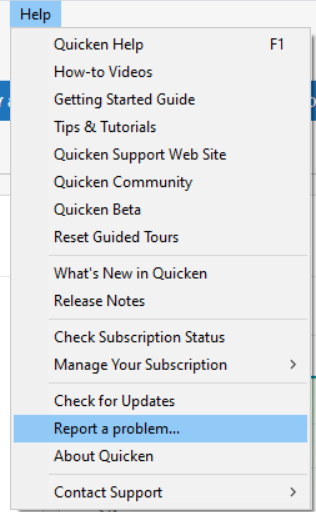
Please let me know once you send the problem report, so that I can review the logs to get more insight into what is causing the error.
Is your Quicken file directly on your local hard drive? Do you sync it with any cloud service? Do you use any anti-virus program that may be doing a file scan while you're using Quicken or any firewall that may be blocking Quicken's communication during One Step Update?
It is strange that it would include a web connect account on your One Step Update summary. Was this a one-off occurrence, or is that account persistently showing up in your summary now? Which financial institutions are giving you a CC-501 error?
Thank you!
Quicken Kristina
Make sure to sign up for the email digest to see a round up of your top posts.
0 -
It is strange that it would include a web connect account on your One Step Update summary. Was this a one-off occurrence, or is that account persistently showing up in your summary now?
Yes, certainly odd. I don't recall ever seeing that happen before. I figured that it is just one of the weird things I've been seeing with this OSU slowness and CC-501 issues but that if I see it happening again I would submit a report about it.
BTW, I ran OSU for that data file, again, and this time I did not get the WC account showing up in the OSU Summary report and now Account List correctly shows the last manual download data of 2 days ago. So, I'm assuming it was just a one-off issue.
Which financial institutions are giving you a CC-501 error?
In this particular data file I had been getting the CC-501 error codes with US Bank and CapOne. But in this last OSU it was only with US Bank.
I just finished running OSU in another data file and it completed in a reasonable amount of time with no error codes. I thought there should have been some transactions downloaded (mostly pending transactions) that did not download. I'll try doing OSU again later today to see if there is any change.
Quicken Classic Premier (US) Subscription: R66.23 on Windows 11 Home
1 -
2:20 PM CST 6-27-25 seems to be working on all counts.
1 -
OSU hangs and when it does finish no transactions are downloaded. Same results on 2 computers running different Q update versions….
Windows 11 (2 separate computers)..... Quicken Premier.. HAVE USED QUICKEN CONTINUOUSLY SINCE 1985.
0 -
I just finished updating 4 data files. OSU runtimes were normal. There were no error codes for any accounts. Expected transactions downloaded. Online Balances were correctly updated.
In short, everything appears to have worked properly.
Quicken Classic Premier (US) Subscription: R66.23 on Windows 11 Home
1 -
Thank you for the follow-up @Boatnmaniac,
I'm glad to hear everything is working properly!
Thank you for letting us know you're still seeing an issue with OSU hanging. How long is it taking to complete? Which financial institutions are missing transactions? Did this behavior just start today? If not, then when did you first notice this issue?
Thank you!
Quicken Kristina
Make sure to sign up for the email digest to see a round up of your top posts.
0 -
I haven't done an OSU since 6-21-25 on 1 computer so I ran it today and boom, it took about 10 minutes to run and said it downloaded but none arrived. Similar results on computer 2. I regressed to an older Q update and restored the data to earlier date and still no smiles. All 15 accounts are Express Web Connect. Will try again tomorrow. The only thing I did after the last good OSU was install R63.21 to both computers and didn't do an OSU till todasy… That may help…
Windows 11 (2 separate computers)..... Quicken Premier.. HAVE USED QUICKEN CONTINUOUSLY SINCE 1985.
1 -
Yes this was performing a typical OSU (not bills). All DC accounts work but the EWC acounts failed multiple times this week and would not work this morning at all.
Just tried again and the OSU worked @ 21:40. Will monitor it.
1 -
Reverted back to R62.16 on both computers….. Restored data files back to 6-21-2025 (my last known good data file) on both computers. (note that each computer has it's own separate data file)
Ran OSU on both computers with same results…
RESULTS:
OSU completed and said 14 tranactions downloaded. Only 2 downloaded. I restored back to 6-21-2025 data file again. Ran OSU again. Once again it completed in good time and said 14 transactions downloaded and this time all 14 transactions downloaded. Both computers did exactly the same….. so whatever is happening is not computer or data file related IMO….. but OSU was completed in good time and was complete. Staying with R62.16 FOR NOW.
THANKS @Quicken Kristina for continuing to monitor and interact with us…..
Windows 11 (2 separate computers)..... Quicken Premier.. HAVE USED QUICKEN CONTINUOUSLY SINCE 1985.
1 -
My Online Accounts now working OK. Didn't do anything to attempt a correction. Software just corrected itself? Just maybe, a software techy lit a candle & the room isn't dark anymore? 😉
⚓️
0 -
Thank you for your replies @retird,
I'm glad to hear that OSU is completing and you're not seeing any CC-501 errors. It is concerning that you're still missing transactions though. If you haven't already done so, I recommend following the steps in this article on missing transactions:
Which financial institutions are these transactions failing to download from?
Thank you!
Quicken Kristina
Make sure to sign up for the email digest to see a round up of your top posts.
2 -
Hello All,
Since the Community Alert has been marked resolved, this thread has been closed.
If you are still encountering this issue, please start a new thread or contact Quicken Support directly.
Thank you!
-Quicken Anja
Make sure to sign up for the email digest to see a round up of your top posts.0






Categories
- All Categories
- 23 Product Ideas
- 34 Announcements
- 245 Alerts, Online Banking & Known Product Issues
- 19 Product Alerts
- 265 Welcome to the Community!
- 360 Before you Buy
- 1.5K Product Ideas
- 55.8K Quicken Classic for Windows
- 16.9K Quicken Classic for Mac
- 1K Quicken Mobile
- 834 Quicken on the Web
- 128 Quicken LifeHub