Missing bank

Recently the bank I use for my main cash accounts did an update to their quicken servers. I've reset all the accounts, multiple times, and the bank does not show up on OSU, and does not perform one step update.
Is there a way to manually add these accounts back to OSU? The bank does not show up in the password vault either.
So, is this a 'me' problem (something in my quicken that didn't update correctly), or a 'them' problem in their server upgrade?
Comments
-
Hello @h stansfield,
Thanks for bringing this to our attention!
Could you please confirm the name of the bank you're referring to? That will help us better investigate what's going on and determine whether it's an issue on your end or something related to the bank’s recent update.
Thank you!
-Quicken Anja
Make sure to sign up for the email digest to see a round up of your top posts.0 -
Anja, The bank in question is Truist, and I'm in Pennsylvania.
0 -
Thanks for confirming the bank name!
We currently have an open Alert regarding Truist—recent changes were made to the connection setup. If you're using Express Web Connect, you'll want to deactivate and reactivate using the “Truist Bank” instance. If you're using Direct Connect, reconnect using “Truist Online Banking – DC.”
You can find more info in the Community Alert here.
Let us know if you run into any issues during the reconnect!
-Quicken Anja
Make sure to sign up for the email digest to see a round up of your top posts.0 -
Anja, I have done this. So, it sounds like I have a problem within my quicken.
One issue that may be related:
I have a checking account with Truist that I have had since 2016, with thousands of transactions. The "red flag" which indicates unaccepted downloads has been showing for quite some time. When I try to do anything-disconnect from online services, reset the account, I get the "you have unaccepted downloads on this account" warning, and I am stuck. Is there a way to locate the unaccepted downloads and repair this issue?
0 -
Hello @h stansfield,
Thanks for providing more information.
First, I suggest following the instructions below in an attempt to resolve this issue. Before beginning any troubleshooting, please save a backup (just in case).
To start with, please right-click the account experiencing this problem in the Account List sidebar and select Edit/Delete Account. Then, navigate to the Online Services tab and check if "Automatic entry is: ..." is set to On or Off (see below).
Please click on it and select the opposite choice of what is currently selected. If it is set to "No - Never...", please switch it to "Yes - Always…" or vice versa (see below). Doing so should allow you to deactivate the account without getting the error message again. You can switch this setting back after reactivating the account.
Once that is done, attempt to deactivate the account. If needed, please follow the steps found in this support article to deactivate. Once deactivated, please reactivate through Add Account, by navigating to Tools > Add Account..., search for your Financial Institution name, and follow the prompts to connect. Once your account(s) have been found, link to the existing account(s) you have already set up in Quicken.
Let us know how it goes!-Quicken Jasmine
Make sure to sign up for the email digest to see a round-up of your top posts.
0 -
That did not work.
I get a message that says, "Quicken cannot edit ____ account because there are downloaded transactions that must first be accepted into the account register or transaction list.
Finish accepting the dowloaded transactions and then try again.
The account on the account list has the 'red flag' showing, and has had for some time. There are no visible transactions to be accepted. Is there a way to find the transaction that is causing this?
0 -
If you haven't done so already, please do the following actions:
- Even if you are on the latest software level already, download and install the latest Manual Patch file from https://www.quicken.com/support/update-and-patch-20182019-release-quicken-windows-subscription-product to ensure your Quicken software is up to date and correctly installed.
- Reboot Windows. Let Windows fully wake up and do whatever it wants to do after booting up … 15 minutes or so.
- Start Quicken. Do not run One Step Update.
- Run BOTH Validate and Supervalidate to attempt to repair your Quicken data file.
- If nothing helps, there may be a last-ditch effort: Create a copy of your data file using File / Backup or Copy File / Create a copy or template / Do not change any Copy options in the next panel. Review the new file name and change if needed. Run the copy process.
Do note, however, that the resulting file copy will have ALL accounts disconnected from One Step Update. You will have to reestablish (Tools / Add Account) download connections one bank at a time.
Validate and Supervalidate instructions
First save a backup file prior to performing these steps
Validate:
• Click File
• Select Validate and Repair File...
• Select Validate File
• If the data file contains investment accounts also select "Rebuild investing lots".
• If you suspect that a damaged Quotes Price History causes your problems, also select "Correct investing price history" functions "Delete" or "Repair and Rebuild".
• Click OK
• Review the Data Log. Anything interesting in there, worthwhile posting here?
• Close Quicken, leave it closed for about 30 secs
• Reopen Quicken and see if the issue persists.Super Validate:
• Click File
• Press and hold both CTRL and Shift keys while you click Validate and Repair File...
• Select Supervalidate File
• Click OK
• Review the Data Log. Anything interesting in there, worthwhile posting here?
• Close Quicken, leave it closed for about 30 secs
• Reopen Quicken and see if the issue persists.0 -
Thanks for coming back.
If you don’t mind, could you please provide a screenshot of the error message you described receiving? If needed, please refer to this Community FAQ for instructions on how to attach a screenshot. Alternatively, you can also drag and drop screenshots to your response if you are not given the option to add attachments. Please remember to redact any personal information as needed.
I appreciate it!
-Quicken Jasmine
Make sure to sign up for the email digest to see a round-up of your top posts.
0 -
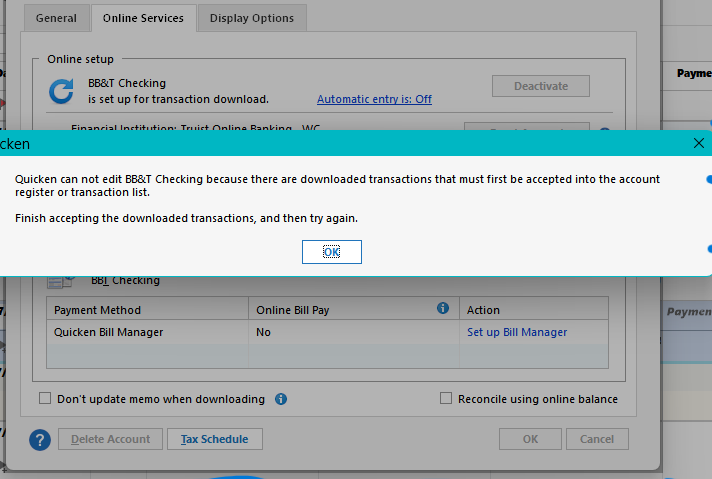
Here is the error message I get. This particular account has the 'red flag' visible on the home screen, which indicates downloaded transactions are present that need to be reconciled. However, there are no transactions to be reconciled. This flag has been constant for quite some time—at least a year or more.
0 -
Hello @h stansfield,
Thank you for providing more information. Have you attempted the troubleshooting steps previously shared by @UKR?
Let us know!
-Quicken Jasmine
Make sure to sign up for the email digest to see a round-up of your top posts.
0


