How do I set up two auto loans and update the Debt balances for each?

I am running Quicken Classic Deluxe R63.21 build 27.1.63.21 on Windows 11.
In 12/23 I purchased a car, had Q set up a the loan and started making payments to USAA. The payments properly split between Principal and Interest, although I did have to adjust the amounts for principal and interest. to agree with USAA. Looking at the Debt account, I saw that the LOAN BALANCE as properly updated.
In March of this year my wife purchased a car. Once again I had Q set up and started making payments to USAA. The payments get properly recorded to the Principal and Interest accounts, but the LOAN BALANCE is no longer updated for car 1 or car 2.
How do I get the payments to properly update the Debt balances on both vehicles.
Best Answer
-
@Dick Dailey I am not sure that this is your issue, but in order for the loan balance to be updated properly, the loan payment split transaction and reminder should contain a principal transaction and an interest transaction. The principal piece should have a transfer category that draws down the loan balance, such as [Car Loan 1]. Here is an example of a loan reminder transaction -
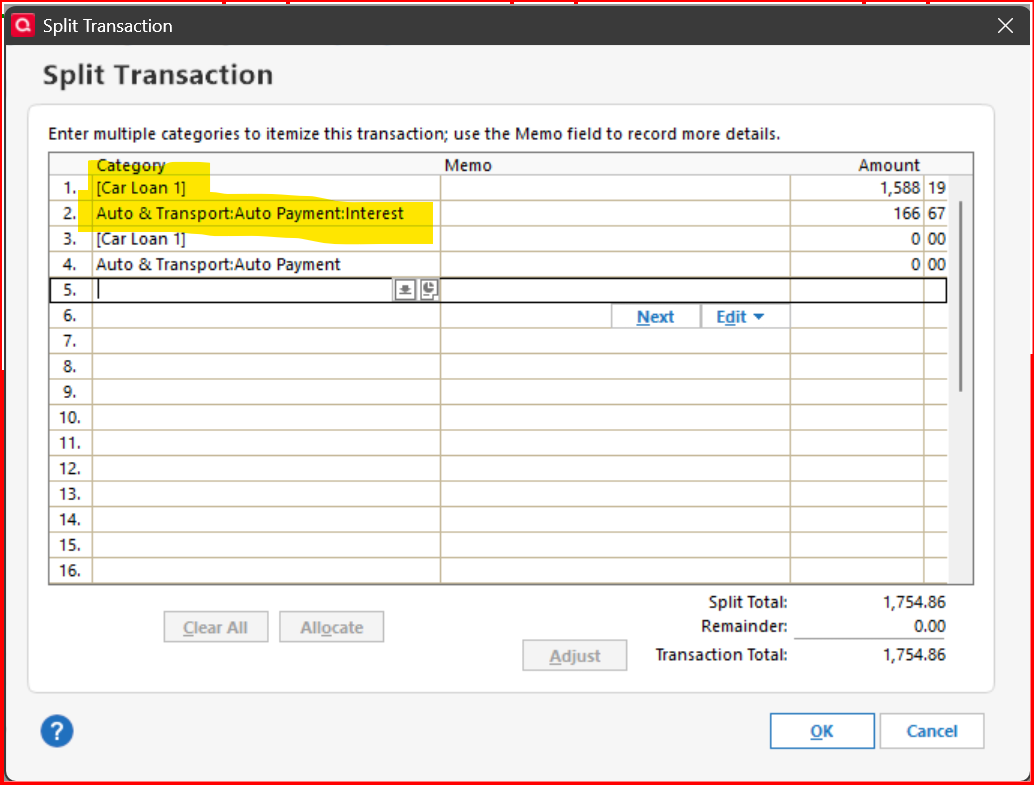
The first split should be the principal payment, the second is the interest. When you set up a loan, a payment reminder transaction is automatically created with the four splits you see in the example. To be safe, I would make sure that lines 3 & 4 are created also, similar to the example. Quicken seems to use these splits for a special purpose and placement of the splits seems to be important.
0
Answers
-
Are the loan accounts connected online to do transaction downloading from the loan servicing company / bank?
Looking at your checking account and the payment transactions, what are the category splits looking like?
Can you please capture one or more images of the transactions showing the issue, sensitive information blacked out as necessary to protectyour privacy but annotated to describe the situation, and attach the image(s)here?
How do I post a screenshot in the community from a macHow do I post a screenshot in the community from windows
Please save images to files of file type PNG or JPG only. They're easier to work with than PDF files.
0 -
Are any principal payments showing in either loan account?
If yes, when did the non-principal payments start? Can you show us the 1st payment (from your checking account) that wasn't recorded properly in the loan account? Graphics format (JPG or GIF) preferred to PDF.
If no, you've got a different problem … that might be data corruption.
Q user since February, 1990. DOS Version 4
Now running Quicken Windows Subscription, Business & Personal
Retired "Certified Information Systems Auditor" & Bank Audit VP0 -
@Dick Dailey I am not sure that this is your issue, but in order for the loan balance to be updated properly, the loan payment split transaction and reminder should contain a principal transaction and an interest transaction. The principal piece should have a transfer category that draws down the loan balance, such as [Car Loan 1]. Here is an example of a loan reminder transaction -
The first split should be the principal payment, the second is the interest. When you set up a loan, a payment reminder transaction is automatically created with the four splits you see in the example. To be safe, I would make sure that lines 3 & 4 are created also, similar to the example. Quicken seems to use these splits for a special purpose and placement of the splits seems to be important.
0 -
Thanks to all.
I accepted the defaults from Q when setting up the loan. Worked great when there was only one loan. Setting up the second loan Q used the same Auto & Transport:Auto Payment:Principal category for principle. Thus the confusion.
I found the categories for the loans and changed the principle to go to those categories. I also ensure there were four category lines in each split. This worked great for CarLoan2. Still some issues with CarLoan1. But I think I now know all the pieces in play and can remedy that.
Thanks again.
0

