Trouble Connecting to USAA After Forced Reauthorization

As discussed by others I have been subjected to Forced Reauthorization for my accounts that are connected through Express Web Connect. I have reauthorized all accounts but my wife and my USAA Accounts. That has been a real disaster because USAA authorizes it successfully but Quicken rejects it for whatever reason. Here are the messages I get:
USAA: Your accounts have been authorized successfully!
You will now be redirected back to Quicken. If you are not redirected in a few seconds, you can close this window and return to Quicken.
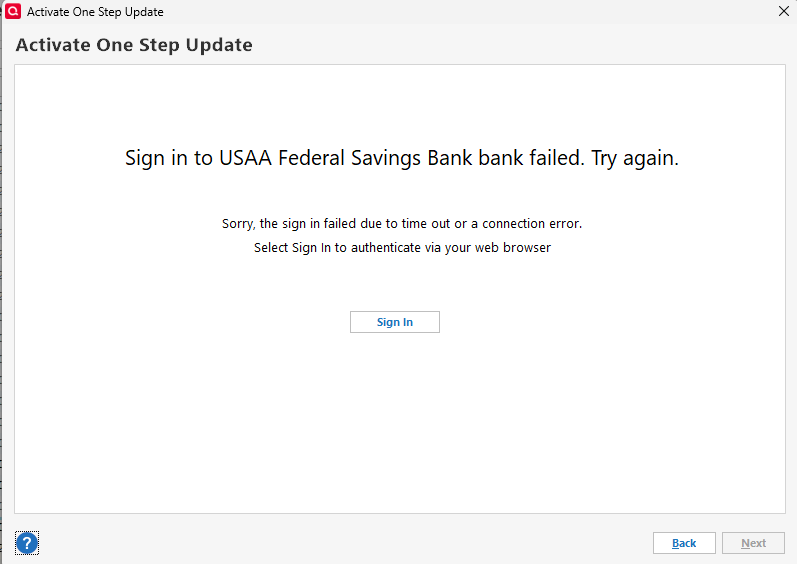
Then Quicken: Sign in to USAA Federal Savings Bank bank failed. Try again.
Sorry, the sign in failed due to time out or a connection error. Select Sign in to authenticate via your web browser.
Have tried repeatedly, have changed browsers, nothing works. It appears USAA and Intuit are not talking.
Any advice would be appreciated.
Comments
-
Hello @Carlos Ferreira,
Thanks for your detailed post. I reviewed the internal error logs, and I can see you're receiving a CP_Account_Not_Found error. This is a general error that can happen for a few different reasons, and I'd like to investigate further to identify the root cause specific to your connection with USAA.
To do that, I’ll need a fresh set of log files. Here’s how to submit them:
- In Quicken, go to Help > Report a Problem.
- Check the boxes for:
- Include log files
- Include screenshot (optional, but helpful if you’re seeing an error message)
- In the description, include:
"USAA CP_Account_Not_Found" - Click Send to Quicken.
Once you’ve submitted the report, just reply here to let me know. I’ll take a closer look as soon as I receive your logs.
-Quicken Jasmine
Make sure to sign up for the email digest to see a round-up of your top posts.
0 -
I also started experiencing exactly this same problem on 5/20. Need a solution from Quicken ASAP!
0 -
Thanks for joining this thread.
Please let me know once you have submitted a problem report using the instructions in my previous response!
-Quicken Jasmine
Make sure to sign up for the email digest to see a round-up of your top posts.
1 -
Hi @Quicken Jasmine - thank you! I have submitted a problem report following the instructions from your previous post. Really appreciate your help in sorting this out!
0 -
Hi @Quicken Jasmine — Checking in: are there any updates on this issue? Thanks!
0 -
Hi@Quicken Jasmine— Checking in: are there any updates on this issue? Thanks!0 -
Quicken required a reauthorization from USAA this AM. I do that and USAA agrees and directs me back to quicken. All I get in Quicken is "Sign in to USAA federal Savings Bank bank" and "use the bank-hosted sign-in form in your browser window to authorize downloads". And then I get the spinning circle forever and never connecting. Then finally it says "Sign in to USAA Federal Savings Bank failed. Try again." and then it says "Sorry, the sign in failed due to time out or a connection error. Select Sign In to authenticate via your web browser". Then same thing happens again and I cannot update Quicken for USAA. Geez.
0 -
I did submit a report to Quicken.
0 -
Lot's of folks have this issue right now.
Check out:
0 -
Thanks for sharing the alert with other users!
-Quicken Jasmine
Make sure to sign up for the email digest to see a round-up of your top posts.
0 -
@Quicken Jasmine The problem with USAA, as described in this thread, still persists as of today (6/26/2025). See screenshot below. Is there an ETA for when this issue will be resolved?
 0
0 -
The same USAA problem existed yesterday and exists today (6/27/25) for Quicken for Mac.
1 -
I too am experiencing issues with reauthorization for my USAA account using Quicken Classic for Windows.Redirects me to USAA to authorize. Says successfully authorized as others has stated then I go back to the Quicken screen and it spins for a minute or so then I get the error having trouble connecting to USAA. says "sorry, we encountered and error. (Its not your fault)"
Check of log file shows the following error
AGGR_STATUS_CODE : FDP-378
1 -
Hello All,
Please be aware that there are known issues connecting to USAA and updating accounts. Please see this Community Alert for more information:
Thank you for sharing the specific error code you saw in the logs. That error code indicates that the financial institution's servers are not providing authorized data. You will need to contact your financial institution for assistance with that error.
Thank you!
Quicken Kristina
Make sure to sign up for the email digest to see a round up of your top posts.
-2 -
@Quicken Kristina — Thank you for this update and for pointing to the Community Alert from 5/22 on this issue.
In this Community Alert, @Quicken Janean states, "Our data provider and USAA are working to resolve these system-related issues. While Quicken software itself is functioning as expected, we are actively collaborating with our data provider and USAA to find a solution."
For clarity, is Quicken's data provider still working with USAA to resolve the problem?0 -
Thank you for your reply,
Yes, they are still working with USAA to correct these issues. We haven't yet received any further updates, nor do we have an ETA. If you haven't already done so, I recommend bookmarking the alert, since any updates, once available, will be posted there.
Thank you!
Quicken Kristina
Make sure to sign up for the email digest to see a round up of your top posts.
1 -
Trying to understand why would I be the one to contact USAA over a connection error between the Quicken application process and USAA data access Your process connects to USAA and I authorize thru their signon process which shows as successful but then when it reverts back to Quicken application to use said authorization to access the USAA customer data, it is failing. This is not anything that I have control over and issue is located within the Quicken application and how it interfaces with the USAA interface for accessing the customer data after authorization is completed.
The FDP-378 error is being shown in the CustomerCentralError.txt log file of my Quicken for Windows. This all started with the Quicken and USAA change on how customer data is accessed. Again, nothing that I as a user have any control over with. Note the connection to USAA is the ONLY financial institution that I am having any issues with at this time.
1 -
Thank you for your reply @cfam728d,
That specific error code you said you saw indicates that the problem is on USAA's end. Since we cannot control what happens on USAA's servers, when the error is happening on their end, we recommend talking to them.
There is also an open alert for USAA (linked earlier in this discussion), so there is a chance that the issue you are seeing is related to the known issue.
Thank you!
Quicken Kristina
Make sure to sign up for the email digest to see a round up of your top posts.
0 -
Hello - I am having the same issue and I just reported and sent my log file. Please let us know if there is any resolution. Really frustrating not to be able to get access to my USAA data.
Thanks
0 -
Thank you for joining this thread and for sending your logs! Please keep an eye on the alert posted by @Quicken Kristina just before your comment!
We appreciate your support!
-Quicken Jasmine
Make sure to sign up for the email digest to see a round-up of your top posts.
0 -
I'm having the same issue with Quicken and USAA. Last time it was an issue with Quicken and Northwestern Mutual Inv Svs. If Quicken can't stay connected, then I will end this more than 1.5 decade-long relationship.
0 -
@Quicken Kristina and @Quicken Jasmine — the issue with USAA accounts persists. Is there any update on a resolution for this issue? Thanks!
0 -
Thank you for the follow-up,
There aren't any updates yet. Once updates are available, they should be posted to the alert.
Sorry I don't have more news!
Quicken Kristina
Make sure to sign up for the email digest to see a round up of your top posts.
0 -
It's 7.22.25 … I've had the same issue with my USAA checking & savings accounts the past couple of days. Today, I went through the forced reauthorization one more time prior to posting this, and, lo & behold, it worked. The connectivity held, both of my accounts showed up as "link to existing", and they updated as they should.
I did nothing new or different. Didn't make any phone calls to USAA about the problem (really?) … don't know if anything was fixed by USAA or Quicken.
I hope others have a similar experience / good luck today with this annoying issue!
1 -
Lucky you! :-) I just tried again this afternoon (7/22/25), but no dice. :-(
0 -
@Imperial1971 Dang it. Was hoping that a functioning connection for one would be a functioning connection for all. Guess not.
0 -
I gave USAA the dickens 4 days ago. Don't know whose issue it is — Quicken or USAA. Quicken has not responded. USAA says that they aren't responsible for Quicken. If this is Quicken, they are on thin ice. If it is USAA, their ice is even thinner.
0 -
UPDATE on 8/13/2025 - I tried again to day to setup online access for USAA, and . . . IT WORKED.
So glad to finally have this issue resolved!
Once online access was setup and transactions were downloaded, there were several duplicate transactions of items that I had already entered manually and reconciled. Took a bit of work to clean up the duplicates, but not too terrible.
Hope that others who are experiencing this same issue will also find that it is resolved.
1 -
September 9 - getting this issue. Tried (and failed) 3 times. Despite getting the "You're reconnected" message from the pop-up USAA browser within Quicken, my quicken accounts show "unable to connect" error messages for the accounts. Disconnected and reconnected the accounts, and approved allowing Quicken to access my USAA info. Accounts reconnected, but no transactions were downloaded as of 8/24.
Using Quicken 2020 for Mac.0 -
This is the Windows Forum. You'd get better responses and assistance in the Mac forum.
Having said that, USAA has been working fine for me lately. However, that could be due to many things.
I'm sure one of the Quicken mods will be along soon to assist.
0