New connection method for Merrill Lynch and BOA does not allow linking to existing accounts properly

Hello,
I went through the steps to re-authenticate for Merrill Lynch and BOA for the new connection method, and when I got to the account mapping screen, in some cases I could link to my existing accounts and in others I either couldn't (did not give me the option at all) or it listed accounts that were not the ones I wanted to link to.
I cancelled and did not link any accounts, hoping this will be fixed soon.
Anyone else see this ?
Are we supposed to have to remove ALL of the accounts in Quicken and then re-add with the new authentication method? This does not seem to make sense…
Tks,
Carl
Comments
-
Hello @cdotger,
Thank you for letting us know you're encountering this problem. To help troubleshoot, please provide more information. What exactly are you seeing on the account mapping screen? When you say it did not give you an option at all for some accounts, do you mean the accounts weren't even listed on that screen, or do you mean you could see them, but the action column just showed "Don't add to Quicken"?
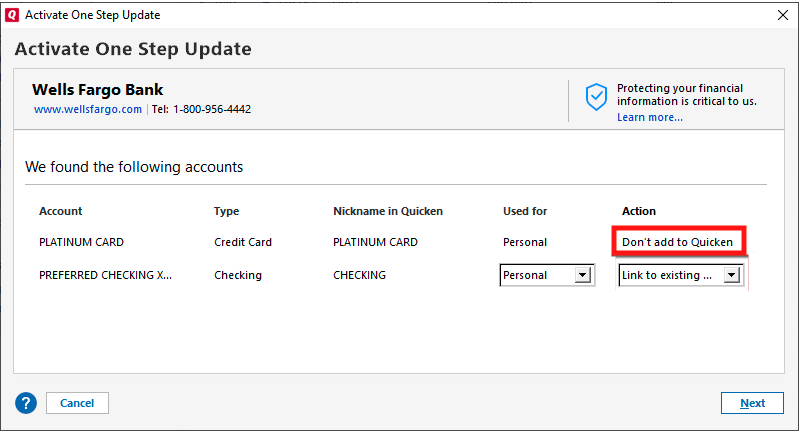
If possible, please provide a screenshot of what you're seeing. Make sure to redact any personal information, especially any account numbers (full or partial). If needed, please refer to this Community FAQ for instructions on how to attach a screenshot. Alternatively, you can also drag and drop screenshots to your response if you are not given the option to add attachments.
I look forward to your response!
Quicken Kristina
Make sure to sign up for the email digest to see a round up of your top posts.
0 -
Kristina,
Tks for checking in…. In some cases it DID show the proper accounts for me to link to, in others it did not show ANY account for me to link to, lastly, in some cases it would show accounts for me to link to, but the proper account was not one of the ones listed. I have about 9 accounts accross Merrill/BOA… I am not going to attach a screen shot for privacy reasons, I think my explanation above explains the situations.
Appreciate your help
1 -
I am having the same problem as cdtoger posted above. Re-authenticated fine but then some cases Quicken DID show the proper accounts for me to link to, in others it did not show ANY account for me to link to, lastly, in some cases it would show accounts for me to link to, but the proper account was not one of the ones listed. Clearly this update is not working so please fix ASAP.
1 -
Thank you for your replies @cdotger & @albmich,
Which account types (loan, credit card, investment, etc.) are you seeing this issue happening with? If you have attempted to reauthorize multiple times, is it always the same accounts that have this issue, or do the problem accounts change?
You mentioned that sometimes there's no option to link at all and sometimes there's an option to link, but the correct account is not in the list.
Which account types are showing no option to link at all? When there is no option to link, is it because Quicken isn't seeing the account at all, or is it in the list, but the only option is "Don't add to Quicken"?
Which account types give an option to link, but the correct account is not in the list? What account type does Quicken see for the accounts? You can see that on the Add/Link screen, in the Type column.
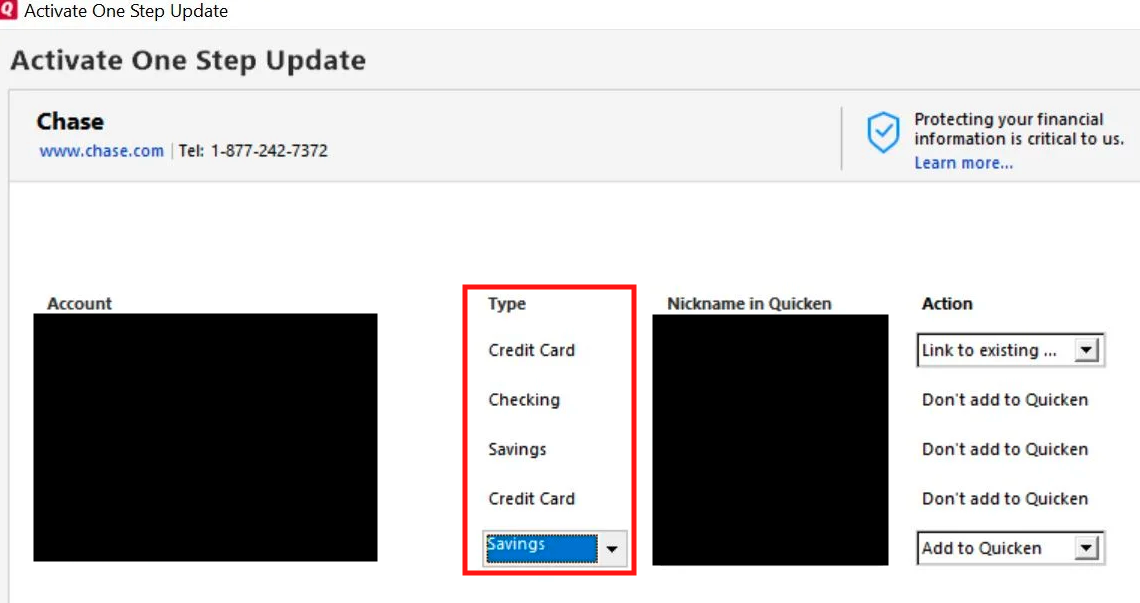
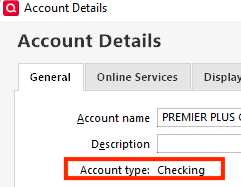
What account type does Quicken see for the correct account to link to? You can check this by navigating to Tools>Account List, then click the Edit button next to the account. On the General tab, near the upper left, it will list the Account type.
Thank you!
Quicken Kristina
Make sure to sign up for the email digest to see a round up of your top posts.
0 -
I'm having the same issue. After reauthorization the only accounts type I could choose for my merrill Lynch Checking account was "Brokerage, IRA, 529". As a result after upadting the account it appeared as a Investment account, was moved into the Investment section, and had the typical Investment account menu "Enter Transactions, Holdings". That was yesterday.
Today the actual investment accounts won't download. Its says the account was closed or nickname was changed. neither is true.
In the meantime I restored a backup from before I reauthorized
0 -
Hello @Cuthbema,
Thanks for joining this thread!
If you don’t mind, could you please provide a screenshot of the error message you described receiving? If needed, please refer to this Community FAQ for instructions on how to attach a screenshot. Alternatively, you can also drag and drop screenshots to your response if you are not given the option to add attachments. Please remember to redact any personal information as needed.
I appreciate it!
I have sent this over to my team for further investigation. In order to contribute to the investigation, could you please submit a Problem Report (with logs files, screenshots, and any other helpful information attached) from within your Quicken Application?
You can submit your log files by navigating to Help > Report a Problem. @Cuthbema, if you could please submit a Problem Report as well, that would be very helpful.
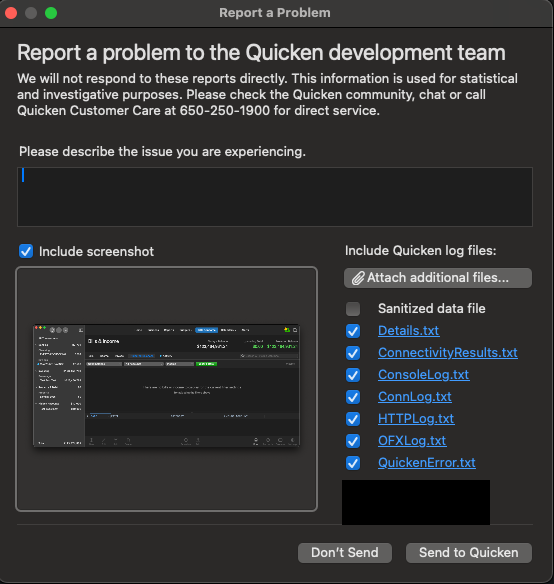
It would also aid the investigation to include a sanitized file when submitting the problem report. A sanitized file is a data file that removes personally identifiable information so you can comfortably share this file with the Quicken team.
Please let me know once you have done so. Thanks!
(CBT-744)
-Quicken Jasmine
Make sure to sign up for the email digest to see a round-up of your top posts.
0 -
Hello, Jasmine… I believe my challenge may be related to me having both Merrill and BOA accounts… Only the Merrill accounts are showing up as needing to reauth, but when I get to the screen to authorize, it is showing ALL Merrill and BOA accounts.
Is there any way for me to just reauth my merrill accounts? Even if I have to do each 1 by 1?
For example, can I go into the account details for each Merrill account and update the connection method for each? It shows I am currently using Direct Connect.
Tks,
0 -
This content has been removed.
-
Hello @cdotger,
Thanks for the additional details!
At this time, you should be able to go through the Merrill-specific reauthorization (choosing the Merrill BID, not BofA), and when you’re returned to Quicken:
- Only check the Merrill accounts you want to re-link.
- Be sure to uncheck any BofA accounts during this step to avoid linking them unnecessarily.
You're also not required to remove and re-add everything—there’s no need to start from scratch. It’s just a matter of carefully selecting which accounts to link at the final screen.
As I mentioned earlier, if you haven’t already, please take a moment to submit a Problem Report directly from within Quicken: Help > Report a Problem (Include logs and a sanitized data file if you're comfortable). You can reference internal ticket CBT-744.
Please let me know once you have done so!
-Quicken Jasmine
Make sure to sign up for the email digest to see a round-up of your top posts.
0 -
It no longer prompts me to update the Merrill/BoA connection when I try to one-step update. Has it been temporarily disabled or do I need to try it via a different method?
0 -
Hello @albmich,
If it is no longer prompting you to update the connection, that would indicate that either you successfully reauthorized the connection, or that the accounts are currently not connected.
Do they update when you run One Step Update (OSU)? Do they show up on the OSU Summary screen after the update completes?
I look forward to your reply!
Quicken Kristina
Make sure to sign up for the email digest to see a round up of your top posts.
0 -
I cancelled the authorization the two times I tried it because it would not map correctly to half of the existing accounts. I do one step update now and they update successfully which makes no sense. I am guessing they are still updating via the old method but I have no idea how to tell
0 -
Thank you for your reply,
If you cancelled the reauthorization before linking the accounts, then I'd assume you're still under the previous connection. That connection will continue to work for a little while, but the financial institution will stop supporting it soon.
You can tell which connection method an account is using by navigating to Tools>Account List and looking in the Transaction Download column for that account.
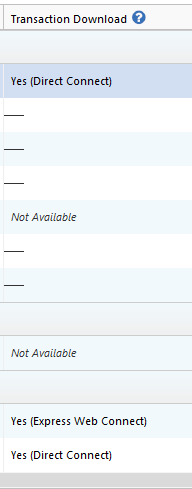
What problem are you encountering when trying to link accounts? For example, is it showing "Don't add to Quicken", with no option to change it? Is it giving you the option to link, but not showing the correct account in the list of options to link to?
Thank you!
Quicken Kristina
Make sure to sign up for the email digest to see a round up of your top posts.
0 -
As I posted above, it re-authenticated fine but then some cases Quicken DID show the proper accounts for me to link to, in others it did not show ANY account for me to link to, lastly, in some cases it would show accounts for me to link to, but the proper account was not one of the ones listed. So I cancelled it. Now it doesn't prompt me to try when doing one step update. How do I try to re-autheticate manually? And does this apply to Merrill accounts only or BoA accounts as well (I have both)? Thanks!
0 -
Also, when I look at account list, the connection type is currently "direct connect". After re-authenticating, what will it be?
0 -
I am not getting a request to relink anymore as well and I have done nothing the last several days… It is almost like it has been disabled.
0 -
Thank you for your reply @albmich,
After reauthorizing, it should show as Express Web Connect+ (EWC+).
Unless the current connection isn't working, I would recommend waiting until you are prompted to reauthorize, rather than forcing it.
If you need to force it, you can do that by making a backup of your Quicken file, then deactivating your Merrill Lynch accounts, then reconnecting them by navigating to Tools>Add Account and following the prompts.
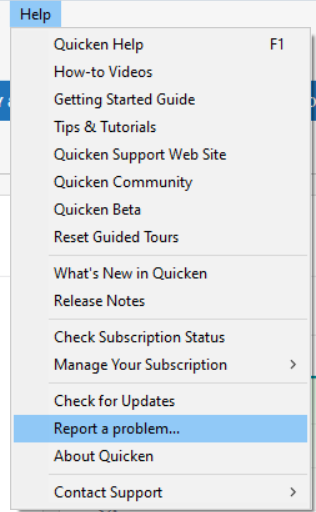
Also, so that our teams can further investigate the issue with accounts not mapping properly on the Add/Link screen, please navigate to Help>Report a Problem and send a Problem Report with log files attached.
Thank you!
(CBT-744)
Quicken Kristina
Make sure to sign up for the email digest to see a round up of your top posts.
0 -
If it doesn't prompt and I need to force it, I need to deactivate all BoA AND Merrill accounts correct? Asking if this updated connection applies to both or just Merrill accounts?
0 -
Thank you for your reply,
It would apply just to the Merrill Lynch accounts. You should not need to deactivate the Bank of America accounts, unless you have them connected in your Quicken under a Merrill Lynch connection option.
If you're not sure which connection option you are using, navigate to Tools>Account List. In the Financial Institution column, it should show which connection option the account is using.
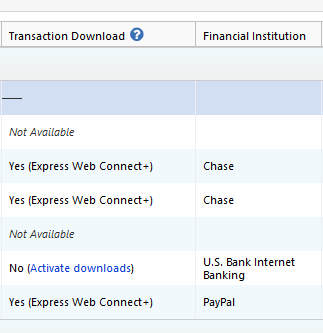
I hope this helps!
Quicken Kristina
Make sure to sign up for the email digest to see a round up of your top posts.
0 -
I manually deactivated all Merrill (ten, a pain) accounts individually, added new accounts following the instructions above and…account list still shows Yes (Direct Connect) as connection method. I have also submitted a help ticket into the void which didn't seem to do anything. Any help would be appreciated. Thanks…
[Edited - Language]
0 -
Thank you for your reply,
Around the 4th of August, Merrill Lynch paused their migration to EWC+. That is likely why it's still on Direct Connect, even though you deactivated and reconnected the accounts. Since the migration is currently paused, I recommend waiting until you are prompted in Quicken to migrate your accounts.
I apologize for any inconvenience!
Quicken Kristina
Make sure to sign up for the email digest to see a round up of your top posts.
0 -
This content has been removed.

