How to record a Roth IRA rollover to another Roth IRA

From my previous job, I had a 401K Roth IRA. I want to roll all that over into a Fidelity Roth IRA. How do I do that? The way I did it caused the Tax Planner to somehow record all this long-term capital gain to show up on the tax planner and throwing my estimated taxes off.
Best Answer
-
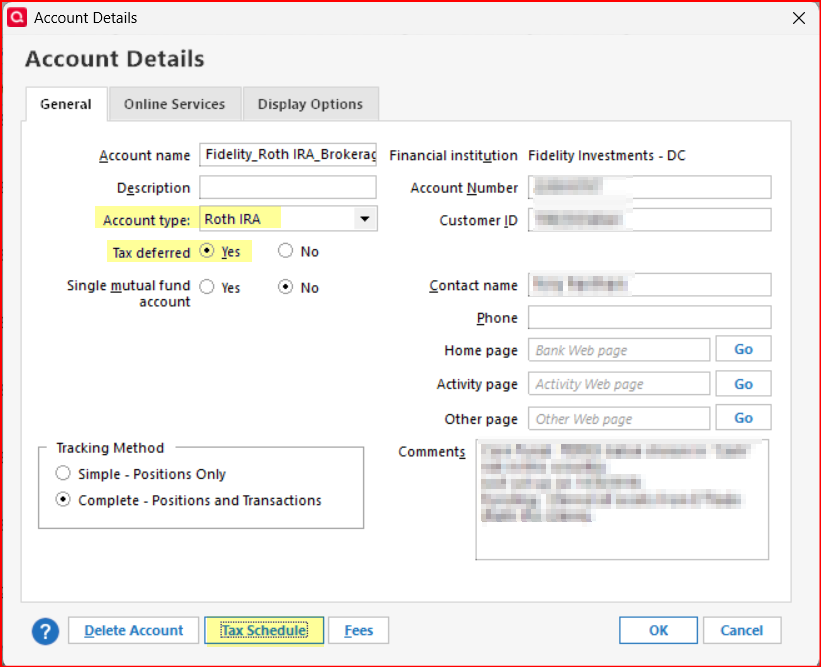
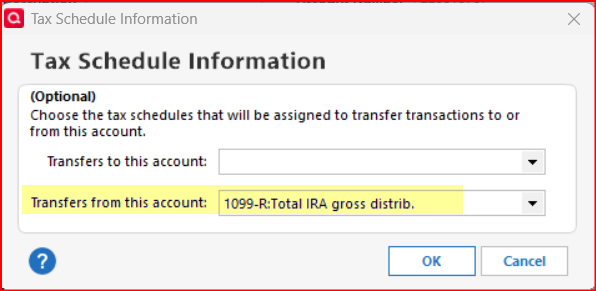
Have you confirmed that your Roth IRA accounts are set up correctly in Quicken? The General Tab of Account Details should look like what is highlighted in yellow:
Quicken Classic Premier (US) Subscription: R66.23 on Windows 11 Home
5

Answers
-
Hello @dennis.f.warren,
Thank you for coming to the Community with this question. Depending on how the rollover was conducted, different instructions would apply. Were the holdings transferred directly, or were they sold, then the cash transferred?
You may find this older discussion helpful:
I look forward to your reply!
Quicken Kristina
Make sure to sign up for the email digest to see a round up of your top posts.
0 -
Well, how it actually happened between the 401K Roth IRA and Fidelity IRA is……The 401K Roth IRA only had one security type. I suppose all those shares were liquidated (sold) and a cash transfer occurred from the 401K Roth IRA to the Fidelity IRA. If I execute the transfer like that in quicken (Sell all the shares in one, and then transfer the cash to the other), that is when quicken calculates capital gain and it shows up as [taxable] capital gain in the Tax Planner.
I tried the "Shares transfer between Accounts" method….Selected All of the one security and it zero'd out the source IRA (the 401K Roth IRA) and then added all the 'moved' securities to the destination Fidelity IRA. That seemed a bit odd because this security that was transfered to the Fidelity account doesn't exist / cannot be purchased in a Fidelity account. So, I just sold them all with the cash of the sale going to same account and everything seems to be correct,0 -
@dennis.f.warren If you're rolling over funds from one Roth account to another Roth account, such as a Roth IRA to another Roth IRA, or a Roth 401(k) to a Roth IRA, then there are generally no tax consequences. I am wondering why the tax planner would record any capital gain? Is it a defect in the tax planner? Maybe I am missing something here.
0 -
Thank you for your reply,
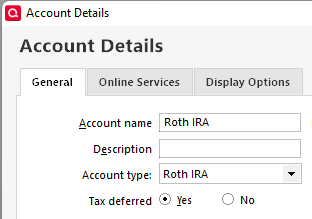
As @CaliQkn pointed out, it is odd for the tax planner to see capital gains for this kind of transaction. What account type are you using for these Roth IRAs in your Quicken file? Are they marked as tax deferred? You can check this by navigating to Tools>Account List, clicking the Edit button next to the account, and looking on the General tab in the Account Details window that comes up.
Thank you!
Quicken Kristina
Make sure to sign up for the email digest to see a round up of your top posts.
1 -
@dennis.f.warren What do you have set as the Tax Attributes for Transfers out in the old Roth and Transfers in in the new Roth.
Do TOOLS, Account List, lclick EDIT adjacent to these accounts to see what the Account Type is, if "Tax Deferred" is checked and click Tax Schedule for each to see that's set for "Transfers to …" and "Transfers from ..."
Q user since February, 1990. DOS Version 4
Now running Quicken Windows Subscription, Business & Personal
Retired "Certified Information Systems Auditor" & Bank Audit VP5 -
Have you confirmed that your Roth IRA accounts are set up correctly in Quicken? The General Tab of Account Details should look like what is highlighted in yellow:
Quicken Classic Premier (US) Subscription: R66.23 on Windows 11 Home
5 -
I know transfers from one Roth to another should not be taxable but Quicken Tax Planner thinks it is.
0 -
All my settings on my Roth IRA account(s) are the same except for the the "Tax Deferred" setting. I have "Tax Deferred" No….which isn't that the correct setting for a Roth IRA?
0 -
I think the Tax Planner is working just fine. It looks like from your response to @Boatnmaniac, you just need to change Tax Deferred to "Yes". (The other responders, @Quicken Kristina , @NotACPA noted that same settings change as well.) Once you make that change, you should no longer see the capital gains for the Roth rollover in the Tax Planner.
1 -
Yes. The problem was the "Tax Deferred" settings. Mine was set to "No". Changed it to "Yes", then I could sell all the securities to "cash" in the source Roth IRA, and then do a cash transfer out to the new Roth IRA and the tax planner didn't count the sale as taxable gain. Thanks.
1 -
I'm glad to hear that it was a simple fix and not a software issue.
Yes, that "Tax deferred" designation for Roth accounts is misleading because Roth accounts are tax exempt, not tax deferred. But when the account is set to Roth "Tax deferred" really means "Tax exempt." It does seem rather silly that this was never corrected many, many years ago because I think it's just a text correction, not a code correction.
Quicken Classic Premier (US) Subscription: R66.23 on Windows 11 Home
0

