Merrill Lynch after reauthorization

Since reauthorization, pending dividends are now showing up with the previous day's date from the actual pending transaction date (the wrong date) and not shown as pending. In addition, every matched transaction is bringing up the verification window asking if the stock/investment ticker shown it is the same stock/investment that it is already in the investment list. These two issues were always working correctly prior to reauthorization. I am running the Windows version and on Version R63.21 and Build 21.1.63.21 all on a Windows 11 operating system. Is there a plan to correct this?
Comments
-
Hello @jefflock,
Thanks for bringing this to our attention!
Regarding the pending dividends:
To better understand what you’re seeing, could you please provide a screenshot showing one of the transactions where the pending dividend appears with the incorrect date? If needed, please refer to this Community FAQ for instructions on how to attach a screenshot. Alternatively, you can also drag and drop screenshots to your response if you are not given the option to add attachments.
Regarding the stock/investment verification window:
This issue has already been escalated to our development team and is being tracked internally. To help us include your experience in that investigation, could you please submit your log files?
Here’s how to do that:
- Go to Help > Report a Problem in Quicken.
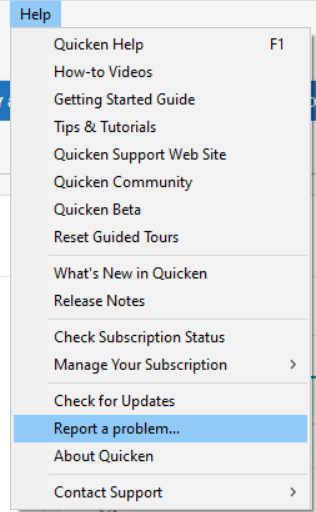
- Include a brief description (you can reference this thread).
- Make sure the boxes for sending log files, sanitized data file, and screenshot (optional) are checked.
- Click Send to Quicken.
Once submitted, let us know here, and we’ll make sure your report is linked to the open ticket.
(CTP-13847)Thank you!
-Quicken Anja
Make sure to sign up for the email digest to see a round up of your top posts.0 - Go to Help > Report a Problem in Quicken.
-
I uploaded the data files. However, I currently don't have any Dividends yet to include. I will do that next week when I am sure there will be dividends.
1 -
Thank you for the follow-up,
Thank you for letting us know you sent the files. Please let us know when you send the logs that include dividends next week.
Thank you!
Quicken Kristina
Make sure to sign up for the email digest to see a round up of your top posts.
0 -
I just uploaded an example of pending dividends and pending cash transfers that picked-up the wrong dates. I also included a screen shot from Merrill Lynch. I am going to show it here too for your information, so it does not get lost in the system.
You can see from the screen shots that Qucken picked-up the pending transactions with the previous Date and showed them as cleared.
1 -
Thank you for your reply,
Thank you for sending the screenshots and the problem report with logs attached. I noticed that the Sync log was missing from the problem report you sent. Would you please try navigating to Help>Report a Problem and sending logs again, making sure that the Sync log is selected?
Thank you!
Quicken Kristina
Make sure to sign up for the email digest to see a round up of your top posts.
0 -
Ok - I just sent it again. Hopefully this time you got the Sync log. If not let me know.
0 -
Hi @jefflock ,
Thank you for sending the updated logs and screenshots!
We took a closer look, and based on the information provided, it appears that the incorrect dates are being applied by Quicken during the download process rather than coming directly from the financial institution. With that in mind, the next step would be to contact Quicken Support directly so they can escalate the issue to the appropriate internal teams for further investigation.
Be sure to reference this Community thread and let them know you’ve already submitted a problem report with the necessary logs and screenshots.
Thank you!
-Quicken Anja
Make sure to sign up for the email digest to see a round up of your top posts.0 -
I just got my 1st transactions downloaded from Merrill and I can verify they are not sending correct info. It is very hard to get a new security matched such as if I change the name in the matching screen, it will not really match. The online center still shows the original name even though I changed it and the name in online center is Not even in the security list of Quicken at all. In addition, I have 10 shares of option short and it shows shares as long and incorrect value? Options download as number of contracts But price downloads *100.
Hopefully, they are still trying to work on it since it is very NOT user friendly in Quicken.
0 -
I'm not entirely sure why, but this seems to have resolved all the issues. I spoke with support, and they had me switch the Merrill Lynch accounts back to "Direct Connect" instead of the "Express Web Connect+" that was enabled during re-authorization.
To make the switch:
- Go to Tools > Account List.
- For each Merrill Lynch account, click Edit, go to the Online Services tab, and click Deactivate.
- Once all accounts are deactivated, repeat the steps and click Activate instead.
- You'll be prompted for your username and password—save them to the Password Vault.
- Make sure to link each account to the correct existing account.
After this, you should be back on "Direct Connect." This cleared up all the errors for me.
0 -
Thanks for the update and for sharing the solution that worked for you! Glad to hear everything is back in working order now. This will definitely help others facing the same issue.
-Quicken Anja
Make sure to sign up for the email digest to see a round up of your top posts.0




