Split transactions get reordered after syncing

Comments
-
I just went through the whole process, even created a backup file without transaction over 5 years old. I still re-orders splits after syncing. From various comments this has been going on a long time. Why not being addressed? It causes me to enter transactions with the wrong account amounts. this is really unacceptable to have it being ignored. Is it time for me to find a different program?
0 -
Hello @Don in VT,
Thank you for letting us know you're seeing this issue with split transactions. To clarify, what do you mean when you say the split transactions are being reordered? Where are you seeing this issue? For example, is this happening in the register, in reminders, in reports, etc.? When did you first notice this issue? You mentioned this happens after syncing. When is the sync being triggered? For example, does it sync during One Step Update, when you close the program, etc.?
I look forward to your response!
Quicken Kristina
Make sure to sign up for the email digest to see a round up of your top posts.
0 -
Quicken Kristina
Make sure to sign up for the email digest to see a round up of your top posts.
0 -
I am having this problem also. It is changing in the bill reminder for me.
0 -
Hello All,
Thanks for sharing your experience—this is actually a known issue that is being worked on. While there’s no ETA for a fix just yet, the issue involves split transactions being reordered, and we understand how frustrating that can be.
If you'd like to have your case included in the investigation and contribute to the open ticket, please submit your logs, and any relevant screenshots by going to Help > Report a Problem in Quicken.
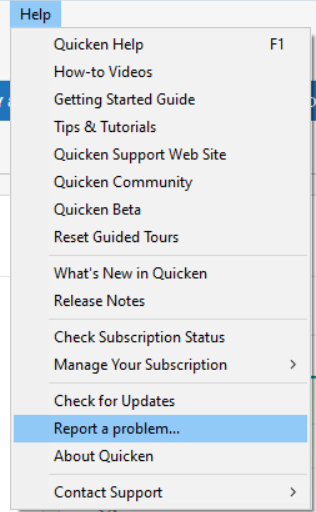
Be sure to include “Attn: CBT-746” in the title/subject field.
It would also aid the investigation to include a sanitized file when submitting the problem report. A sanitized file is a data file that removes personally identifiable information so you can comfortably share this file with the Quicken team.
While you will not receive a response through this submission, these reports will help our teams in further investigating the issue. The more problem reports we receive, the better.
We appreciate your help and patience as our teams work on this.
Thank you!
(CBT-746)-Quicken Anja
Make sure to sign up for the email digest to see a round up of your top posts.0


