Quicken Fidelty NETBENEFITS integration is broken

Mac Quicken. Transitioned to 'updated' Fidelity NETBENEFITS download integration yesterday.
- Following transition - duplicated all transactions, so doubled the amounts in the record.
- I tried to implement a workaround by deleting everything and thought I could move on.
- Today, downloaded first of the month transactions and…
- Reports 'donations' that should have gone to specific funds as unknown cash deposits
- Missing one of three allocations to funds.
- Is using those pesky 'placeholder' transactions to update the account to the actual holdings (rather than listing the transactions that occurred).
- It's a mess.
Is Quicken aware of this and is there a timeline for a fix??
Comments
-
Fidelity BROKERAGE accounts are behaving normally after the 'update'.
0 -
Hello @dfreymann,
Thanks for bringing this to our attention, and I’m sorry to hear about the trouble with the updated Fidelity migration.
To better understand what’s happening and pass the right details along to the appropriate team, could you please provide the following information:
- How did you go through the cutover?
Did you deactivate and reactivate the account manually, or did you follow the Fix It flow when prompted? - For the transaction issues:
What is the date range of the affected transactions, and approximately how many are missing? - Screenshots:
We’ll also need screenshots showing:- The transactions you're seeing in Quicken
- What you're seeing for the same time period on the Fidelity website
- Any placeholders or unusual entries you’re noticing
Please be sure to redact or crop out any personal or sensitive information before uploading. Refer to this Community FAQ for instructions on how to attach screenshots. Alternatively, you can also drag and drop screenshots to your response if you are not given the option to add attachments.
- Please submit your log files
Navigate to Help > Report a problem to do so.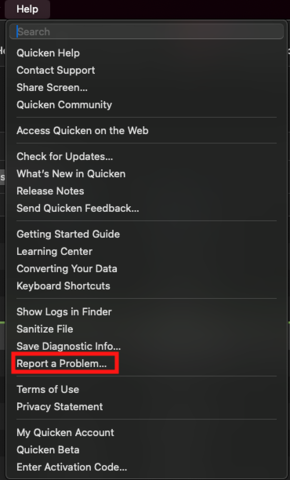
Once we have that info, we’ll be able to investigate further.
Thank you!
-Quicken Anja
Make sure to sign up for the email digest to see a round up of your top posts.0 - How did you go through the cutover?
-
It's a mess.
- I followed the prompt to do the cutover.
- Yesterday I tried to rebalance some accounts in Netbenefits (fund exchanges). This is what I see today when I update:

That's not information that I can use. And it leaves my account with a cash balance that is incorrect.
3. But wait! The share holdings are also updated using a pesky 'placeholder'!

4. So I have → the correct # of shares in this account as of today → an incorrect cash balance → no record of the actual transactions (only the magical placeholder).
It's a mess.
5. I will 'report a problem…' via Help.
Thanks.
0 -
There are always hiccups with these switchovers, and the one with Fidelity is no different. The common culprits reported (and what I have personally seen for NetBeneftis) are as follows. It took me about 15 minutes to clean up.
- Your funds are now being reported with a slightly different security name (albeit same ticker), hence the doubling. To fix, (after making a backup): Go into Windows: Securities and locate the two matching funds. The new one will typically have a blank "Type", so you will want to set that to the correct one which is typically Mutual Fund. Then, select the two matching ones, and click "Merge Securities" at bottom of window. Follow the prompt about which name you wish to use going forward (I used my old), and you might get a warning about a few price history incosistiences. I knew mine were correct, so I ignored. Repeat for each duplicated fund, and those placeholders should disappear. Even before this conversion, Fidelity did this about every 2 years, so I was familiar with the exercise .
- You get a few (and often unknown) indescribable recent transactions. In my case, I was able to simply delete, and the cash was correct. From your screenshot, though, they may be more recent transx that are needed, but not correct. I suggest deleting them (as they are erroneous (cash transx) to begin with.) and evaluate your cash balance. If a mismatch, then you will have to check at the NetBenefits website under recent activity if those are recent transactions that you will have to manually enter so your file is correct for now.
Every account while have its own intricacies, but the two above should get you much closer to an accurate file until the backend issues with Fidelity/Intuit/Quicken get worked out.
0 -
@John_in_NC Thanks for the Securities > Merge Securities guidance. This does indeed get rid of the pesky placeholders. Things look better now, if not yet 100% correct - I still have some things to clean up.
0 -
Good to hear. I suggest you narrow it down to any discrepancies over the weekend while markets closed/NetBenefints is showing balances that should match your data file. That should make it far easier as the amounts should balance (or +/- a few pennies for rounding)
You might have to manually enter any transx that happened after this conversion (which occurred around 8/1). I have not heard of any transactional history issues-all the problems were either security mismatch or random recent garbage being pushed out.
Using the portfolio view to compare share balances is another great way to check if your securities are inline with what Fidelity shows.
Good luck-I got my file cleaned up in short order.
0 -
Fidelity Netbenefits is still broken. Automatic monthly transactions downloaded as 'Contribution' 'Uncategorized' and the specific fund purchases are not recorded. Also, missing transactions. It's a mess.
1 -
Yeah, it is annoying, but I am dealing with it.
I just typed in this pay period's transx this morning to get things to balance.
Chase has historically had a better relationship with Intuit/Quicken, so I am hopeful this will get resolved soon.
0

