New Fidelity Connection - Incorrect # of Shares/Missing Investment Accounts [Mac]

I just did the Fidelity conversion to a new connection method….at least that's what it's advertised as. The convoluted conversion dropped an important mutual fund with a long transaction history from my brokerage account. I've restored my file to an earlier version. But I'm afraid to touch my Fidelity accounts…..and that's a huge problem for me. HELP!!
Answers
-
Hello @AFN,
Thank you for letting us know you encountered this issue. To help troubleshoot, please provide more information. Do you recall which mutual fund was dropped? Did it disappear from your file completely? Did you notice any other issues after connecting to the new connection method?
You mentioned that you restored a backup. Is your Fidelity account connected via Direct Connect again? Is the information displaying properly in the restored backup file?
I look forward to your response!
Quicken Kristina
Make sure to sign up for the email digest to see a round up of your top posts.
0 -
I went through the conversion today and saw some changes in downloads that are problematic:
- Purchased Money Market funds are displaying as cash rather than a holding. This causes balances not to match for users previously tracking them as a holding.
- Prices in transaction downloads appeared to be truncated to 3 decimal places and the share quantity was slightly off. These old transactions downloaded as new and I was able to delete them, and I'll need to see if this issue continues for fresh transactions.
0 -
Today Quicken for Mac prompted me to update my connections for my Fidelity accounts, of which I have several under two different user names. They all reconnected fine, but three accounts have discrepancies. This post will focus on one.
I have an account which has a FDRXX security (money market, cash position) which does not show up on my Quicken ledger. It's just not there and the the total brokerage balance is missing the FDRXX amount. All other securities have the correct balance.
Needless to say, a missing security is a serious issue.
0 -
Hello. I was prompted by Quicken today to update my Fidelity accounts to the new connection. I went through the steps and things look good for the most part. However, there is a transaction (placeholder) in my Cash Management account now that shouldn't be there.

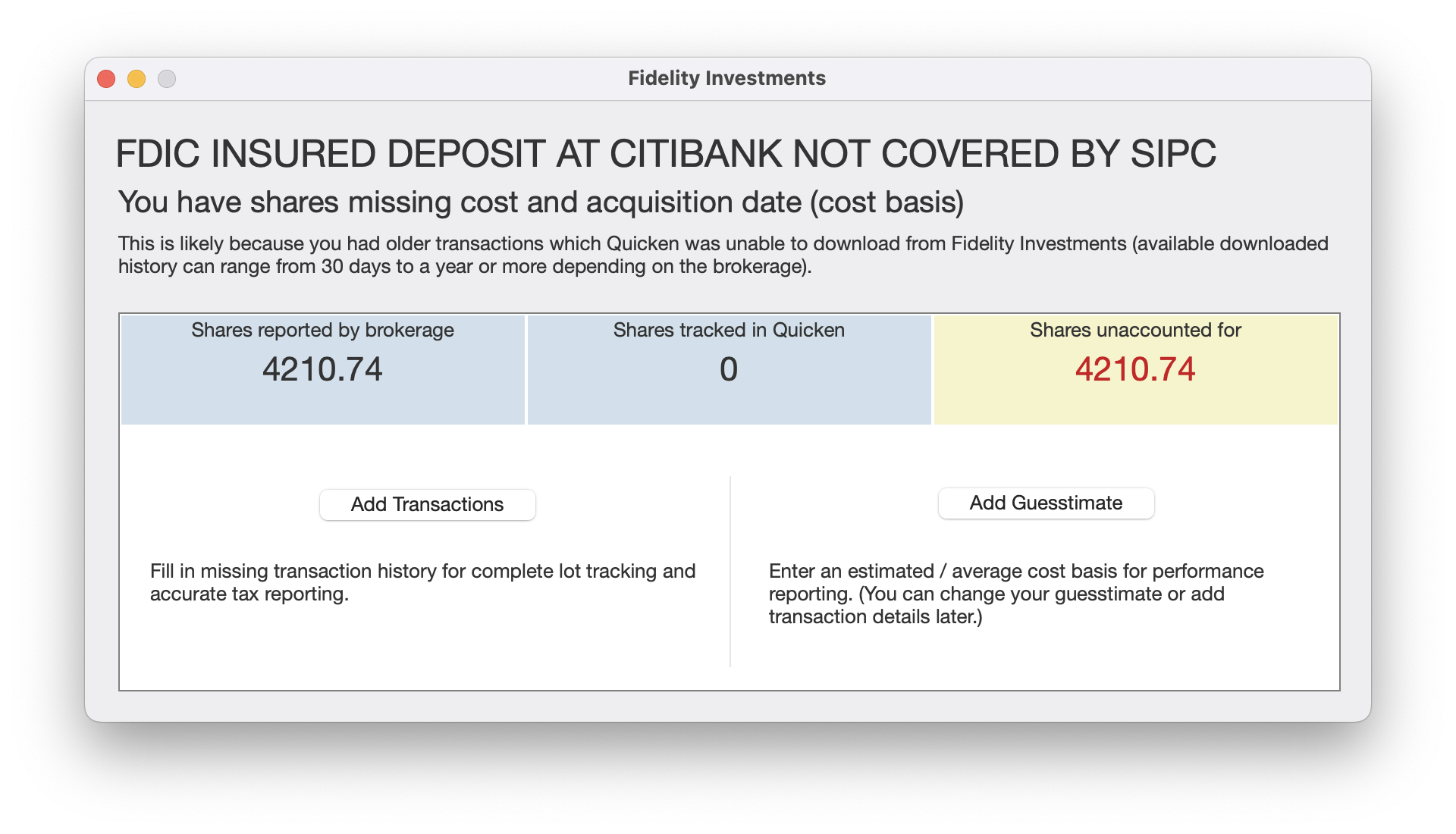
First, the title of this transaction is completely wrong. This is not about Citibank or the SIPC, it was downloaded from Fidelity. Next, the contents of this account are cash, not shares. And the placeholder doesn't even describe what "shares" it's talking about (what symbol?).
The net effect of this placeholder is that the balance of my Fidelity Cash Management account is now exactly doubled.
If this is something new and not actually an error, I will need some help with how to deal with this as it will be really annoying if I have to manually delete this transaction every time I download.
I also sent a report about this error from within Quicken.
Thanks!
Quicken Premier for Mac
1 -
The fund is FZFXX - Fidelity Treasury MMF. My net worth in Quicken after the "conversion" is reduced by my holding in that fund.
After restoring, the Fidelity accounts are back to Direct Connect. When encountering the Fidelity conversion window, I will continue to select the "Remind Me Later" option until Quicken and Fidelity assure me that this process works 100% correctly.
I can't tell you how frustrating this is. I rely on Quicken every day and do not expect to encounter this type of problem.
3 -
Hello @richard13,
Thanks for bringing this issue to our attention.
We will be forwarding this issue to the proper channels to have this further investigated. However, we request that you please navigate to Help > Report a problem within your Quicken program and submit a problem report with log files and screenshots attached in order to contribute to the investigation.

It would also aid the investigation to include a sanitized file when submitting the problem report. A sanitized file is a data file that removes personally identifiable information so you can comfortably share this file with the Quicken team.
Please let me know once you have done so!
-Quicken Jasmine
Make sure to sign up for the email digest to see a round-up of your top posts.
0 -
If your Fidelity account is set up to keep uninvested cash in an FDIC insured account, Fidelity keeps those accounts at a variety of banks (roughly two dozen last time I looked); your cash is likely being kept in a Citibank account. These deposits would be insured by FDIC and not by SIPC (which is what normally insures brokerage deposits). That's probably why SIPC and Citibank were mentioned in the message.
In any event, if the transaction is erroneous just delete it. When I've had to delete erroneous or duplicate transactions I haven't had an issue with them appearing again, so I would expect this to be a one time event.
1 -
@AFN Was your total Net Worth reduced by the holding in that fund, or was your non-cash holding reduced?
For a while Quicken has had the option of taking a money market fund in Fidelity and treating it as either a fund/holding, or as cash. If during the "conversion" process that option got flipped somehow, that might be your issue.
@Quicken Kristina - I have 3 Fidelity investment accounts, HSA, Roth, and trad Rollover. In my HSA SPAXX (Fidelity Govt Money Market fund) is treated as a holding, and I have a $0 cash balance. In the other two it's treated as cash, and I show an accurate Cash Balance (ie: available to purchase with). I cannot find anywhere in the options that would allow me to flip the switch for HSA so it is treated like the other two. Is there a way to do that?
0 -
What a mess. The last time there was a problem with tracking my Fidelity 401k in Quicken I lost several years of historical data because I had to rebuild my account. After changing to the new connection method, it's looking very similar to that previous disaster. My connected account shows a balance $163K higher than my actual balance after the change. I think I can see the funds that were either duplicated or added erroneously but I have no idea how to delete them from the ledger in Quicken. The erroneous balances go back to 4/2024 in Portfolio view. I can't tell you how frustratingly bad this is. I had not quit the app for 3 weeks so had no auto-backup (my bad). And did not think to backup before changing the connection (also my bad). Lesson learned. Perhaps Quicken should add a prompt to backup the data file for any change that affects connections since it seems there's a decent probability for data mangling.
I added/linked to the same Fidelity account using a different name in Quicken to try and rebuild the account, and the balance is closer (still $900+ in cash and $30K in a fund that I don't own), but now, just like last time, I only have 2 or so months of Fidelity history (their limit I guess).
This is a BIG problem Quicken peeps. What the &*^$% happened and will it be fixed so my long standing Fidelity account in my data file reflects my actual investments???0 -
Hello All,
This issue has been reported and is currently being investigated by my team. Although, there is no current ETA or information to share, we will update this thread with any information as it is received.
Please refer to my previous response within this thread to send a Problem Report.
Let me know once you have done so, thanks!
(CBT-748)
-Quicken Jasmine
Make sure to sign up for the email digest to see a round-up of your top posts.
0 -
Last night I converted to the new Fidelity connection. Upon the automatic update, it downloaded the same transactions it had already downloaded the previous time (separate issue, which I'll raise if it happens again). I don't see any other duplicate downloads, which is good.
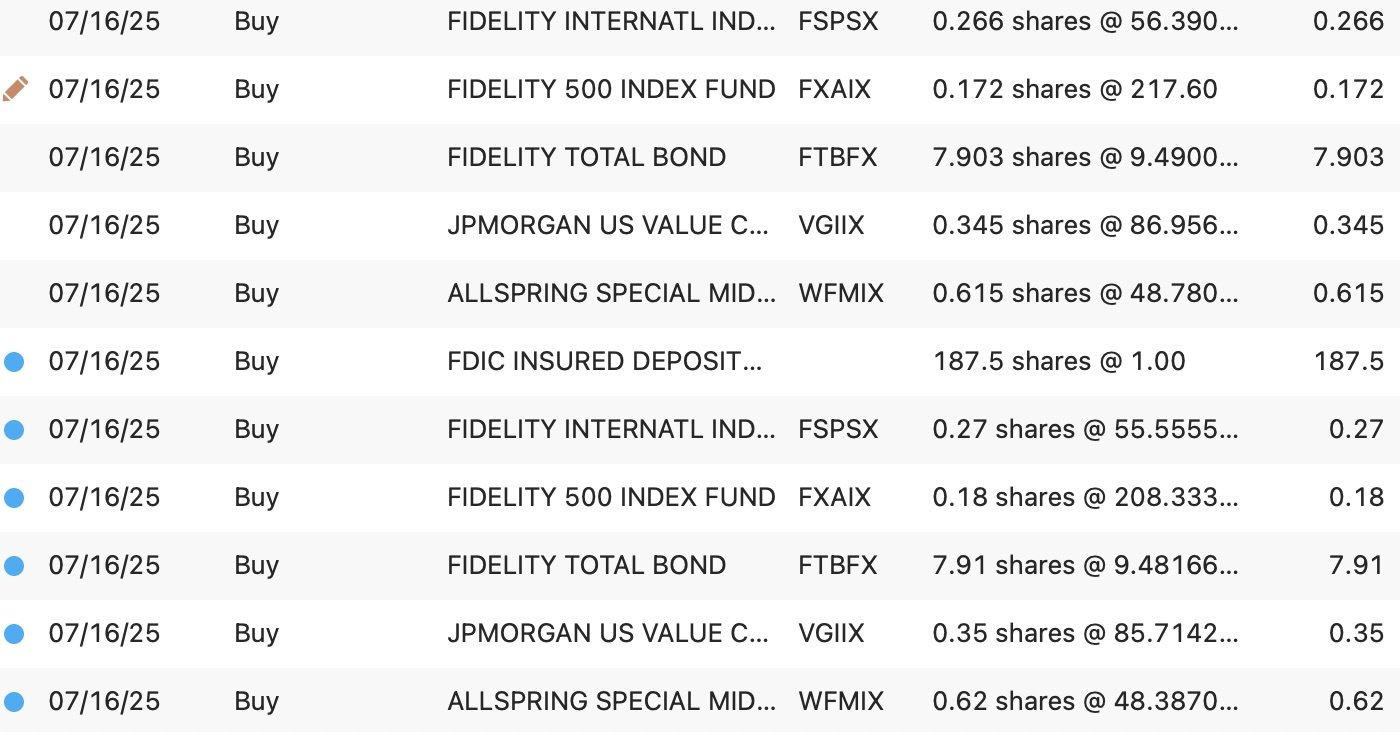
But these transactions' share quantities are rounded to 2 decimal places instead of the 3 places it was rounding to previously. My Fidelity statements display to 3 places. This discrepancy is bad for reconciliation.
But also, it's rounding the share quantities incorrectly. This will make reconciliation impossible.
This happened across all my Fidelity accounts (401k, IRAs, HSA). In fact, in my brokerage account, it rounded to the nearest integer, not even to any decimal places. The duplicated download helps us see this in one account:
symbol
shQty-pre-change
shQty-after-change
FSPSX
0.266
0.27
FXAIX
0.172
0.18
FTBFX
7.903
7.91
VGIIX
0.345
0.35
WFMIX
0.615
0.62
 1
1 -
Thanks for reaching out with this issue!
Please use the instructions that I previously shared within this thread to send a Problem Report to us.
Let me know once you have done so. Thanks!
-Quicken Jasmine
Make sure to sign up for the email digest to see a round-up of your top posts.
-1 -
I saw the same issue as cheezydee, but had already cleaned up the transactions with incorrect share amounts. I submitted 2 problem reports— one for the issue with non-core money market mutual funds being included as a cash balance which I mentioned earlier in the thread and a second one for the incorrect share amounts in the transaction download.
0 -
Hello Quicken Jasmine,
Yes, I filled out a problem report before I posted here.
Thanks.
Quicken Premier for Mac
0 -
My Fidelity CMA has zero cash and all assets invested in FDLXX (Treasury-Only MM Fund). If I have $10,000 (example only) invested in FDLXX, after I download, my account shows FDLXX $10,000 and CASH $10,000. I fixed this yesterday by adding a Balance Adjustment transaction in the register to subtract the Cash, but when I downloaded again today, another Balance Adjustment transaction was automatically added bumping the cash up to $10,000 and the error was repeated. I did send in an error report from Quicken Mac both yesterday and today. I'm sure this isn't only happening to me. This is after going through the process to migrate the Downloads to the new Fidelity download process (which also required fixing the balances on my traditional IRA and Roth IRA accounts).
One other issue is that the Quicken screen that comes up after reconnecting Fidelity with the new download process is that the user is given the choice of Simple or Full Transactions (whatever-its-called) downloads, BUT…it applies to ALL Fidelity accounts. A user that has some accounts set to Simple and some to full download has a dilemma. I think the workaround is to set all accounts to Simple and then after the first successful download, go into each account that should be set to full transaction download and reset the download from Simple to full transactions…but that's just my guess. The program should allow the setting for EACH account, not a blanket Simple or Full transactions.
But the issue in the first paragraph is the priority. My account balance shouldn't be DOUBLE the real amount. Thanks in advance.
0 -
Thanks Jon. That makes sense. The account is using an FDIC sweep so it's possible it's at Citibank. But it is odd that SIPC is mentioned too. Cash Management accounts are of type Brokerage. I could buy and sell equities from here but it's really meant to just act like a checking account.
The real problem with deleting the placeholder is that it comes back on the next download.
It feels very much like this is related to the Quicken updates with Fidelity. I never had this problem before where the placeholder comes back. Usually they stay deleted.
The placeholder is likely being created because Quicken thinks I'm missing something. Problem is, I'm not missing anything. And if this is some new fangled way of keeping track of my Cash Management account it is very unwelcome.
Hopefully this can be resolved soon.
Quicken Premier for Mac
0 -
I just submitted a third problem report this morning. New transactions in Fidelity are not automatically matching if they were manually entered prior to download, even if they are identical (except for the date which is one day apart). I see this in multiple Fidelity accounts, and manual matching works OK. It's not clear to me why this is happening.
0 -
Hello All,
Thank you for joining this thread and for sharing that you are also experiencing this issue. The issues with Fidelity and the migration have been reported and are currently being investigated. Please refer to my previous post in this thread to submit a Problem Report.
Let us know once you have done so.
We appreciate your patience and support!
-Quicken Jasmine
Make sure to sign up for the email digest to see a round-up of your top posts.
-1 -
I'm seeing the same thing as @Andrew Hodes in my Fidelity brokerage accounts, transactions are not getting automatically matched anymore. I had three new transactions in my CMA this morning and none of them matched the manually entered transactions that were already in the register. My Fidelity VISA is not being affected by this, so far transactions are still matching up in that account.
0 -
After running the conversion process, each of my four Fidelity accounts contained 10-20 transaction downloads labeled as new that were actually duplicates of existing entries in the register. The duplicates were not all in chronological order (?). All of the existing entries in the registers were from downloads prior to the conversion, not manual entries. I deleted all the duplicate downloads manually. FYI my Quicken file is 140 Mb, something that might be relevant. As reported in earlier posts, I saw truncation of data in some cases as well.
As one who has relied on Quicken for 35+ years to manage my finances, this "security update" is an unmitigated disaster! Coming from a career in high-tech, I would have fired those responsible for releasing software with so many serious bugs. Is the regression testing of software a lost art at Quicken/Fidelity?
0 -
So, a new wrinkle on my issue today. The errant placeholder showed up this morning as expected but I also received an interest payment (yesterday was the last day of the month). And it interest payment has the same description as the placeholder. "FDIC INSURED DEPOSIT AT CITIBANK NOT COVERED BY SIPC". I have reported this again to Quicken in app. I have also changed my Cash position for this account from FDIC insured to SPAXX to see if this is related to the type of cash position.
Quicken Premier for Mac
0 -
Problem with FDRXX (money market fund) still remains. The Transaction view shows a dividend received but no share balance! And Portfolio view doesn't list FDRXX at all (and it is clearly there on Fidelity site)! Report filed.
Here is a kludgy but effective workaround for net worth and analysis reports while Quicken fixes this. I created a dummy brokerage account and manually entered the FDRXX balance. Of course reports have to modified to include the dummy account.
As with the Vanguard migration issues, this may take weeks to fix. I just wish they published a daily status of know errors and progress - even if it doesn't change every day.
0 -
I have the exact same issue with three different transactions.
0 -
This situation has happened to me at least three times. The most recent occurrence was as many others have pointed out, an issue with the Fidelity accounts starting on July 30, 2025. Shame of the Quicken Mac team!
0 -
I notice that the Fidelity connection upgrade option no longer appears when I try to update my accounts. Great move, Quicken. [Removed - Disruptive]
0 -
Hello All,
Thank you for continuing to update this thread with the issues that you are experiencing. Our teams are investigating and actively working towards a resolution.
We appreciate your patience and support!
-Quicken Jasmine
Make sure to sign up for the email digest to see a round-up of your top posts.
0 -
Update on my issue: I moved the cash in my Fidelity Cash Management account from FDIC Insured to SPAXX and this seems to have resolved my issue for now. I am no longer seeing the recurring placeholder. I would like to see this bug fixed but it's less critical (for me) at this point.
Quicken Premier for Mac
0 -
Thank you for sharing!
-Quicken Jasmine
Make sure to sign up for the email digest to see a round-up of your top posts.
0 -
I have the same issue with placeholder for Fidelity Government Cash Reserve (FDRXX) after the conversion of the download method from Direct Connect to EWC+. During the conversion, I selected the Quicken Recommeded method of coverting the money security to cash balance, instead of tracking money securities. Basically, I encountered 2 problems.
- It created the incorrect placeholder for FDRXX. Even I have deleted it manually, it came back again.

I agree with another comment above that the placeholder is likely being created because Quicken thinks I'm missing something. Problem is, I'm not missing anything.
2. Even I have selected not to track the individual money security (e.g. SPAXX, FDRXX), but the next download from Fidelity still tried to track the money securities and separate them from the cash balance. As a result, my Fidelity account shows the cash balance as partialy as CASH, and partially as the security.

Please fix this problem.
0 -
@Quicken Jasmine I have submitted the Problem Report regarding the issue of rounding share quantities after switching to the new Fidelity connection. Thanks!
[edit] Sorry: forgot to quote the relevant post. See my post above of July 30.
0


