PayPal account connection disappears

Hello,
About a week or so ago, Quicken Mac stopped connecting to PayPal. In the Connection Status window after manually updating accounts, I see this message:
Downloads for this connection need to be set up again. (NO_ACCOUNTS_FOUND)
I click the Set Up button (in some instances it may read Reconnect) and Quicken proceed with the authentication process. I provide my credentials to PayPal and the result is this message:
Quicken couldn't find any accounts to add.
We were unable to identify any accounts to add. This could be because there aren't any accounts associated with this login or because your accounts aren't supported by Quicken at this time.
The accounts do indeed exist (PayPal, PayPal Mastercard, and PayPal Credit) and I am able to access them with no issue by directly accessing them via PayPal.
I attempt to reconnect these account daily (over a the last week) to no avail.
I know that PayPal is in the process of converting PayPal Credit accounts to a traditional credit card format. Perhaps this is related?
Thanks for any insight .
Best Answer
-
Hello @dirtbagdad,
Thanks for the update on PayPal—glad to hear you’re no longer seeing issues there.
For your Target Mastercard, when we checked your account internally, we didn’t see any errors occurring on our side. Since you’re seeing a 324 error, please review and follow the steps in this support article to deactivate and then reactivate/link your account carefully.
This process ensures your account reconnects properly and downloads recent transactions without duplication. If the issue continues after these steps, please reach out to Quicken Support directly.
As for Venmo, the issue you’re seeing is a known issue that our team is actively working on, though we do not have an ETA on resolution at this time. While the investigation remains ongoing, please refer to this Community Alert for any and all available updates and information.
Thank you!
-Quicken Anja
Make sure to sign up for the email digest to see a round up of your top posts.0

Answers
-
Hello @dirtbagdad,
We appreciate you bringing this issue to our attention!
To start with, please take a moment to review and follow the troubleshooting instructions found in this support article.
Hope this helps!
-Quicken Anja
Make sure to sign up for the email digest to see a round up of your top posts.0 -
Hello,
Thanks for your support.
I tried removing and adding back the accounts as instructed in the article (twice, in fact).
Unfortunately, I still get the same result as noted in my original report.
0 -
Hello @dirtbagdad,
Thanks for letting us know!
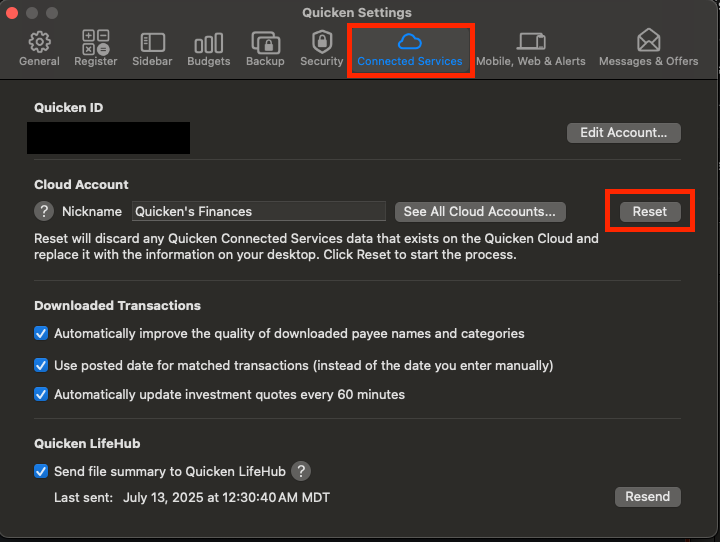
Next, I would like you to attempt a Cloud Reset to see if this may resolve the issue. You can follow the instructions below. It is always recommended to save a backup before proceeding.
- Go to Quicken > Settings.
- Go to the Connected Services tab.
- In the Cloud Account section, click Reset.
Let me know how it goes!
-Quicken Jasmine
Make sure to sign up for the email digest to see a round-up of your top posts.
0 -
Just checking in! Are you still needing assistance?
Let us know!
-Quicken Jasmine
Make sure to sign up for the email digest to see a round-up of your top posts.
0 -
Thanks for the suggestion and following up.
I tried a Cloud Reset and am unfortunately still getting the same result ("couldn't find any accounts to add").
Another piece of data: I use a VPN (Proton) and am in Canada. I tried adding the PayPal accounts with a Canadian VPN, a U.S. VPN, and none. Still get the same results.
What can I try next?
0 -
Hello @dirtbagdad,
Thanks for coming back and providing more information!
Due to the nature of this error message and the previous troubleshooting steps having failed, I suggest contacting Quicken Support directly to continue, as an escalation may be in order. The Quicken Support phone number can be found through this link here. Phone support is available from 5:00 am PT to 5:00 pm PT, Monday through Friday.
I apologize that I could not be of more assistance!
-Quicken Jasmine
Make sure to sign up for the email digest to see a round-up of your top posts.
0 -
Hello,
I figured out the source of the problem: For PayPal I had both multi factor authentication and a Passkey set up. Removing both from PayPal allowed me to successfully connect Quicken with PayPal.
While this works, not having that layer of security is a heightened risk.
Please report this as a bug.
Thank you!
1 -
Thanks for coming back to update us. I am happy to hear that you were able to figure out the issue!
The multifactor authentication requirements/setup do come directly from the financial institution and their servers. I recommend reaching out to them for further assistance with this matter. I do suggest requesting to speak to the banking or aggregator departments, as they are generally more familiar with third-party applications such as Quicken.
Please let us know how it goes!
-Quicken Jasmine
Make sure to sign up for the email digest to see a round-up of your top posts.
0 -
OK, Paypal is a large behemoth… we'll see how responsive they are.
On an additional note, a couple of days ago, I received an alert in Quicken the Fidelity Investments was changing the methods of connection with Quicken. It requires one to reestablish a link with Quicken… the same process as with PayPal. Alas, I get the same message from Fidelity as with Quicken (Quicken couldn't find any accounts to add.). I also have multi-factor authentication set up for this brokerage account. I cannot test since there is no obvious way to turn this off for Fidelity.
A pattern emerges.
0 -
Thanks dirkbagdad………..!!!
I also have been struggling with CC-501 errors when trying to download the Paypal MasterCard. I turned off the multi factor authentication…….and now I am able to connect again. I had spent over an hour with Quicken support and was not able to get MC to download.
0 -
Could be a coincidence but I was getting an error with PayPal. The error message was that the account was hidden or separate or was closed with PayPal (it wasn't). I changed the account so it wasn't hidden or separate any longer and I was able to update it. I'd rather not have it listed there as I don't use it, don't want to close it, but just want to monitor it.
Edit: I just moved it back to hidden/separate and now it works for some reason.
0 -
Thank you for sharing! I am happy to hear that this issue is fixed for you!
Hello all,
If you are still experiencing issues, please let us know!
-Quicken Jasmine
Make sure to sign up for the email digest to see a round-up of your top posts.
0 -
Hello Everyone,
Just checking in once more to see where you stand with this issue.
Please let us know!
-Quicken Jasmine
Make sure to sign up for the email digest to see a round-up of your top posts.
0 -
Just checking in once more before this thread is closed.
Let me know!
-Quicken Jasmine
Make sure to sign up for the email digest to see a round-up of your top posts.
0 -
Hello,
I'm no longer seeing the issues with PayPal accounts (I only have a passkey set up for security there).
However, as of this past week, I am now seeing errors that are similar with Target Mastercard and Venmo:
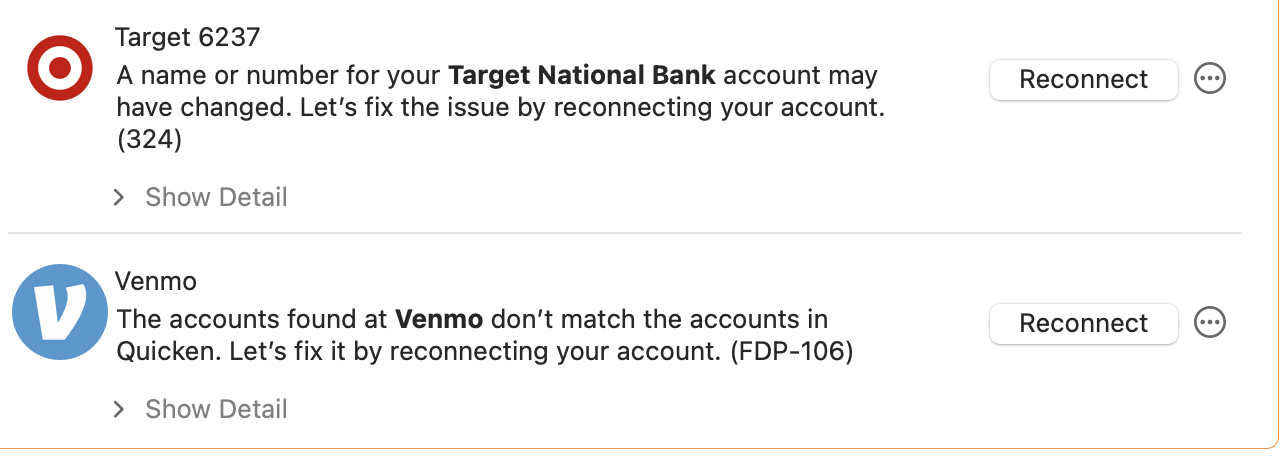
Naturally, both accounts exist and are active (I can access them by non-Quicken means).
0 -
Hello @dirtbagdad,
Thanks for the update on PayPal—glad to hear you’re no longer seeing issues there.
For your Target Mastercard, when we checked your account internally, we didn’t see any errors occurring on our side. Since you’re seeing a 324 error, please review and follow the steps in this support article to deactivate and then reactivate/link your account carefully.
This process ensures your account reconnects properly and downloads recent transactions without duplication. If the issue continues after these steps, please reach out to Quicken Support directly.
As for Venmo, the issue you’re seeing is a known issue that our team is actively working on, though we do not have an ETA on resolution at this time. While the investigation remains ongoing, please refer to this Community Alert for any and all available updates and information.
Thank you!
-Quicken Anja
Make sure to sign up for the email digest to see a round up of your top posts.0 -
Update: after about a week, I reconnected the Target account and it now seems to be working.
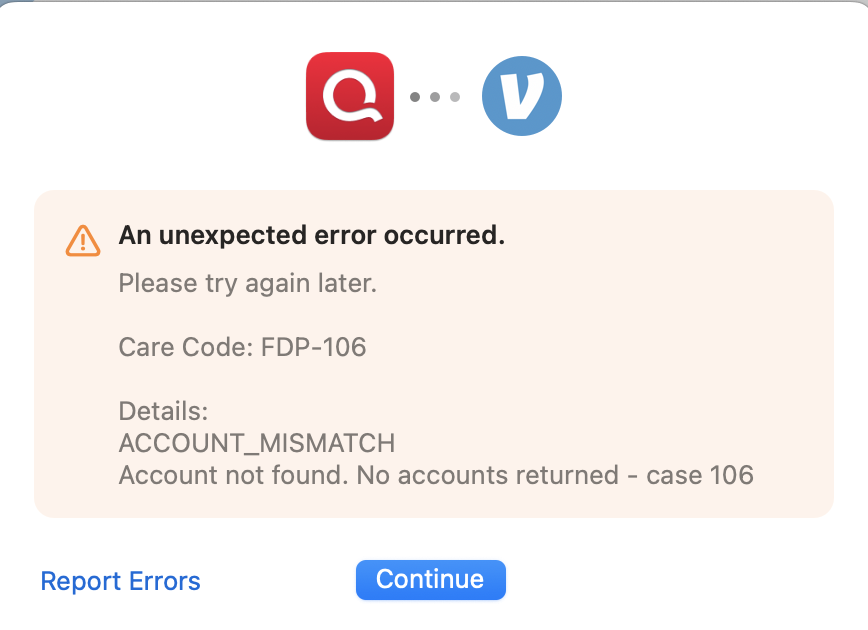
The issue continues with Venmo. When I attempt to reconnect it, I see this message:
 0
0 -
Thank you for the follow-up @dirtbagdad,
Unfortunately, the FDP-106 errors with Venmo are a known issue. To be notified of any updates, once available, and know when the issue is resolved, please bookmark the Community Alert linked below:
Thank you!
(Ticket #11912441/CTP-14208)
Quicken Kristina
Make sure to sign up for the email digest to see a round up of your top posts.
0

