zzz-Fidelity Updates
Comments
-
If you have not already done so, it is strongly suggested that you restore the recent backup file like was mentioned toward the end of my previous reply so you can continue to use the DC connection which does not have this nor several other critical issues with the current Fidelity EWC+ connection method…at least until we are forced to migrate to EWC+ on 8/20. And if/when your are then prompted to reauthorize your Fidelity accounts be sure to decline it by clicking the "Remind me later" link.
Quicken Classic Premier (US) Subscription: R66.23 on Windows 11 Home
0 -
Has anyone been able to get 401ks (i.e. Fidelity Netbenefits) to download correctly. I don't see Fidelity Netbenefits as a banking institution option any longer, and if I use Fidelity investments for the 401k, it doesn't download detailed transaction information.
1 -
Since there are so many problems with the Fidelity conversion, can you list what items are being covered by CTP-13955 so we can make sure nothing is missed? I see confirmation of a few items above, but not everything that has been reported and we need to make sure everything is being investigated.
3 -
The following has also been provided to my Fidelity account team.
I was under the impression that Fidelity and Quicken are ‘joined at the hip’ when it comes to transmitting and swapping data for matching accounts, i.e., they talk to each other in such a way that would lead a customer to believe that when we get a statement from Fidelity and we look at the accounts balance in our Quicken file for the statement end date the balances would match. They don’t. In fact, after several years I have yet to get a monthly statement from Fidelity that matches my Quicken accounts.
I put the fault equally on Fidelity and Quicken for this lack of account transaction synchronization since both company profiles talk about the inter-connection that exists when Quicken asks Fidelity for an update of transactions executed on the Fidelity side. Again, this transactional synchronization appears to have some holes, e.g.:
- Regardless of the Fidelity account, almost all the transactions (buys, sells, reinvests, etc.) for the Fidelity Government Cash Reserves (FDRXX) short-term fund never show up in my Quicken accounts when an Online Update in Quicken is performed. This puts a burden on me to create the transactions manually in Quicken to make the accounts match so I can properly reconcile the account to the Fidelity statement. I should not have to do this work except on a rare occasion when something ‘goes bump in the night’ and a human’s eye needs to investigate the abnormality.
- Every month there are transactions received by Quicken from Fidelity that may be dated say 6/30/2025 and are included in the Quicken account holdings balance as of 6/30/2025. Rightfully so. However, several times these transactions have not been included in the statement from Fidelity therefore providing an overvalued Quicken account against the statement from Fidelity. In order to obtain equal account balances, I have to change the processing date of any such transactions in Quicken to a 7/1/2025 date so that Quicken does not reflect them in order to obtain equal account balances and proper reconciliation to the Fidelity statement for 6/30/2025. Reconciliation becomes burdensome as a result.
- The balance of our accounts, i.e., IRA and Brokerage accounts in Fidelity and Quicken are never in balance. They may only be off by a dollar or so, but they shouldn’t be off at all. I believe this is due to the different decimal positions used by Fidelity and Quicken when calculating and reporting number of shares and cost/value numbers. I believe a review of possible differences in field definition, values, and rounding methods should be undertaken to alleviate these differences which might lead to a more accurate reporting of these important values.
I'm on a Windows 11 Version 24H2 for x64-based System, Quicken Version R63.21, Build 27.1.63.21.
0 -
@Quicken Kristina Is the 8/20 deadline set by Quicken or by Fidelity?
If Quicken is setting the deadline, we need for you to advocate for a MUCH later date to give everyone time to sort out all the problems.
If Fidelity is setting the deadline, we need to know that (and, if possible, WHO in Fidelity is setting it) so we can contact our account teams and let them know that Fidelity needs to extend it.
Please let us know ASAP so that we can get some involvement from Fidelity management if necessary before this hits the wall.2 -
Requesting Moderator reply:
I'm one of the victims of this fiasco looking for the best way to restore some sanity to my Quicken. In view of the earlier post that said this conversion is no longer being offered, if I restore a backup from before the conversion, will subsequent attempts to update Fidelity accounts revert to the previously working Fidelity download method without still truncating data etc.etc? If so, then perhaps we can all do a restore and wait while Quicken and Fidelity get their act together and offer (hopefully!) a working conversion before attempting to try doing it again.
0 -
Not me; it looks like the regular 401(k) account (not BrokerageLink) was switched to Simple investment tracking even though the settings say Complete. Has anyone tried switching to Simple and back to Complete to see if it works around the bug?
0 -
Hello @bmbass,
Here is the list of issues that are currently being investigated under CTP-13955:
- Missing accounts: Investment accounts not shown in the account linking screen, preventing setup or reconnection.
- Incorrect share balances: Share quantities downloaded with reduced precision (e.g., 2 decimal places instead of 3), leading to inaccurate holdings and potential placeholder entries.
- Misclassified securities: Money Market Funds (e.g., FDRXX, FZFXX, SPAXX) are being treated inconsistently—sometimes as cash, other times as holdings, or disappearing altogether.
- Transaction duplication: Historical transactions redownload as new entries and fail to match existing register data, forcing manual cleanup.
- Account display mode changes: Investment accounts that were previously set to “Complete” tracking revert to “Simple” without user action.
- Incorrect transaction placeholders: Cash management accounts show erroneous transactions with incorrect labels and values, sometimes doubling balances.
- CDs misrepresented as stocks: Certificates of Deposit are converted to stocks with inflated share quantities and distorted prices.
- Net worth discrepancies: All of the above lead to incorrect account balances and distorted net worth calculations.
For issues with missing transactions, duplicate transactions, and incorrect transactions, we do still need additional information so that we can investigate:
- How did you go through the transition to Express Web Connect+ (EWC+)? What steps did you follow?
- Did you deactivate/reactivate your accounts? Did you go through the fix-it flow? If you got the reauthorization prompt, did you use the Reauthorize button?
- For missing/incorrect transactions, what is the date range for the affected transactions?
- How many transactions are missing? How many are there, but incorrect?
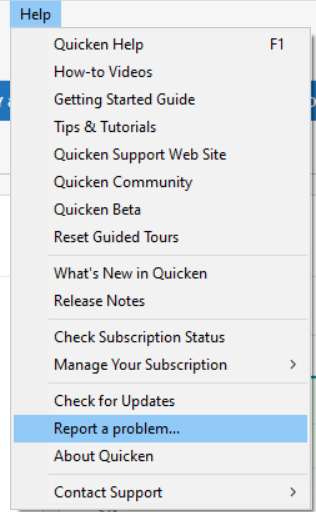
- Please navigate to Help>Report a Problem and send a problem report with log files attached.
- Please include a screenshot of the problem transactions, as they appear on the financial institution website.
- Please also include a screenshot of how the problem transactions appear (or don't appear, if they're missing transactions) in Quicken.
- If you fill in the missing transactions manually, please send the logs before manually entering the transactions in your Quicken.
- Problem Reports allow a maximum of 10 attachments. If needed, you can unselect any files with OLD in the file name to make room, or you can send a second problem report with the additional attachments.
As I understand it, the deadline is agreed on by both Quicken and Fidelity.
Thank you!
Quicken Kristina
Make sure to sign up for the email digest to see a round up of your top posts.
6 -
What a mess….
I know there was a bulletin in here about the migration but it has been extremely messy (at least for me.)
Unfortunately for me I did about 75 stock trades on friday to rebalance an account no knowing about this. After having to re-authorize the account and sign the documents, it loaded about 25 duplicate transactions going back to July 11th stock trades. I spent two hours reconciling the account back to the website's activity log.
I also have 6 fidelity accounts and have spent an hour on each going through them to authorize, yet now it seems like the fidelity servers are down and I am stock on the last two accounts unable to authorize them.
Is anyone else have issues this morning?
1 -
Well, yes and no. When I first did the swap, I noticed the downloaded transactions didn't look right. I noticed the accounts detail page also looked wrong. The I spotted the "Tax Deferred" box was unchecked. When I checked it, it also allowed me to designate the account as a 401K. When I did, the Complete Transaction button was checked. However the downloads still did not have the transaction detail. After messing with it some more, I reverted back to a backup before the change to maintain use of DC instead of EWC+ for now until some of these issues get resolved.
1 -
All of my Fidelity acccounts, including my NetBenefits account, have switched over to the new download method (Express Web Connect+). All accounts EXCEPT NetBenefits are updating correctly. The NetBenefits account indicates is is updating (circle arrow) along with the other Fidelity accounts, but did not pick up the new tranactions that occurred this week.
0 -
Hello @User1811,
Thank you for letting us know you're encountering an issue with new transactions not downloading for your Fidelity NetBenefits account. This is a known issue which has been reported to the proper channels for further investigation and resolution. So that we can investigate this issue, please provide the following information:
- How did you go through the transition to Express Web Connect+ (EWC+)? What steps did you follow?
- Did you deactivate/reactivate your accounts? Did you go through the fix-it flow? If you got the reauthorization prompt, did you use the Reauthorize button?
- For missing/incorrect transactions, what is the date range for the affected transactions?
- How many transactions are missing? How many are there, but incorrect?
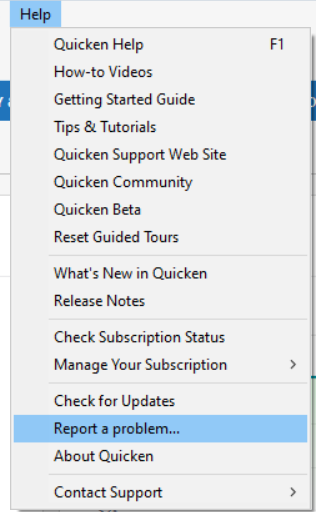
- Please navigate to Help>Report a Problem and send a problem report with log files attached.
- Please include a screenshot of the problem transactions, as they appear on the financial institution website.
- Please also include a screenshot of how the problem transactions appear (or don't appear, if they're missing transactions) in Quicken.
- If you fill in the missing transactions manually, please send the logs before manually entering the transactions in your Quicken.
- Problem Reports allow a maximum of 10 attachments. If needed, you can unselect any files with OLD in the file name to make room, or you can send a second problem report with the additional attachments.
Thank you!
Quicken Kristina
Make sure to sign up for the email digest to see a round up of your top posts.
0 - How did you go through the transition to Express Web Connect+ (EWC+)? What steps did you follow?
-
Ok I am now noticing both my Brokerage account and my GO account are not downloading any transactions from July 31st (i.e., yesterday.) So all my monthly dividends and interest payments are not recorded.
Interestingly all four tax deferred accounts did download properly.
Do not really understand why the differences.
0 -
It could be your NetBenefits account was switched to Simple investment tracking, and you had no transactions of a certain type to your account. I think this happened to me. I do see Dividend & Contribution transactions downloaded (haven't accepted yet). Back when it used DC, I would get ReinvDiv, Bought & Added transactions. The Added transaction was for Roth in-plan conversion.
0 -
Good day.
With the recent Fidelity "Improvement" update (it is great that it is properly connecting and updating), my Account Tracking method changed from Complete to Simple. This is not acceptable to me and I have had to deactivate the update. This has also occurred on my Merrill Lynch accounts. I've not experienced it with Vanguard, but I'm afraid. Why is this and how can it be considered an "improvement". Is there a planned change or work-around to allow updates but also track transactions in "Complete" mode?
1 -
Hello @Marshall-Saybrook,
Thank you for letting us know you're seeing this issue. The account tracking method changing without user input when you change to the new connection method for Fidelity is a known issue, which has already been reported for further investigation and resolution (CTP-13955).
You should be able to change the tracking method back to Complete. To do so, first, backup your Quicken file, then navigate to Tools>Account List. Click the Edit button next to the problem account. On the General tab, go to the Tracking Method section and select Complete.
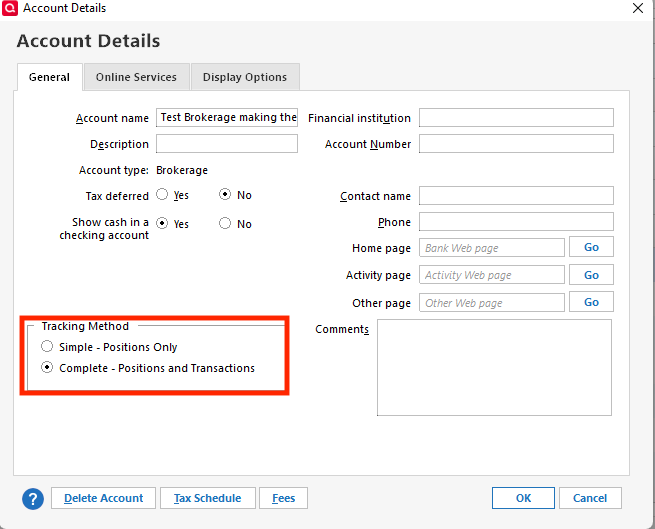
The same process should also work for changing your Merrill Lynch accounts back to Complete.
I hope this helps!
Quicken Kristina
Make sure to sign up for the email digest to see a round up of your top posts.
0 -
Quicken Kristina —- Thank you. So, as I read your response, this is a known issue which "at this time" prevents using Complete Tracking with connecting" to Fidelity. I believe I should follow CTP-13955 to see when this updates with a change. Is this correct?
Thank you.l
0 -
Several days ago I noticed that ZZZ showed up as an addition to my account name when I would perform OneStep update. However, this change didn't impact my account when I downloaded transactions (everthing was working fine).
Fast forward to this morning (8/2) and when I went to update my Friday transactions nothing downloaded. Unfortuately, Friday is when I make my normal weekly purchases in all of my Fidelity accounts plus I had rebalanced one account (50+ transactions).
So based on previous experience I manually updated, entered all my tranactions from Friday (8/1) which took over an hour and manually balanced all my accounts. Next I deactivated online set-up and started the process to reactivate all my accounts.
First thing I noticed is that Fidelity NetBenefits is no longer listed as a financial institution for my 3 401(k) accounts. The only option was Fidelity Investments. In the past the only way to get investment transactions for 401(k) accounts was to use Fidelity NetBenefits for my 3 401(k) accounts.
Second thing I noticed is the new log-in screen at Fidelity where I had accept Fidelity's terms and conditions. No big deal and I understand this acknolwegement and agreement to share data. So I selected the accounts and accepted the terms.
Third, I finished the steps in Quicken; matching up Fidelity accounts with Quicken accounts. However, Quicken still isn't downloading any of the transactions from Fidelity.
2 -
Thank you for your reply @Marshall-Saybrook,
You should be able to switch back to complete by following the instructions from my previous post. Are you having trouble changing back?
Hello @Just Me and Not Someone Else,
Thank you for letting us know you're not seeing new transactions downloading from Fidelity. If you haven't already done so, click the Date column on your investment account register to make sure that the transactions are sorted by date (just in case the transactions are there, but hidden by the sort order). If that does not resolve the issue, then please provide the following information so that we can further investigate:
- How did you go through the transition to Express Web Connect+ (EWC+)? What steps did you follow?
- Did you deactivate/reactivate your accounts? Did you go through the fix-it flow? If you got the reauthorization prompt, did you use the Reauthorize button?
- For missing/incorrect transactions, what is the date range for the affected transactions?
- How many transactions are missing? How many are there, but incorrect?
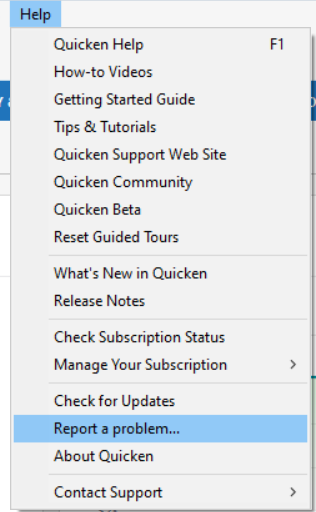
- Please navigate to Help>Report a Problem and send a problem report with log files attached.
- Please include a screenshot of the problem transactions, as they appear on the financial institution website.
- Please also include a screenshot of how the problem transactions appear (or don't appear, if they're missing transactions) in Quicken.
- If you fill in the missing transactions manually, please send the logs before manually entering the transactions in your Quicken.
- Problem Reports allow a maximum of 10 attachments. If needed, you can unselect any files with OLD in the file name to make room, or you can send a second problem report with the additional attachments.
Thank you!
Quicken Kristina
Make sure to sign up for the email digest to see a round up of your top posts.
0 - How did you go through the transition to Express Web Connect+ (EWC+)? What steps did you follow?
-
Quicken Kristen
I am able to change to Complete ONLY when Online Services is not set. If I do "Set Up now" and authorize my accounts, all accounts then switch (without user interaction) to "Simple", Connection Method indicates Express Web Connect+
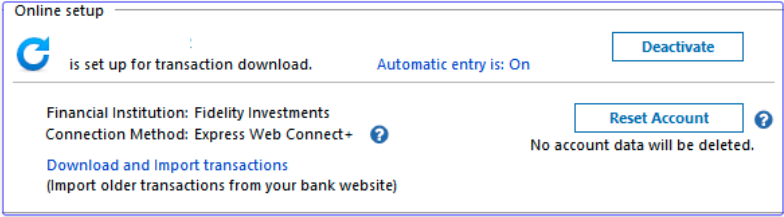
, and the General tab reflects —-
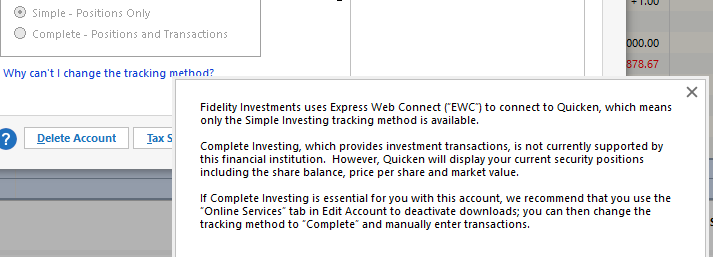
Soooo, while having a connection to Fidelity, my option is Simple — Positions Only. Am I missing some option to get back to "Complete"?
[Edited - Removed Personal Information]
0 -
What's also odd is I had to do the exact same thing with Merrill Lynch a few days ago and it worked perfectly find. In fact ML seemed to correct the issue of constantly putting in placeholders for cash balances even though I had automatic reconciliation off.
Cannot understand how Fidelity screwed this up so badly.
0 -
Previously in July when I had to 'authorize' my Merrill Lynchc account, the tracking changed to Simple. In order to change back to Complete, I removed the connection. Today, I reactivated the connection method with ML and the tracking method remained as Complete. 'Automatic entry is OFF' and 'Reconcile using online balance' is not checked.
0 -
You must have missed all the discussions in this Community about the ML EWC+ connection issues that occurred prior to the more recent ML re-implementation of EWC+. It was not a smooth transition for them either, but I won't speculate about which was better or worse than the other since I do not have any ML accounts.
Quicken Classic Premier (US) Subscription: R66.23 on Windows 11 Home
0 -
Thank you for your reply @Marshall-Saybrook,
It should give you the option for Complete. Please backup your Quicken file, deactivate the problem account(s), then reconnect them by navigating to Tools>Add Account and following the prompts, making sure to carefully link them to the proper nicknames in Quicken.
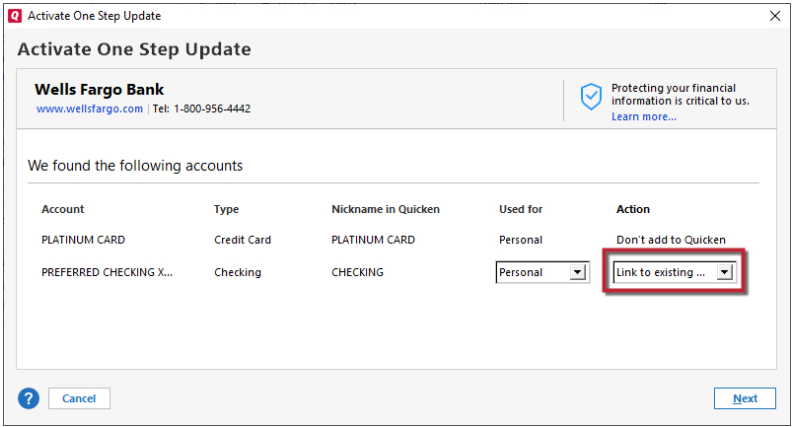
Please let me know how it goes!
Quicken Kristina
Make sure to sign up for the email digest to see a round up of your top posts.
0 -
I restored the three files from a week ago to my laptop (normally use a desktop, laptop used when traveling). Doing the updates on Fidelity it shows as zzz-Fidelity and does not prompt me for logging into my account and accepting anything. I presume this is the old connection (DC)? Should I use this version going forward, keep both the desktop and laptop versions up to date for now or what? The laptop version has many other accounts (credit cards, etc) that would need to be updated. I also remember when I had to restore once before one of my credit card accounts stopped updating. Thanks !!!
0 -
@stevemcd444 said -
Regardless of the Fidelity account, almost all the transactions (buys, sells, reinvests, etc.) for the Fidelity Government Cash Reserves (FDRXX) short-term fund never show up in my Quicken accounts when an Online Update in Quicken is performed. This puts a burden on me to create the transactions manually in Quicken to make the accounts match so I can properly reconcile the account to the Fidelity statement. I should not have to do this work except on a rare occasion when something ‘goes bump in the night’ and a human’s eye needs to investigate the abnormality.
If FDRXX is your Core Account then this is a designed practice by Fidelity. The Core Account is a variation of a cash Sweep Account but instead of the cash being held in a bank account it is held in a MMF (Money Market Fund). For at least the last 20-25 yrs they have been downloading the Core Account value as Cash Balance, not as shares. Buy, Sell, ReinvDiv Core Account MMF shares transactions that Fidelity does behind the scenes for us generally are not downloaded because that would create an overstatement of Core Account value (MMF shares held + the cash value of those MMF shares would cause a duplication of value in Quicken).
Shares transactions will still get downloaded if/when the account holder places buy or sell transactions for the Core Account MMF on Fidelity.com. Because of this these types of transactions generally should never be done on Fidelity.com. Instead, let Fidelity make those transactions on your behalf behind the scenes so these transactions do not get downloaded.
In your online Fidelity account if you look at the Positions tab you will see that the top line is for "Cash" where it used to show the Core Account MMF with *** behind the ticker. Now you need to click on that "Cash" line to expand it where the Core Account MMF will be listed.
The way my Fidelity adviser explained it to me (paraphrased): "When it come to the Core Account think about it as Cash and not as shares of a security. So Cash = Core Account and Core Account = Cash."
Fidelity is not the only brokerage to download into Quicken this way. Some people don't like it but many people like it a lot because they are able to quickly see how much cash is available for trades and distributions without having to search for the number of MMF shares.
I am one of those who really likes the value of the MMF being downloaded as Cash Balance instead of shares. When I reconcile to a paper balance I only compare the value of that MMF to the Cash Balance in Quicken and then I'm done with that part of the reconciliation. As long as the two numbers match then all is good.
This Fidelity EWC+ migration is breaking this practice with some migrated accounts including the value of the Core Account MMF as the Cash Balance, some accounts are downloading the shares of the MMF and not downloading the Cash Balance, some accounts are downloading a mix of the two and some accounts are downloading neither. It's a mess. The Quicken Team is aware of this issue and is working with Fidelity to resolve it.
When I talked last night with a member of the Development Team they indicated that maybe they can put into Quicken the option to select download as Cash or to download as the MMF Security. That, I think would be a good idea and it reflects what was done with Schwab accounts. But first they need to fix the current issue.
Quicken Classic Premier (US) Subscription: R66.23 on Windows 11 Home
3 -
@Ray the compare feature you speak of must be a windows feature. Does anyone know if that exists in the Mac version?
[Edited - Readability]
0 -
I just did the connection update to EWC+ this week.
When I did the EWC+ update, it did ask me if I wanted to use the FCASH (Fidelity's sweep account) account as Cash — I said yes. But when I do the Reconcile and input my current cash balance, Quicken treats "Cash" separately from FCASH.
My Fidelity IRA accounts have the Cash Representation button in the "Update Cash Balance" option (to be able to set FCASH as Cash).
My regular Brokerage/Investment account does NOT show this button.
1) How can I get Quicken to treat FCASH as Cash balance?
2) Is there a way to get the Cash Representation button back for Fidelity Brokerage/Investment accounts?1 -
@Boatnmaniac said:
When I talked last night with a member of the Development Team they indicated that maybe they can put into Quicken the option to select download as Cash or to download as the MMF Security.
When I converted to EWC+, one of my Fidelity accounts (an HSA) that uses FDRXX as the cash/sweep account ASKED me using a dialog box if I wanted to treat FDRXX as a security or cash. I selected cash and this account is still working as before. So, the code to ASK and allow you to SELECT already exists, we just need Quicken to cause this to happen for all accounts, not just the ones using FDRXX. AND, also add some mechanism to change the setting after the fact (since my other Fidelity accounts didn't ask and are now treating SPAXX as a security).
1 -
That ability to select how to download the MMF cash sweep account has existed with Schwab accounts but until now not with Fidelity accounts.
It has started to appear inconsistently with the new EWC+ connections. For instance, you saw it in your HSA account but I have not seen it with any of my 9 Fidelity accounts.
The Quicken person I talked with last night said he thought this feature was built into the Fidelity EWC+ connection and seemed surprised when I showed him it is not available in my file. We both agreed it would be good to provide this feature to all Fidelity users. He said he would ask his team to investigate why there is this inconsistency with this feature implementation with the EWC+ connection.
BTW, another inconsistency: Some, are seeing the Core Account MMF being downloaded with EWC+ as a security instead of Cash. And that is what is happening with 1 of the 9 Fidelity accounts I have set up with EWC+ in test files. But in 3 of the 9 account it is still be downloaded as Cash, in another account is it being downloaded as both and in another account it is not being downloaded at all. The other 3 accounts are managed by a 3rd party and they use a traditional bank sweep for managing cash so there is no issue there.
This is the most confusing and conflicting EWC+ migration I think I have ever seen. The scale of the issues identified coupled with the inconsistencies in how they are impacting users makes me think there is a pretty good chance the 8/20 hard cut-in date is going to slip out some. But that is just a guess. No one at Quicken has told me anything like that. In fact I was told they are pushing hard to get everything fixed well before that date. Let's hope so.
Quicken Classic Premier (US) Subscription: R66.23 on Windows 11 Home
0