Vanguard - 1 of 4 accounts not updating in One Step Update

I have 4 accounts at Vanguard. 3 of them update just fine in One Step Update (Quicken for Windows), the 4th, an IRA, hasn't updated in OSU for a couple of months now.
As a temporary solution, I've been able to go into Vanguard directly and downloaded a QFX file to manually update. That is fine as far as it goes, but less desirable than OSU. The manual QFX update also produces a reporting anomaly - see next paragraph - which or may not be relevant.
The reporting anomaly is — say the problem account had 6 transactions in the prior month, which I manually updated via QFX on the 1st of the next month. A few days later, I run another OSU to download new activity in my other Vanguard accounts (OSU is set for all 4 accounts) — that new OSU Summary will report a count of new transactions that is 6 more than the actual number brought in by that OSU - i.e. continues to report as "newly downloaded", the 6 transactions for the problem IRA that I already added via QFX on the 1st. The extra 6 is just a count shown in the interim OSU Summary - not actual "Downloaded Transactions" in the problem account's register.
Even if that anomaly is inconsequential - I still can't update this one Vanguard account with OSU.
This problem "feels to me" a lot like the Vanguard mess earlier this year in
which affected me as well, but since resolved. However, now I'm NOT getting an OL-295 or any other error message - it's just that the one account at Vanguard doesn't update.
I also looked with interest at this thread
and I carefully followed all the steps in @Jim_Harman's helpful post
but unlike others, this didn't fix my problem.
Any help appreciated!
Comments
-
Hello @rattytom,
Thank you for letting us know you have an account that's not downloading. To help troubleshoot, first, please click on the Date column to make sure that your register is sorted by Date.

That may resolve the issue if the transactions have been downloading, but are "hidden" by the sort order.
Please let me know how it goes!
Quicken Kristina
Make sure to sign up for the email digest to see a round up of your top posts.
0 -
Yes, the register is sorted by date. Thank you.
0 -
Thank you for your reply,
To check for file-specific issues that may be keeping new transactions from showing up in the account, please backup your Quicken file, deactivate the problem account, then navigate to Tools>Add Account, follow the prompts, and add the account as a new account instead of linking to the existing account.
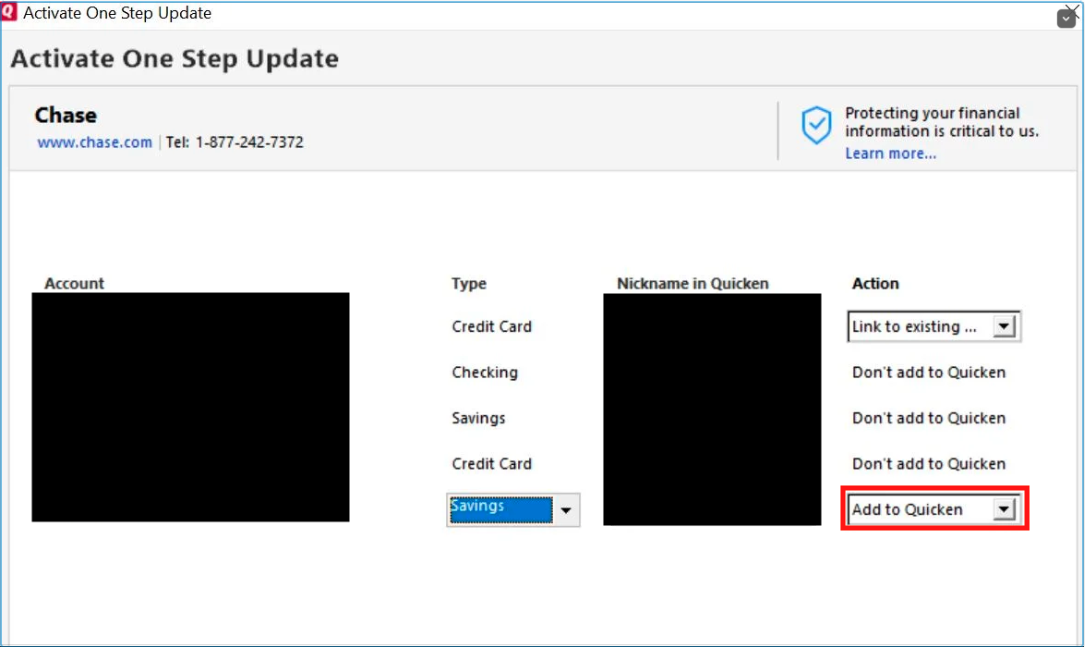
Once you have added the account as a new account, test to see if the issue with new transactions not downloading persists.
Please let me know how it goes!
Quicken Kristina
Make sure to sign up for the email digest to see a round up of your top posts.
1 -
Kristina,
Thank you, yes, the process you outlined correctly added the account as a new Vanguard investment account — and the add process correctly downloaded transactions up through the latest. So thanks for that.
But I now have 2 accounts, 1 deactivated and one new. The new account "only" pulled in 18 months worth of transactions, but the old deactivated account had 8 yrs + of activity. Is there a way for me to merge them, or copy the old transactions into the new account?
Tom
0 -
Thank you for your reply,
You should be able to move the transactions from the old account to the new one. First, it is important to backup your Quicken file before moving transactions. Then, in the old account, click the gear icon near the upper right of the register and select Move Transactions.
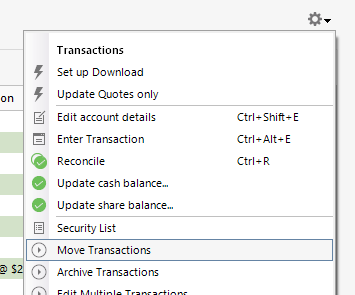
That will bring you to a Move Investment Transactions window, where you can select the transactions you want to move (or click the Select All button if you're moving everything). There is a dropdown to select the destination account near the lower right of the window.
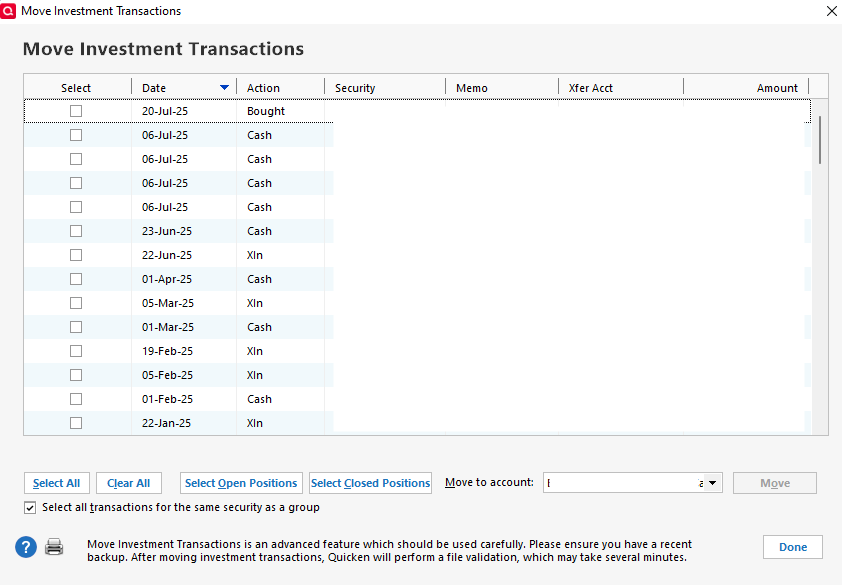
Once the transactions are moved to the correct account, review that account. Make sure to delete any duplicate transactions. If there are discrepancies, make sure to check for placeholder transactions, since they would have been automatically generated before you moved the additional historical information into the new account, and may be incorrect as a result.
I hope this helps!
Quicken Kristina
Make sure to sign up for the email digest to see a round up of your top posts.
1 -
This worked great. My accounts are all fixed now. Thank you!
0 -
Thank you for the follow-up,
I'm glad to hear the issue is now resolved!
If you need further assistance, please feel free to reach out!
Quicken Kristina
Make sure to sign up for the email digest to see a round up of your top posts.
0
