Transactions downloaded from Merrill Lynch not mapped correctly

This discussion was created from comments split from:
Merrill Lynch transitioning from Direct Connect to 'a new connection method' not working
.
Comments
-
I finally got the new connection to work. However, the records coming through are not "mapped" correctly and I'm getting some information downloaded that not correct such as not noted as interest, dividends, changes in the names of securities, etc. Sometimes there are duplicate entries — one that was a deposit and the other interest. This needs to fixed quickly!
0 -
Hello @WillyG,
Thank you for letting us know you're seeing issues with the information downloading from Merrill Lynch. To help troubleshoot, please provide more details about the problem. You mentioned that interest and dividends aren't reflecting correctly. What kind of transaction are they downloading as?
Were the duplicate downloads completely identical? Was it a one-time incident, or are you having duplicates download consistently?
If the changes in security names coincides with when you switched to the new connection method, the most likely cause is a change in format on Merrill Lynch's end. Are the names different every time they download, or are they just different from the names under the previous connection, but otherwise consistent?
I look forward to your response!
Quicken Kristina
Make sure to sign up for the email digest to see a round up of your top posts.
0 -
I am having the exact same issue. Having to review all downloaded transactions and remap to existing securities. Also getting a bunch of garbage transactions downloaded. I will need to login to my account online and manually fix this mess. I may have to restore an older backup file. Please revert back to the old download method until you guys work out the bugs and properly test.
2 -
My incorrect downloads occur on two different days. The first day I receive amounts that are noted as "Deposits" for interest on various stock and bonds. The second day, they are downloaded as "IntInc" or DivInc" which is what I would expect. The first day's downloads are not correct. The amounts are exactly the same on both downloads. I have been deleting the ones that are "deposits".
As for the security names, the only difference I can see are in the names that are being assigned as the Ticker symbol for the "new" security is the same as the previously downloaded version. It is just a pain to have to verify these, when I would have expected them to be the same as what was being sent before.
0 -
Thank you for your reply,
To confirm if this is being caused by something happening in Quicken or if it's being caused by the way the financial institution is sending the data to us, I need to review the logs. Please navigate to Help>Report a Problem and send a problem report with log files attached. Please include at least 3 of the incorrect transactions & the correct version that downloaded later (date, payee, and amount).
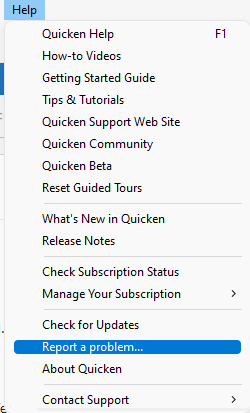
Please let me know once you've sent the logs.
Thank you!
Quicken Kristina
Make sure to sign up for the email digest to see a round up of your top posts.
0 -
I am having similar issues since the security conversation. Frustrating. The downloaded data is random, not complete, not similar to before the security changes and it requires manual entries to make things right. The manual Quicken transaction downloads are also incorrect in my testing. I have a lot of Merrill Lynch account so this is creating a huge burden with lots of manual corrections and work. Something is definitely broke. Thank you.
MEL0 -
Hello @MELCO,
Thank you for sharing your experience. Are you also having an issue with duplicates downloading? You mentioned that it's downloading random and not complete. What is missing? What do you mean by random? For example, do you mean it's random what fails to download, or what does download is incorrect in random ways (such as wrong transaction type)?
What is going wrong when manually importing a QFX? Have you viewed the QFX file itself to verify if the information in the file is correct?
I look forward to your response!
Quicken Kristina
Make sure to sign up for the email digest to see a round up of your top posts.
0 -
The manual QFX file downloads via the Merrill Lynch web site, like the new Express Web Connect+ download, is missing data with the downloads. No memo data, incomplete re-investment data, incomplete dividend or capital gain data, failure to reconcile an investment with the same ticker symbol already in the system, etc. All the data downloaded manually or via the new Express Web Connect+ requires going to the Merrill Lynch web site, viewing the activity data per account and manually correcting all the downloaded data. Nothing downloaded is viable enough to just accept as downloaded as with the previous connection technology. As one other person mentioned, the mapping of the downloaded data it incomplete, and wrong in most cases. I tried resetting all of my Merrill Lynch connections and rebuilding them with no success. When I use the new Express Web Connect+ data, which is incomplete, then I downloaded the manual QFX file, it overwrites the data and makes the transaction even more useless. This is extremely frustrating, and it is creating an incredibly amount of manual work for me given the amount of Merrill Lynch accounts I manage. This all started with the new Express Web Connect+ conversion and it has been ongoing for me every day since last week. I've also restarted my PC, verified that all my applications and Microsoft Windows 11 are updated.
Today for example, one transaction downloaded in one account. It was just the investment and shares. No memo. No dollar value. No explanation. I had to go to the Merrill Lynch web site and view the activity to determine that it was a reinvestment. In the past, I would get three downloads. The dividend amount, then the added shares and in then one in the cash account. I would delete the cash account information and consolidate the other two as one reinvestment transaction. Not perfect, but all of the data was there. The other day I had a sale transaction, with no memo or share number, just the dollar amount.
Also, today I had a pending transaction download, and I do not have the option selected for pending downloads.
MEL1 -
Thank you for your reply,
The QFX file is generated by the financial institution. If that file is missing information, then I recommend that you contact Merrill Lynch directly for assistance.
For the transactions downloading into your account(s) via Express Web Connect+, please keep in mind that not all account types support downloading transactions. See this alert for more details:
If the account getting these partial/incomplete downloads is not an IRA account, please contact Quicken Support directly for further assistance, since they have access to tools that we can't access on the Community, and they're able to escalate the issue as needed. The Quicken Support phone number can be found through this link here. Phone support is available from 5:00 am PT to 5:00 pm PT, Monday through Friday.
If the account having these issues is an IRA, then to confirm if this is being caused by something happening in Quicken or if it's being caused by the way the financial institution is sending the data to us, I need to review the logs. Please navigate to Help>Report a Problem and send a problem report with log files attached. Please include at least 3 of the incorrect transactions & the correct version that downloaded later (date, payee, and amount).
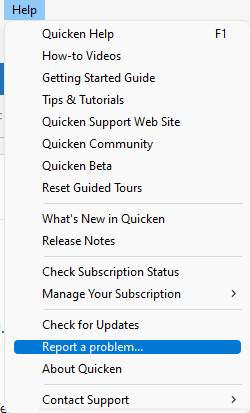
Please let me know once the logs are sent.
Thank you!
Quicken Kristina
Make sure to sign up for the email digest to see a round up of your top posts.
0 -
Quicken Kristina, I have changed nothing. No account changes, no new accounts, no deleted accounts, no account access changes, no password changes. I have a collection of regular accounts, custodial accounts, retirement accounts and credit accounts. All these issues are post the new Express Web Connect+ conversion. Coincidence? Very unlikely, especially given that others are reporting similar issues.
MEL1 -
My further testing update:
Merrill Lynch downloaded transactions are still missing data and are incomplete (7/30/25). Today, the investment was already in Quicken, yet I had to confirm it again. One transaction downloaded with just the transaction name and dollar amount with no detail or memo. I have to manually go to the Merrill Lynch web site to complete the transaction. If I download the Quicken data file manually, the date downloaded has less value (More on this below). Again, I need to enter all transactions manually comparing them to the Merrill Lynch web site.
If I download Merrill Lynch transactions via the standard internal Quicken for Windows "One Step Update", here apparently in lies the issues. Data is missing and incomplete. If I then do a manual Merrill Lynch QFX data download after the Quicken for Windows "One Step Update", the data overwrites what I had just downloaded and for which was incomplete, but for which I did not enter. If, however, I DO NOT use the Quicken for Windows "One Step Update", and I just do a manual Merrill Lynch QFX data download, this data appears to be what I am used to and appears to be correct.
In summary, it appears that the issue is isolated to the Quicken for Windows "One Step Update" as the manual Merrill Lynch QFX data download is accurate if done only, and without using the Quicken for Windows "One Step Update.
I did issue one Quicken for Windows "Report a Problem". I have ~7 different Quicken data files that I use. With all my testing, for which I should not be doing, the "Report a Problem" may not have been accurate for my various files.
Please Quicken, get this addressed. If you all need to call me, please do. I've spent too much time on this issue. With end of the month reconciliation coming in a few days, I don't need the extra work to close the month.
MEL1 -
Thank you for working on this issue, MEL. The data integration with ML is a total disaster now. I cant imagine this was actually tested before release to production!
1 -
@Quicken Kristina — My issue is similar to @Melco. On one day I receive a "deposit" or "withdrawal" for an amount that is associated with security, and the next day I receive the "IntInc" or "Div" entry for the same security. When I compare to my online account, it appears that the first transaction is from the "pending" activity in ML and the second is the "cleared" transaction. I believe you need to stop the download of "pending" transactions for the investment accounts. At least for me that would clear up the issue.
I could not send a sanitized version of my file - it was too large, but here is a screenshot of what I am seeing. See the Paccar and Prologis entries on 7/30 and 7/31.
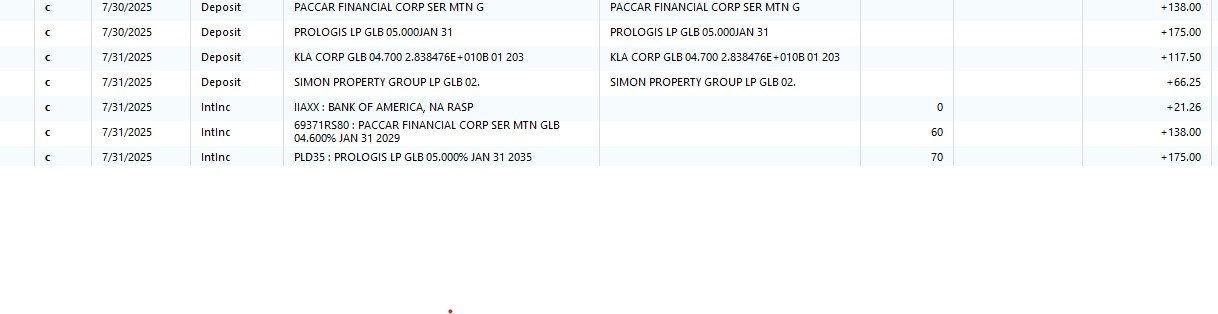
Thanks
0 -
@WillyG → Quicken has acknowledged the issue…
ONGOING 7/30/25 Bank of America/Merrill Lynch Investments - Missing Transactions
https://community.quicken.com/discussion/7964414/update-7-24-25-bank-of-america-merrill-lynch-investments-missing-transactions
ONGOING 7/30/25
This issue remains ongoing, and our teams continue to work toward a solution. No ETA or further details are available at this time, and this Alert will be updated once more information becomes available.
We apologize for any inconvenience and appreciate your patience.
Thank you!
MEL1 -
And I'm beginning to see a LOT of "Placeholder entries" since the change over from downloading from Merrill Lynn to Bank of America. Anything be done about that?
0 -
Hello @Texas Blue Boy,
Thank you for letting us know you're seeing a lot of placeholder entries. Placeholder entries may appear in your account if there are missing transactions for a particular security. Quicken creates these placeholder entries to balance your account so that the total number of shares owned matches the number of shares in your transaction list.
Since you said this happened when you changed the connection method, the most likely cause of this is a change in format for the names of the holdings causing Quicken to not recognize the holdings as ones already in your account.
When you first reconnected the account and downloaded, did you see a Match Securities dialogue (for more information on the match securities dialogue box, click here)? If you did see the dialogue, were you able to match the securities to the appropriate existing security in your Quicken, or did you select No (which would cause Quicken to add it as a new security)?
I look forward to your response!
Quicken Kristina
Make sure to sign up for the email digest to see a round up of your top posts.
0 -
Right off hand I believe I just said to accept the one it found. It was usually a match at least on the first word or two of the title.
I'm not a financial expert by any means, so I usually just accept whatever the Quicken app suggests.
0 -
Thank you for your reply @Texas Blue Boy,
Are the placeholders causing incorrect account balances at all? Are you able to tell if these are for new securities or securities that are already in your Quicken?
This article may be helpful for deciding how to handle the recently added placeholders:
It's a good idea to backup your Quicken file prior to resolving or deleting placeholders.
I hope this helps!
Quicken Kristina
Make sure to sign up for the email digest to see a round up of your top posts.
0 -
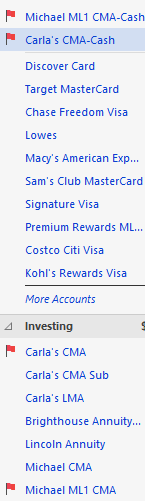
I don't think this related issue I just encountered has been reported, so here it is. I have two CMA accounts with separate registers for cash. When dividends are posted, they transfer from the main CMA account to the cash account. Today, I see that transfers were processed but reported not accepted in the cash account because there was no dialog box to accept them. Below is the dialog from the main account after accepting the transfer. The Continue button is new. I never got that before, but when I hit it, it switches to the cash account where there is no option to accept it.

Now I have the these accounts still flagged with unaccepted transactions with no way to clear them. Error report has been sent.
 0
0 -
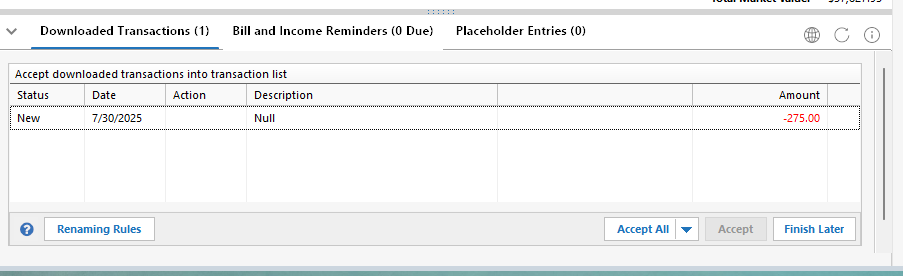
UPDATE: I did a Validate on my file to see if it would fix this. Interestingly, after doing that, the cash accounts had one new downloaded transaction requesting acceptance. They were for pending account fees that were to be taken out on 8/4 but they only had "null" in the description. I deleted those in both accounts and that cleared the flags. I had sent a report earlier for those null pending tractions that had occurred in other accounts, but they did not appear on these until after I did the Validate. This is the only result that may have been what was fixed:
"Quicken repaired damaged transaction index. No action required."
1 -
Hello @Michael Sloss,
Thank you for sharing your experience. Was this a one-time issue, or does this happen every time a posted dividend downloads?
You mentioned that the Validate caused the transactions to appear in the linked cash accounts. Is the balance in those accounts correct? Have any other transactions downloaded with "null" in the description field?
I look forward to your reply!
Quicken Kristina
Make sure to sign up for the email digest to see a round up of your top posts.
0 -
This was a first time issue related to the linked cash accounts not being able to be accept transaction, but it was only the null pending fee transactions that showed up after the validate. Once I deleted them from the transaction list, it cleared the flags. That leads me to believe it was not the dividend transactions causing the issue, but just the null pending fees. Yes, the balances were all correct.
Those null pending transactions had appeared in the downloads in all the non-linked accounts before the validate and allowed me to delete them rather than accept them.
One other issue was that there were several transactions downloaded in the non-linked accounts for reinvested dividends, but with "unidentified security". I had to look up on the ML web site what they were for and then fill in the correct security. Non-reinvested dividends had the correct security, so different transaction types seem to have different issues.
It should also be noted that prior to this change I never got ReinvDiv transactions in the download. They all came as three separate transactions - the dividend, the added shares, and the reinvestment withdrawal from the cash balance. I would much prefer the single transaction going forward if the security field was correct.
1 -
New "null" pending transactions downloaded again today for all accounts having pending future withdrawals.
Report sent.
Michael
 0
0 -
Thank you for your replies @Michael Sloss,
To test if the null description and unidentified securities may be a file-specific issue, please backup your file, deactivate the problem accounts, then navigate to Tools>Add Account and add the problem accounts as new, instead of linking to the existing accounts.
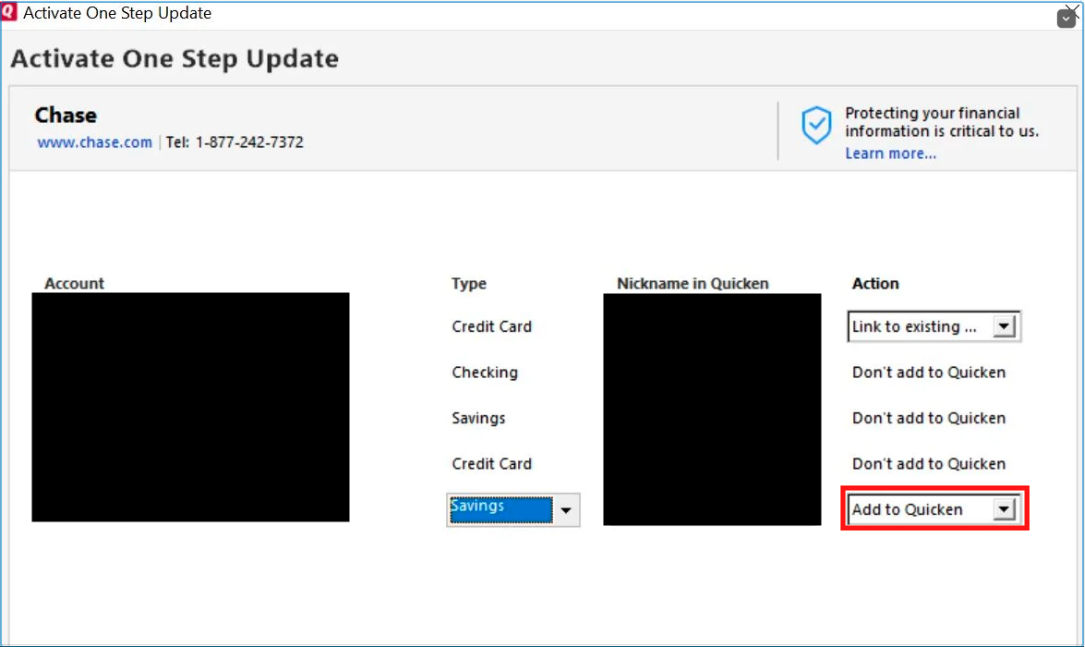
Once they are added as new accounts, check to see if the data downloads correctly in the new accounts, or if the issues persist.
Please let me know how it goes!
Quicken Kristina
Make sure to sign up for the email digest to see a round up of your top posts.
0 -
I don't think there is any need for that. Other transactions, i.e. dividends, have downloaded on those accounts normally. I don't see how these can be anything other than transaction specific bugs related to future transactions and security matching. For now, it is much less of a hassle just deleting and fixing those transactions if they recur than what you are suggesting. Also, these are not repeatable errors that can be duplicated and retested.
2 -
Thank you for your reply,
I just found another discussion reporting the same issue with Null downloading as the description for pending fees:
Since the issue is impacting multiple customers, that particular problem is unlikely to be file specific, and I reported it to the proper channels for further investigation and resolution.
(CTP-14029)
You mentioned that you're also seeing "unidentified security" download. Is this happening only with reinvested dividends, or have you observed this behavior with other transaction types also? I notice you included a screenshot of it with the problem report you sent yesterday. How does that "unidentified security" appear on Merrill Lynch's website?
Thank you!
Quicken Kristina
Make sure to sign up for the email digest to see a round up of your top posts.
0 -
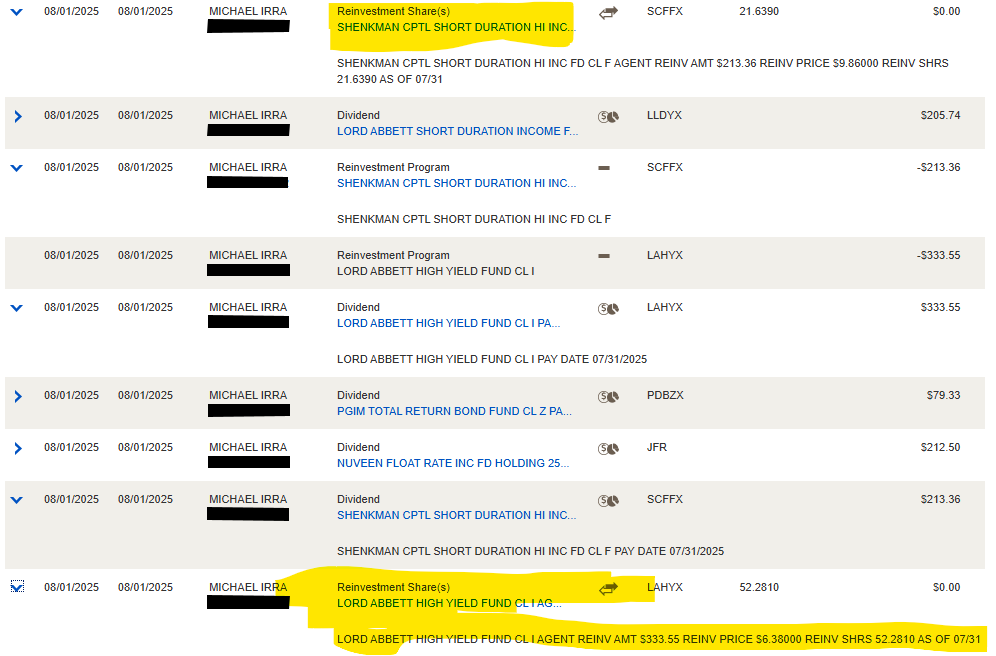
Here are the transactions related to the two reinvested dividends from the ML activity page for one the two accounts where this occurred. The ones highlighted in yellow had "unidentified security" in their download.
Note that there are two related transactions for each those titled "Dividend" and "Reinvestment Program". I remember the "dividend" transactions downloaded and matched OK on 7/31, then the reinvestment on 8/1.
 0
0 -
The Merrill Lynch transaction downloads post change over to the new Express Web Connect+ security model is an acknowledged cluster. I spent way too much time troubleshooting what is an apparent known issue.
For me, after testing, the only current safe solution is to manually enter transactions while using the Merrill Lynch web site as guidance or bypass the Quicken for Windows "One Step Update" and use the manual Merrill Lynch QFX data download as this is the only accurate downloaded data I have found. The Quicken for Windows "One Step Update also is downloading inaccurate stock and mutual fund prices. This is adding much time and energy as I have ~7 Quicken data files and 13+ Merrill Lynch accounts… :(
Hopefully Quicken figures this out promptly…
Quicken has acknowledged the issue:
ONGOING 7/30/25 Bank of America/Merrill Lynch Investments - Missing Transactions
https://community.quicken.com/discussion/7964414/update-7-24-25-bank-of-america-merrill-lynch-investments-missing-transactions
ONGOING 7/30/25
This issue remains ongoing, and our teams continue to work toward a solution. No ETA or further details are available at this time, and this Alert will be updated once more information becomes available.
We apologize for any inconvenience and appreciate your patience.
Thank you,
MEL1 -
@MELCO "The Quicken for Windows "One Step Update also is downloading inaccurate stock and mutual fund prices."
Your comment concerned me so I did a spot check of my account balances, and I have not found any issue with my downloaded security prices. Everything else you experienced with this EWC+ "update" matches the issues I have been dealing with. However, I have managed to continue using One Step Update and correcting the transactions after accepting them, or deleting the erroneous or duplicate ones.
FYI - My wife and I have 6 IRA accounts and 3 Cash management accounts, 2 of which have linked cash accounts.
As a retired IT change manager, I agree with other users' comments expressing complete bewilderment how Quicken let this change get into production without adequate testing and validation. Totally inexcusable.
Michael
1 -
This is the type of issue I am seeing with dividends/reinvestment. My accounts are now a total un-repairable mess……….
 1
1