Merrill Lynch Account with new connection values incorrect (QWin)

This discussion was created from comments split from:
Merrill Lynch Account with new connection values incorrect
.
Comments
-
I am having the same issue. Here are my answers to the questions. Also, I just download positions and account balances, not transactions.
- Just bonds, US treasuries.
- The positions that are missing do not appear in the security list nor do the incorrect ones that did download. Since I download balances and positions, the securities are set-up automatically. For example, one of the positions that did download is US Treasury Bill. This security is not in the security list. When I look at details by drilling down via the positions' view, there is no cusip. The quantity matches one position, but the price matches a different position with a different quantity.
- It is a taxable account.
- I have run the update multiple times. Nothing changes but I get a message that the positions and prices have updated.
- No updates.
Again, this worked fine on Friday 6/18 but the problem started on Monday 6/21 when Quicken forced me reauthorize my account as it said there was a new connection type. Interesting, after I reauthorized the account, I got the screen acting like it was a new account and I was asked to add it or link it. I did the link. Also, I deactivated online services and re added it but there was no change.
0 -
Hello @KevinTL,
Thanks for providing more information!
One more thing I'd like you to check — is it possible that the missing securities were mistakenly matched to a different one during the download? Take a look at your holdings and see if any are showing more shares than they should, which could indicate a misalignment.
Also, what happens if you try to manually add the correct security and position for one of the missing holdings? Does that fill the gap correctly, or does the next download remove or overwrite it?
Knowing how Quicken handles that manual adjustment will tell us a lot about whether this is a one-time sync issue or an ongoing mismatch coming from the data feed.
Let me know!
-Quicken Jasmine
Make sure to sign up for the email digest to see a round-up of your top posts.
0 -
Hi Jasmine,
Non-Merrill Lynch accounts are fine. The only issue is with Merrill. There are no mistakenly matched securities as the securities aren't real. For example, the Merrill security is "U.S. Treasury Bill". For other brokerage accounts I have (and used to be for Merrill) the security is "cusip" U S security…. The generic "U.S. Treasury Bill" is in the security list but does not have a cusip whereas the other brokerage downloads do have cusips. If I drill down into the position to the security detail view and look at the price history, it is all gone except for 7/21/25. If I say do an historical price download, it prompts me to choose a security since there is no cusip to link to.
[Edited - Readability]
0 -
Jasmine, is there any update?
0 -
Some more information.
The quantity downloaded over the last 3 days went from 1 of 3 positions that had the same quantity to one that had an unique quantity back to 1 of 3 positions.
[Edited - Readability]
0 -
One last thing. Is there a case number associated with this problem so that I can call support?
Thanks,
Kevin
0 -
Hello @KevinTL,
I do apologize for my delay. I was doing some diving and collaboration with my team for this issue.
I believe what may have happened was a small glitch or error during the reauthorization process. The first thing that I think we should try is restoring from a backup that was created before July 21st (or whenever you first reauthorized and noticed the issue). You can review this Support Article on restoring a backup if needed. Then, I would attempt the reauthorization process once more to see if the same issues occur.
Please let me know how it goes!
-Quicken Jasmine
Make sure to sign up for the email digest to see a round-up of your top posts.
0 -
Jasmine,
I posted something yesterday but for some reason it isn't here. Either way, here is what I did.
First, I created a new Quicken file and attempted to add the Merrill Lynch account. I tried to add it multiple times and each time I got the below error.
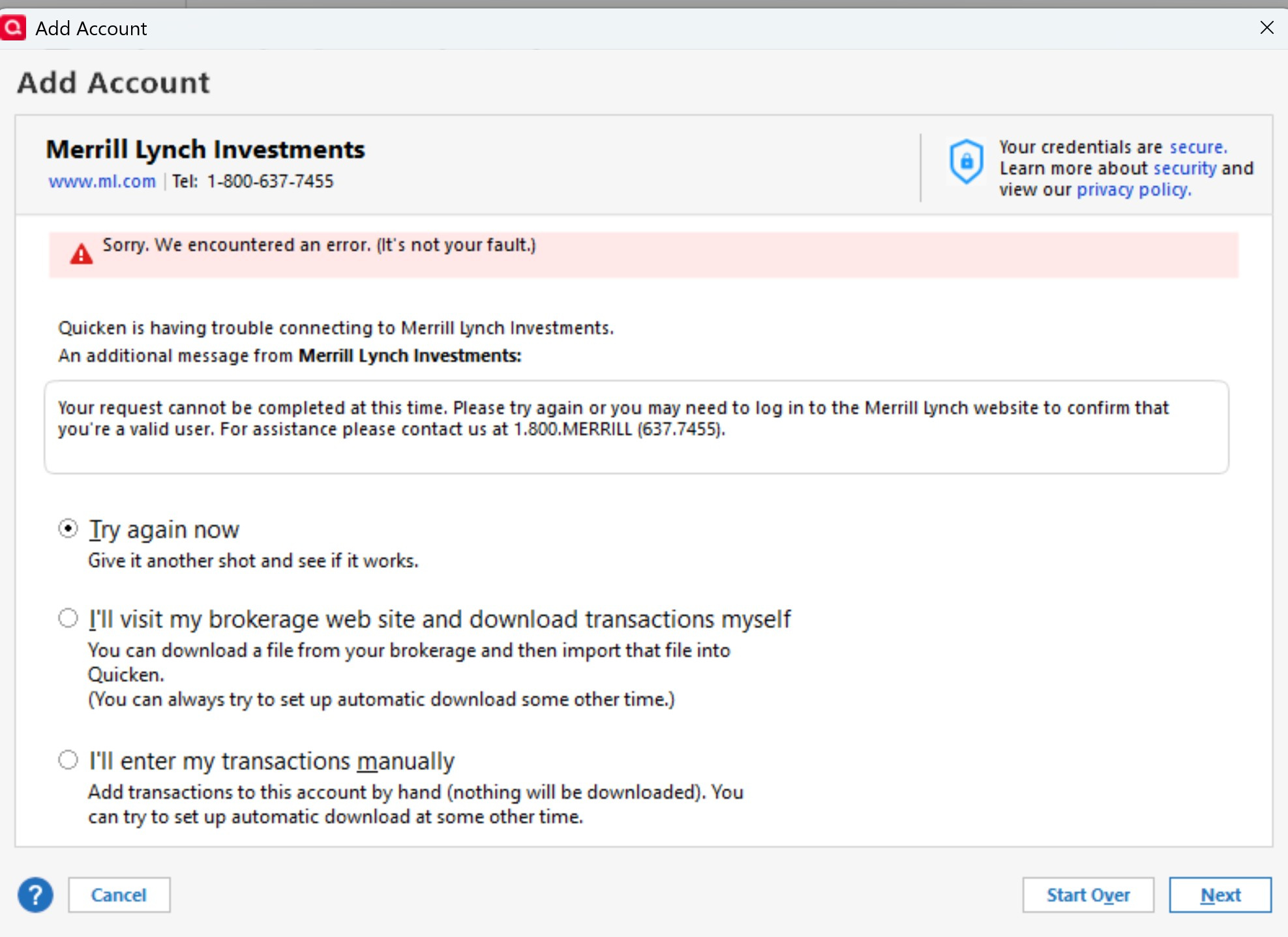
I then did a 2nd test by restoring my original Quicken file from a 7/17/25 backup (one day before the problem started). I then did a One Step Update. When the connection update occurred, I was no longer required to enter my Merrill password. After the restore, I was again required to enter the password. The One Step Update worked and the Merrill account was back to where it should be (quantity and prices were OK but no accumulated interest). There were 2 things I noticed. For a treasury note, the price and quantity were correct, but the value was off as accumulated interest was not included. For any OID, the valuations were correct. The second thing I noticed is that the price history for ALL bonds in ALL accounts lost a week's worth of prices. In other words, there were prices for 7/17/25 (date of backup) and then 7/24/25 (when One Step Update was run). I ran the One Step Update multiple times and the behavour was the same every time.
Kevin
0 -
Jasmine,
I am using Quicken Classic Deluxe on a Windows PC. My version is up to date (Version R63.21, Build 27.1.63.21).
0 -
One more item. The Merrill account no longer has its cash/sweep position.
0 -
Thank you for your replies @KevinTL,
The error message you show from the new file looks like the error one would see when trying to connect via Direct Connect. Were you trying to connect via Direct Connect in that new file, or did you get redirected to the financial institution's website to authorize the connection?
I would assume the loss of a week's worth of prices may have to do with the fact that you restored a backup, although it is odd that the history didn't redownload. Do the bonds have a CUSIP associated with their ticker in your Securities List?
What is the name of the missing cash/sweep position? Was it present in the backup file that you restored? If so, do you recall when it went missing? Was there anything which may have triggered it to go missing? Is the cash value in your account correct?
I look forward to your response!
Quicken Kristina
Make sure to sign up for the email digest to see a round up of your top posts.
0 -
Hi @Quicken Jasmine , @Quicken Kristina and @KevinTL ,
I once helped a friend. You can't treat the same, using one Login.
You need to treat Merrill Lynch for Merrill Lynch Accounts and For Bank of America Accounts go through to Bank of America to Login. It is the only way to get all the Accounts. Separate the accounts and do. And do Bank of America, first, then the login for Merrill Lynch.
All Accounts can be in the Same File. Just remember to Deactivate all Accounts for Online Access for Bank of America and for Merrill Lynch Accounts before beginning. It won't work otherwise.
thecreator-bTesting Quicken Subscription Beta B63.19 (Nov. 2023) Installed 24/7.
in Windows 10 Pro 64-Bit Build 19045.3693 Quicken Classic Business & Personal0 -
Kristina,
I did not choose a connection type. I went to add an account, chose Merrill Lynch Investments, got prompted for my login info, got the error message.
All of the bonds that lost a week's worth of prices had a cusip. Also, Quicken did successfully download prices for 7/24/25 so it was working from that point forward. The issue is lost history from the date of the backup up until the date One Step Update was run again.
The missing position is Cash. I don't want to do another restore as the one I did caused me to lose data. I can say my other accounts have the Cash position propeprly.
thecreator-b, my logins for B of A and Merrill are separate accounts with separate (and different) logins.
Kevin
0 -
Any update?
0 -
Thank you for your reply,
To fill in the missing price history, if you haven't already done so, please navigate to the Investing tab, click the Update dropdown, and select Historical prices….
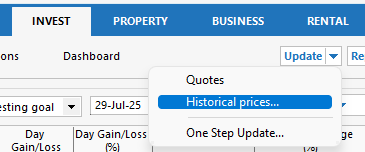
Is the cash/sweep reflecting in cash in the account (just not as a holding), or is it completely missing?
Thank you!
Quicken Kristina
Make sure to sign up for the email digest to see a round up of your top posts.
0 -
Kristina,
Downloading historical prices did not fill in the missing prices.
Cash is missing. By missing, I mean it is not shown included in the account value.
Normally, when you have a brokerage account with Cash, the portfolio will show "-Cash" as the security name but it is not s a security and you can't drill down/click on it like a normal security.
Is there any update on the issue that caused this, i.e. the Merrill Lynch connection update?
0 -
Thank you for your reply,
Due to the nature of the issue, I recommend that you contact Quicken Support directly for further assistance, since they have access to tools that we can't access on the Community and they're able to escalate the issue as needed. The Quicken Support phone number can be found through this link here. Phone support is available from 5:00 am PT to 5:00 pm PT, Monday through Friday.
I apologize that I could not be of more assistance!
Quicken Kristina
Make sure to sign up for the email digest to see a round up of your top posts.
0


