Stock Quote Download Showing Incorrect Values MSFT

I’ve never doubted the accuracy of Quicken’s stock quote downloads—until today. I noticed that my portfolio value dropped by an estimated 2–3% overnight, which was odd since this happened on a Saturday when markets were closed.
By coincidence, I saw that one of my holdings, MSFT, was downloaded at $512, even though the actual price was $524. I refreshed a few times and got the same incorrect value. I then manually entered the correct price and tried downloading again, but the value didn’t update—it retained the manually entered figure.
It seems like something in the quote download process has stopped working, but I didn’t receive any error messages. I would have expected some kind of alert or warning if the data wasn’t updating properly.
Known Issue? anyone experienced this before?
Answers
-
Please see this recent discussion that seems to be the same issue you are having.
Quicken user since Q1999. Currently using QW2017.
Questions? Check out the Quicken Windows FAQ list0 -
Thank you for sharing this link to the user!
-Quicken Jasmine
Make sure to sign up for the email digest to see a round-up of your top posts.
0 -
thanks for the link. I too had a Shwab account that i disabled.
Not sure what caused this to show up now after years of no issue… either way, its a bug.
by pure luck i found the MSFT stock was not up to date but maybe there are more … not sure. Someone at quicken should find what the issue is and fix it for all so we wont be fishing for accounts/stocks.1 -
@r-e-l glad to hear the referenced post was helpful. Agree it is odd that the issue would show up after many years of working fine.
Quicken user since Q1999. Currently using QW2017.
Questions? Check out the Quicken Windows FAQ list1 -
Here’s an additional update:
This weekend, the issue occurred again. I suspect it might be related to the lack of price updates, as it has now happened twice over the weekend.
Why MSFT and not other stocks (as far as I know)? The only unique thing about MSFT for me is that recently, after they released their financial results, I did a "what if" scenario. I entered the aftermarket hours price to see its impact on my portfolio. After finishing the check, I manually re-entered the actual price at the close date. That’s when it happened, and I’ve noticed Quicken reverting to that value during the weekend.
I think this might be connected to the absence of "live updates" and/or stocks with manually entered values.
Hopefully, this can provide the Quicken team with a clue on where to investigate.
0 -
@r-e-l It sounds like you have an incorrect or out of date price recorded for MSFT. Go to Tools > Security list and click on the Microsoft name to open the Security Detail view. Click on More then Edit price history to see the prices that are recorded.
Any prices you typed in will override prices that Quicken got from other sources. Also if there is no price entered for a given date, Quicken uses the price from the most recent earlier date.
If that doesn't explain what you are seeing, please post a screenshot of the price histories in your file for MSFT around the problem date.
QWin Premier subscription0 -
@jim_harman
Thanks. I'm not sure what I should be looking for as there is lots of history there, but I do notice some oddities that match the pattern I mentioned. Take a look at this list: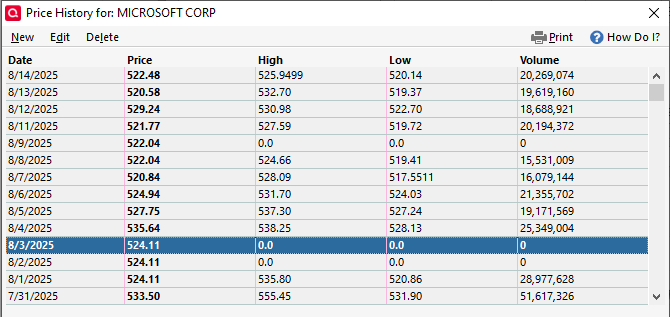
You will notice on 8/9 and 8/3 which are weekends that the high and low are 0. One might say "its normal" but take a look at the weeks before it:
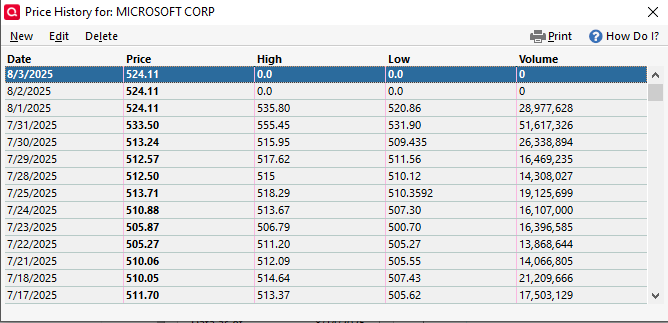
The issue I see started on 8/3….
You might notice that the weekends before 8/3, specifically 7/26, have no entries, as well as the weekend before that. It seems Quicken started downloading values for Microsoft over the weekend as zero, then defaulted to some value.
Compare this to another stock that doesn’t appear to have this issue.
Notice, there is no 8/9 or 8/10 entry and no 8/3 and 8/2….
The only unusual thing I recall doing was a one-time manual edit, which took place on either July 30, July 31.Also note: Everything returns to normal during the week.0 -
Do you hold Alphabet and Microsoft at different brokerages?
Do you do update transactions on weekends?
It appears that the weekend MSFT prices came from a broker download rather than from Quicken's quote provider. When present, they duplicate the Friday closing price, so I don't see anything wrong here.
QWin Premier subscription0 -
I do full updates every day, and agree the history list looks fine. What I’m pointing out is:
- I’m having issues when downloading data over the weekend.
- The problem started two weeks ago.
- Coincidence or not, the download history shows behavior different from the past. The new behavior coincides with the issues I’m experiencing.
- When downloading over the weekend, Quicken changes the value to an old one I entered manually, right before all this started.
I don’t think it’s a coincidence, and I don’t believe it’s a broker issue. I don’t think the problem lies with the history itself, but I think it’s evidence or a log pointing to something else. What that might be, I’m not sure, but I suspect the bug is elsewhere.
0 -
Had you corrected the errors in the price history data in your screenshots?
QWin Premier subscription0 -
The price lists were fine, but the issue was with the 0 values for high, low, and volume. I just deleted the last entry with those values, and the problem seems to have resolved. I can't say for certain if that's what fixed it, but everything appears to be back to normal now.
0 -
Thank you for the follow-up,
I'm glad to hear the issue seems to be resolved, and thank you for sharing what you did that may have fixed it!
Quicken Kristina
Make sure to sign up for the email digest to see a round up of your top posts.
0



